JavaScript is disabled. For a better experience, please enable JavaScript in your browser before proceeding.
You are using an out of date browser. It may not display this or other websites correctly.
You should upgrade or use an
alternative browser .
Installed 7127, now can't boot into RC
New member
Power User
VIP
Here's my setup, I was dual booting XP and Windows 7 RC1 7100 on two separate partitions and that was going swell.
7 Pro Build 7600.16385x64 [2.0 WEI] Intel(R) Celeron(R) D CPU 3.33GHz 2.00 GB RAM (1.87 GB usable) ATI Radeon™ X300 based integrated graphics eMachines W3503 7 Pro Build 7600.16385x64 [2.0 WEI] Intel(R) Celeron(R) D CPU 3.33GHz 2.00 GB RAM (1.87 GB usable) ATI Radeon™ X300 based integrated graphics 6-channel (5.1) ATI High Definition Audio eMachines® 17" LCD Flat Panel Monitor (17F3) 1024 x 768 @ 85Hz 160GB HDD (7200rpm, 2MB cache)
Boot into 7100, download EasyBCD and use that to add the new 7127 install partition to the boot manager as a choice. (Use Add/remove entries on the left side.) Hit save when done. You can then go to change settings on the left to set the default OS.
7600.20510 x86 P4 550 3.4 GHz HT running at 3.5 GHz OCZ 2 GB(2x1GB) DDR400mHz running @ 414 mHz HIS Radeon HD 3850 IceQ 3 Turbo HDMI Dual DL-... self built 7600.20510 x86 P4 550 3.4 GHz HT running at 3.5 GHz MSI PM8M3-V (MS-7211 v1.x) Micro-ATX mainboard OCZ 2 GB(2x1GB) DDR400mHz running @ 414 mHz HIS Radeon HD 3850 IceQ 3 Turbo HDMI Dual DL-DVI AGP MOTU Traveler firewire studio interface 192 kHz 24 bit 22" widescreen Acer X223W LCD, 17" Compaq P75 CRT 1680x1050 and 1280x1024 SATA I x2 WD, 400 GB and 120 GB, SATA 2 WD Caviar Black 1 TB 350W generic Cybertronpc, it glows blue stock cpu fan, Ice-Q 3 gpu and system, many case fans Logitch Classical Keyboard 200 Logitech Mediaplay cordless 1792/448 kbits/sec SATA II PCI fake RAID adapter, 1 GB Readyboost, original ATI Remote Wonder (even works with WMC perfectly), Logitech Rumblepad 2 game controller x2
New member
Power User
VIP
Thread Starter
Boot into 7100, download EasyBCD and use that to add the new 7127 install partition to the boot manager as a choice.
thanks for the response, but the problem is that I can boot into 7127, but now now 7100.
-edit-
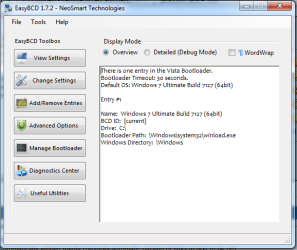
theoretically speaking, can i use it to readd my 7100 to the boot manager?
screenshot.png
20.7 KB
· Views: 41
7 Pro Build 7600.16385x64 [2.0 WEI] Intel(R) Celeron(R) D CPU 3.33GHz 2.00 GB RAM (1.87 GB usable) ATI Radeon™ X300 based integrated graphics eMachines W3503 7 Pro Build 7600.16385x64 [2.0 WEI] Intel(R) Celeron(R) D CPU 3.33GHz 2.00 GB RAM (1.87 GB usable) ATI Radeon™ X300 based integrated graphics 6-channel (5.1) ATI High Definition Audio eMachines® 17" LCD Flat Panel Monitor (17F3) 1024 x 768 @ 85Hz 160GB HDD (7200rpm, 2MB cache)
Ah, ok my bad. Then yeah, you can add 7100 partition to the boot manager while in 7127 and all will be well.
7600.20510 x86 P4 550 3.4 GHz HT running at 3.5 GHz OCZ 2 GB(2x1GB) DDR400mHz running @ 414 mHz HIS Radeon HD 3850 IceQ 3 Turbo HDMI Dual DL-... self built 7600.20510 x86 P4 550 3.4 GHz HT running at 3.5 GHz MSI PM8M3-V (MS-7211 v1.x) Micro-ATX mainboard OCZ 2 GB(2x1GB) DDR400mHz running @ 414 mHz HIS Radeon HD 3850 IceQ 3 Turbo HDMI Dual DL-DVI AGP MOTU Traveler firewire studio interface 192 kHz 24 bit 22" widescreen Acer X223W LCD, 17" Compaq P75 CRT 1680x1050 and 1280x1024 SATA I x2 WD, 400 GB and 120 GB, SATA 2 WD Caviar Black 1 TB 350W generic Cybertronpc, it glows blue stock cpu fan, Ice-Q 3 gpu and system, many case fans Logitch Classical Keyboard 200 Logitech Mediaplay cordless 1792/448 kbits/sec SATA II PCI fake RAID adapter, 1 GB Readyboost, original ATI Remote Wonder (even works with WMC perfectly), Logitech Rumblepad 2 game controller x2
New member
Power User
VIP
Thread Starter
Ah, ok my bad. Then yeah, you can add 7100 partition to the boot manager while in 7127 and all will be well.
thanks. i really don't know how to do that because i'm unfamiliar with EasyBCD but to spare a "let me Google that for you", I will try to figure it out on my own.
7 Pro Build 7600.16385x64 [2.0 WEI] Intel(R) Celeron(R) D CPU 3.33GHz 2.00 GB RAM (1.87 GB usable) ATI Radeon™ X300 based integrated graphics eMachines W3503 7 Pro Build 7600.16385x64 [2.0 WEI] Intel(R) Celeron(R) D CPU 3.33GHz 2.00 GB RAM (1.87 GB usable) ATI Radeon™ X300 based integrated graphics 6-channel (5.1) ATI High Definition Audio eMachines® 17" LCD Flat Panel Monitor (17F3) 1024 x 768 @ 85Hz 160GB HDD (7200rpm, 2MB cache)
YTS GEEK
Guru
Gold Member
SF Team
From within 7127, open an elevated command prompt, type: ( press enter after each command)
7 X64 i5 8400 2x8gb 3200mhz PC/Desktop 7 X64 i5 8400 gigabyte b365m ds3h 2x8gb 3200mhz various pure power 11 400w cm Coolermaster cryorig m9i
PC/Desktop 7x64 g5400 ga b365m ds3h 8gb ddr4 2400 xfx pro 450w
New member
Power User
VIP
Thread Starter
thank you both, i am happy to report that i am sending this message from build 7100.
im gonna have to copy this down if this ever happens again.
7 Pro Build 7600.16385x64 [2.0 WEI] Intel(R) Celeron(R) D CPU 3.33GHz 2.00 GB RAM (1.87 GB usable) ATI Radeon™ X300 based integrated graphics eMachines W3503 7 Pro Build 7600.16385x64 [2.0 WEI] Intel(R) Celeron(R) D CPU 3.33GHz 2.00 GB RAM (1.87 GB usable) ATI Radeon™ X300 based integrated graphics 6-channel (5.1) ATI High Definition Audio eMachines® 17" LCD Flat Panel Monitor (17F3) 1024 x 768 @ 85Hz 160GB HDD (7200rpm, 2MB cache)
YTS GEEK
Guru
Gold Member
SF Team
Hi andy - glad it worked for you.
You can use any name you like in between the "".
You can use the same copy commands to add any of the NT6 o/s - Vista or 7 to any of their bcd's.
7 X64 i5 8400 2x8gb 3200mhz PC/Desktop 7 X64 i5 8400 gigabyte b365m ds3h 2x8gb 3200mhz various pure power 11 400w cm Coolermaster cryorig m9i
PC/Desktop 7x64 g5400 ga b365m ds3h 8gb ddr4 2400 xfx pro 450w