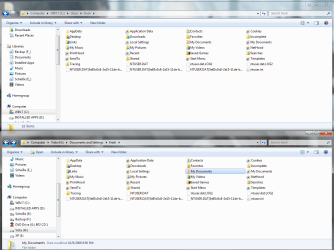
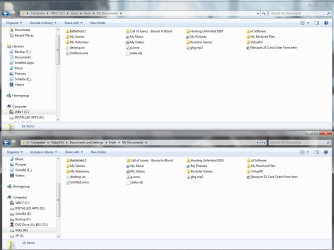
I have a question i have searched high and low and I cant find any info. Im sure im just using the wrong words in the search but here goes. When i install programs on win 7 they show up in my win7 partition under %\users\username but they are also duplicated on my vista partition under %\documents and settings\username. The Same is true with my temp. internet files. I was wondering what is the mechanism behind this and how do I find more information about the two os's sharing profile info and other things with each other. I found some info about roaming profiles but as far as i can tell that is a network feature not a partition feature.
Ideally, the best option would be to delete the vista partiton and extend the 7 partition. As to why that happens, is this for every program you have installed? Can you post a screenshot of your installed apps? Search for snip in the start menu.
The documents and settings folder tree is vertualised on windows 7 by the use of junction points, (a special type of system shortcut), to allow older programs which may have the address hard coded into them to find the data
If you therefore do a directory listing of c:\...documents % setting\... you will actually see the contents of the ...\users\... folders.
This may be what you are seeing although it should not effect another vista partition
Windows 11 Pro x64 [Latest Release and Releas...Ryzen 9 5950X, 3.8 - 5.2 MHz64GB [2 x 32GB] DDR4 3200MHz4GB NVIDIA GEFORCE GTX 1650 Ti
Computer type
PC/Desktop
Computer Manufacturer/Model Number
ChillBlast - Custom to my design
OS
Windows 11 Pro x64 [Latest Release and Release Preview]
CPU
Ryzen 9 5950X, 3.8 - 5.2 MHz
Motherboard
Asus Prime X570-Pro
Memory
64GB [2 x 32GB] DDR4 3200MHz
Graphics Card(s)
4GB NVIDIA GEFORCE GTX 1650 Ti
Sound Card
On-board SPDIF to 5.1 System + HDMI [5.1 system]
Monitor(s) Displays
32" UHD 32 Bit HDR Monitor + 43" UHD 4K 32Bit HDR TV
Screen Resolution
2 x 3840 x 2160 @60Hz
Hard Drives
1TB M2 SSD OS, 500GB Fast Access SSD, 2 x 8TB Data + Various Externals from 1TB to 4TB, 10TB NAS
PSU
NZXT C750 80 PLUS Gold 750W Modular PSU
Case
Workstation Case [Matt Black]
Cooling
NZXT Kraken X63 280mm CPU Cooler +2x Quiet Case fans
Keyboard
Logitech Wireless MX Keys & K400 + others
Mouse
Logitech Wireless MX Master 3S
Internet Speed
920 MB Down 50 MB Up
Antivirus
BitDefender Total Security Pro
Browser
Chrome (always run latest Non-Beta)
Other Info
Also run ...
Laptop - Quad 8GB - Windows 10 Pro x64
Nexus 7 Android tablet x2
Samsung 10.2" tablet
Blackview TAB 8 4G Android Tablet c/w Keyboard
Wacom Intuos Pro Medium Pen Pad
Wacom Intuos Pro Small Pen Pad
Wacom Expresskeys Remote
Loopdeck+ Graphics Controller
Shuttle Pro v2 Control
At a glance
Windows 11 Pro x64 Latest RPIntel I7 10750H 5.0GHz32GB [2x16GB] DDR4 2933 MHznVidia GTX1650Ti 4 GB GDDR6
Computer type
Laptop
System Manufacturer/Model Number
Dell XPS 17 10750H
OS
Windows 11 Pro x64 Latest RP
CPU
Intel I7 10750H 5.0GHz
Motherboard
Dell XPS
Memory
32GB [2x16GB] DDR4 2933 MHz
Graphics Card(s)
nVidia GTX1650Ti 4 GB GDDR6
Sound Card
Stock [Realtek] 4 Speaker
Monitor(s) Displays
17" IPS UHD+ Infinity Edge Touchscreen
Screen Resolution
3840 x 2400
Hard Drives
2TB M2 NVMe, 4TB External + various 500GB & 1TB External NVMe (also have access to spinner HDD from
PSU
Stock
Case
Stock XPS Aluminium & Carbon Fibre
Cooling
Stock - Active Fan Control
Keyboard
Backlit + Various Logitech
Mouse
Stock Track Pad + Logitech MX Trackball
Internet Speed
72 MB Down 18MB Up
Browser
Chrome
Other Info
Also run ...
Laptop - Quad 8GB - Windows 10 Pro x64
Nexus 7 Android tablet x2
10.2" tablet
Sony Z3 Android Smartphone
Wacom Intuos Pro Medium Pen Pad
Wacom Intuos Pro Small Pen Pad
Wacom Expresskeys Remote
Loopdeck+ Graphics Controller
Shuttle Pro v2 Control Pad
10TB NAS
It's everthing that installs anything into the \user\username folder for example game profiles or if i add a picture to my documents folder. When I open the folders side by side like in the attached screen grab anything i delete or create in either of the folders it does the same exact thing to the other. For Example if i create a text file in the seven ...\user\ folder it automaticly duplicates it on the vista ...\docs&set\ folder instantly. Im assuming its so i can run the apps from either os by just installing it on one instead of both, but im not sure if the same thing happens in the registry and i just noticed this like an hour ago so i really haven't ivestigated that much yet. I really appreciate the help though.