Installed new HDD

pare

New member
Member
Local time
7:59 PM
Messages
98
Location
Aruba
Hi to you all.
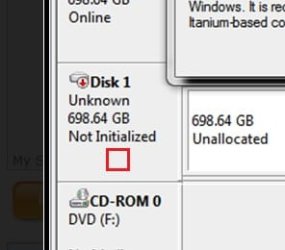
I just installed a new 750 GB HDD with the intention of using it for my back-up's.
Not to put any O.S's on it. This is the message I get by going to device manager.
Can any one tell me what would be the next step or steps in order to get so far to be able to start doing my back-up's.
Any help would be appreciated.
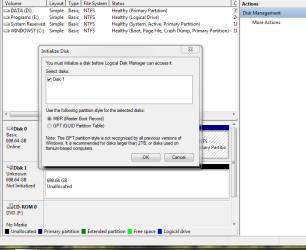

Capture 3.PNG
 

My Computer

OS
windows 7 home premium 64bit
CPU
Intel (R) Pentium (R) 4 CPU 3.06 GHz
Motherboard
Gigabyte GA-81865 GME-775
Memory
Ultra 1024 MB PC2700 DDR 333 MHz (2 RAM)
Graphics Card(s)
Nvidia Geforce 6200 256 Mbytes
Sound Card
Realtek AC'97 Audio
Monitor(s) Displays
Generic PnP monitor
Screen Resolution
1024*768 @ 75 Hz
Hard Drives
Seagate ST3320620AS 320 GB Serial ATA
Case
PC312 Lyra Super Case
Internet Speed
100 Mbps
Hello pare.


You have to right click here.

in.jpg
 

My Computer

Computer Manufacturer/Model Number
* BFK Customs *
OS
W 7 64-bit Ultimate
CPU
Intel Q9550 Yorkfield
Motherboard
ASUS P5Q Pro
Memory
8GB Dominator 8500C5D
Graphics Card(s)
ATI : XFX 5870
Sound Card
Realtek HD Audio 7-1
Monitor(s) Displays
1x 47" LCD HDMI & 3x 26" LCD HDMI
Screen Resolution
1920x1080P & 1920x1200
Hard Drives
1x 80GB Intel X25-M G2 SSD : 1x 500GB & 1x 640GB WD Caviar Black(s)
PSU
Corsair 620HX
Case
Cooler Master RC-690
Cooling
Tuniq Tower 120, 2x 140mm and 3x 120mm case fans
Keyboard
Microsoft 500
Mouse
Razer Diamondback 3G
Internet Speed
14 Mb/s
Other Info
1x Koutech 3Gb/s SATA HDD Hot Swap Rack
Hi Bare foot kid,
Thanks for helping me out.
Now it doesn't say not initialized. It says on line. I know you should partition a hdd if the intention is to
put an O.S. on it. But in this case what should I do with this unallocated space in order to use this hdd
for my back-up's. Should I partition it? Should I make a primary partition? This is new to me!
 

My Computer

OS
windows 7 home premium 64bit
CPU
Intel (R) Pentium (R) 4 CPU 3.06 GHz
Motherboard
Gigabyte GA-81865 GME-775
Memory
Ultra 1024 MB PC2700 DDR 333 MHz (2 RAM)
Graphics Card(s)
Nvidia Geforce 6200 256 Mbytes
Sound Card
Realtek AC'97 Audio
Monitor(s) Displays
Generic PnP monitor
Screen Resolution
1024*768 @ 75 Hz
Hard Drives
Seagate ST3320620AS 320 GB Serial ATA
Case
PC312 Lyra Super Case
Internet Speed
100 Mbps
You won't be able to put anything on it unless you partition and format it.
 

My Computers

System One System Two

  • Computer type
    PC/Desktop
    OS
    7 X64
    CPU
    i5 8400
    Motherboard
    gigabyte b365m ds3h
    Memory
    2x8gb 3200mhz
    Hard Drives
    various
    PSU
    pure power 11 400w cm
    Case
    Coolermaster
    Cooling
    cryorig m9i
  • Computer type
    PC/Desktop
    OS
    7x64
    CPU
    g5400
    Motherboard
    ga b365m ds3h
    Memory
    8gb ddr4 2400
    PSU
    xfx pro 450w
For data, a logical partition is fine. You only need a primary partition for a partition from where you want to boot.
 

My Computer

Computer Manufacturer/Model Number
HP, Dell, Gateway, Toshiba - 4 laptops and 2 desktops
OS
Vista, Windows7, Mint Mate, Zorin, Windows 8
CPU
from 1.6GHz Duo to i7
Monitor(s) Displays
2x HP w2207
Hard Drives
5x HDD, 7x SSD, 12x Externals
Keyboard
with trackball - no mices
Mouse
Trackball mice
Internet Speed
DSL 6000
Hi SIW2 and WHS.
Thanks for your reply.
How much space do I need for my back-up's. Can I take for instance half of the HDD
for my back-up's and leave the rest unallocated? Maybe half of the HDD is too much?
 

My Computer

OS
windows 7 home premium 64bit
CPU
Intel (R) Pentium (R) 4 CPU 3.06 GHz
Motherboard
Gigabyte GA-81865 GME-775
Memory
Ultra 1024 MB PC2700 DDR 333 MHz (2 RAM)
Graphics Card(s)
Nvidia Geforce 6200 256 Mbytes
Sound Card
Realtek AC'97 Audio
Monitor(s) Displays
Generic PnP monitor
Screen Resolution
1024*768 @ 75 Hz
Hard Drives
Seagate ST3320620AS 320 GB Serial ATA
Case
PC312 Lyra Super Case
Internet Speed
100 Mbps
Hi SIW2 and WHS.
Thanks for your reply.
How much space do I need for my back-up's. Can I take for instance half of the HDD
for my back-up's and leave the rest unallocated? Maybe half of the HDD is too much?
If you are talking images with Macrium, figure that you need about 55% of the data you image for each image - e.g if you have a 300GB partition containing 100GBs of data, the image would be 55GBs. Only the amount of data counts, not the size of the partition.

I take an image nearly daily and always keep about a dozen - plus some real old ones on a seperate disk.
 

My Computer

Computer Manufacturer/Model Number
HP, Dell, Gateway, Toshiba - 4 laptops and 2 desktops
OS
Vista, Windows7, Mint Mate, Zorin, Windows 8
CPU
from 1.6GHz Duo to i7
Monitor(s) Displays
2x HP w2207
Hard Drives
5x HDD, 7x SSD, 12x Externals
Keyboard
with trackball - no mices
Mouse
Trackball mice
Internet Speed
DSL 6000
Hello again.


It would be ok to make 2 equal partitions and be sure to Label (name) then so it will be easy to recognize which is which; have a look at this tutorial at the link below and be sure to post back with any further questions you may have and to keep us informed.


How to Create a New Partition or Volume in Windows 7
 

My Computer

Computer Manufacturer/Model Number
* BFK Customs *
OS
W 7 64-bit Ultimate
CPU
Intel Q9550 Yorkfield
Motherboard
ASUS P5Q Pro
Memory
8GB Dominator 8500C5D
Graphics Card(s)
ATI : XFX 5870
Sound Card
Realtek HD Audio 7-1
Monitor(s) Displays
1x 47" LCD HDMI & 3x 26" LCD HDMI
Screen Resolution
1920x1080P & 1920x1200
Hard Drives
1x 80GB Intel X25-M G2 SSD : 1x 500GB & 1x 640GB WD Caviar Black(s)
PSU
Corsair 620HX
Case
Cooler Master RC-690
Cooling
Tuniq Tower 120, 2x 140mm and 3x 120mm case fans
Keyboard
Microsoft 500
Mouse
Razer Diamondback 3G
Internet Speed
14 Mb/s
Other Info
1x Koutech 3Gb/s SATA HDD Hot Swap Rack
Back
Top