
I've got a problem that is showing up in 2 ways.
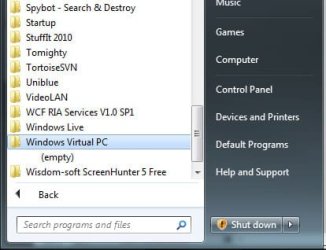
1. I'll install software such as Windows Virtual PC and the folder will show up in the programs menu, but the folder will be empty. How does the software get installed but the program icon not added to the software folder? Screenshot is help2.jpg. Notice the Windows Virtual PC folder is empty.
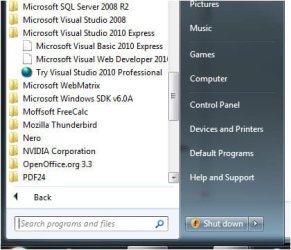
2. I'll install software such as the Microsoft Visual Basic 2010 Express and an icon to start the program is in the folder, but nothing happens when it's clicked. Screenshot is help1.jpg.
What is going on? What do I do to get software installed with icons in the folders? I go into windows explorer and cannot find the programs.
1. I'll install software such as Windows Virtual PC and the folder will show up in the programs menu, but the folder will be empty. How does the software get installed but the program icon not added to the software folder? Screenshot is help2.jpg. Notice the Windows Virtual PC folder is empty.
2. I'll install software such as the Microsoft Visual Basic 2010 Express and an icon to start the program is in the folder, but nothing happens when it's clicked. Screenshot is help1.jpg.
What is going on? What do I do to get software installed with icons in the folders? I go into windows explorer and cannot find the programs.
Attachments
My Computer
- OS
- windows 7 home premium 64 bit

