Installed Ubuntu 9.10 after windows 7 and Can't boot-

Alright so now Windows 7 will start and all, it asks me for my password and then it says "Preparing your desktop" for about 5 minutes, and goes to a dull blue colored with an XP style cursor. No icons, taskbar, or anything pops up.
When XP was installed, it was the C partition correct? And Windows 7 was what?

Well this might be a bit confusing so ill go with it. When i first got the laptop it had vista on it, then i dual booted vista with win 7. (vista is C and 7 is G) Then i replaced vista with xp, now i just replaced xp with ubuntu, so ubuntu should be C and Windows 7 should be G.
 

My Computer My Computer

At a glance

Ubuntu 9.10 and Seven Ultimate OEM 32 bitAMD Athlon 64 x2 Mobile2gb (2x1024) DDR2HD Radeon 1270 integrated.
OS
Ubuntu 9.10 and Seven Ultimate OEM 32 bit
CPU
AMD Athlon 64 x2 Mobile
Memory
2gb (2x1024) DDR2
Graphics Card(s)
HD Radeon 1270 integrated.
Sound Card
integrated.
Monitor(s) Displays
15" laptop display and 15" external monitor
Screen Resolution
1280x768
Hard Drives
120gb WD 2.5 internal
1tb WD external.
Cooling
Fan
Alright so now Windows 7 will start and all, it asks me for my password and then it says "Preparing your desktop" for about 5 minutes, and goes to a dull blue colored with an XP style cursor. No icons, taskbar, or anything pops up.
When XP was installed, it was the C partition correct? And Windows 7 was what?

Well this might be a bit confusing so ill go with it. When i first got the laptop it had vista on it, then i dual booted vista with win 7. (vista is C and 7 is G) Then i replaced vista with xp, now i just replaced xp with ubuntu, so ubuntu should be C and Windows 7 should be G.
Well ... this is a guess, but Windows does not recognize the Ubuntu partitions, so I think Windows does not know what drive letter it should be. Please have a look at this link: Multibooters, Vista Dual and Multibooting - Drive Letter Problems

What you are going to try to do is to boot to safemode, use regedit to remove the "Mounted Devices" folder so that when Windows reboots, it will rebuild that folder with the correct drive letters.
 

My Computer My Computer

At a glance

...
OS
...
When XP was installed, it was the C partition correct? And Windows 7 was what?

Well this might be a bit confusing so ill go with it. When i first got the laptop it had vista on it, then i dual booted vista with win 7. (vista is C and 7 is G) Then i replaced vista with xp, now i just replaced xp with ubuntu, so ubuntu should be C and Windows 7 should be G.
Well ... this is a guess, but Windows does not recognize the Ubuntu partitions, so I think Windows does not know what drive letter it should be. Please have a look at this link: Multibooters, Vista Dual and Multibooting - Drive Letter Problems

What you are going to try to do is to boot to safemode, use regedit to remove the "Mounted Devices" folder so that when Windows reboots, it will rebuild that folder with the correct drive letters.

Thank you sooo very much, I'm going on vacation tomorrow and i needed windows 7 back. Now there is one more final thing i need to do, I neeed to replace grub with windows 7 boot loader, how exactly should i do this with easybcd? I don't want to mess things up to bad before tomorrow.

Also windows is showing that i have only 1 Partition and here is what easybcd says.

There is one entry in the Windows Vista bootloader.

Default: Windows 7 Ultimate (recovered)
Timeout: 30 seconds.
Boot Drive: G:\

Entry #1
Name: Windows 7 Ultimate (recovered)
BCD ID: {current}
Drive: G:\
Bootloader Path: \Windows\system32\winload.exe
 

My Computer My Computer

At a glance

Ubuntu 9.10 and Seven Ultimate OEM 32 bitAMD Athlon 64 x2 Mobile2gb (2x1024) DDR2HD Radeon 1270 integrated.
OS
Ubuntu 9.10 and Seven Ultimate OEM 32 bit
CPU
AMD Athlon 64 x2 Mobile
Memory
2gb (2x1024) DDR2
Graphics Card(s)
HD Radeon 1270 integrated.
Sound Card
integrated.
Monitor(s) Displays
15" laptop display and 15" external monitor
Screen Resolution
1280x768
Hard Drives
120gb WD 2.5 internal
1tb WD external.
Cooling
Fan
Thank you sooo very much, I'm going on vacation tomorrow and i needed windows 7 back. Now there is one more final thing i need to do, I neeed to replace grub with windows 7 boot loader, how exactly should i do this with easybcd? I don't want to mess things up to bad before tomorrow.

Also windows is showing that i have only 1 Partition and here is what easybcd says.

There is one entry in the Windows Vista bootloader.

Default: Windows 7 Ultimate (recovered)
Timeout: 30 seconds.
Boot Drive: G:\

Entry #1
Name: Windows 7 Ultimate (recovered)
BCD ID: {current}
Drive: G:\
Bootloader Path: \Windows\system32\winload.exe
You are sooo welcome! I am just glad I was able to help.

OK, you have confused me a little. You should have replaced Grub when you did the "Startup Repair". But if you meant to add a Ubuntu menu entry to your Windows boot menu, what you need is EasyBCD2. Ubuntu 9.10 uses Grub2, and older versions of EasyBCD will not recognize it.

The Dell Utility partition is hidden so you won't see it. Windows does not recognize the Ubuntu ext4 file system so it won't see that. That only leaves the one Windows 7 NTFS partition.

The two entries are from the BCD Store, and they say that the Windows 7 partition is the boot partition first, and the Windows partition second. As I understand the way it works, you will need to install grub in the Ubuntu partition (NOT in the MBR as is normal) then EasyBCD2 will connect to the grub and allow you to place an entry in your Windows boot menu.

Cheers!
Robert
 

My Computer My Computer

At a glance

...
OS
...
How would i install grub on just the ubuntu partition?
 

My Computer My Computer

At a glance

Ubuntu 9.10 and Seven Ultimate OEM 32 bitAMD Athlon 64 x2 Mobile2gb (2x1024) DDR2HD Radeon 1270 integrated.
OS
Ubuntu 9.10 and Seven Ultimate OEM 32 bit
CPU
AMD Athlon 64 x2 Mobile
Memory
2gb (2x1024) DDR2
Graphics Card(s)
HD Radeon 1270 integrated.
Sound Card
integrated.
Monitor(s) Displays
15" laptop display and 15" external monitor
Screen Resolution
1280x768
Hard Drives
120gb WD 2.5 internal
1tb WD external.
Cooling
Fan
How would i install grub on just the ubuntu partition?
When you install Ubuntu, you usually get the option of selecting where you want the Grub boot code placed, as in the MBR (the front of the hard drive), a seperate boot partition you create, or in the Ubuntu partition itself. Ubuntu will scream at you when you try to do that but it will work ok, since you are going to use the Windows boot manager and only need it to point to the Ubuntu partition.
 

My Computer My Computer

At a glance

...
OS
...
How would i install grub on just the ubuntu partition?
When you install Ubuntu, you usually get the option of selecting where you want the Grub boot code placed, as in the MBR (the front of the hard drive), a seperate boot partition you create, or in the Ubuntu partition itself. Ubuntu will scream at you when you try to do that but it will work ok, since you are going to use the Windows boot manager and only need it to point to the Ubuntu partition.

Alright, so i have to reinstall ubuntu?
 

My Computer My Computer

At a glance

Ubuntu 9.10 and Seven Ultimate OEM 32 bitAMD Athlon 64 x2 Mobile2gb (2x1024) DDR2HD Radeon 1270 integrated.
OS
Ubuntu 9.10 and Seven Ultimate OEM 32 bit
CPU
AMD Athlon 64 x2 Mobile
Memory
2gb (2x1024) DDR2
Graphics Card(s)
HD Radeon 1270 integrated.
Sound Card
integrated.
Monitor(s) Displays
15" laptop display and 15" external monitor
Screen Resolution
1280x768
Hard Drives
120gb WD 2.5 internal
1tb WD external.
Cooling
Fan
How would i install grub on just the ubuntu partition?
When you install Ubuntu, you usually get the option of selecting where you want the Grub boot code placed, as in the MBR (the front of the hard drive), a seperate boot partition you create, or in the Ubuntu partition itself. Ubuntu will scream at you when you try to do that but it will work ok, since you are going to use the Windows boot manager and only need it to point to the Ubuntu partition.

Alright, so i have to reinstall ubuntu?
No, although at this point, since Ubuntu is new and you don't have anything there to loose (I asume) it might be easier!

This link http://www.sevenforums.com/installation-setup/62840-fixed-windows-but-now-grub-gone.html shows how to reinstall grub from the live Ubuntu install cd. Only DO NOT install to the MBR, instead choose the partition (in Linux the Ubuntu partition on you computer is /dev/sda2) Ubuntu is installed.
 

My Computer My Computer

At a glance

...
OS
...
So check me on this and also help. Since you're saying to not install mbr i wouldn't type "sudo grub-install --root-directory=/mnt/ /dev/sda". If so, what would i type?
 

My Computer My Computer

At a glance

Ubuntu 9.10 and Seven Ultimate OEM 32 bitAMD Athlon 64 x2 Mobile2gb (2x1024) DDR2HD Radeon 1270 integrated.
OS
Ubuntu 9.10 and Seven Ultimate OEM 32 bit
CPU
AMD Athlon 64 x2 Mobile
Memory
2gb (2x1024) DDR2
Graphics Card(s)
HD Radeon 1270 integrated.
Sound Card
integrated.
Monitor(s) Displays
15" laptop display and 15" external monitor
Screen Resolution
1280x768
Hard Drives
120gb WD 2.5 internal
1tb WD external.
Cooling
Fan
So check me on this and also help. Since you're saying to not install mbr i wouldn't type "sudo grub-install --root-directory=/mnt/ /dev/sda". If so, what would i type?
Sure no problem. First you would need to mount the Ubuntu partition:
type: sudo mount /dev/sda2 /mnt

Then install Grub on sda2

Then type: sudo grub-install --root-directory=/mnt/ /dev/sda2
 

My Computer My Computer

At a glance

...
OS
...
Thats all i have to do?
 

My Computer My Computer

At a glance

Ubuntu 9.10 and Seven Ultimate OEM 32 bitAMD Athlon 64 x2 Mobile2gb (2x1024) DDR2HD Radeon 1270 integrated.
OS
Ubuntu 9.10 and Seven Ultimate OEM 32 bit
CPU
AMD Athlon 64 x2 Mobile
Memory
2gb (2x1024) DDR2
Graphics Card(s)
HD Radeon 1270 integrated.
Sound Card
integrated.
Monitor(s) Displays
15" laptop display and 15" external monitor
Screen Resolution
1280x768
Hard Drives
120gb WD 2.5 internal
1tb WD external.
Cooling
Fan
Thats all i have to do?
That will reinstall grub to the partition and should allow EasyBCD to create an entry for your Windows boot menu.

The text that follows the commands will tell you if it has been successful or not.

Then do a normal shut down of the live Ubuntu and reboot.
 

My Computer My Computer

At a glance

...
OS
...
Now I'm back to the grub loader, but I'm able to boot into windows 7. Easybcd still says the same thing, so I'm assuming i have to change it?
 

My Computer My Computer

At a glance

Ubuntu 9.10 and Seven Ultimate OEM 32 bitAMD Athlon 64 x2 Mobile2gb (2x1024) DDR2HD Radeon 1270 integrated.
OS
Ubuntu 9.10 and Seven Ultimate OEM 32 bit
CPU
AMD Athlon 64 x2 Mobile
Memory
2gb (2x1024) DDR2
Graphics Card(s)
HD Radeon 1270 integrated.
Sound Card
integrated.
Monitor(s) Displays
15" laptop display and 15" external monitor
Screen Resolution
1280x768
Hard Drives
120gb WD 2.5 internal
1tb WD external.
Cooling
Fan
I don't think it worked correctly, here is what the terminal says.

To run a command as administrator (user "root"), use "sudo <command>".
See "man sudo_root" for details.

ubuntu@ubuntu:~$ sudo mount /dev/sda2 /mnt
ubuntu@ubuntu:~$ sudo grub-install --root-directory=/mnt/ /dev/sda2
grub-setup:warn: Attempting to install GRUB to a partition instead of the MBR.
This is a BAD idea.
grub-setup: warn: Embedding is not possible. GRUB can only be installed in this
setup by using blocklists. However, blocklists are UNRELIABLE and its use is d
iscouraged.
grub-setup: error: Cannot read `/grub/crore.img' correctly
ubuntu@ubuntu:~$
DOH! Can you install Ubuntu again? Grub wants to be THE boot loader in the MBR so that's why the warning messages. But if you do not want to use Grub for any reason, (I prefer Grub when dual booting with Linux) you will have to install the Grub boot code somewhere else. If Ubuntu refuses to cooperate, you may have to create a small boot partition. I would suggest you check out the Ubuntu and NeoSoft (EasyBCD2) forums for more detailed info. I know others have done this successfully so they should be able to give you more pointers.

Cheers!
Robert
 

My Computer My Computer

At a glance

...
OS
...
I don't think it worked correctly, here is what the terminal says.

To run a command as administrator (user "root"), use "sudo <command>".
See "man sudo_root" for details.

ubuntu@ubuntu:~$ sudo mount /dev/sda2 /mnt
ubuntu@ubuntu:~$ sudo grub-install --root-directory=/mnt/ /dev/sda2
grub-setup:warn: Attempting to install GRUB to a partition instead of the MBR.
This is a BAD idea.
grub-setup: warn: Embedding is not possible. GRUB can only be installed in this
setup by using blocklists. However, blocklists are UNRELIABLE and its use is d
iscouraged.
grub-setup: error: Cannot read `/grub/crore.img' correctly
ubuntu@ubuntu:~$
DOH! Can you install Ubuntu again? Grub wants to be THE boot loader in the MBR so that's why the warning messages. But if you do not want to use Grub for any reason, (I prefer Grub when dual booting with Linux) you will have to install the Grub boot code somewhere else. If Ubuntu refuses to cooperate, you may have to create a small boot partition. I would suggest you check out the Ubuntu and NeoSoft (EasyBCD2) forums for more detailed info. I know others have done this successfully so they should be able to give you more pointers.

Cheers!
Robert

I typed the code again and that problem didn't come back, i can now boot into both of the OS, i just need help with easybcd since its saying both entries are windows 7 (G:)
 

My Computer My Computer

At a glance

Ubuntu 9.10 and Seven Ultimate OEM 32 bitAMD Athlon 64 x2 Mobile2gb (2x1024) DDR2HD Radeon 1270 integrated.
OS
Ubuntu 9.10 and Seven Ultimate OEM 32 bit
CPU
AMD Athlon 64 x2 Mobile
Memory
2gb (2x1024) DDR2
Graphics Card(s)
HD Radeon 1270 integrated.
Sound Card
integrated.
Monitor(s) Displays
15" laptop display and 15" external monitor
Screen Resolution
1280x768
Hard Drives
120gb WD 2.5 internal
1tb WD external.
Cooling
Fan
I typed the code again and that problem didn't come back, i can now boot into both of the OS, i just need help with easybcd since its saying both entries are windows 7 (G:)
It sounds like you just need to edit the entries and give them a more descriptive label?
 

My Computer My Computer

At a glance

...
OS
...
Well thats what im trying to do but i know that windows 7 should be G: so i keep it as that, but when i try to change the other one to like C: or something it says that the drive letter is automatically determined or something like that and its giving it drive letter G:


Now i think i have grub and windows 7 loader on at the same time? When i first start up my laptop it does the bios thing then says "GRUB loading" and then gives me options to what i want to boot into, and if i choose windows 7 (which is named windows vista, so i need help on how to rename that) it will then ask me if i want to boot into windows 7 or ubuntu (which it won't boot into ubuntu using this way)with the 7 loader.
 

My Computer My Computer

At a glance

Ubuntu 9.10 and Seven Ultimate OEM 32 bitAMD Athlon 64 x2 Mobile2gb (2x1024) DDR2HD Radeon 1270 integrated.
OS
Ubuntu 9.10 and Seven Ultimate OEM 32 bit
CPU
AMD Athlon 64 x2 Mobile
Memory
2gb (2x1024) DDR2
Graphics Card(s)
HD Radeon 1270 integrated.
Sound Card
integrated.
Monitor(s) Displays
15" laptop display and 15" external monitor
Screen Resolution
1280x768
Hard Drives
120gb WD 2.5 internal
1tb WD external.
Cooling
Fan
Well thats what im trying to do but i know that windows 7 should be G: so i keep it as that, but when i try to change the other one to like C: or something it says that the drive letter is automatically determined or something like that and its giving it drive letter G:


Now i think i have grub and windows 7 loader on at the same time? When i first start up my laptop it does the bios thing then says "GRUB loading" and then gives me options to what i want to boot into, and if i choose windows 7 (which is named windows vista, so i need help on how to rename that) it will then ask me if i want to boot into windows 7 or ubuntu with the 7 loader.
Well drive letter G is both the boot partition and the Windows partition ...

I do not use EasyBCD, I use a paid program (when I do not use Grub), so maybe we can get one of the experienced EasyBCD members to help out here?

Cheers!
Robert
 

My Computer My Computer

At a glance

...
OS
...
Ill try going over to neosmart to get help with easybcd, but can you still help me with renaming the windows 7 entry in the
Grub?
 

My Computer My Computer

At a glance

Ubuntu 9.10 and Seven Ultimate OEM 32 bitAMD Athlon 64 x2 Mobile2gb (2x1024) DDR2HD Radeon 1270 integrated.
OS
Ubuntu 9.10 and Seven Ultimate OEM 32 bit
CPU
AMD Athlon 64 x2 Mobile
Memory
2gb (2x1024) DDR2
Graphics Card(s)
HD Radeon 1270 integrated.
Sound Card
integrated.
Monitor(s) Displays
15" laptop display and 15" external monitor
Screen Resolution
1280x768
Hard Drives
120gb WD 2.5 internal
1tb WD external.
Cooling
Fan
Ill try going over to neosmart to get help with easybcd, but can you still help me with renaming the windows 7 entry in the
Grub?
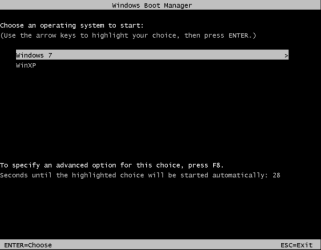
I am really confused now. If the Windows boot loader is correctly installed in the MBR, there should be no "Grub loading". You should only have the Windows boot menu: (ignore the XP entry)

win7_plus_XP_02.PNG

The Grub boot menu:

grub_fix_06.PNG

should only appear after you select Grub from the Windows boot menu?
 

My Computer My Computer

At a glance

...
OS
...
Back
Top