Installed W7 from secondary hard drive, now I can't boot! (pics)

polar8

New member
Local time
7:29 AM
Messages
1
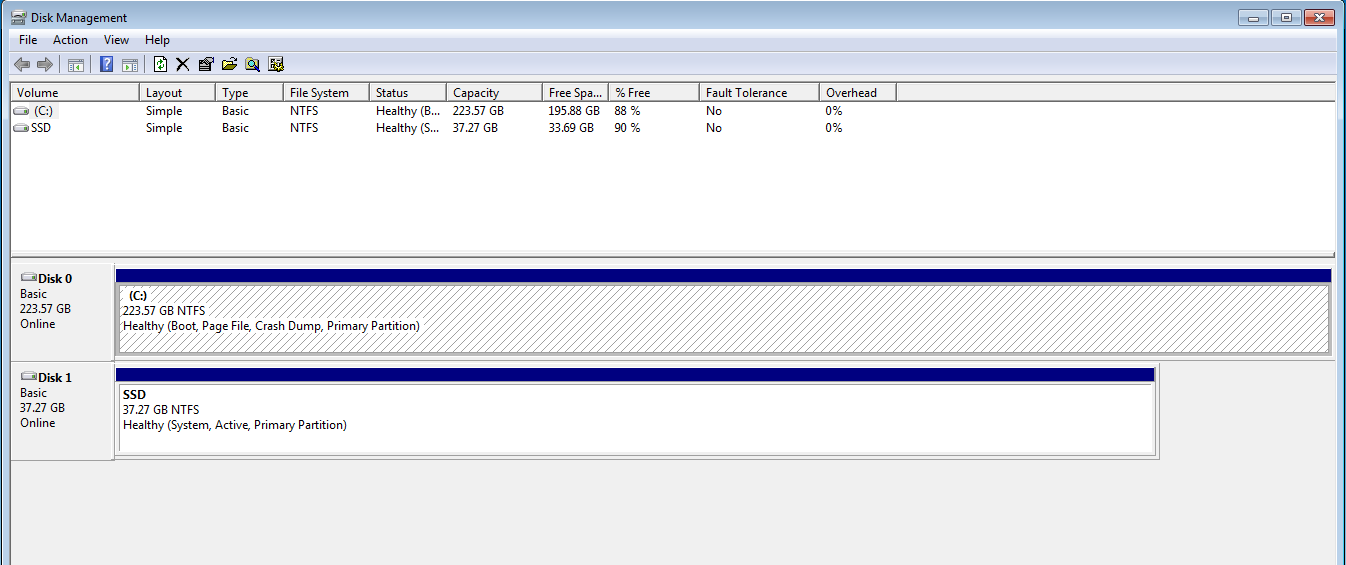
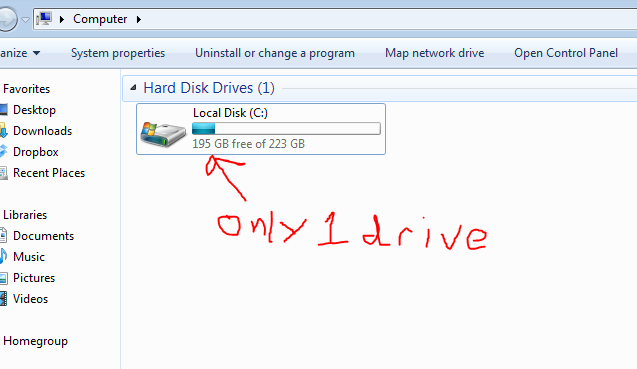
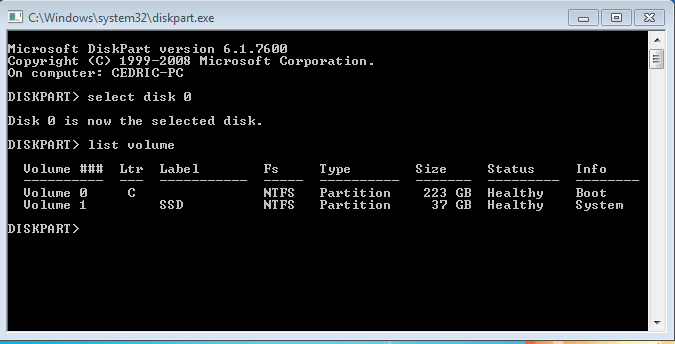
I tried something new- installing W7 from a second SATA hard drive. I extracted my W7 iso from MSDNAA to the hard drive, and was able to boot from it. Then, I told the installer to install windows to my main drive. Unfortunately, it seems that Windows has incorporated my W7 iso drive (the secondary one) as part of the boot routine, and I can't remove it. My system will only boot if I tell it to use the secondary drive as the boot disk. However when I get into Windows, the secondary drive isn't displayed!

Here were the drives I used-
240gb: The one I wanted to install windows ONTO
40gb: The one I installed windows FROM


How can I fix this? Here is the result of my diskpart, disk management, and my computer screens:

Thanks!
IVcxk.png


oKZd2.png


EZgP9.png
 

My Computer My Computer

At a glance

W7
OS
W7

My Computer My Computer

At a glance

Windows 7 Home Premium SP1, 64-bitIntel Skylake i5-6600K, not overclocked8 GB HyperX DDR4-2666 (2 x 4 GB)none; graphics are integrated on CPU
Computer type
PC/Desktop
Computer Manufacturer/Model Number
Ignatz Special; 4 speed manual gearbox; factory air conditioning; one of one
OS
Windows 7 Home Premium SP1, 64-bit
CPU
Intel Skylake i5-6600K, not overclocked
Motherboard
AsRock Z170M Extreme 4, micro ATX
Memory
8 GB HyperX DDR4-2666 (2 x 4 GB)
Graphics Card(s)
none; graphics are integrated on CPU
Sound Card
onboard: Realtek ALC1150; external: USB Behringer UF0-202
Monitor(s) Displays
Dell S2340M 23 inch IPS
Screen Resolution
1600 x 900
Hard Drives
System: Crucial MX100 series SSD, 128 GB;
Data: Samsung Spinpoint 103SJ, 1 TB;
Backup: WD Caviar Green WD30EZRX-00D8PB0, 3 TB
PSU
Rosewill SilentNight 500 watt fanless, semi-modular
Case
Antec Solo II
Cooling
Noctua NH-U12S; Noctua F12 intake, Noctua S12A exhaust
Keyboard
Microsoft 200 6JH-00001 USB
Mouse
Dell or Microsoft optical wired; USB
Antivirus
Microsoft Security Essentials and Malwarebytes Premium
Browser
Pale Moon
Other Info
All fans PWM; speeds at idle: CPU circa 500 rpm; intake circa 600 rpm; exhaust circa 600 rpm; CPU temps 27 idle and 47 C load in a warm room (27 C/81 F) when running Intel Extreme Tuning Utility stress test.
Make the C: partition active then open an administrative command prompt and type:

bcdboot C:\Windows /s C:

Should take care of it and allow boot to whichever drive is primary. You may want to remove the active status from the SSD after you reboot.
 

My Computer My Computer

At a glance

Windows 7 x64i7-2600K8 GGTX 480
Computer Manufacturer/Model Number
Homebuilt
OS
Windows 7 x64
CPU
i7-2600K
Motherboard
Asus P8Z77-v Pro
Memory
8 G
Graphics Card(s)
GTX 480
Sound Card
Onboard
Monitor(s) Displays
LG W2753V
Screen Resolution
1920x1080
Hard Drives
Crucial M4 128 G SSD
Neither of the above solutions will rewrite WinRE to the F8 Advanced boot tools which is a convenience most users prefer.

For this reason the Best Practice to get all necessary functions restored is Marking Win7 Partition Active then running Startup Repair - Run 3 Separate Times until Win7 starts and holds the System boot flag. You'll need to unplug the other HD so it doesn't interfere.

I wonder why you wouldn't want the OS on the better-performing SSD, with the files and any lower priority programs (if necessary) placed on the HDD? Best method for this is to copy the User folders to the HD, then rightclick each to link to the related Library - Include a Folder - Windows 7 Forums.
 
Back
Top