Solved Installed Windows Essentials 2012 but can't find Movie Maker

outerbank

New member
Local time
4:19 AM
Messages
26
Have attempted to get Photo Gallery and Movie Maker on my Win 7 Pro computer. Installed Windows Essentials 2012 which is supposed to include these two programs. The only program that installs and shows up on the computer is Microsoft One Drive. Did a search of the computer but did not find either program. A number of websites discuss this problem and offer solutions. I've tried all of the solutions. None have worked for me. My computer specs are more than what is required for these two programs, so that isn't the problem. I'm beginning to wonder if these programs have been eliminated by Microsoft.

Any ideas would be welcomed.
 

My Computer My Computer

At a glance

Windows 7 Pro Sp1 64-Bit 7601 MultiprocessIntel Core i5 760 @ 2.80GHzTotal 4.00 GB Usable 3.99 GBAMD Radeon HD5670 Memory 1024 MB
Computer type
PC/Desktop
Computer Manufacturer/Model Number
Powerspec
OS
Windows 7 Pro Sp1 64-Bit 7601 Multiprocess
CPU
Intel Core i5 760 @ 2.80GHz
Motherboard
Intel Corp DP55WB
Memory
Total 4.00 GB Usable 3.99 GB
Graphics Card(s)
AMD Radeon HD5670 Memory 1024 MB
Sound Card
(1) AMD Hi Def Auduio Device (2) Realtek Hi Def Audio
Monitor(s) Displays
Acer
Screen Resolution
1920x1080
Hard Drives
(1) Hitachi HDS721010CLA332 (2) WDC WD1002FAEX-00Z3A SCSI (3) Generic Compact Flash USB Device (4) Generic MS/MS-PRO USB Device
Keyboard
Inland
Mouse
Inland
Antivirus
Norton Internet Security
Browser
IE 11

My Computer My Computer

At a glance

Windows 10 Pro x64Intel Core i7 6700KGSkill TridentZ RGB 16GB 3600 16-16-16-36EVGA GTX 980 Ti SC x2
Computer type
PC/Desktop
Computer Manufacturer/Model Number
Skylake Special #666
OS
Windows 10 Pro x64
CPU
Intel Core i7 6700K
Motherboard
Asus Sabertooth Z170 Mark 1
Memory
GSkill TridentZ RGB 16GB 3600 16-16-16-36
Graphics Card(s)
EVGA GTX 980 Ti SC x2
Sound Card
Realtek High Definition
Monitor(s) Displays
AOC G2460PG
Screen Resolution
1920 x 1080 144Hz
Hard Drives
Samsung 860 Pro 256GB, Seagate Barracuda 4TB x2
PSU
EVGA 1000 P2, EVGA White Custom Braided Cables
Case
Corsair Vengeance C70 Gunmetal Black
Cooling
Corsair H100i v2, Corsair ML120 x2, Thermal Grizzly Kryonaut
Keyboard
Logitech G910 Orion Spectrum
Mouse
Logitech G700s
Internet Speed
Verizon Fios Quantum Gateway 75/75
Antivirus
Windows Defender, Malwarebytes Free 3.8.3
Browser
Chrome
Other Info
Corsair SP120 x4, LG Blu-ray Drive, Durabrand HT-395 100 Watt Dolby Digital Amp, Corsair H2100 Wireless 7.1 Headset
Windows Essentials

I have already downloaded and installed Essentials, Photo Gallery and Movie Maker several times. Each time the only program that seems to install is Microsoft One Drive. During one of the latter install attempts, it was indicated that both Photo Gallery and Movie Maker were already installed even though a search of the computer did not find any evidence of these two programs. I've been at this for most of the day and am about to just give up.
 

My Computer My Computer

At a glance

Windows 7 Pro Sp1 64-Bit 7601 MultiprocessIntel Core i5 760 @ 2.80GHzTotal 4.00 GB Usable 3.99 GBAMD Radeon HD5670 Memory 1024 MB
Computer type
PC/Desktop
Computer Manufacturer/Model Number
Powerspec
OS
Windows 7 Pro Sp1 64-Bit 7601 Multiprocess
CPU
Intel Core i5 760 @ 2.80GHz
Motherboard
Intel Corp DP55WB
Memory
Total 4.00 GB Usable 3.99 GB
Graphics Card(s)
AMD Radeon HD5670 Memory 1024 MB
Sound Card
(1) AMD Hi Def Auduio Device (2) Realtek Hi Def Audio
Monitor(s) Displays
Acer
Screen Resolution
1920x1080
Hard Drives
(1) Hitachi HDS721010CLA332 (2) WDC WD1002FAEX-00Z3A SCSI (3) Generic Compact Flash USB Device (4) Generic MS/MS-PRO USB Device
Keyboard
Inland
Mouse
Inland
Antivirus
Norton Internet Security
Browser
IE 11
Look under Programs Files (x86) - Windows Live - Photo Gallery and there should be an exe for Movie Maker and Photo Gallery

Jim :cool:
 

My Computer My Computer

At a glance

Windows 8.1 Pro w/Media Center 64bit, Windows...Phenom II X6 1100TCrucial Balistic 8gb DDR3-1866 CL9MSI R6850 Cyclone IGD5 PE
Computer type
PC/Desktop
Computer Manufacturer/Model Number
Home Built
OS
Windows 8.1 Pro w/Media Center 64bit, Windows 7 HP 64bit
CPU
Phenom II X6 1100T
Motherboard
ASUS M5A99X EVO
Memory
Crucial Balistic 8gb DDR3-1866 CL9
Graphics Card(s)
MSI R6850 Cyclone IGD5 PE
Sound Card
On Board
Monitor(s) Displays
ASUS VE258Q 25" LED with DVI-HDMI-DisplayPort
Screen Resolution
1920 x 1080
Hard Drives
Two WD Cavier Black 2TB Sata III, WD My Book Essential 2TB USB 3.0
PSU
Seasonic X650 80 Plus GOLD Modular
Case
Corsair 400R
Cooling
Antec Kuhler H2O 620, Two 120mm and four 140mm
Keyboard
Logitech K120
Mouse
Logitech Marble Mouse USB, Logitech Precision Game Pad
Internet Speed
15MB
Antivirus
Norton IS 2013, Malwarebytes Pro Beta 2
Browser
IE-11, FF-27
Other Info
APC UPS ES 750, Netgear WNR3500L Gigabit & Wireless N Router with SamKnows Test Program, Motorola SB6120 Gigabit Cable Modem. Brother HL-2170W Laser Printer, Epson V300 Scanner
Movie Maker

Have already done that. It's not located at the x86 folder, nor is there any folder thereafter, nor anyplace else on the computer that indicates either Photo Gallery or Movie Maker exists on the computer. After a number of attempts to install the programs, and after just getting Microsoft One Drive and nothing else, one has to wonder if Photo Gallery and Movie Maker are still available as part of Windows Essentials 2012, even though the website appears to indicate they are. Even tried to install Movie Maker 2011. It did download to the computer and it started the install, but soon after a window opened indicating that my computer wasn't connected to the internet, even though it was. After all, the Movie Maker install file did download no more than a minute before the download was run. Found a website that addressed this last problem and followed it to the T, but it also did not work. Even attempted the installation in clean boot mode. The only item that installed again was Microsoft One Drive.

Unless anyone that reads this post and has a great idea about how the problem with the install can be resolved, I'm giving up.
 

My Computer My Computer

At a glance

Windows 7 Pro Sp1 64-Bit 7601 MultiprocessIntel Core i5 760 @ 2.80GHzTotal 4.00 GB Usable 3.99 GBAMD Radeon HD5670 Memory 1024 MB
Computer type
PC/Desktop
Computer Manufacturer/Model Number
Powerspec
OS
Windows 7 Pro Sp1 64-Bit 7601 Multiprocess
CPU
Intel Core i5 760 @ 2.80GHz
Motherboard
Intel Corp DP55WB
Memory
Total 4.00 GB Usable 3.99 GB
Graphics Card(s)
AMD Radeon HD5670 Memory 1024 MB
Sound Card
(1) AMD Hi Def Auduio Device (2) Realtek Hi Def Audio
Monitor(s) Displays
Acer
Screen Resolution
1920x1080
Hard Drives
(1) Hitachi HDS721010CLA332 (2) WDC WD1002FAEX-00Z3A SCSI (3) Generic Compact Flash USB Device (4) Generic MS/MS-PRO USB Device
Keyboard
Inland
Mouse
Inland
Antivirus
Norton Internet Security
Browser
IE 11
Run a System File Check to make sure there are no errors.
http://www.sevenforums.com/tutorials/1538-sfc-scannow-command-system-file-checker.html

In Control Panel / Programs and Features
If Windows Essentials is listed, uninstall it, and see if a re-install will work.

I was curious about this, so i installed WE 2012 Photo Gallery and Movie Maker in Win 10.
No problem, they installed successfully.
I had to set Movie Maker to run in Win 7 compatibility mode.
From what i see these programs can still be installed.

EDIT:
Is Windows up to date with Windows Updates ?
I just saw this thread about the same issue:
http://www.sevenforums.com/software/387200-good-substitute-software-windows-live-essentials.html
 

My Computer My Computer

At a glance

Multi-Boot W7_Pro_x64 W8.1_Pro_x64 W10_Pro_x6...AMD Athlon II x4 6206GB GSkill DDR2 800AMD 4670 GPU + AMD 4200 IGP
Computer type
PC/Desktop
Computer Manufacturer/Model Number
home built
OS
Multi-Boot W7_Pro_x64 W8.1_Pro_x64 W10_Pro_x64 +Linux_VMs +Chromium_VM
CPU
AMD Athlon II x4 620
Motherboard
Gigabyte GA-MA785G-UD3H
Memory
6GB GSkill DDR2 800
Graphics Card(s)
AMD 4670 GPU + AMD 4200 IGP
Sound Card
on board Realtek ALC889A
Monitor(s) Displays
RCA 40" LCD TV, Insignia 32" LCD TV, HP 15" LCD monitor
Screen Resolution
1680 x 1050
Hard Drives
OCZ Vertex 3 120GB,
Samsung F3 1TB (3),
Several others - WD, Seagate, Hitachi, ...
PSU
Corsair 500 W
Case
Rosewill mid tower
Cooling
CM 90mm rifle
Keyboard
Gyration wireless, Logitech wireless, Dell USB wired
Mouse
Gyration wireless, Logitech wireless, V7 USB wired
Internet Speed
Spectrum - 100Mbps D / 10Mbps U
Antivirus
Avast, MBAM3, EMET, WinPatrol
Browser
Pale Moon, Firefox, IE
Other Info
2 multi-boot PC's
Mainly HTPC/Office/Gen purpose (no gaming).
Trendnet USB KVM.
LG DVD burner/Blue Ray Player.
Tray system for removable SATA backup drives.

Not currently OCd, under-volted.
I use Hybrid sleep, rarely re-boot or shutdown.

Hauppauge HD-PVR, Avermedia PCIe TV Tuner, Hauppauge PCI TV Tuner.
Hi,
With all of the programs included in windows essentials 2012 and some now being discontinued or altered like windows live mail it's probably been pulled by M$ until the download is updated

I haven't downloaded it in some time and don't have we2012 installed anymore because I just don't need it but movie maker was the best one but nasty photo gallery was included too but either way I just don't work with videos so I got rid of it.
 

My Computer My Computer

At a glance

Win-7-Pro64bit 7-H-Prem-64biti7-5930K 2nd i9-9940x both water blocked VRM'...Trident-z 3200C14 2nd Trident-z 3600C16EVGA 1080ti ftw3 2nd Titan Xp both water blocked
Computer type
PC/Desktop
Computer Manufacturer/Model Number
Custom assembled by me :}
OS
Win-7-Pro64bit 7-H-Prem-64bit
CPU
i7-5930K 2nd i9-9940x both water blocked VRM's too
Motherboard
ASUS SABERTOOTH X99 2nd ASUS x299 Apex
Memory
Trident-z 3200C14 2nd Trident-z 3600C16
Graphics Card(s)
EVGA 1080ti ftw3 2nd Titan Xp both water blocked
Sound Card
Built-in Realtek
Monitor(s) Displays
1-AOC G2460PG 24"G-Sync 144Hz/ 2nd 1-ASUS VG248QE 24" 144Hz
Screen Resolution
1920 x 1080 144Hz
Hard Drives
2-Samsung M.2 Evo & Evo Plus
2-Samsung 850 EVO 500GB SSD's/ 3-2.5 W.D. Black 1tb-&3-1tb/3-3.5 WD Black 1tb hdd's
PSU
EVGA SuperNOVA 1000-P2 2nd 1200-P2
Case
2-Corsair Obsidian Series 450D Black ATX Mid Tower
Cooling
Custom water loops
Keyboard
Logitech G710+/ 2nd Logitech G910
Mouse
2-RedDragon M901 Perdition 16400 dpi Gaming mouse = wired
Internet Speed
Comcast Ping 19ms 89.31mbps download speed 6.12mbps upload
Antivirus
Malwarebytes Pro/ Superantispyware Pro
Browser
FireFox & Pale moon
Other Info
2nd ASUS X299 Apex/Intel i9-9940x with Custom water loop/7H-Prem-x64/Corsair 450D case/Ram Trident-z 3600C16 4x8gb / Samsung970Evo plus 500gb SSD/Dual ssd EZ swap evo/PSU EVGA SuperNova 1200w-P2 80+Platinum/GPU Titan Xp /8-ML-140 on push-pull on 2-280GTX rads
Now I need a movie maker that is no longer available for download on the official channel and the links that have just been attached, it is in a Microsoft Essentials compound I think I have seen it.
 

My Computer My Computer

At a glance

Windows 7 Ultimate x64AMD E-450 APU with Raedon(tm) HD Graphics (2 ...6 GBAMD Raedon HD 6320 Graphics
Computer type
Laptop
Computer Manufacturer/Model Number
HP
OS
Windows 7 Ultimate x64
CPU
AMD E-450 APU with Raedon(tm) HD Graphics (2 CPUs), ~1.6GHz
Motherboard
Hewlett-Packard
Memory
6 GB
Graphics Card(s)
AMD Raedon HD 6320 Graphics
Sound Card
High Definition Audio
Monitor(s) Displays
Monitor PnP Generic
Screen Resolution
1024 x 728 (32 bit) (60Hz)
Keyboard
HP Key
Mouse
Perfect Choice
Internet Speed
1 MB/S
Antivirus
Windows Defender
Browser
Google Chrome
Now I need a movie maker that is no longer available for download on the official channel and the links that have just been attached...


Microsoft long ago stopped supporting Window Essentials 2012 and removed all copies of it from their servers.

However, the Internet Archive Wayback Machine has an archived copy of an MS page from which you can still download the Offline installer wlsetup-all.exe.


Microsoft Windows Essentials 2012: Download Now | AVIRAJ AJGEKAR'S BLOG...

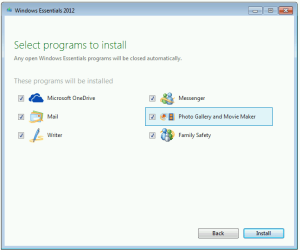
I have just downloaded the Offline Installer and tested it...
 

Attachments

  • Windows Essentials 2012 setup.PNG
    Windows Essentials 2012 setup.PNG
    10.6 KB · Views: 8

My Computers My Computers

  • At a glance

    Windows 7 Home Premium x64AMD V1204GB
    Computer type
    Laptop
    Computer Manufacturer/Model Number
    Toshiba satellite C650D
    OS
    Windows 7 Home Premium x64
    CPU
    AMD V120
    Memory
    4GB
    Internet Speed
    150 Mbps
    Antivirus
    MSE
    Browser
    IE11, Edge, Firefox
    Other Info
    I also have W7 Pro on my System Two, and several W7 Hyper-V VMs. My other machines run Windows 10/11. Their specs are in my Ten Forums & Eleven Forum profiles.
  • At a glance

    Windows 7 Pro x64Intel i5-3320M8 GB
    Computer type
    Laptop
    System Manufacturer/Model Number
    Lenovo Thinkpad T430
    OS
    Windows 7 Pro x64
    CPU
    Intel i5-3320M
    Memory
    8 GB
    Hard Drives
    250GB Samsung SSD 860 EVO
    Antivirus
    MSE
Back
Top