Installed windows seven, Now can't boot to vista.

04orgzx6r

New member
Local time
3:41 AM
Messages
9
Problem:

I installed windows seven and it boots up automatically without giving me the option to boot into my old vista partition.


Background:

I am sure this is something simple, but I can't get it working.
I had vista installed and I used partition magic to repartition my hard drive on my laptop.
I made the new partition come before my old partition, because I wanted windows 7 to be my primary eventually.

I think it may have someting to do with making the vista partition active, but I am notentirely sure how to do that, so if you can help me out i would really appreciate it, Thanks!
 

My Computer My Computer

At a glance

Windows 7, Vista
OS
Windows 7, Vista
Ok, so I did the commands in this post, except I changed the "XP" to "Vista" and it shows vista but it will not boot, it says I need to insert my vista disk..

Do I need to do that? Or is there something wrong in those commands?
 

My Computer My Computer

At a glance

Windows 7, Vista
OS
Windows 7, Vista
Hi,

No , those commands won't work here - nice try , though.

If you moved your Vista partition , you will need to make a bcd entry to reflect the new position.

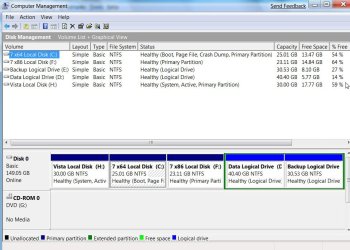
Look in Disk Management and find which is the System partition.

Better still, post a jpeg screenshot, like this: ( click View and untick the Action pane and Console Tree to take a shot of the whole Disk Management window)

DISKMANAGEMENT2009-02-04_031947.jpg

To post a jpeg screenshot, click Go Advanced at the bottom of this page and follow Step 8 onward of this tutorial:

http://www.vistax64.com/tutorials/148532-how-use-snipping-tool-vista.html
 

My Computers My Computers

  • At a glance

    7 X64i5 84002x8gb 3200mhz
    Computer type
    PC/Desktop
    OS
    7 X64
    CPU
    i5 8400
    Motherboard
    gigabyte b365m ds3h
    Memory
    2x8gb 3200mhz
    Hard Drives
    various
    PSU
    pure power 11 400w cm
    Case
    Coolermaster
    Cooling
    cryorig m9i
  • At a glance

    7x64g54008gb ddr4 2400
    Computer type
    PC/Desktop
    OS
    7x64
    CPU
    g5400
    Motherboard
    ga b365m ds3h
    Memory
    8gb ddr4 2400
    PSU
    xfx pro 450w
Heres my disk management, I did insert the vista disk and it tried to fix the boot, but it didn't work either:shock:


Thanks for the help in advance
 

My Computer My Computer

At a glance

Windows 7, Vista
OS
Windows 7, Vista
Sadly, Partition Magic is not compatible with NT6 (Vista/Win7 ) o/s - it wrecks them.

You got away with it because you installed 7 after using it.

1. Go to folder options and make sure Hidden Files and Protected Operating System files are showing.In Disk Management, rt click C and Mark as active

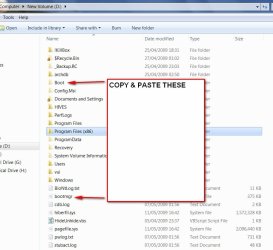
2. Copy and paste bootmgr and the yellow boot folder from D to C.

BOOTMGR2009-05-11_182540.jpg

You will get a message saying you can't copy bcd as it is in use - skip it and the rest will copy.

3. Open an elevated command prompt and at the > prompt, type: (press enter after each command as indicated)

bcdedit /export C:\Boot\bcd {enter}

4. then type:

bcdedit /copy {current} /d "Windows Vista" {enter}

You will get a long number in brackets - the {GUID} , or identifier.

Use the {guid-you-got}, including the brackets, in these commands:


bcdedit /set {guid-you-got} device partition=D: {enter}

bcdedit /set {guid-you-got} osdevice partition=D: {enter}

close the cmd prompt.

5. Reboot . Done..
 

My Computers My Computers

  • At a glance

    7 X64i5 84002x8gb 3200mhz
    Computer type
    PC/Desktop
    OS
    7 X64
    CPU
    i5 8400
    Motherboard
    gigabyte b365m ds3h
    Memory
    2x8gb 3200mhz
    Hard Drives
    various
    PSU
    pure power 11 400w cm
    Case
    Coolermaster
    Cooling
    cryorig m9i
  • At a glance

    7x64g54008gb ddr4 2400
    Computer type
    PC/Desktop
    OS
    7x64
    CPU
    g5400
    Motherboard
    ga b365m ds3h
    Memory
    8gb ddr4 2400
    PSU
    xfx pro 450w
bcdedit /export D:\Boot\bcd C:\Boot\bcd

I am getting stuck here, it says that the export command is invalid and that the parameter is incorrect....

Any ideas?

Edit: It looks like I need to create or store the BCD file before I can export it, but I am a not very familar with windows cmd...
 

My Computer My Computer

At a glance

Windows 7, Vista
OS
Windows 7, Vista
Are you sure you did SIW2's step number 2 first?

The absence of C:\boot folder, if you did not, would explain the error message.

If so, just do this command instead:

bcdedit /export C:\Boot\bcd
 

My Computer My Computer

At a glance

7600.20510 x86P4 550 3.4 GHz HT running at 3.5 GHzOCZ 2 GB(2x1GB) DDR400mHz running @ 414 mHzHIS Radeon HD 3850 IceQ 3 Turbo HDMI Dual DL-...
Computer Manufacturer/Model Number
self built
OS
7600.20510 x86
CPU
P4 550 3.4 GHz HT running at 3.5 GHz
Motherboard
MSI PM8M3-V (MS-7211 v1.x) Micro-ATX mainboard
Memory
OCZ 2 GB(2x1GB) DDR400mHz running @ 414 mHz
Graphics Card(s)
HIS Radeon HD 3850 IceQ 3 Turbo HDMI Dual DL-DVI AGP
Sound Card
MOTU Traveler firewire studio interface 192 kHz 24 bit
Monitor(s) Displays
22" widescreen Acer X223W LCD, 17" Compaq P75 CRT
Screen Resolution
1680x1050 and 1280x1024
Hard Drives
SATA I x2 WD, 400 GB and 120 GB, SATA 2 WD Caviar Black 1 TB
PSU
350W generic
Case
Cybertronpc, it glows blue
Cooling
stock cpu fan, Ice-Q 3 gpu and system, many case fans
Keyboard
Logitch Classical Keyboard 200
Mouse
Logitech Mediaplay cordless
Internet Speed
1792/448 kbits/sec
Other Info
SATA II PCI fake RAID adapter, 1 GB Readyboost, original ATI Remote Wonder (even works with WMC perfectly), Logitech Rumblepad 2 game controller x2
Are you sure you did SIW2's step number 2 first?

The absence of C:\boot folder, if you did not, would explain the error message.

If so, just do this command instead:

bcdedit /export C:\Boot\bcd

Ya except my boot directory was named "boot" "Boot" so I used lower case

What I did after a little research was used the import cmd from D: and then the export cmd to C: and that seemed to work...
Still finishing up the rest, but I will report back, Thanks for the help guys!
 

My Computer My Computer

At a glance

Windows 7, Vista
OS
Windows 7, Vista
Okay, That worked, and I can now get choose vista and even log-in but after that it says "preparing your desktop" forever and then finally loads a blank turqoise screen, ughh!
Anyway, I can run tskmanager and thats about it, What did I do!

BTW, what free partitioning tool do you guys use, now that I know I shouldn't use Parted magic :(
 

My Computer My Computer

At a glance

Windows 7, Vista
OS
Windows 7, Vista
I use Acronis Disk Director Suite. Others, including SIW2 like and use Paragon.

See SIW2 post here:
http://www.sevenforums.com/installation-setup/10167-clean-install-partition.html

Either will do well for ya. Gparted is a free one though. I never used that but see that it is recommended a lot.

Is explorer.exe started, when looking in task manager? If not, go to file | new task (run) in it and type explorer.exe, hit enter.
 

My Computer My Computer

At a glance

7600.20510 x86P4 550 3.4 GHz HT running at 3.5 GHzOCZ 2 GB(2x1GB) DDR400mHz running @ 414 mHzHIS Radeon HD 3850 IceQ 3 Turbo HDMI Dual DL-...
Computer Manufacturer/Model Number
self built
OS
7600.20510 x86
CPU
P4 550 3.4 GHz HT running at 3.5 GHz
Motherboard
MSI PM8M3-V (MS-7211 v1.x) Micro-ATX mainboard
Memory
OCZ 2 GB(2x1GB) DDR400mHz running @ 414 mHz
Graphics Card(s)
HIS Radeon HD 3850 IceQ 3 Turbo HDMI Dual DL-DVI AGP
Sound Card
MOTU Traveler firewire studio interface 192 kHz 24 bit
Monitor(s) Displays
22" widescreen Acer X223W LCD, 17" Compaq P75 CRT
Screen Resolution
1680x1050 and 1280x1024
Hard Drives
SATA I x2 WD, 400 GB and 120 GB, SATA 2 WD Caviar Black 1 TB
PSU
350W generic
Case
Cybertronpc, it glows blue
Cooling
stock cpu fan, Ice-Q 3 gpu and system, many case fans
Keyboard
Logitch Classical Keyboard 200
Mouse
Logitech Mediaplay cordless
Internet Speed
1792/448 kbits/sec
Other Info
SATA II PCI fake RAID adapter, 1 GB Readyboost, original ATI Remote Wonder (even works with WMC perfectly), Logitech Rumblepad 2 game controller x2
I use Acronis Disk Director Suite. Others, including SIW2 like and use Paragon.

See SIW2 post here:
http://www.sevenforums.com/installation-setup/10167-clean-install-partition.html

Either will do well for ya. Gparted is a free one though. I never used that but see that it is recommended a lot.

Is explorer.exe started, when looking in task manager? If not, go to file | new task (run) in it and type explorer.exe, hit enter.

No its not, I started it though and it wouln't load my profile only a temp.

But I think I fiured out that it isn't seeing the partitions correctly, it sees the partition it is on as F but it should see it as C, so once I get that figured out I should be good to go!
 

My Computer My Computer

At a glance

Windows 7, Vista
OS
Windows 7, Vista
I am officially back up and running on vista!
I went into the regeditor and changed the drives back to the way vista needs them:sarc:
Thanks again for all of the help guys!
 

My Computer My Computer

At a glance

Windows 7, Vista
OS
Windows 7, Vista
Good stuff, glad you got it sorted.
 

My Computer My Computer

At a glance

7600.20510 x86P4 550 3.4 GHz HT running at 3.5 GHzOCZ 2 GB(2x1GB) DDR400mHz running @ 414 mHzHIS Radeon HD 3850 IceQ 3 Turbo HDMI Dual DL-...
Computer Manufacturer/Model Number
self built
OS
7600.20510 x86
CPU
P4 550 3.4 GHz HT running at 3.5 GHz
Motherboard
MSI PM8M3-V (MS-7211 v1.x) Micro-ATX mainboard
Memory
OCZ 2 GB(2x1GB) DDR400mHz running @ 414 mHz
Graphics Card(s)
HIS Radeon HD 3850 IceQ 3 Turbo HDMI Dual DL-DVI AGP
Sound Card
MOTU Traveler firewire studio interface 192 kHz 24 bit
Monitor(s) Displays
22" widescreen Acer X223W LCD, 17" Compaq P75 CRT
Screen Resolution
1680x1050 and 1280x1024
Hard Drives
SATA I x2 WD, 400 GB and 120 GB, SATA 2 WD Caviar Black 1 TB
PSU
350W generic
Case
Cybertronpc, it glows blue
Cooling
stock cpu fan, Ice-Q 3 gpu and system, many case fans
Keyboard
Logitch Classical Keyboard 200
Mouse
Logitech Mediaplay cordless
Internet Speed
1792/448 kbits/sec
Other Info
SATA II PCI fake RAID adapter, 1 GB Readyboost, original ATI Remote Wonder (even works with WMC perfectly), Logitech Rumblepad 2 game controller x2
Hi,

Torrentg - thanks for stepping in there.

04 - Well done - that's not easy the first time.

I didn't type that out very well - you may find you have an unused entry in bcd - you may have a Vista entry with id {ntldr} from the commands you first attempted from the other thread.

You can see what is there, with the command:

bcdedit

You can remove that entry with:

bcdedit /del {ntldr} /f

Hope it helps.
 

My Computers My Computers

  • At a glance

    7 X64i5 84002x8gb 3200mhz
    Computer type
    PC/Desktop
    OS
    7 X64
    CPU
    i5 8400
    Motherboard
    gigabyte b365m ds3h
    Memory
    2x8gb 3200mhz
    Hard Drives
    various
    PSU
    pure power 11 400w cm
    Case
    Coolermaster
    Cooling
    cryorig m9i
  • At a glance

    7x64g54008gb ddr4 2400
    Computer type
    PC/Desktop
    OS
    7x64
    CPU
    g5400
    Motherboard
    ga b365m ds3h
    Memory
    8gb ddr4 2400
    PSU
    xfx pro 450w
Hi,

Torrentg - thanks for stepping in there.

04 - Well done - that's not easy the first time.

I didn't type that out very well - you may find you have an unused entry in bcd - you may have a Vista entry with id {ntldr} from the commands you first attempted from the other thread.

You can see what is there, with the command:

bcdedit

You can remove that entry with:

bcdedit /del {ntldr} /f

Hope it helps.

Haha Nice! I do have an extra entry but I didn't want to ask again, its like you read my mind:p

I am kinda glad it got all screwed up though, cause I learned a lot from fixing it.

Thanks again for all of the help, its users like you guys who make this a very nice place to hang around:D
 

My Computer My Computer

At a glance

Windows 7, Vista
OS
Windows 7, Vista
y dnt u try bcdeditor...i think there is some problem with the vista boot loader settings that might have got overlapped when installing windows 7.so try using the software it can fix up
 

My Computer My Computer

At a glance

Windows 7 RC ,Windows Vista Ultimate ,Windows...Core 2 Duo 2.4 Ghz4 GB Ram
OS
Windows 7 RC ,Windows Vista Ultimate ,Windows XP SP3,Ubuntu 8.01
CPU
Core 2 Duo 2.4 Ghz
Motherboard
Intel 945 G
Memory
4 GB Ram
Hard Drives
WD SATA 250 GB
Hitachi SATA 80 GB
Back
Top