Solved Installed wrong version of W7

fstr

New member
Local time
3:42 PM
Messages
3
I've had a week of the perfect storm of problems with my multi PC setup! But without boring everyone with the details, I reinstalled win7 home premium, recovered my setup key from a backup after recovering part of the backup from WHS, only to realize the key is for professional, not home premium!

So basically I installed the wrong version of Win7 and it wont allow me to enter the key saying rightly that I'm entering a key to the wrong product.
I also attempted to do an anytime upgrade but that fails without message. I think it is failing because the installed product is not registered yet.

At this point the last thing I want to do is a reinstall because I just finished a weeks worth of work to get the fresh install back to the state I need it in.

What is my best choice here? Can I do a repair install with Professional without losing anything?
 

My Computer

OS
Windows 7 Premium x64
Hello fstr, welcome to Seven Forums!


Have a look at this tutorial at the link below, it says Vista but the principal is the same and be sure to post back with any further questions you may have and to keep us informed.


My Computer

Computer Manufacturer/Model Number
* BFK Customs *
OS
W 7 64-bit Ultimate
CPU
Intel Q9550 Yorkfield
Motherboard
ASUS P5Q Pro
Memory
8GB Dominator 8500C5D
Graphics Card(s)
ATI : XFX 5870
Sound Card
Realtek HD Audio 7-1
Monitor(s) Displays
1x 47" LCD HDMI & 3x 26" LCD HDMI
Screen Resolution
1920x1080P & 1920x1200
Hard Drives
1x 80GB Intel X25-M G2 SSD : 1x 500GB & 1x 640GB WD Caviar Black(s)
PSU
Corsair 620HX
Case
Cooler Master RC-690
Cooling
Tuniq Tower 120, 2x 140mm and 3x 120mm case fans
Keyboard
Microsoft 500
Mouse
Razer Diamondback 3G
Internet Speed
14 Mb/s
Other Info
1x Koutech 3Gb/s SATA HDD Hot Swap Rack

My Computer

OS
Windows 7 Premium x64
First set a System Restore Point - Create

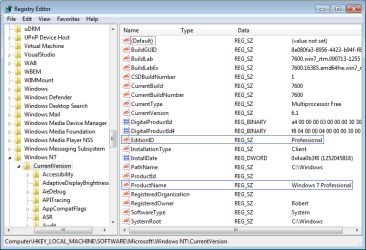
Type regedit in Start Search box, rightclick result to Run as Admin, change the two Registry Keys exactly as shown below to trick the installer into running a same-version Repair Install which is always allowed.

click to enlarge
win7_alter_registry.png
 
Last edited by a moderator:
SOLVED;
In a last attempt to avoid a repair or upgrade install, I installed sp1 and all the subsequent updates. At that point I did a selective (msconfig) restart and the anytime upgrade worked
Thanks for all the help!

Sent from my ADR6400L using Tapatalk
 

My Computer

OS
Windows 7 Premium x64
Good to see you found a solution and thanks for the update.
 

My Computer

Computer Manufacturer/Model Number
* BFK Customs *
OS
W 7 64-bit Ultimate
CPU
Intel Q9550 Yorkfield
Motherboard
ASUS P5Q Pro
Memory
8GB Dominator 8500C5D
Graphics Card(s)
ATI : XFX 5870
Sound Card
Realtek HD Audio 7-1
Monitor(s) Displays
1x 47" LCD HDMI & 3x 26" LCD HDMI
Screen Resolution
1920x1080P & 1920x1200
Hard Drives
1x 80GB Intel X25-M G2 SSD : 1x 500GB & 1x 640GB WD Caviar Black(s)
PSU
Corsair 620HX
Case
Cooler Master RC-690
Cooling
Tuniq Tower 120, 2x 140mm and 3x 120mm case fans
Keyboard
Microsoft 500
Mouse
Razer Diamondback 3G
Internet Speed
14 Mb/s
Other Info
1x Koutech 3Gb/s SATA HDD Hot Swap Rack
Back
Top