Solved Installed XP over 7 and cant access 7!

srinisid

New member
Local time
3:24 PM
Messages
24
Hey hii there everyone!!
last week i installed xp over my windows 7 using boot setup.the setup went just fine but i think it messed up my disk naming.since then my drive on which my windows 7 used to earlier(c drive) is now the D drive and now my xp is in c drive(whch was D earlier).
Due to this mixup i cant access my win7.my bootup doesnt show two options but boots directly into my XP.
i installed easyBCD 2.0 in my xp and tried changing it but cant access win 7....
a little help plz......!
 

My Computer My Computer

At a glance

Windows 7 32 bitAMD Athlon II X4 630 2.80 GhzKingston RAM 2 GB 1066Nvidia GeForce 9500GT
OS
Windows 7 32 bit
CPU
AMD Athlon II X4 630 2.80 Ghz
Motherboard
ASUS motherboard M2N68-AM SE2
Memory
Kingston RAM 2 GB 1066
Graphics Card(s)
Nvidia GeForce 9500GT
Screen Resolution
1600X900
Hard Drives
Segate 1 TB
If you installed XP over Win7 then why would you expect Win7 to be there?

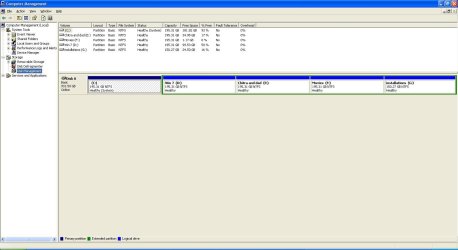
Please post back a screenshot of your full Disk Mgmt drive map with listings, label each drive so we know what is where: Screenshot with Paint - Windows 7 Forums

Is this factory preinstalled Win7? Do you have the installation DVD? How is it activated?
 
NO its not a factory installed win7.the problem is that i have still all my win 7 files in the drive lablled win7 with the windows folder and all.i have zillion installed programs which i dont wanna install again.thanks!!untitled.JPG
 

My Computer My Computer

At a glance

Windows 7 32 bitAMD Athlon II X4 630 2.80 GhzKingston RAM 2 GB 1066Nvidia GeForce 9500GT
OS
Windows 7 32 bit
CPU
AMD Athlon II X4 630 2.80 Ghz
Motherboard
ASUS motherboard M2N68-AM SE2
Memory
Kingston RAM 2 GB 1066
Graphics Card(s)
Nvidia GeForce 9500GT
Screen Resolution
1600X900
Hard Drives
Segate 1 TB
thanks bare foot kid...
but unfortunately i dont see a mark as active partition nywhere in the options of ny drive
 

My Computer My Computer

At a glance

Windows 7 32 bitAMD Athlon II X4 630 2.80 GhzKingston RAM 2 GB 1066Nvidia GeForce 9500GT
OS
Windows 7 32 bit
CPU
AMD Athlon II X4 630 2.80 Ghz
Motherboard
ASUS motherboard M2N68-AM SE2
Memory
Kingston RAM 2 GB 1066
Graphics Card(s)
Nvidia GeForce 9500GT
Screen Resolution
1600X900
Hard Drives
Segate 1 TB
thanks bare foot kid...
but unfortunately i dont see a mark as active partition nywhere in the options of ny drive


Forget all that since it's on an Extended partition / Logical drive, that won't work.
 

My Computer My Computer

At a glance

W 7 64-bit UltimateIntel Q9550 Yorkfield8GB Dominator 8500C5DATI : XFX 5870
Computer Manufacturer/Model Number
* BFK Customs *
OS
W 7 64-bit Ultimate
CPU
Intel Q9550 Yorkfield
Motherboard
ASUS P5Q Pro
Memory
8GB Dominator 8500C5D
Graphics Card(s)
ATI : XFX 5870
Sound Card
Realtek HD Audio 7-1
Monitor(s) Displays
1x 47" LCD HDMI & 3x 26" LCD HDMI
Screen Resolution
1920x1080P & 1920x1200
Hard Drives
1x 80GB Intel X25-M G2 SSD : 1x 500GB & 1x 640GB WD Caviar Black(s)
PSU
Corsair 620HX
Case
Cooler Master RC-690
Cooling
Tuniq Tower 120, 2x 140mm and 3x 120mm case fans
Keyboard
Microsoft 500
Mouse
Razer Diamondback 3G
Internet Speed
14 Mb/s
Other Info
1x Koutech 3Gb/s SATA HDD Hot Swap Rack
so what should i do??????
 

My Computer My Computer

At a glance

Windows 7 32 bitAMD Athlon II X4 630 2.80 GhzKingston RAM 2 GB 1066Nvidia GeForce 9500GT
OS
Windows 7 32 bit
CPU
AMD Athlon II X4 630 2.80 Ghz
Motherboard
ASUS motherboard M2N68-AM SE2
Memory
Kingston RAM 2 GB 1066
Graphics Card(s)
Nvidia GeForce 9500GT
Screen Resolution
1600X900
Hard Drives
Segate 1 TB
Just out of curiosity, do you have an external Hard Disk Drive that you could back-up all the data you need to save?

   Note

have copied out or made back-ups of the data you need to save to external media
 

My Computer My Computer

At a glance

W 7 64-bit UltimateIntel Q9550 Yorkfield8GB Dominator 8500C5DATI : XFX 5870
Computer Manufacturer/Model Number
* BFK Customs *
OS
W 7 64-bit Ultimate
CPU
Intel Q9550 Yorkfield
Motherboard
ASUS P5Q Pro
Memory
8GB Dominator 8500C5D
Graphics Card(s)
ATI : XFX 5870
Sound Card
Realtek HD Audio 7-1
Monitor(s) Displays
1x 47" LCD HDMI & 3x 26" LCD HDMI
Screen Resolution
1920x1080P & 1920x1200
Hard Drives
1x 80GB Intel X25-M G2 SSD : 1x 500GB & 1x 640GB WD Caviar Black(s)
PSU
Corsair 620HX
Case
Cooler Master RC-690
Cooling
Tuniq Tower 120, 2x 140mm and 3x 120mm case fans
Keyboard
Microsoft 500
Mouse
Razer Diamondback 3G
Internet Speed
14 Mb/s
Other Info
1x Koutech 3Gb/s SATA HDD Hot Swap Rack
actually no.but i can arange that... is that necessary??
cant dere be another way.Idont care much about the xp.even if it is gone i wont care much........
 

My Computer My Computer

At a glance

Windows 7 32 bitAMD Athlon II X4 630 2.80 GhzKingston RAM 2 GB 1066Nvidia GeForce 9500GT
OS
Windows 7 32 bit
CPU
AMD Athlon II X4 630 2.80 Ghz
Motherboard
ASUS motherboard M2N68-AM SE2
Memory
Kingston RAM 2 GB 1066
Graphics Card(s)
Nvidia GeForce 9500GT
Screen Resolution
1600X900
Hard Drives
Segate 1 TB
You can use the Partition Wizard Bootable Disk to convert the Windows 7partition to a Primary partition but the drive letter will remain the same as it causes real isseues to attempt to change it once it has been installed as a certain drive letter.

Have a look at Option Three Four in this tutorial at the link below.

Partition Wizard : Use the Bootable CD


Be sure to use the Partition Wizard Bootable Disk (PWBD) and not the installed version; download the PWBD ISO file from this link and burn the ISO to CD then boot the CD to make the changes.

Partition Wizard Free Bootable CD

ImgBurn Free ISO Burning Software


Then we'll work on getting Windows 7 booting on its own, you already have an idea of what that will entail.
 

My Computer My Computer

At a glance

W 7 64-bit UltimateIntel Q9550 Yorkfield8GB Dominator 8500C5DATI : XFX 5870
Computer Manufacturer/Model Number
* BFK Customs *
OS
W 7 64-bit Ultimate
CPU
Intel Q9550 Yorkfield
Motherboard
ASUS P5Q Pro
Memory
8GB Dominator 8500C5D
Graphics Card(s)
ATI : XFX 5870
Sound Card
Realtek HD Audio 7-1
Monitor(s) Displays
1x 47" LCD HDMI & 3x 26" LCD HDMI
Screen Resolution
1920x1080P & 1920x1200
Hard Drives
1x 80GB Intel X25-M G2 SSD : 1x 500GB & 1x 640GB WD Caviar Black(s)
PSU
Corsair 620HX
Case
Cooler Master RC-690
Cooling
Tuniq Tower 120, 2x 140mm and 3x 120mm case fans
Keyboard
Microsoft 500
Mouse
Razer Diamondback 3G
Internet Speed
14 Mb/s
Other Info
1x Koutech 3Gb/s SATA HDD Hot Swap Rack
Have you got your Windows 7 installation DVD? If so, boot from the DVD and attempt a repair. You will have to select your language, repair, and then the repair program will try to locate a Windows 7 installation.

If you are lucky it will also identify the XP installation and create a BCD which dual boots, "An earlier version of Windows" and "Windows 7". If no luck try the following - use EasyBCD to rewrite the Windows 7 MBR.

The XP installation has probably overwritten the MBR, EasyBCD can rewrite the Windows 7 MBR, which may leave you without the XP, but then try running the Windows 7 repair from the DVD again
 

My Computer My Computer

At a glance

Win 7 Ult + Starter, XP Pro +Home, 2kAS, Linu...AMD 64 Athlon X2 , Intel Atom N450, Intel Cel...2.5GB ; 1GB; 2GBNvidia GeForce7000m; Intel; Intel
Computer Manufacturer/Model Number
Acer 7520, Packard Bell dot se, Acer travelmate 2423
OS
Win 7 Ult + Starter, XP Pro +Home, 2kAS, Linux Mint 8, SuperOS
CPU
AMD 64 Athlon X2 , Intel Atom N450, Intel Celeron M 1.50 Ghz
Motherboard
Acer Fuquene
Memory
2.5GB ; 1GB; 2GB
Graphics Card(s)
Nvidia GeForce7000m; Intel; Intel
Sound Card
Realtek AC57
Monitor(s) Displays
17" ;10.1"; 19"
Screen Resolution
1440x900;1024x600;1440x900;
Hard Drives
WD 80, WD 320;
PSU
19v
Case
Laptop
Cooling
Air
Internet Speed
9.7Mb/s down 0.99Mb/s up
Other Info
ISP VIRGINMEDIA 10M cable broadband - D-Link DIR615 wireless router, 3Com OfficeConnect ASDL router used as wireless extender switch
bare foot kid i got all confused with that tutorial and dint understand y it was done....
the post before this would that work????
 

My Computer My Computer

At a glance

Windows 7 32 bitAMD Athlon II X4 630 2.80 GhzKingston RAM 2 GB 1066Nvidia GeForce 9500GT
OS
Windows 7 32 bit
CPU
AMD Athlon II X4 630 2.80 Ghz
Motherboard
ASUS motherboard M2N68-AM SE2
Memory
Kingston RAM 2 GB 1066
Graphics Card(s)
Nvidia GeForce 9500GT
Screen Resolution
1600X900
Hard Drives
Segate 1 TB
No that won't work because the Windows 7 is on an Extended partition / Logical drive and Windows OSs will not/are not able boot independantly from a Logical drive.

That's why you will have to convert the Windows 7 Logical drive to a Primary partition using Option Three Four in the tutorial I posted, what don't you understand, you boot the PW CD and right click the Windows 7 partition/drive and ...


Oh my bad, I wrote Option Three and I was supposed to write Option Four to convert a Logical to Primary, I'm very sorry.

I bet it will make sence now. :o
 

My Computer My Computer

At a glance

W 7 64-bit UltimateIntel Q9550 Yorkfield8GB Dominator 8500C5DATI : XFX 5870
Computer Manufacturer/Model Number
* BFK Customs *
OS
W 7 64-bit Ultimate
CPU
Intel Q9550 Yorkfield
Motherboard
ASUS P5Q Pro
Memory
8GB Dominator 8500C5D
Graphics Card(s)
ATI : XFX 5870
Sound Card
Realtek HD Audio 7-1
Monitor(s) Displays
1x 47" LCD HDMI & 3x 26" LCD HDMI
Screen Resolution
1920x1080P & 1920x1200
Hard Drives
1x 80GB Intel X25-M G2 SSD : 1x 500GB & 1x 640GB WD Caviar Black(s)
PSU
Corsair 620HX
Case
Cooler Master RC-690
Cooling
Tuniq Tower 120, 2x 140mm and 3x 120mm case fans
Keyboard
Microsoft 500
Mouse
Razer Diamondback 3G
Internet Speed
14 Mb/s
Other Info
1x Koutech 3Gb/s SATA HDD Hot Swap Rack
You'll need to mark XP partition Active first before running Startup Repair from the DVD Repair console up to 3 separate times with reboots to start Win7 or create a Dual Boot with the boot files placed on the XP primary partition.
Partition - Mark as Active - Windows 7 Forums
DISKPART At PC Startup - Windows 7 Forums
Startup Repair - Run 3 Separate Times - Windows 7 Forums

If this fails, try completing Method Two Steps 7-12 of this tutorial to Dual Boot XP-Win when XP is installed last: Dual Boot Installation with Windows 7 and XP - Windows 7 Forums

if that fails, back up your files off the Extended partition to delete all but the Win7 partition so it will convert to Primary using free Partition Wizard bootable CD, mark Active, then run Startup Repair x3 to write boot files to a it. You can then add XP using EasyBCD from Win7 which works better.
 
yipee problem solved!!!!!!
i used the PWBD to make my win7 drive as primary and then used easy bcd and wrote the mbr in win 7.
then i started the wn7 installation from boot and did a repair and voila it worked!!!!!!now i have both xp and win7!
Thanks a lot fafhrd and bare foot kid thanks a ton!!!
 

My Computer My Computer

At a glance

Windows 7 32 bitAMD Athlon II X4 630 2.80 GhzKingston RAM 2 GB 1066Nvidia GeForce 9500GT
OS
Windows 7 32 bit
CPU
AMD Athlon II X4 630 2.80 Ghz
Motherboard
ASUS motherboard M2N68-AM SE2
Memory
Kingston RAM 2 GB 1066
Graphics Card(s)
Nvidia GeForce 9500GT
Screen Resolution
1600X900
Hard Drives
Segate 1 TB
Good to see you got it running and thanks for the update.
 

My Computer My Computer

At a glance

W 7 64-bit UltimateIntel Q9550 Yorkfield8GB Dominator 8500C5DATI : XFX 5870
Computer Manufacturer/Model Number
* BFK Customs *
OS
W 7 64-bit Ultimate
CPU
Intel Q9550 Yorkfield
Motherboard
ASUS P5Q Pro
Memory
8GB Dominator 8500C5D
Graphics Card(s)
ATI : XFX 5870
Sound Card
Realtek HD Audio 7-1
Monitor(s) Displays
1x 47" LCD HDMI & 3x 26" LCD HDMI
Screen Resolution
1920x1080P & 1920x1200
Hard Drives
1x 80GB Intel X25-M G2 SSD : 1x 500GB & 1x 640GB WD Caviar Black(s)
PSU
Corsair 620HX
Case
Cooler Master RC-690
Cooling
Tuniq Tower 120, 2x 140mm and 3x 120mm case fans
Keyboard
Microsoft 500
Mouse
Razer Diamondback 3G
Internet Speed
14 Mb/s
Other Info
1x Koutech 3Gb/s SATA HDD Hot Swap Rack
Back
Top