
Installer problem - Cannot even install Mirrors Edge (Windows 7 64bit)

shaneoh4

New member
Local time
11:58 AM
Messages
3
Hi,

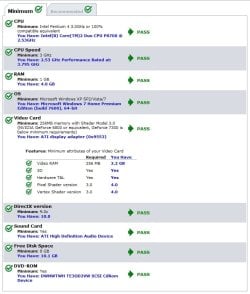
Recently got mirrors edge and when I load the game and click install - nothing happens at all! Tried using other compatibility such as XP/vista to no avail.

Searching this and various other forums provided no answers. All my specs are listed below.

Any help would be greatly appreciated.

Thanks..

Never had this problem with other games (Modern Warfare/Mass Effect 2/Borderlands)
 

Attachments
  • 11111.jpg
    11111.jpg
    63.8 KB · Views: 119

My Computer

OS
Windows 7 Home Premium Edition (Build 7600), 64-bit
Anybody out of the 70 views?? At my wits end here :confused:
 

My Computer

OS
Windows 7 Home Premium Edition (Build 7600), 64-bit
Well I'll jump in so that there is at least some reply, even though I am most definitely no expert in this area :rolleyes:

Two things jump out at me looking at your specs versus the game requirements. The first is your audio device. Isn't an ATI HD audio device some kind of home theatre arrangement, pumped out through an HDMI port? Can you set your default audio device to something else (either a sound card, if you have one installed, or onboard sound), then get the game to inspect your system again? It may be detecting an audio device at the moment, and thinks it has passed, but maybe the game installer is more picky when push comes to shove...

Second, you are tight on disk space. Are you running an SSD? If so you may just be pushing things a little too close to the limit. If it's a conventional hard drive then it really is too close to the limit: you need at least 10% of drive space free for things to run nicely, but the install is only going to leave you with 2Gb free and I expect that is way less than 10% of the drive's capacity.

Just my £0.02 worth :)
 

My Computer

Computer Manufacturer/Model Number
Custom
OS
Windows 7 Enterprise x64
CPU
Intel i7 920
Motherboard
Asus P6T Deluxe v2
Memory
6 GB
Graphics Card(s)
nVidia GTX260 + nVidia 3D
Sound Card
Onboard
Monitor(s) Displays
Samsung SyncMaster 2233RZ
Screen Resolution
1680 x 1050
Hard Drives
1 x 64GB SSD primary
2 x 1 TB (mirrored)
PSU
700W
Other Info
Edimax 802.11n Wireless PCI Card
Netgear DG834G router
Hey, thanks for the advice. Firstly it's just a regular dell laptop, the specs are more than fine for running the game. As far as I know it's not some home theatre arrangement, just a normal soundcard for a laptop? I havent changed anything to do with that.

You're right on the disk space though. I've hundreds and hundreds of movies i need to take off this and put onto my home pc 1tb drive, just havent got around to it. I'll do that and try again I suppose.

cheers
 

My Computer

OS
Windows 7 Home Premium Edition (Build 7600), 64-bit
Back
Top