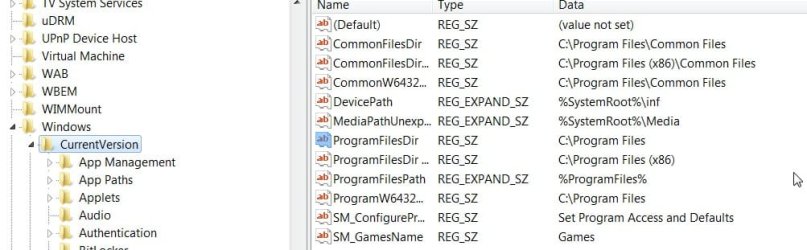
Okay, I'm dual booting W7 right now, as drive G: (Vista is C: ).
My problem is that installers like to use C: rather than G:, is there a setting somewhere where I can make my absolute main drive G:, rather than C:?
Some installers correctly use G:, while others (NSIS based, some others) use C: -- perhaps it's an installer issue, I don't know.
-- ALSO --
When I try to install Microsoft software, the installer extracts temporary files.. okay, but it extracts them to my external drive, and often they are not removed. How can I stop that from happening?
My problem is that installers like to use C: rather than G:, is there a setting somewhere where I can make my absolute main drive G:, rather than C:?
Some installers correctly use G:, while others (NSIS based, some others) use C: -- perhaps it's an installer issue, I don't know.
-- ALSO --
When I try to install Microsoft software, the installer extracts temporary files.. okay, but it extracts them to my external drive, and often they are not removed. How can I stop that from happening?
My Computer
- OS
- Windows 7 x64
- CPU
- AMD Phenom X4 9850 Black Edition @ 2.65GHz
- Motherboard
- NVIDIA nForce 720
- Memory
- 8 GB
- Graphics Card(s)
- NVIDIA 9800 GT 512MB
- Sound Card
- Creative XTreme-Gamer
- Monitor(s) Displays
- 22" ViewSonic
- Screen Resolution
- 1680x1050
- Hard Drives
- 750 GB
500 GB
- PSU
- 500 watt
- Keyboard
- Razer Lycosa (Mirror)
- Mouse
- Razer DeathAdder
- Internet Speed
- 1.5Mbps
- Other Info
- 5.1 surround sound


 )
)

 .
.