Solved Installing 64 bit problems

MrDuskling

New member
Local time
4:10 PM
Messages
6
I just built my new PC, and I installed 32 bit windows on it. Now, I want to install 64 over the 32 bit installation. Putting the 64 bit disc (legit copy) into the PC and clicking on setup, or any files on the setup disc, it says "This version is not compatable with the 32 bit version of windows. It does this when the disc is in and it says it if I put the files on an external hard drive and run it from there. Trying to boot from BIOS with the disc doesn't recognize a windows setup on the disc. Please help!

System Specs:

4GB DDR3 RAM
AMD Phenom II x4 965 3.40ghz black edition CPU
MSI 880gm-E41motherboard
Radeon HD 6850 video card
 

My Computer

OS
Windows 7 Home Premium 32bit

My Computer

Computer type
PC/Desktop
Computer Manufacturer/Model Number
Lenovo IdeaCenter 450
OS
Windows 10 Pro X64
CPU
Intel Quad Core i7-4770 @ 3.4Ghz
Memory
16.0GB PC3-12800 DDR3 SDRAM 1600 MHz
Graphics Card(s)
Intel Integrated HD Graphics
Sound Card
Realtek HD Audio
Monitor(s) Displays
HP 22" LCD
Screen Resolution
1680 x 1050
Hard Drives
250GB Samsung EVO SATA-3 SSD
2TB Seagate ST2000DM001 SATA-2
1.5TB Seagate ST3150041AS SATA
Keyboard
Dell USB
Mouse
Lenovo USB
Internet Speed
Cable via Road Runner 3MB Upload, 30MB Download
Antivirus
Windows Defender, MBAM Pro, MBAE
Browser
Seamonkey
Other Info
UEFI/GPT
PLDS DVD-RW DH16AERSH
Thank you for the response!

I actually tried the Clean install ( Normal Install ) Method. But I cannot do this, because I cannot access the BIOS on my motherboard. Seems to be some sort of problem, but I will deal with that later.

I actually think I cannot access it because I am using a USB keyboard. But anyways, I cannot get into my bios to boot from the CD. What is a alternative?

There is a bios update for my motherboard which supposedly allows a USB keyboard to be used to access the BIOS, but i heard that it can turn your motherboard into a brick. and I don't want that.
 

My Computer

OS
Windows 7 Home Premium 32bit
Using a USB keyboard to get into the BIOS shouldn't be a problem.

As far as I'm aware you need to tap the DEL key at startup to get in if you're using an MSI motherboard.
 

My Computer

Computer Manufacturer/Model Number
HP Pavilion Elite 495UK
OS
Windows 7 Ultimate SP1 64-Bit
CPU
Intel Core i7 870 @ 2.93GHz
Motherboard
MSI 2A9C (CPU1)
Memory
8Gb Dual-Channel DDR3 @ 664MHz
Graphics Card(s)
nVidia GeForce GTX 460 1024MB dedicated RAM
Sound Card
Realtek HD Audio
Monitor(s) Displays
HP2310i
Screen Resolution
1920 x 1080
Hard Drives
1x1954GB Hitachi HDS22020ALA 330 (RAID), 1x1954GB Hitachi External for backup and storage
PSU
460W
Case
HP Elite
Cooling
Air cooled
Keyboard
Logitech K750 solar-powered keyboard
Mouse
Logitech Wireless M180 mouse
Internet Speed
2Mb
Other Info
Pure Avanti Flow Internet Radio with iPod Dock, 64Gb iPod, HP USB Speakers, Sony MDR-V500 Headphones, Sony Vaio F-Series Laptop
Using a USB keyboard to get into the BIOS shouldn't be a problem..

Actaully it would if the BIOS/Motherboard isn't configured to take commands from a USB keyboard while posting. However most newer motherboard usually don't have this issue. This is where system specs would be helpful.

As to the BIOS update, yeah, if you don't know what you're doing or don't follow the directions posted for updating the BIOS you will brick your motherboard. Reading is a must here!

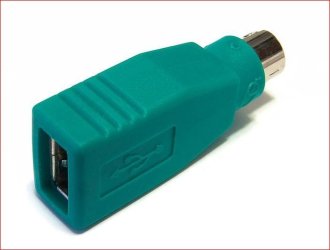
As for getting into the BIOS - If your MB won't accept a USB keyboard you can find a USB to PS2 adapter and use that on the keyboard and then try to access the BIOS. They can be found for about 3-4 bucks. Or you can just find an old PS2 type keyboard.

USB-PS2.JPG

StarTech.com Replacement USB Mouse to PS/2 Adapter - F/M - mouse adapter#
 

My Computer

Computer type
PC/Desktop
Computer Manufacturer/Model Number
Custom built by me.
OS
Windows 10 Pro
CPU
Intel Core i7-4770K (3.5Ghz)
Motherboard
Gigabyte G1 Sniper 5 (F10 Bios)
Memory
32 gig Corsair Dominator Platinum (4x8Gig)
Graphics Card(s)
Sapphire Tri-X R9 Fury
Sound Card
Soundblaster ZXR
Monitor(s) Displays
NEC PA242W 24" LCD Monitor
Screen Resolution
1920 x 1200
Hard Drives
Primary - Samsung 850 Pro (512gig), Samsung 840 Pro (256gig), 2TB WD Caviar Black.
PSU
EVGA Supernova 1000 G2
Case
Cooler Master HAF X
Cooling
Corsair H100i with Corsair Air Series SP120 Quiet Fans
Keyboard
Logitech Wireless Wave
Mouse
Logitech Performance MX
Internet Speed
High Speed Cable
Antivirus
Norton Security
Browser
IE11
Other Info
Memory Timings - 1866MHz @ 9-9-9-27-1T @ 1.5 volts
I just removed the CMOS Battery on the motherboard and the thing allowed me to use the USB keyboard.
Strange..

But anyway this is now solved :)
 

My Computer

OS
Windows 7 Home Premium 32bit
Be aware that removing that battery may also reset your BIOS settings - meaning the settings that were there for you CPU, memory, and other stuff may have been reset. This may also include your clock. So..... if your PC starts acting strange, you may need to look at the BIOS.

Just something to think about.

Good luck.
 

My Computer

Computer type
PC/Desktop
Computer Manufacturer/Model Number
Custom built by me.
OS
Windows 10 Pro
CPU
Intel Core i7-4770K (3.5Ghz)
Motherboard
Gigabyte G1 Sniper 5 (F10 Bios)
Memory
32 gig Corsair Dominator Platinum (4x8Gig)
Graphics Card(s)
Sapphire Tri-X R9 Fury
Sound Card
Soundblaster ZXR
Monitor(s) Displays
NEC PA242W 24" LCD Monitor
Screen Resolution
1920 x 1200
Hard Drives
Primary - Samsung 850 Pro (512gig), Samsung 840 Pro (256gig), 2TB WD Caviar Black.
PSU
EVGA Supernova 1000 G2
Case
Cooler Master HAF X
Cooling
Corsair H100i with Corsair Air Series SP120 Quiet Fans
Keyboard
Logitech Wireless Wave
Mouse
Logitech Performance MX
Internet Speed
High Speed Cable
Antivirus
Norton Security
Browser
IE11
Other Info
Memory Timings - 1866MHz @ 9-9-9-27-1T @ 1.5 volts
Check in BIOS for USB legacy is enable, & not disabled.
 

My Computer

OS
ME/XP/Vista/Win7
Back
Top