installing a 3rd party theme and req. to change exploereframe.dll

ningpra

Banned
Local time
12:02 PM
Messages
93
please guide me how to install this

Windows 7 Themes: Seamus by TheBull - Page 3

i mean the installation requires to change the explorer.dll files
i just curious maybe installation of these pack is different from other theme pack..

and maybe using the theme manager is also require??(because its included in folder)
please help me through with this..

i actually get touch with thebull but his not replying..T_T
my bad..

i had crush my desktop before so i dont want to take risk again

i just to be sure it what will i do now..lolz:geek:
 

My Computer My Computer

Computer Manufacturer/Model Number
Acer
OS
Microsoft Windows 7 Home Premium 64-bit 7601 Multiprocessor Free Service Pack 1
CPU
Intel(R) Core(TM) i5-2450M CPU @ 2.50GHz
Motherboard
Acer JE50_HR
Memory
8.00 GB
Graphics Card(s)
Intel(R) HD Graphics Family
Sound Card
(1) Realtek High Definition Audio (2) Intel(R) Display Aud
Screen Resolution
1366 x 768 x 32 bits (4294967296 colors) @ 60 Hz
Hard Drives
(1) TOSHIBA MK1059GSMP (2) ZTE MMC Storage USB Device
i mean the installation requires to change the explorer.dll files
i just curious maybe installation of these pack is different from other theme pack..
There are no .dll in that theme to change, and yes this is different than other theme pack.

and maybe using the theme manager is also require??(because its included in folder)
please help me through with this..
There is not a theme manager in this theme in less you can take a screenshot of it and show me.
There is a Theme Resource Changer in their that needs to be installed, that is why there is no .dll to change they are using images instead.

Jerry
 

My Computer My Computer

Computer type
Laptop
Computer Manufacturer/Model Number
Sager NP9170
OS
Win 7 Pro x64 / Win 10 Pro
CPU
Intel(R) Core(TM) i7-3630QM CPU @ 2.40GHz
Motherboard
CLEVO P170EM
Memory
12 GB
Graphics Card(s)
(1) Intel(R) HD Graphics 4000 (2) NVIDIA GeForce GTX 675M
Sound Card
(1) Realtek High Definition Audio (2) Intel(R) Display Aud
Monitor(s) Displays
17.3
Screen Resolution
1920x1080
Hard Drives
(1) Samsung 860 EVO 500GB(OS) (1) Samsung 860 EVO 500GB(Data)
Keyboard
Backlite
Antivirus
MSE, Malwarebytes Pro
Browser
Firefox
Other Info
DESKTOP: Custom-built.
OS: Win 10 Pro x64.
CASE: Rosewill R5.
CPU: Intel I5 4670K CPU @ 3.40GHz.
CPU COOLER: Cool Master Hyper 212 EVO.
MOTHERBOARD: Asus Z87-A.
MEMORY: Kingston HyperX 2x4 GB.
GPU: Nvidia Geforce 650 TI.
PSU: Corsair TX750.
DRIVES: (1) Samsung 840 120 GB SSD (2) Western Digital blue 500 GB 7200 RPM.
i mean the installation requires to change the explorer.dll files
i just curious maybe installation of these pack is different from other theme pack..
There are no .dll in that theme to change, and yes this is different than other theme pack.

and maybe using the theme manager is also require??(because its included in folder)
please help me through with this..
There is not a theme manager in this theme in less you can take a screenshot of it and show me.
There is a Theme Resource Changer in their that needs to be installed, that is why there is no .dll to change they are using images instead.

Jerry

hmm so how can i install the theme ??

is it ok,that i do the natural way of installing theme

just like copy paste it from the resource/theme
then right click to desk click personalize then pick a theme

hmmm..

is there any other way in installing theme ??

and is it OK that i will change the explorerframe.dll???

its given in instruction but i get a little confuse

i need a guide hahahahaha..lolz

can u help me figuring out what supposed to do
 

My Computer My Computer

Computer Manufacturer/Model Number
Acer
OS
Microsoft Windows 7 Home Premium 64-bit 7601 Multiprocessor Free Service Pack 1
CPU
Intel(R) Core(TM) i5-2450M CPU @ 2.50GHz
Motherboard
Acer JE50_HR
Memory
8.00 GB
Graphics Card(s)
Intel(R) HD Graphics Family
Sound Card
(1) Realtek High Definition Audio (2) Intel(R) Display Aud
Screen Resolution
1366 x 768 x 32 bits (4294967296 colors) @ 60 Hz
Hard Drives
(1) TOSHIBA MK1059GSMP (2) ZTE MMC Storage USB Device
hmm so how can i install the theme ??

is it ok,that i do the natural way of installing theme

just like copy paste it from the resource/theme
then right click to desk click personalize then pick a theme
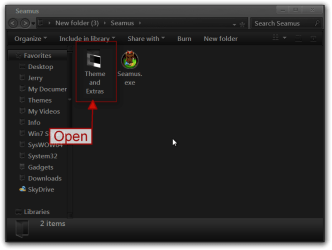
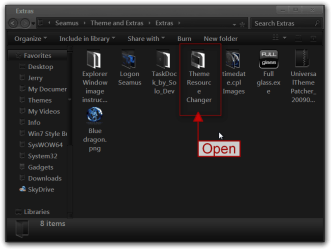
Open the Theme and Extra folder
1(1).png

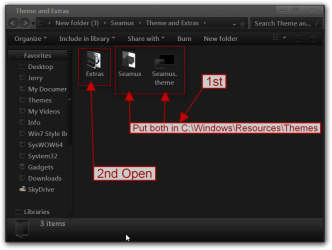
Put both 1 Seamus folder and 1 Seamus.theme in C:\Windows\Resources\Themes
Then open the Extra folder
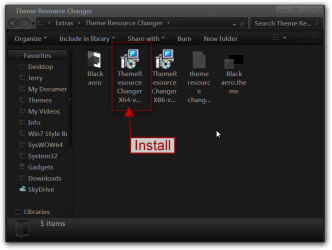
1(2).png

Open the Theme Resource Changer folder and install the Theme Resource Changer X64 if you are using 64-bit
1(3).png1(4).png


and is it OK that i will change the explorerframe.dll???

its given in instruction but i get a little confuse
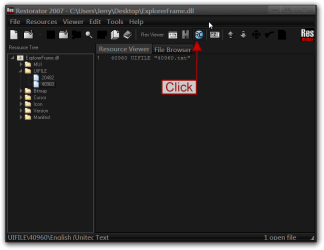
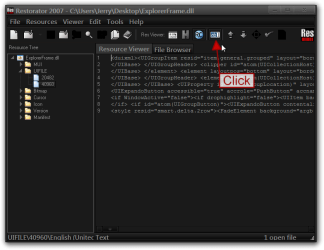
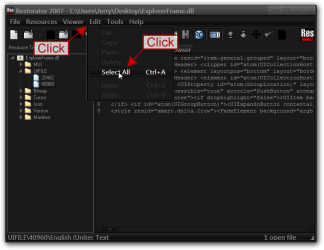
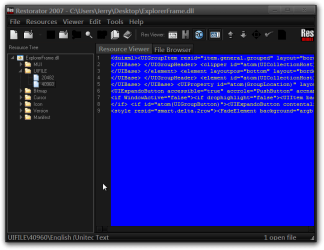
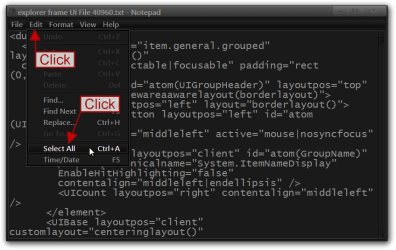
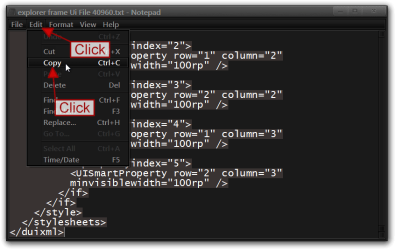
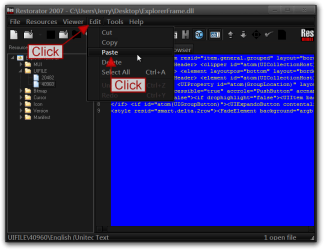
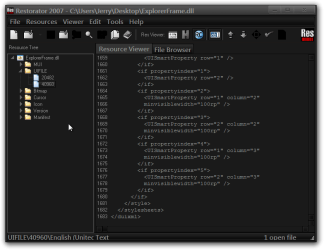
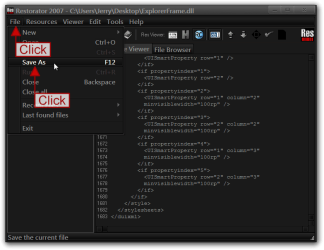
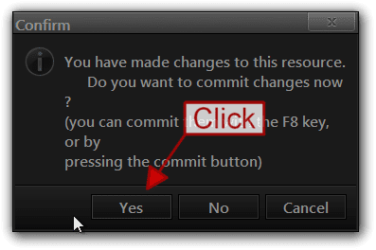
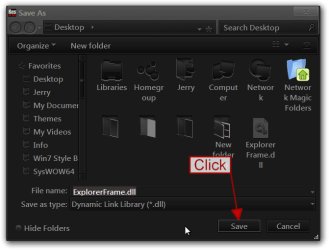
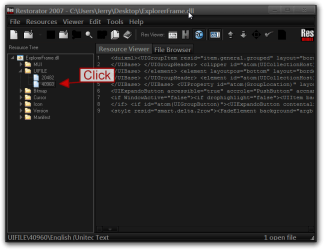
If that's what you want to do, just follow the instructions that are provided in the Explorer Window image instructions folder I have provided step-by-step screenshots below on how to do it.
Jerry
1.png

2.png

3.png

4.png

5.png

6.png

7.png

8.png

9.png

10.png

11.png

12.png
 

My Computer My Computer

Computer type
Laptop
Computer Manufacturer/Model Number
Sager NP9170
OS
Win 7 Pro x64 / Win 10 Pro
CPU
Intel(R) Core(TM) i7-3630QM CPU @ 2.40GHz
Motherboard
CLEVO P170EM
Memory
12 GB
Graphics Card(s)
(1) Intel(R) HD Graphics 4000 (2) NVIDIA GeForce GTX 675M
Sound Card
(1) Realtek High Definition Audio (2) Intel(R) Display Aud
Monitor(s) Displays
17.3
Screen Resolution
1920x1080
Hard Drives
(1) Samsung 860 EVO 500GB(OS) (1) Samsung 860 EVO 500GB(Data)
Keyboard
Backlite
Antivirus
MSE, Malwarebytes Pro
Browser
Firefox
Other Info
DESKTOP: Custom-built.
OS: Win 10 Pro x64.
CASE: Rosewill R5.
CPU: Intel I5 4670K CPU @ 3.40GHz.
CPU COOLER: Cool Master Hyper 212 EVO.
MOTHERBOARD: Asus Z87-A.
MEMORY: Kingston HyperX 2x4 GB.
GPU: Nvidia Geforce 650 TI.
PSU: Corsair TX750.
DRIVES: (1) Samsung 840 120 GB SSD (2) Western Digital blue 500 GB 7200 RPM.
GOOD TUT this is exactly what i need..

haha thx .....

but 1 thing ,is restorator2007 will do the automatic back-up or im the one who will do that??

so this time i will work with takeOwnership right?
i will backup explorer.exe,explorerframe.dll and shell..

and if the explorerframe will change what if i will change again my theme do i have to change it again to default ??

i cant do the process now i dnt have restorator2007 yet but i will do this TUT tom.

thx thx thx again wo0o0
 

My Computer My Computer

Computer Manufacturer/Model Number
Acer
OS
Microsoft Windows 7 Home Premium 64-bit 7601 Multiprocessor Free Service Pack 1
CPU
Intel(R) Core(TM) i5-2450M CPU @ 2.50GHz
Motherboard
Acer JE50_HR
Memory
8.00 GB
Graphics Card(s)
Intel(R) HD Graphics Family
Sound Card
(1) Realtek High Definition Audio (2) Intel(R) Display Aud
Screen Resolution
1366 x 768 x 32 bits (4294967296 colors) @ 60 Hz
Hard Drives
(1) TOSHIBA MK1059GSMP (2) ZTE MMC Storage USB Device
but 1 thing ,is restorator2007 will do the automatic back-up or im the one who will do that??
Yes it will make a backup automatically for you, I would put a copy of the original .dll on your desktop and modify that one do not try to modify the original .dll while it is in system32 or SysWOW64 folder.

so this time i will work with takeOwnership right?
i will backup explorer.exe,explorerframe.dll and shell..
Yes when you go to change them you will need to take ownership give yourself permission and rename the original .dll or .exe and then copy the modified one back in the appropriate folder.

and if the explorerframe will change what if i will change again my theme do i have to change it again to default ??
If you just change the theme you will not have to change the Explorerframe.dll but if you want it to match your theme you will have to change it.


Restorator2007 has a free 30 day trial, if by chance you would decide to purchase this I sent them an e-mail and ask for a discount and they sold me a student license which was 30% off.
Jerry
 

My Computer My Computer

Computer type
Laptop
Computer Manufacturer/Model Number
Sager NP9170
OS
Win 7 Pro x64 / Win 10 Pro
CPU
Intel(R) Core(TM) i7-3630QM CPU @ 2.40GHz
Motherboard
CLEVO P170EM
Memory
12 GB
Graphics Card(s)
(1) Intel(R) HD Graphics 4000 (2) NVIDIA GeForce GTX 675M
Sound Card
(1) Realtek High Definition Audio (2) Intel(R) Display Aud
Monitor(s) Displays
17.3
Screen Resolution
1920x1080
Hard Drives
(1) Samsung 860 EVO 500GB(OS) (1) Samsung 860 EVO 500GB(Data)
Keyboard
Backlite
Antivirus
MSE, Malwarebytes Pro
Browser
Firefox
Other Info
DESKTOP: Custom-built.
OS: Win 10 Pro x64.
CASE: Rosewill R5.
CPU: Intel I5 4670K CPU @ 3.40GHz.
CPU COOLER: Cool Master Hyper 212 EVO.
MOTHERBOARD: Asus Z87-A.
MEMORY: Kingston HyperX 2x4 GB.
GPU: Nvidia Geforce 650 TI.
PSU: Corsair TX750.
DRIVES: (1) Samsung 840 120 GB SSD (2) Western Digital blue 500 GB 7200 RPM.
grrr yeah i use now the theme i dunno how i thnk u

wo0o

but somethings bother me about the backup hmm
the restorator didnt make an automatic backup in my desktop.

i use the restorator trial. hahaha
but wait if ever the restorator is expire is the restorator effect my used theme
i mean if i didnt purchaase the restorator for 30days is it crush my theme or make it to default again..

and can i use it do build up my own theme i mean to target my current style to my own style


and please see the attached file i just want to clarify the SS
and the logon screen i try to restart but it just run in default

thx thx thx again
 

Attachments

  • wwwww.png
    wwwww.png
    94.1 KB · Views: 25

My Computer My Computer

Computer Manufacturer/Model Number
Acer
OS
Microsoft Windows 7 Home Premium 64-bit 7601 Multiprocessor Free Service Pack 1
CPU
Intel(R) Core(TM) i5-2450M CPU @ 2.50GHz
Motherboard
Acer JE50_HR
Memory
8.00 GB
Graphics Card(s)
Intel(R) HD Graphics Family
Sound Card
(1) Realtek High Definition Audio (2) Intel(R) Display Aud
Screen Resolution
1366 x 768 x 32 bits (4294967296 colors) @ 60 Hz
Hard Drives
(1) TOSHIBA MK1059GSMP (2) ZTE MMC Storage USB Device
but somethings bother me about the backup hmm
the restorator didnt make an automatic backup in my desktop.

i use the restorator trial. hahaha
but wait if ever the restorator is expire is the restorator effect my used theme
i mean if i didnt purchaase the restorator for 30days is it crush my theme or make it to default again..
I am surprised it didn't make a backup maybe it's because it is the trial I don't know.
After the trial expires it will not affect anything that you have done.

and can i use it do build up my own theme i mean to target my current style to my own style
Yes it can, just about any resource hacker would work but if you are going to do any real customizing of theme I would recommend Windows Style Builder Ave's Windows7 Style Builder it's the best tool out there for customizing the .msstyles
Jerry

And that image you have posted I get the same thing.
 

My Computer My Computer

Computer type
Laptop
Computer Manufacturer/Model Number
Sager NP9170
OS
Win 7 Pro x64 / Win 10 Pro
CPU
Intel(R) Core(TM) i7-3630QM CPU @ 2.40GHz
Motherboard
CLEVO P170EM
Memory
12 GB
Graphics Card(s)
(1) Intel(R) HD Graphics 4000 (2) NVIDIA GeForce GTX 675M
Sound Card
(1) Realtek High Definition Audio (2) Intel(R) Display Aud
Monitor(s) Displays
17.3
Screen Resolution
1920x1080
Hard Drives
(1) Samsung 860 EVO 500GB(OS) (1) Samsung 860 EVO 500GB(Data)
Keyboard
Backlite
Antivirus
MSE, Malwarebytes Pro
Browser
Firefox
Other Info
DESKTOP: Custom-built.
OS: Win 10 Pro x64.
CASE: Rosewill R5.
CPU: Intel I5 4670K CPU @ 3.40GHz.
CPU COOLER: Cool Master Hyper 212 EVO.
MOTHERBOARD: Asus Z87-A.
MEMORY: Kingston HyperX 2x4 GB.
GPU: Nvidia Geforce 650 TI.
PSU: Corsair TX750.
DRIVES: (1) Samsung 840 120 GB SSD (2) Western Digital blue 500 GB 7200 RPM.
BOOOONNGGGGOOOOO


for the last time

please comment on this

lolz,, what about the shell32??
it didnt apply on theme

please guide me for the last time T_T
 

My Computer My Computer

Computer Manufacturer/Model Number
Acer
OS
Microsoft Windows 7 Home Premium 64-bit 7601 Multiprocessor Free Service Pack 1
CPU
Intel(R) Core(TM) i5-2450M CPU @ 2.50GHz
Motherboard
Acer JE50_HR
Memory
8.00 GB
Graphics Card(s)
Intel(R) HD Graphics Family
Sound Card
(1) Realtek High Definition Audio (2) Intel(R) Display Aud
Screen Resolution
1366 x 768 x 32 bits (4294967296 colors) @ 60 Hz
Hard Drives
(1) TOSHIBA MK1059GSMP (2) ZTE MMC Storage USB Device
It works for me.
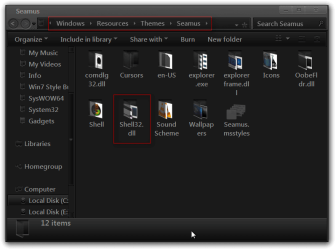
Do you have the shell32.dll folder in C:\Windows\Resources\Themes\Seamus ?
Jerry
Seamus.png
 

My Computer My Computer

Computer type
Laptop
Computer Manufacturer/Model Number
Sager NP9170
OS
Win 7 Pro x64 / Win 10 Pro
CPU
Intel(R) Core(TM) i7-3630QM CPU @ 2.40GHz
Motherboard
CLEVO P170EM
Memory
12 GB
Graphics Card(s)
(1) Intel(R) HD Graphics 4000 (2) NVIDIA GeForce GTX 675M
Sound Card
(1) Realtek High Definition Audio (2) Intel(R) Display Aud
Monitor(s) Displays
17.3
Screen Resolution
1920x1080
Hard Drives
(1) Samsung 860 EVO 500GB(OS) (1) Samsung 860 EVO 500GB(Data)
Keyboard
Backlite
Antivirus
MSE, Malwarebytes Pro
Browser
Firefox
Other Info
DESKTOP: Custom-built.
OS: Win 10 Pro x64.
CASE: Rosewill R5.
CPU: Intel I5 4670K CPU @ 3.40GHz.
CPU COOLER: Cool Master Hyper 212 EVO.
MOTHERBOARD: Asus Z87-A.
MEMORY: Kingston HyperX 2x4 GB.
GPU: Nvidia Geforce 650 TI.
PSU: Corsair TX750.
DRIVES: (1) Samsung 840 120 GB SSD (2) Western Digital blue 500 GB 7200 RPM.
hmm i had that folder but is that already applied??

i didnt see any of the icons there that has been applied on the theme,

hmmm..i mean

for example:

"28.ico" and "277.ico" i didnt see them anywhere here in existing theme

do i need? to replace again the shell32.dll or something??

i actually change the system32 and syswow64 explorerframe.dll so i dont have a problem either of the two will trigger.

actually its OK that im using the default icon of folders for me to not mislead or confuse
but i just curious why it didnt apply or if ever its applied where can i trace or see them??

sorry i have to many question
:p
 

My Computer My Computer

Computer Manufacturer/Model Number
Acer
OS
Microsoft Windows 7 Home Premium 64-bit 7601 Multiprocessor Free Service Pack 1
CPU
Intel(R) Core(TM) i5-2450M CPU @ 2.50GHz
Motherboard
Acer JE50_HR
Memory
8.00 GB
Graphics Card(s)
Intel(R) HD Graphics Family
Sound Card
(1) Realtek High Definition Audio (2) Intel(R) Display Aud
Screen Resolution
1366 x 768 x 32 bits (4294967296 colors) @ 60 Hz
Hard Drives
(1) TOSHIBA MK1059GSMP (2) ZTE MMC Storage USB Device
for example:
"28.ico" and "277.ico" i didnt see them anywhere here in existing theme
I have no idea where them 2 icons show up at.

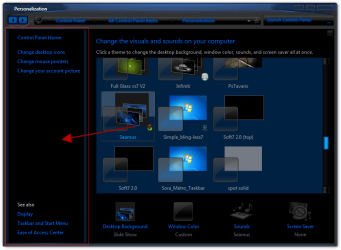
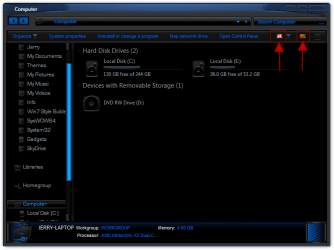
If you are getting what I have highlighted in red in the screenshots below then it is applying.
Jerry
Personalization.pngComputer.png
 

My Computer My Computer

Computer type
Laptop
Computer Manufacturer/Model Number
Sager NP9170
OS
Win 7 Pro x64 / Win 10 Pro
CPU
Intel(R) Core(TM) i7-3630QM CPU @ 2.40GHz
Motherboard
CLEVO P170EM
Memory
12 GB
Graphics Card(s)
(1) Intel(R) HD Graphics 4000 (2) NVIDIA GeForce GTX 675M
Sound Card
(1) Realtek High Definition Audio (2) Intel(R) Display Aud
Monitor(s) Displays
17.3
Screen Resolution
1920x1080
Hard Drives
(1) Samsung 860 EVO 500GB(OS) (1) Samsung 860 EVO 500GB(Data)
Keyboard
Backlite
Antivirus
MSE, Malwarebytes Pro
Browser
Firefox
Other Info
DESKTOP: Custom-built.
OS: Win 10 Pro x64.
CASE: Rosewill R5.
CPU: Intel I5 4670K CPU @ 3.40GHz.
CPU COOLER: Cool Master Hyper 212 EVO.
MOTHERBOARD: Asus Z87-A.
MEMORY: Kingston HyperX 2x4 GB.
GPU: Nvidia Geforce 650 TI.
PSU: Corsair TX750.
DRIVES: (1) Samsung 840 120 GB SSD (2) Western Digital blue 500 GB 7200 RPM.
Back
Top