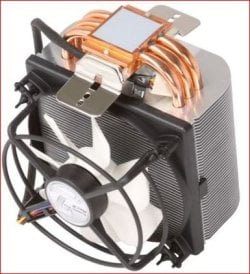
Installing Artic Frezer Pro 2

pcgamer

New member
Local time
2:00 PM
Messages
187
I installed it with the fan facing down wards the only other way was facing directly oposit the PSU at the top but while installing it i had to remove it and reset it to get it ni place properly this caused the thermal paste that was pre installed on it to smudge of on the CPU its self what im thinking is shall i take it off and reapply artic silver or will it be fine as it is?
 

My Computer

Computer Manufacturer/Model Number
Custom Built By Myself
OS
Windows 7 Pro 32Bit
CPU
Intel Core 2 Quad Q9400
Motherboard
ASUS P5G41C-M LX
Memory
4GB DDR2 800MHz
Graphics Card(s)
Point Of View Nvidia GTX470
Sound Card
6 Channel 5.1 VIA HD
Monitor(s) Displays
23" 1080P Samsung Sync Master 2333
Screen Resolution
1920X1080
Hard Drives
Samsung 750GB SATAII 7200RPM
PSU
XFX XXX Edition 650W
Case
Coolermaster Storm Scout Gaming Case
Cooling
Artic Cooling Pro REV 2, 3X 120MM Red Case Fans
Keyboard
Microsoft 600
Mouse
Microsoft Wireless Bluetrack 5000
Internet Speed
2MBs
I installed it with the fan facing down wards the only other way was facing directly oposit the PSU at the top but while installing it i had to remove it and reset it to get it ni place properly this caused the thermal paste that was pre installed on it to smudge of on the CPU its self what im thinking is shall i take it off and reapply artic silver or will it be fine as it is?

You should always remove and reapply new thermal paste.

There's probably nothing wrong with the past itself, but you can no longer trust that you will get a proper gap-free layer between parts.
 

My Computer

Computer Manufacturer/Model Number
Homebrew
OS
XP Pro SP3 X86 / Win7 Pro X86
CPU
Amd 64 x2 4200 (2.4ghz)
Motherboard
Asus M2N-MX SE Plus
Memory
Kingston DDR2 800 2gb
Graphics Card(s)
Nvidia GF-8400
Sound Card
Realtek on Motherboard
Monitor(s) Displays
Acer x-193bw
Screen Resolution
1440 x 900
Hard Drives
Western Digital 500g
PSU
350watt In-Win
Case
In-Win
Cooling
Air
Keyboard
yes
Mouse
yes
Internet Speed
5mpbs
Other Info
Also ASRock ION 330 as HTPC (on XP).
Acer Aspire as GP netbook (on XP).
I installed it with the fan facing down wards the only other way was facing directly oposit the PSU at the top but while installing it i had to remove it and reset it to get it ni place properly this caused the thermal paste that was pre installed on it to smudge of on the CPU its self what im thinking is shall i take it off and reapply artic silver or will it be fine as it is?

You should always remove and reapply new thermal paste.

There's probably nothing wrong with the past itself, but you can no longer trust that you will get a proper gap-free layer between parts.

So i should remove it and reapply then even though it is new today?
 

My Computer

Computer Manufacturer/Model Number
Custom Built By Myself
OS
Windows 7 Pro 32Bit
CPU
Intel Core 2 Quad Q9400
Motherboard
ASUS P5G41C-M LX
Memory
4GB DDR2 800MHz
Graphics Card(s)
Point Of View Nvidia GTX470
Sound Card
6 Channel 5.1 VIA HD
Monitor(s) Displays
23" 1080P Samsung Sync Master 2333
Screen Resolution
1920X1080
Hard Drives
Samsung 750GB SATAII 7200RPM
PSU
XFX XXX Edition 650W
Case
Coolermaster Storm Scout Gaming Case
Cooling
Artic Cooling Pro REV 2, 3X 120MM Red Case Fans
Keyboard
Microsoft 600
Mouse
Microsoft Wireless Bluetrack 5000
Internet Speed
2MBs
I also get stable temps as well at the moment
 

My Computer

Computer Manufacturer/Model Number
Custom Built By Myself
OS
Windows 7 Pro 32Bit
CPU
Intel Core 2 Quad Q9400
Motherboard
ASUS P5G41C-M LX
Memory
4GB DDR2 800MHz
Graphics Card(s)
Point Of View Nvidia GTX470
Sound Card
6 Channel 5.1 VIA HD
Monitor(s) Displays
23" 1080P Samsung Sync Master 2333
Screen Resolution
1920X1080
Hard Drives
Samsung 750GB SATAII 7200RPM
PSU
XFX XXX Edition 650W
Case
Coolermaster Storm Scout Gaming Case
Cooling
Artic Cooling Pro REV 2, 3X 120MM Red Case Fans
Keyboard
Microsoft 600
Mouse
Microsoft Wireless Bluetrack 5000
Internet Speed
2MBs
I installed it with the fan facing down wards the only other way was facing directly oposit the PSU at the top but while installing it i had to remove it and reset it to get it ni place properly this caused the thermal paste that was pre installed on it to smudge of on the CPU its self what im thinking is shall i take it off and reapply artic silver or will it be fine as it is?

You should always remove and reapply new thermal paste.

There's probably nothing wrong with the past itself, but you can no longer trust that you will get a proper gap-free layer between parts.

So i should remove it and reapply then even though it is new today?

Yep.
 

My Computer

Computer Manufacturer/Model Number
Homebrew
OS
XP Pro SP3 X86 / Win7 Pro X86
CPU
Amd 64 x2 4200 (2.4ghz)
Motherboard
Asus M2N-MX SE Plus
Memory
Kingston DDR2 800 2gb
Graphics Card(s)
Nvidia GF-8400
Sound Card
Realtek on Motherboard
Monitor(s) Displays
Acer x-193bw
Screen Resolution
1440 x 900
Hard Drives
Western Digital 500g
PSU
350watt In-Win
Case
In-Win
Cooling
Air
Keyboard
yes
Mouse
yes
Internet Speed
5mpbs
Other Info
Also ASRock ION 330 as HTPC (on XP).
Acer Aspire as GP netbook (on XP).
There's probably nothing wrong with the past itself,
Depends on the paste. Some "cures" after x number of heat/cool cycles. Just another reason to ALWAYS thoroughly clean and apply a "fresh" layer whenever the HSF is pulled.
 

My Computer

Computer Manufacturer/Model Number
BrightWorks Systems B4
OS
Windows 7 Profession 64-bit
CPU
Intel Core i7-860 Quad
Motherboard
Gigabyte P55-UD4P
Memory
Mushkin 4x2Gb PC12800
Graphics Card(s)
Gigabyte GTX260 896Mb
Sound Card
Integrated 7.1 HD Dolby
Monitor(s) Displays
2 Samsung 2220wm-HAS 22"
Screen Resolution
1680 x 1050 | 1680 x 1050
Hard Drives
WD HE 1Tb
PSU
Corsair TX-750W
Case
Ultra M998
Cooling
OEM
Keyboard
MS Wireless Comfort 5000
Mouse
MS Wireless 5000
Internet Speed
Cable and pretty darn fast
There's probably nothing wrong with the past itself,
Depends on the paste. Some "cures" after x number of heat/cool cycles. Just another reason to ALWAYS thoroughly clean and apply a "fresh" layer whenever the HSF is pulled.

I'm aware of that... but the OP was talking a matter of a couple of hours.
 

My Computer

Computer Manufacturer/Model Number
Homebrew
OS
XP Pro SP3 X86 / Win7 Pro X86
CPU
Amd 64 x2 4200 (2.4ghz)
Motherboard
Asus M2N-MX SE Plus
Memory
Kingston DDR2 800 2gb
Graphics Card(s)
Nvidia GF-8400
Sound Card
Realtek on Motherboard
Monitor(s) Displays
Acer x-193bw
Screen Resolution
1440 x 900
Hard Drives
Western Digital 500g
PSU
350watt In-Win
Case
In-Win
Cooling
Air
Keyboard
yes
Mouse
yes
Internet Speed
5mpbs
Other Info
Also ASRock ION 330 as HTPC (on XP).
Acer Aspire as GP netbook (on XP).
I installed it with the fan facing down wards the only other way was facing directly oposit the PSU at the top but while installing it i had to remove it and reset it to get it ni place properly this caused the thermal paste that was pre installed on it to smudge of on the CPU its self what im thinking is shall i take it off and reapply artic silver or will it be fine as it is?

you can actually turn it round 90 degrees if you require by taking the clamp off and repositioning it between the heat pipes :)
 

My Computer

Computer type
PC/Desktop
Computer Manufacturer/Model Number
self build
OS
win 7 ultimate32bit, Win8.1pro wmc 32bit
CPU
amd phenom x4 9600
Motherboard
asus m2n32-sli deluxe
Memory
corsair twinxs 2x2gb
Graphics Card(s)
2x nvidia 1gb 8500gt
Sound Card
onboard
Monitor(s) Displays
23" PB Viseo 233d
Screen Resolution
1920x1080
Hard Drives
maxtor sata 500gb
maxtor sata 320gb
fujitsu sata200gb
PSU
oryxx tornado 750w
Case
thermaltake xaser lll
Cooling
artic freezer64 pro + 7 case fans
you can actually turn it round 90 degrees if you require by taking the clamp off and repositioning it between the heat pipes :)

Not with the Freezer 7 Rev 2 you can't,

acf72.JPG

the mounting bracket for AMD sockets is part of the base, with the retaining clips being attached to them. One reason why back when he started asking about this heatsink I recommended the Freezer 64 pro over the Freezer 7 Rev 2.
 

My Computer

Computer type
PC/Desktop
Computer Manufacturer/Model Number
Me
OS
Win 7 Ultimate x64
CPU
FX-8350 @ 4.6 GHz so far
Motherboard
Asus M5A97 EVO
Memory
ADATA XPG V1 Series Black 8GB DDR3 1600
Graphics Card(s)
Sapphire R9 270x Dual-X
Sound Card
Xonar DGX w/ Corsair Vengence 1300
Monitor(s) Displays
Acer S232HL Abid
Screen Resolution
1920x1080
Hard Drives
120 GB OCZ Vertex 3
500 GB Seagate 7200.12
PSU
Antec Earthwatts 650W Green
Case
Antec Three Hundred
Cooling
Cooler Master 212 EVO
Keyboard
Logitech G510
Mouse
Logitech G500s
Internet Speed
35000/3000
you are of course right there stormy, should have read the description a little better :o
 

My Computer

Computer type
PC/Desktop
Computer Manufacturer/Model Number
self build
OS
win 7 ultimate32bit, Win8.1pro wmc 32bit
CPU
amd phenom x4 9600
Motherboard
asus m2n32-sli deluxe
Memory
corsair twinxs 2x2gb
Graphics Card(s)
2x nvidia 1gb 8500gt
Sound Card
onboard
Monitor(s) Displays
23" PB Viseo 233d
Screen Resolution
1920x1080
Hard Drives
maxtor sata 500gb
maxtor sata 320gb
fujitsu sata200gb
PSU
oryxx tornado 750w
Case
thermaltake xaser lll
Cooling
artic freezer64 pro + 7 case fans
Not a problem. I have a feeling Arctic Cooling did it that way for two reasons,

1. Most of the tower coolers out now are oriented the same way (up-down), with very few allowing for a front to back orientation unless you get lucky and retaining bracket is rotated 90° from what is on most AMD boards.

2. Put it out as an all in one and charge more for it,

http://www.newegg.com/Product/Productcompare.aspx?Submit=ENE&N=2010110574%2050002107&bop=And&CompareItemList=574|35-186-134^35-186-134-TS%2C35-185-125^35-185-125-S01

$12.00 more for 300 rpm and 5 CFM is quite a bit more for not much of an improvement.
 

My Computer

Computer type
PC/Desktop
Computer Manufacturer/Model Number
Me
OS
Win 7 Ultimate x64
CPU
FX-8350 @ 4.6 GHz so far
Motherboard
Asus M5A97 EVO
Memory
ADATA XPG V1 Series Black 8GB DDR3 1600
Graphics Card(s)
Sapphire R9 270x Dual-X
Sound Card
Xonar DGX w/ Corsair Vengence 1300
Monitor(s) Displays
Acer S232HL Abid
Screen Resolution
1920x1080
Hard Drives
120 GB OCZ Vertex 3
500 GB Seagate 7200.12
PSU
Antec Earthwatts 650W Green
Case
Antec Three Hundred
Cooling
Cooler Master 212 EVO
Keyboard
Logitech G510
Mouse
Logitech G500s
Internet Speed
35000/3000
Back
Top