Installing both 32bit and 64 bit on same hard disk?

farhi

New member
Local time
8:47 PM
Messages
4
Hi
I'm currently using win 7 ult 32bit.
Is it possible to install another win7 64bit copy on the same hard disk but on a different partition? will there be a dual boot option?
Or is it possible to upgrade without losing all the settings?
Thanks a lot
 

My Computer

OS
Windows 7 Ultimate x32
You can always dual boot -- but IMO you'd be better off installing ONE version of W7 and running the other as a Virtual Machine.

I'd probably start with the 32 bit version on the real machine (YOU CAN run a 64 bit guest OS on a 32 bit Host OS) and run the 64 bit version as a guest VM.

Unless you are doing a lot of graphics then the VM will sort out most of the driver problems.

When you have sorted out your hardware and software issues you could say do a W7 X-64 VIRTUAL to REAL conversion and get rid of the 32 bit version.

Unless you have >> 4GB RAM -- Min 8GB I'd say there isn't a huge advantage in running Windows 7 x-64. In a years time with really powerful CPU's and MORE RAM it makes sense but now I'd be content with W7 X32 since nearly everything from XP runs on it fine -- not so for x-64.

Cheers
jimbo
 

My Computer

Computer type
PC/Desktop
Computer Manufacturer/Model Number
Custom built, several laptops HP/ASUS
OS
Linux CENTOS 7 / various Windows OS'es and servers
CPU
Intel i7 Intel i5
Memory
8GB, 16GB
Graphics Card(s)
On Motherboard
Sound Card
Realtek HD audio
Monitor(s) Displays
Apple Cinema display, Samsung LCD
Screen Resolution
1920 X 1080
Hard Drives
4 X 1TB SATA
Mouse
Toshiba wireless laser
Internet Speed
> 20MB up
You can always dual boot -- but IMO you'd be better off installing ONE version of W7 and running the other as a Virtual Machine.

I'd probably start with the 32 bit version on the real machine (YOU CAN run a 64 bit guest OS on a 32 bit Host OS) and run the 64 bit version as a guest VM.

Unless you are doing a lot of graphics then the VM will sort out most of the driver problems.

When you have sorted out your hardware and software issues you could say do a W7 X-64 VIRTUAL to REAL conversion and get rid of the 32 bit version.

Unless you have >> 4GB RAM -- Min 8GB I'd say there isn't a huge advantage in running Windows 7 x-64. In a years time with really powerful CPU's and MORE RAM it makes sense but now I'd be content with W7 X32 since nearly everything from XP runs on it fine -- not so for x-64.

Cheers
jimbo

In my personal opinion; if you have the hardware specifications to run it, you should install the 64-bit version and then virtualize the 32-bit version as it will be less resource intensive in the virtualized enviorment.
 

My Computer

Computer Manufacturer/Model Number
Custom | Whitebox
OS
Windows 7 Ultimate, OS X 10.7, Ubuntu 11.04
CPU
Intel E6750 @ 3.80GHz
Motherboard
Gigabyte GA-EP45-UD3L (Revision 1.1)
Memory
2x2GB & 2x1GB (6GB) OCZ Reaper 1066MHz @ 1080MHz
Graphics Card(s)
EVGA nVidia GTX 260 896mb (216 Core) FTW Edition
Sound Card
Realtek ALC888
Monitor(s) Displays
21" VIZIO TV
Screen Resolution
1680x1050 @ 60Hz
Hard Drives
Western Digital WD6401AALS - 640GB
Hitachi HDP725016GLA380 - 160GB
PSU
Corsair 750W
Case
NZXT Nemesis Elite
Cooling
Thermaltake SpinQ
Keyboard
Logitech Wireless S520
Mouse
Logitech Wireless S520 - Microsoft Wireless Arc Mouse
Internet Speed
Download: 20mbps, Upload: 3mbps
Hi farhi and welcome to Windows 7 Forums :party:

Absolutely possible, but please note that each install will require activation and a unique product key. Although the retail version of Windows Ultimate comes with both 32-bit and 64-bit DVDs, there is only one product key. You may install either, but not both, of these disks using this key. If you wish to use the other disk, either on a separate system or as a second OS on the system that the other OS was installed on, you will need to purchase another product key. If, however, you intend to replace the original installation (in other words, remove it and replace with the other version), then you can use the same key. In this case you will need to do a telephone activation and explain to the activation operative what you have done. Be aware that Microsoft can detect if product keys are used on more installations than they are licensed for.

Look at my specs. You will see that I have both Vista and Windows 7 installed, both 32-bit and 64-bit versions. They co-exist on the same HDD (actually 2 HDDs, in a RAID 0 array). You cannot upgrade a 32-bit OS to 64-bit (or vice-versa). It has to be a clean install because of the architectural differences between the two.

Any more questions, please ask and we'll endeavour to answer them for you.
 

My Computer

Computer type
PC/Desktop
Computer Manufacturer/Model Number
Dwarf Dwf/11/2012 r09/2013
OS
Windows 8.1 Pro RTM x64
CPU
Intel Core-i5-3570K 4-core @ 3.4GHz (Ivy Bridge) (OC 4.4GHz)
Motherboard
ASRock Z77 Extreme4-M
Memory
4 x 4GB DDR3-1600 Corsair Vengeance CMZ8GX3M2A1600C9B (16GB)
Graphics Card(s)
MSI GeForce GTX770 Gaming OC 2GB
Sound Card
Realtek High Definition on board solution (ALC 898)
Monitor(s) Displays
ViewSonic VA1912w Widescreen (VGA)
Screen Resolution
1440x900
Hard Drives
OCZ Agility 3 SSD 120GB SATA III x2 (RAID 0)
Samsung HD501LJ 500GB SATA II x2
Hitachi HDS721010CLA332 1TB SATA II
Iomega 1.5TB Ext USB 2.0
WD 2.0TB Ext USB 3.0
PSU
XFX Pro Series 850W Semi-Modular
Case
Gigabyte IF233
Cooling
1 x 120mm Front Inlet 1 x 120mm Rear Exhaust
Keyboard
Microsoft Comfort Curve Keyboard 3000 (USB)
Mouse
Microsoft Comfort Mouse 3000 for Business (USB)
Internet Speed
NetGear DG834Gv3 ADSL Modem/Router (Ethernet) ~4.0 Mb/s (O2)
Antivirus
Avast! 8.0.1497
Browser
IE 11
Other Info
Optical Drive: HL-DT-ST BD-RE BH10LS30 SATA Bluray
Lexmark S305 Printer/Scanner/Copier (USB)
WEI Score: 8.1/8.1/8.5/8.5/8.25
Asus Eee PC 1011PX Netbook (Windows 7 x86 Starter)
Hello farhi, welcome to Seven Forums!


There is no upgrade path from 32-bit to 64-bit Windows, it will have to be a clean install and yes, with 2 separate installs on the same Hard Disk Drive (HDD) you will get a Windows managed dual boot.

If it is your intention to migrate to the 64-bit version at a later time, you may care to have a look at this first tutorial at the link below as it will make removing the older OS easier later.

Dual Boot : Create Partitions Using PWBD

Clean Install Windows 7
 

My Computer

Computer Manufacturer/Model Number
* BFK Customs *
OS
W 7 64-bit Ultimate
CPU
Intel Q9550 Yorkfield
Motherboard
ASUS P5Q Pro
Memory
8GB Dominator 8500C5D
Graphics Card(s)
ATI : XFX 5870
Sound Card
Realtek HD Audio 7-1
Monitor(s) Displays
1x 47" LCD HDMI & 3x 26" LCD HDMI
Screen Resolution
1920x1080P & 1920x1200
Hard Drives
1x 80GB Intel X25-M G2 SSD : 1x 500GB & 1x 640GB WD Caviar Black(s)
PSU
Corsair 620HX
Case
Cooler Master RC-690
Cooling
Tuniq Tower 120, 2x 140mm and 3x 120mm case fans
Keyboard
Microsoft 500
Mouse
Razer Diamondback 3G
Internet Speed
14 Mb/s
Other Info
1x Koutech 3Gb/s SATA HDD Hot Swap Rack
WOW thanks guys, the reason i want the 64bit is because i cant install Adobe Premiere CS5, it only runs on 64 bit.
I have 2 partitions now, one is XP pro and one is WIN 7 32 bit.
So the best way is to upgrade the XP to Win 7 64 bit? or Format the partition and start from a boot CD?
Thanks
 

My Computer

OS
Windows 7 Ultimate x32
WOW thanks guys, the reason i want the 64bit is because i cant install Adobe Premiere CS5, it only runs on 64 bit.
I have 2 partitions now, one is XP pro and one is WIN 7 32 bit.
So the best way is to upgrade the XP to Win 7 64 bit? or Format the partition and start from a boot CD?
Thanks

Since there is no upgrade path for 32-bit to 64-bit you would have to perform a clean install on that partition.
 

My Computer

Computer Manufacturer/Model Number
Custom | Whitebox
OS
Windows 7 Ultimate, OS X 10.7, Ubuntu 11.04
CPU
Intel E6750 @ 3.80GHz
Motherboard
Gigabyte GA-EP45-UD3L (Revision 1.1)
Memory
2x2GB & 2x1GB (6GB) OCZ Reaper 1066MHz @ 1080MHz
Graphics Card(s)
EVGA nVidia GTX 260 896mb (216 Core) FTW Edition
Sound Card
Realtek ALC888
Monitor(s) Displays
21" VIZIO TV
Screen Resolution
1680x1050 @ 60Hz
Hard Drives
Western Digital WD6401AALS - 640GB
Hitachi HDP725016GLA380 - 160GB
PSU
Corsair 750W
Case
NZXT Nemesis Elite
Cooling
Thermaltake SpinQ
Keyboard
Logitech Wireless S520
Mouse
Logitech Wireless S520 - Microsoft Wireless Arc Mouse
Internet Speed
Download: 20mbps, Upload: 3mbps
Hello farhi.


There is no upgrade path from XP to Windows 7 at all, it will have to be a clean install.

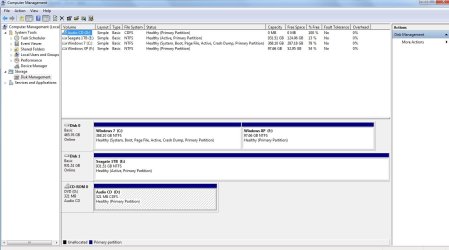
Please post a snip of your entire disk management drive map so we can have a look at it and explain which drive letter is which OS.


In the Windows start menu right click computer and click manage, in the left pane of the "Computer Management" window that opens click disk management and post a snip of that.

How to Post a Screenshot in Seven Forums
 

My Computer

Computer Manufacturer/Model Number
* BFK Customs *
OS
W 7 64-bit Ultimate
CPU
Intel Q9550 Yorkfield
Motherboard
ASUS P5Q Pro
Memory
8GB Dominator 8500C5D
Graphics Card(s)
ATI : XFX 5870
Sound Card
Realtek HD Audio 7-1
Monitor(s) Displays
1x 47" LCD HDMI & 3x 26" LCD HDMI
Screen Resolution
1920x1080P & 1920x1200
Hard Drives
1x 80GB Intel X25-M G2 SSD : 1x 500GB & 1x 640GB WD Caviar Black(s)
PSU
Corsair 620HX
Case
Cooler Master RC-690
Cooling
Tuniq Tower 120, 2x 140mm and 3x 120mm case fans
Keyboard
Microsoft 500
Mouse
Razer Diamondback 3G
Internet Speed
14 Mb/s
Other Info
1x Koutech 3Gb/s SATA HDD Hot Swap Rack
Hello farhi.


There is no upgrade path from XP to Windows 7 at all, it will have to be a clean install.

Please post a snip of your entire disk management drive map so we can have a look at it and explain which drive letter is which OS.


In the Windows start menu right click computer and click manage, in the left pane of the "Computer Management" window that opens click disk management and post a snip of that.

How to Post a Screenshot in Seven Forums

Well, for 32-bit to 32-bit you can actually upgrade from Windows XP, to Windows Vista, then to Windows 7. Which is a path per-say. Not a viable one but a path regardless! :)
 

My Computer

Computer Manufacturer/Model Number
Custom | Whitebox
OS
Windows 7 Ultimate, OS X 10.7, Ubuntu 11.04
CPU
Intel E6750 @ 3.80GHz
Motherboard
Gigabyte GA-EP45-UD3L (Revision 1.1)
Memory
2x2GB & 2x1GB (6GB) OCZ Reaper 1066MHz @ 1080MHz
Graphics Card(s)
EVGA nVidia GTX 260 896mb (216 Core) FTW Edition
Sound Card
Realtek ALC888
Monitor(s) Displays
21" VIZIO TV
Screen Resolution
1680x1050 @ 60Hz
Hard Drives
Western Digital WD6401AALS - 640GB
Hitachi HDP725016GLA380 - 160GB
PSU
Corsair 750W
Case
NZXT Nemesis Elite
Cooling
Thermaltake SpinQ
Keyboard
Logitech Wireless S520
Mouse
Logitech Wireless S520 - Microsoft Wireless Arc Mouse
Internet Speed
Download: 20mbps, Upload: 3mbps
There you go
Thanks!
 

Attachments

  • Untitled.jpg
    Untitled.jpg
    98.2 KB · Views: 49

My Computer

OS
Windows 7 Ultimate x32
@DNG, why post it if it has no relevance, you're just confusing the issue.
 

My Computer

Computer Manufacturer/Model Number
* BFK Customs *
OS
W 7 64-bit Ultimate
CPU
Intel Q9550 Yorkfield
Motherboard
ASUS P5Q Pro
Memory
8GB Dominator 8500C5D
Graphics Card(s)
ATI : XFX 5870
Sound Card
Realtek HD Audio 7-1
Monitor(s) Displays
1x 47" LCD HDMI & 3x 26" LCD HDMI
Screen Resolution
1920x1080P & 1920x1200
Hard Drives
1x 80GB Intel X25-M G2 SSD : 1x 500GB & 1x 640GB WD Caviar Black(s)
PSU
Corsair 620HX
Case
Cooler Master RC-690
Cooling
Tuniq Tower 120, 2x 140mm and 3x 120mm case fans
Keyboard
Microsoft 500
Mouse
Razer Diamondback 3G
Internet Speed
14 Mb/s
Other Info
1x Koutech 3Gb/s SATA HDD Hot Swap Rack
@DNG, why post it if it has no relevance, you're just confusing the issue.

All I was pointing out it was a possible upgrade path. Nothing else was meant by it.
 

My Computer

Computer Manufacturer/Model Number
Custom | Whitebox
OS
Windows 7 Ultimate, OS X 10.7, Ubuntu 11.04
CPU
Intel E6750 @ 3.80GHz
Motherboard
Gigabyte GA-EP45-UD3L (Revision 1.1)
Memory
2x2GB & 2x1GB (6GB) OCZ Reaper 1066MHz @ 1080MHz
Graphics Card(s)
EVGA nVidia GTX 260 896mb (216 Core) FTW Edition
Sound Card
Realtek ALC888
Monitor(s) Displays
21" VIZIO TV
Screen Resolution
1680x1050 @ 60Hz
Hard Drives
Western Digital WD6401AALS - 640GB
Hitachi HDP725016GLA380 - 160GB
PSU
Corsair 750W
Case
NZXT Nemesis Elite
Cooling
Thermaltake SpinQ
Keyboard
Logitech Wireless S520
Mouse
Logitech Wireless S520 - Microsoft Wireless Arc Mouse
Internet Speed
Download: 20mbps, Upload: 3mbps
There you go
Thanks!

From that you can easily remove the XP partition and reclaim the space back into the Windows 7 partition using this method (delete the XP partition first).

Delete and Extend a Partition with Disk Management

Then if you're serious about the dual boot, have a look at this one.

If it is your intention to migrate to the 64-bit version at a later time, you may care to have a look at this first tutorial at the link below as it will make removing the older OS easier later.

Dual Boot : Create Partitions Using PWBD
 

My Computer

Computer Manufacturer/Model Number
* BFK Customs *
OS
W 7 64-bit Ultimate
CPU
Intel Q9550 Yorkfield
Motherboard
ASUS P5Q Pro
Memory
8GB Dominator 8500C5D
Graphics Card(s)
ATI : XFX 5870
Sound Card
Realtek HD Audio 7-1
Monitor(s) Displays
1x 47" LCD HDMI & 3x 26" LCD HDMI
Screen Resolution
1920x1080P & 1920x1200
Hard Drives
1x 80GB Intel X25-M G2 SSD : 1x 500GB & 1x 640GB WD Caviar Black(s)
PSU
Corsair 620HX
Case
Cooler Master RC-690
Cooling
Tuniq Tower 120, 2x 140mm and 3x 120mm case fans
Keyboard
Microsoft 500
Mouse
Razer Diamondback 3G
Internet Speed
14 Mb/s
Other Info
1x Koutech 3Gb/s SATA HDD Hot Swap Rack
But why should i migrate both drives? Shouldn't I keep the XP partition and install the Win7 64bit on it?
 

My Computer

OS
Windows 7 Ultimate x32
Yes, install the 64-bit Windows 7 to the XP partition.
 

My Computer

Computer Manufacturer/Model Number
* BFK Customs *
OS
W 7 64-bit Ultimate
CPU
Intel Q9550 Yorkfield
Motherboard
ASUS P5Q Pro
Memory
8GB Dominator 8500C5D
Graphics Card(s)
ATI : XFX 5870
Sound Card
Realtek HD Audio 7-1
Monitor(s) Displays
1x 47" LCD HDMI & 3x 26" LCD HDMI
Screen Resolution
1920x1080P & 1920x1200
Hard Drives
1x 80GB Intel X25-M G2 SSD : 1x 500GB & 1x 640GB WD Caviar Black(s)
PSU
Corsair 620HX
Case
Cooler Master RC-690
Cooling
Tuniq Tower 120, 2x 140mm and 3x 120mm case fans
Keyboard
Microsoft 500
Mouse
Razer Diamondback 3G
Internet Speed
14 Mb/s
Other Info
1x Koutech 3Gb/s SATA HDD Hot Swap Rack
Since you have separate HD's you have the ability to do the cleanest possible Dual Boot : via the BIOS, using either the BIOS boot order or one-time BIOS Boot Menu key. This keeps each OS HD independent to come and go as you please.

If you wish to use this method, install 64 bit Win7 to the other HD while the current WIn7 HD is unplugged. Then after install, plug XP HD back in to boot it via one-time BIOS Boot Menu key:
Asus - F8
HP/Compaq - Esc
Sony - F2
Acer - F2
Gateway - F10
eMachnes - F10
Toshiba - F12
Dell - F12
IBM/Lenovo - the blue Thinkvantage button

This also allows you to try 64 bit first without activating for up to 120 days using this method: Use any version of Windows 7 free for 120 days

If after that time you decide you want to get rid of 32 bit on the XP drive, run an XP Repair Install to write the System MBR back to XP, next use free Partition Wizard CD to Delete 32 bit WIn7 then Resize XP into the preferred lower (left hand) HD address. Activate 64 bit at Computer>Properties link.
 
I have a 4GB RAM and a processor speed of 1.4GHz and have windows 7 home basic 64x...
Can I install windows 7 32 bit os along with it, as some softwares still dont run satisfactorily on 64 bit??
Please also tell how as I am very new to this field...
 

My Computer

OS
Windows 7 Home Basic 64 bit
32 bit programs install fine on 64 bit. If they are not running well on 64 bit, they aren`t gonna run any better on 32 bit. You have a slow CPU, that`s probably the problem..

But yes, you can dual boot 32 bit if you want to see if they will run better.

This is the closest tutorial I could find. Works the same.

http://www.sevenforums.com/tutorials/5166-dual-boot-installation-windows-7-vista.html

P. S. You should have started your own, new thread.
 

My Computer

Computer type
PC/Desktop
Computer Manufacturer/Model Number
Skylake Special #666
OS
Windows 10 Pro x64
CPU
Intel Core i7 6700K
Motherboard
Asus Sabertooth Z170 Mark 1
Memory
GSkill TridentZ RGB 16GB 3600 16-16-16-36
Graphics Card(s)
EVGA GTX 980 Ti SC x2
Sound Card
Realtek High Definition
Monitor(s) Displays
AOC G2460PG
Screen Resolution
1920 x 1080 144Hz
Hard Drives
Samsung 860 Pro 256GB, Seagate Barracuda 4TB x2
PSU
EVGA 1000 P2, EVGA White Custom Braided Cables
Case
Corsair Vengeance C70 Gunmetal Black
Cooling
Corsair H100i v2, Corsair ML120 x2, Thermal Grizzly Kryonaut
Keyboard
Logitech G910 Orion Spectrum
Mouse
Logitech G700s
Internet Speed
Verizon Fios Quantum Gateway 75/75
Antivirus
Windows Defender, Malwarebytes Free 3.8.3
Browser
Chrome
Other Info
Corsair SP120 x4, LG Blu-ray Drive, Durabrand HT-395 100 Watt Dolby Digital Amp, Corsair H2100 Wireless 7.1 Headset
I'm going to mimic others on here and say that if you really need some kind of backwards compatibility, you can virtualize any OS you want, but I'd install Windows 7 x64 as your primary and only OS. Besides that, there's no need or reason to dual boot two copies of Windows 7 anyway.
 

My Computer

OS
Windows 7 Ultimate x64 SP1
CPU
Intel Core i7-2600
Motherboard
Gigabyte GA-P67A-UD3P-B3
Memory
12 GB Patriot Extreme DDR3-1333
Graphics Card(s)
Nvidia GTX 470
Monitor(s) Displays
Dell UltraSharp 2209WA
Hard Drives
OCZ Agility3 240 GB, WD5001AALS, WD7501AALS
PSU
OCZ ModStream 700W
Case
CoolerMaster HAF 912 Advanced
Cooling
CoolerMaster Hyper 212 Plus
Back
Top