Installing dual-boot windows xp on windows 7 issues

winer1987

New member
Local time
2:26 PM
Messages
7
Last week i try to instal a dual-boot system windows xp on windows 7 installed ,i couldn't shrink the disk c: from manage (it said something about defragmentation, i have 2 disk drives with no partitions
,the disk c: it has 74.5 with 40 GB free) to create a new partition with 20 GB ,i know that easeus partition will help me because i did do this once(but was dual boot windows 7 on a windows xp installed)
i made one partition(with 20 gb from C: with easeus partition then
i restart my computer and easeus made his proces after a moment -> restart and then i should put the windows in the dvd-rom but the system was blocked like this http://img695.yfrog.com/img695/2573/86486920.jpg del/tab was not working
-> restart again but this time i push del fast to go to bios but i didn't go to bios it made his usualy components verification (everything was ok) and then was blocked there.

I made my decision to go to a friend to format my hard drive(+instal athe windows on the disk) and everything was ok on his pc so... to explain i record my problem now( my english sucks).

On my pc it remains the same probl. but i could reinstal my windows (windows xp) and i have this problem on my startup MEGAUPLOAD - The leading online storage and file delivery service the first half is a delay the last half is when i restart to go to bios.
 

My Computer My Computer

OS
XP+7
Welcome!

I don't really understand your problem, but try pressing F11 during the POST. The manually select your drive from the resulting window.

Hope this helps,
~JK
 

My Computer My Computer

Computer Manufacturer/Model Number
Custom
OS
Windows 7 Professional x64
CPU
Intel i7 2600K OC'd @ 4620 MHz
Motherboard
Asus P8Z68-V Pro
Memory
16GB GSkill Sniper 2133 Mhz (4x4GB)
Graphics Card(s)
EVGA GeForce GTX 480 SuperClocked+
Sound Card
Realtek High Definition Audio
Monitor(s) Displays
2x Acer S273HLbmii 27"
Screen Resolution
2 x 1920x1080
Hard Drives
64GB Crucial M4 SSD

Storage: Hitachi 1TB 5400RPM, Samsung 1.5TB 5400RPM
PSU
Corsair HW Series 750w (modular)
Case
Cooler Master HAF 932 Advanced Blue Edition
Cooling
CM Hyper 212+ CPU cooler, 3x 230mm + 1x 140mm case fans
Keyboard
Logitech MK320 (wireless)
Mouse
Logitech MK320 (wireless)
Internet Speed
30 Mb/s : 2 Mb/s
i have right now windows xp , and my problem is after i try to install a dual boot system and fail, i don't want any more dual boot, read my first post (complet) i record my problem (the megaupload link)
i know my english sucks.
 

My Computer My Computer

OS
XP+7
Try running the Windows 7 DVD from XP.

If you dont' want XP, then install Win7 over XP.

If you want to keep XP in a dual boot, make another partition to install Win7 from the XP desktop.
 
I have right now WINDOWS XP ON MY SYSTEM, and my problem is after i try to install a dual boot system and i fail, i don't want any more dual boot, read my first post (complet) i record my problem (the megaupload link) .

RIGHT NOW I DON'T HAVE A DUAL BOOT SYSTEM, I HAVE A PROBLEM, IF MY PROBLEM WILL BE FIXED BY DUAL BOOTING MY SYSTEM I WILL DO THIS.
 

My Computer My Computer

OS
XP+7
Could you please explain your problem in words? It is hard to see what is going on in the video.
 

My Computer My Computer

Computer Manufacturer/Model Number
Custom
OS
Windows 7 Professional x64
CPU
Intel i7 2600K OC'd @ 4620 MHz
Motherboard
Asus P8Z68-V Pro
Memory
16GB GSkill Sniper 2133 Mhz (4x4GB)
Graphics Card(s)
EVGA GeForce GTX 480 SuperClocked+
Sound Card
Realtek High Definition Audio
Monitor(s) Displays
2x Acer S273HLbmii 27"
Screen Resolution
2 x 1920x1080
Hard Drives
64GB Crucial M4 SSD

Storage: Hitachi 1TB 5400RPM, Samsung 1.5TB 5400RPM
PSU
Corsair HW Series 750w (modular)
Case
Cooler Master HAF 932 Advanced Blue Edition
Cooling
CM Hyper 212+ CPU cooler, 3x 230mm + 1x 140mm case fans
Keyboard
Logitech MK320 (wireless)
Mouse
Logitech MK320 (wireless)
Internet Speed
30 Mb/s : 2 Mb/s
How is that blocked? What exactly are you trying to do that it won't let you?

We can work on the delays later.
 

My Computer My Computer

Computer Manufacturer/Model Number
Custom
OS
Windows 7 Professional x64
CPU
Intel i7 2600K OC'd @ 4620 MHz
Motherboard
Asus P8Z68-V Pro
Memory
16GB GSkill Sniper 2133 Mhz (4x4GB)
Graphics Card(s)
EVGA GeForce GTX 480 SuperClocked+
Sound Card
Realtek High Definition Audio
Monitor(s) Displays
2x Acer S273HLbmii 27"
Screen Resolution
2 x 1920x1080
Hard Drives
64GB Crucial M4 SSD

Storage: Hitachi 1TB 5400RPM, Samsung 1.5TB 5400RPM
PSU
Corsair HW Series 750w (modular)
Case
Cooler Master HAF 932 Advanced Blue Edition
Cooling
CM Hyper 212+ CPU cooler, 3x 230mm + 1x 140mm case fans
Keyboard
Logitech MK320 (wireless)
Mouse
Logitech MK320 (wireless)
Internet Speed
30 Mb/s : 2 Mb/s
Did you try running the DVD from XP?

Where did you get the DVD? Did you burn it yourself?


ok so basically i must install windows 7,
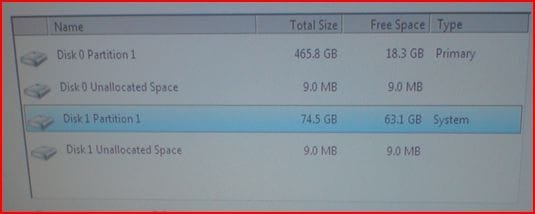
http://img63.imageshack.us/img63/7061/83061677.jpg

the weird thing is that the many times when i install windows 7 the hard with the total size 74.5 was disk 0 and the other one disk 1,but now is the reverse order.

@Jonathan_King it's a simple delay,when i log on to my pc will take 2 minutes to enter windows xp,i hope you get it.
@
gregrocker i don't have any problems with my dvd/cd , and i burn it my self (i usualy do this)
 

My Computer My Computer

OS
XP+7
Try updating your BIOS.
 

My Computer My Computer

Computer Manufacturer/Model Number
Custom
OS
Windows 7 Professional x64
CPU
Intel i7 2600K OC'd @ 4620 MHz
Motherboard
Asus P8Z68-V Pro
Memory
16GB GSkill Sniper 2133 Mhz (4x4GB)
Graphics Card(s)
EVGA GeForce GTX 480 SuperClocked+
Sound Card
Realtek High Definition Audio
Monitor(s) Displays
2x Acer S273HLbmii 27"
Screen Resolution
2 x 1920x1080
Hard Drives
64GB Crucial M4 SSD

Storage: Hitachi 1TB 5400RPM, Samsung 1.5TB 5400RPM
PSU
Corsair HW Series 750w (modular)
Case
Cooler Master HAF 932 Advanced Blue Edition
Cooling
CM Hyper 212+ CPU cooler, 3x 230mm + 1x 140mm case fans
Keyboard
Logitech MK320 (wireless)
Mouse
Logitech MK320 (wireless)
Internet Speed
30 Mb/s : 2 Mb/s
Which disk has win XP install on?
 

Attachments

  • Capture10.JPG
    Capture10.JPG
    18.3 KB · Views: 3

My Computer My Computer

OS
ME/XP/Vista/Win7
i have right now only windows xp on disk 1
 

My Computer My Computer

OS
XP+7
It's actually pretty simple. Find out what motherboard you have (use Speccy to find out), and go to the manufacturer's site. The BIOS is in the downloads section.

Sometimes OEMs like Dell use custom motherboards, in which case you need to go to their site and look there.
 

My Computer My Computer

Computer Manufacturer/Model Number
Custom
OS
Windows 7 Professional x64
CPU
Intel i7 2600K OC'd @ 4620 MHz
Motherboard
Asus P8Z68-V Pro
Memory
16GB GSkill Sniper 2133 Mhz (4x4GB)
Graphics Card(s)
EVGA GeForce GTX 480 SuperClocked+
Sound Card
Realtek High Definition Audio
Monitor(s) Displays
2x Acer S273HLbmii 27"
Screen Resolution
2 x 1920x1080
Hard Drives
64GB Crucial M4 SSD

Storage: Hitachi 1TB 5400RPM, Samsung 1.5TB 5400RPM
PSU
Corsair HW Series 750w (modular)
Case
Cooler Master HAF 932 Advanced Blue Edition
Cooling
CM Hyper 212+ CPU cooler, 3x 230mm + 1x 140mm case fans
Keyboard
Logitech MK320 (wireless)
Mouse
Logitech MK320 (wireless)
Internet Speed
30 Mb/s : 2 Mb/s
Back
Top