Installing hauppauge colossus no Tv Signal Type Option

jwalker2012

New member
Local time
10:46 AM
Messages
3
Win 7 Ultimate
hauppauge colossus
Direct Tv

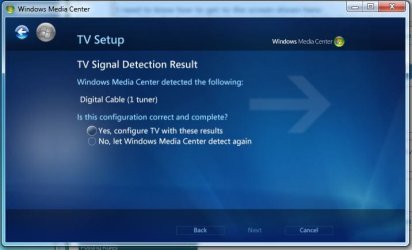
My issue is that Window 7 is not giving me the option to choose the tv signal type. It auto detects the signal as Digital Cable (which is wrong, its DirectTV) and gives me two options: (see attachement screen.jpg)

Yes, Configure TV with these results
No, Let window Media Center detect again

Detecting again simply detects it correctly again.

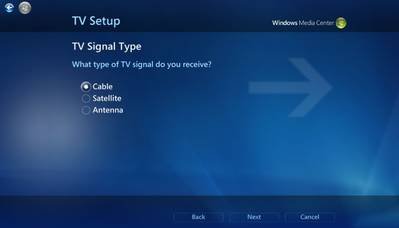
I need to know how to get to the screen shown here in attachment signal-select-10.jpg

any help is greatly appreciated!!
 

Attachments
  • screen.JPG
    screen.JPG
    35.9 KB · Views: 18
  • signal-select-10.jpg
    signal-select-10.jpg
    6.2 KB · Views: 10

My Computer My Computer

At a glance

Windows 7 Ultimate x64
OS
Windows 7 Ultimate x64

My Computer My Computer

At a glance

Systems 1 and 2: Windows 7 Enterprise x64, Wi...System 1: i7 [email protected], System 2: AMD FX-41...System 1: 8GB System 2: 8GBSystem 1: ATI FirePro V4800 System 2: Radeon ...
Computer Manufacturer/Model Number
Dell and Custom
OS
Systems 1 and 2: Windows 7 Enterprise x64, Win 8 Developer
CPU
System 1: i7 [email protected], System 2: AMD FX-4100 Zambezi 3.6G
Motherboard
System 1:Dell 06NWYK System 2: ASUS M5A97 AM3+
Memory
System 1: 8GB System 2: 8GB
Graphics Card(s)
System 1: ATI FirePro V4800 System 2: Radeon HD 6850
Sound Card
System 1: onboard System 2: onboard
Monitor(s) Displays
System1: Viewsonic HDMI 24"
Screen Resolution
System 1: 1920x1080 System 2: 1920x1080
Hard Drives
System 1: Mirrored .5B drives System 2: Seagate Barracuda ST1000DM003 1TB 7200 RPM 64MB Cache SATA 6.0Gb/s
Case
System 1: Dell System 2: Cooler Master
Internet Speed
10 MBPS
thanks for the reply...

Yep I installed the latest drivers and the mce installation also. The card is installed and works great with WinTv.

My issue is that win 7 will not give me the manual configuration screen.


thanks.
 
Last edited:

My Computer My Computer

At a glance

Windows 7 Ultimate x64
OS
Windows 7 Ultimate x64
I anyone else has this problem here is the solution:

HDPVR MC Setup utility in the Hauppauge:
Select the card of your choice and set the tv signal type for Media Center

and restart the computer

If you have already configure the TV Signal in MCE you need to clear it out. I used the following to do so:

shut down MC
run from the Windows > ehome directory:
mcupdate -MediaCenterRecoveryTask
reboot

reconfigure start MC and reconfigure the TV Signal should work did for me
 

My Computer My Computer

At a glance

Windows 7 Ultimate x64
OS
Windows 7 Ultimate x64
Back
Top