installing home prem, on Ultimate RC?

Sabotage

New member
Member
Local time
4:40 AM
Messages
53
Location
Wellandport, ON
so yea, i have home prem. OEM and i want to install on my RC ultimate but it doesn't boot to disk when i set it in my bios and it keep loading onto my desktop even though the harddrive isn't in the boot order. how do i install this?

EDIT: oops sorry, you can move this topic please
 

My Computer My Computer

Computer Manufacturer/Model Number
Custom
OS
Windows 7 Home Prem. 64-bit
CPU
Intel ivybridge something or rather...
Motherboard
MSi Z77A G43
Memory
8gb ddr3 g.skill
Graphics Card(s)
PNY 560 Ti
Monitor(s) Displays
Samsung SyncMaster 2253LW
Screen Resolution
1680x1050
Hard Drives
Seagate Barracuda 7200.11 750Gb
Seagate Barracuda 7200.11 1.5Tb
PSU
ULTRA 750watt
Case
white something and such
Cooling
Corsair H60
Keyboard
Logitech G15
Mouse
Logitech wireless contraption
Internet Speed
500kb/s~
Can you manually run the setup.exe file found on the install disc? Open up the drive in My Computer and you should see the file.
 

My Computer My Computer

Computer Manufacturer/Model Number
Custom
OS
Windows 7 Professional x64
CPU
Intel i7 2600K OC'd @ 4620 MHz
Motherboard
Asus P8Z68-V Pro
Memory
16GB GSkill Sniper 2133 Mhz (4x4GB)
Graphics Card(s)
EVGA GeForce GTX 480 SuperClocked+
Sound Card
Realtek High Definition Audio
Monitor(s) Displays
2x Acer S273HLbmii 27"
Screen Resolution
2 x 1920x1080
Hard Drives
64GB Crucial M4 SSD

Storage: Hitachi 1TB 5400RPM, Samsung 1.5TB 5400RPM
PSU
Corsair HW Series 750w (modular)
Case
Cooler Master HAF 932 Advanced Blue Edition
Cooling
CM Hyper 212+ CPU cooler, 3x 230mm + 1x 140mm case fans
Keyboard
Logitech MK320 (wireless)
Mouse
Logitech MK320 (wireless)
Internet Speed
30 Mb/s : 2 Mb/s
Set your bios to boot from the DVD first.

Turn off your computer.
Turn on your computer.
IMMEDIATELY start tapping F2 until you get into the bios setup program

On your computer, maybe the needed key is not F2. Many computers do use F2. Consult your computer manual or the mfrs web site.
 

My Computer My Computer

Computer Manufacturer/Model Number
Toshiba Satellite S875D-S7239 laptop
OS
MS Windows 7 Ultimate SP1 64-bit
CPU
AMD A10-4600M
Motherboard
AMD Pumori (Socket FT1)
Memory
6.00 GB Dual-Channel DDR3 @ 798MHz (11-11-12-28)
Graphics Card(s)
AMD Radeon HD 7660G
Sound Card
High Definition Audio Device
Monitor(s) Displays
Generic PnP Monitor (1600x900@60Hz)
Screen Resolution
1600x900@60Hz
Hard Drives
SSD 119GB Corsair CSSD-V128GB2 ATA Device
Keyboard
Standard PS/2 Keyboard
Mouse
HP Wireless Optical Mobile Mouse Model FHA-3410
Internet Speed
What the local pub, local coffee shop offers.
Other Info
Optical Drive:MATSHITA BD-CMB UJ160B ATA Device


Also have an Asus ha1002xp netbook with Win 7 Ultimate installed.
i know, i already set the boot order to that.

i did try and install off my computer but when i get to the partition page i delete all partitions? WHILE i'm literally on ultimate RC?
 

My Computer My Computer

Computer Manufacturer/Model Number
Custom
OS
Windows 7 Home Prem. 64-bit
CPU
Intel ivybridge something or rather...
Motherboard
MSi Z77A G43
Memory
8gb ddr3 g.skill
Graphics Card(s)
PNY 560 Ti
Monitor(s) Displays
Samsung SyncMaster 2253LW
Screen Resolution
1680x1050
Hard Drives
Seagate Barracuda 7200.11 750Gb
Seagate Barracuda 7200.11 1.5Tb
PSU
ULTRA 750watt
Case
white something and such
Cooling
Corsair H60
Keyboard
Logitech G15
Mouse
Logitech wireless contraption
Internet Speed
500kb/s~
Sabotage, you should install on a different partition. I would recommend you do that, and perform a clean install. When you transfered everything and know everything is fine and dandy you delete the RC partition and edit BCD to get rid of the reference to the RC. I did that on 3 different computers and they are running very fine
If you need instructions we can point you to the tutorials for all this
 

My Computer My Computer

Computer Manufacturer/Model Number
Wally, Innc.
OS
Windows 7 x64 finally!
CPU
AMD Athlon II X2 240
Motherboard
Biostar TA790GX XE
Memory
OCZ Platinum 4GB DDR2 1066 (will not work past 800MHz)
Graphics Card(s)
MSI R4670-MD1G Radeon HD 4670 1GB 128-bit GDDR3
Sound Card
ATI High Definition Audio Device Realtek ALC888
Monitor(s) Displays
HP w19e
Screen Resolution
1440x900
Hard Drives
Western Digital Caviar Green WD5000AADS 500GB SATA
Western Digital Caviar Blue WD5000AAKS 500GB SATA
PSU
Athena Power Micro ATX 400W
Case
HEC 6T 6T10BB Black MicroATX Mini Tower
Cooling
stock
Keyboard
wired, many keys
Mouse
HP wireless, 2 buttons, 1 wheel
Internet Speed
DSL 2Mb (recently getting 1.65M!)
Yep, If you booted from the DVD then actually you are running a Win7 PE and not running Win7RC. As long as you've backed up any data you want, then go for it.
 

My Computer My Computer

Computer Manufacturer/Model Number
Toshiba Satellite S875D-S7239 laptop
OS
MS Windows 7 Ultimate SP1 64-bit
CPU
AMD A10-4600M
Motherboard
AMD Pumori (Socket FT1)
Memory
6.00 GB Dual-Channel DDR3 @ 798MHz (11-11-12-28)
Graphics Card(s)
AMD Radeon HD 7660G
Sound Card
High Definition Audio Device
Monitor(s) Displays
Generic PnP Monitor (1600x900@60Hz)
Screen Resolution
1600x900@60Hz
Hard Drives
SSD 119GB Corsair CSSD-V128GB2 ATA Device
Keyboard
Standard PS/2 Keyboard
Mouse
HP Wireless Optical Mobile Mouse Model FHA-3410
Internet Speed
What the local pub, local coffee shop offers.
Other Info
Optical Drive:MATSHITA BD-CMB UJ160B ATA Device


Also have an Asus ha1002xp netbook with Win 7 Ultimate installed.
That's the problem, he can't get it to boot from the DVD, only running under the current Win7 install. I never did that, so I don't know what happens when you delete the partition.

I just thought of something: Sabotage, did you get the "press any key to boot from CD/DVD" message? did you press one?
I myself am one that likes to multiplex, so I always miss that...
 

My Computer My Computer

Computer Manufacturer/Model Number
Wally, Innc.
OS
Windows 7 x64 finally!
CPU
AMD Athlon II X2 240
Motherboard
Biostar TA790GX XE
Memory
OCZ Platinum 4GB DDR2 1066 (will not work past 800MHz)
Graphics Card(s)
MSI R4670-MD1G Radeon HD 4670 1GB 128-bit GDDR3
Sound Card
ATI High Definition Audio Device Realtek ALC888
Monitor(s) Displays
HP w19e
Screen Resolution
1440x900
Hard Drives
Western Digital Caviar Green WD5000AADS 500GB SATA
Western Digital Caviar Blue WD5000AAKS 500GB SATA
PSU
Athena Power Micro ATX 400W
Case
HEC 6T 6T10BB Black MicroATX Mini Tower
Cooling
stock
Keyboard
wired, many keys
Mouse
HP wireless, 2 buttons, 1 wheel
Internet Speed
DSL 2Mb (recently getting 1.65M!)
Whether you can boot from DVD first is a BIOS setting.

I've installed numerous times, with numerous versions, both from DVD and USB stick.

Of course for the USB then I had to change the bios to boot from the USB first.
 

My Computer My Computer

Computer Manufacturer/Model Number
Toshiba Satellite S875D-S7239 laptop
OS
MS Windows 7 Ultimate SP1 64-bit
CPU
AMD A10-4600M
Motherboard
AMD Pumori (Socket FT1)
Memory
6.00 GB Dual-Channel DDR3 @ 798MHz (11-11-12-28)
Graphics Card(s)
AMD Radeon HD 7660G
Sound Card
High Definition Audio Device
Monitor(s) Displays
Generic PnP Monitor (1600x900@60Hz)
Screen Resolution
1600x900@60Hz
Hard Drives
SSD 119GB Corsair CSSD-V128GB2 ATA Device
Keyboard
Standard PS/2 Keyboard
Mouse
HP Wireless Optical Mobile Mouse Model FHA-3410
Internet Speed
What the local pub, local coffee shop offers.
Other Info
Optical Drive:MATSHITA BD-CMB UJ160B ATA Device


Also have an Asus ha1002xp netbook with Win 7 Ultimate installed.

My Computer My Computer

Computer Manufacturer/Model Number
Toshiba Satellite S875D-S7239 laptop
OS
MS Windows 7 Ultimate SP1 64-bit
CPU
AMD A10-4600M
Motherboard
AMD Pumori (Socket FT1)
Memory
6.00 GB Dual-Channel DDR3 @ 798MHz (11-11-12-28)
Graphics Card(s)
AMD Radeon HD 7660G
Sound Card
High Definition Audio Device
Monitor(s) Displays
Generic PnP Monitor (1600x900@60Hz)
Screen Resolution
1600x900@60Hz
Hard Drives
SSD 119GB Corsair CSSD-V128GB2 ATA Device
Keyboard
Standard PS/2 Keyboard
Mouse
HP Wireless Optical Mobile Mouse Model FHA-3410
Internet Speed
What the local pub, local coffee shop offers.
Other Info
Optical Drive:MATSHITA BD-CMB UJ160B ATA Device


Also have an Asus ha1002xp netbook with Win 7 Ultimate installed.
Some BIOSs, especially ASUS, you can set the boot order to DVD/CD first. HOWEVER, there is another section called "boot drives' or something like that, and if the desired drive isn't listed there first, the BIOS basically ignores the Boot Order setting and goes next in line until something in the boot drives is there.
 

My Computer My Computer

OS
Windows 7
CPU
i5-750
Motherboard
Asus
Memory
4GB DDR3 1600
Graphics Card(s)
GT220
Desslok,
Very true. Since I have an ASUS 1002HA/XP with Win7 installed on it and I did the install from a USB stick.
karl
 

My Computer My Computer

Computer Manufacturer/Model Number
Toshiba Satellite S875D-S7239 laptop
OS
MS Windows 7 Ultimate SP1 64-bit
CPU
AMD A10-4600M
Motherboard
AMD Pumori (Socket FT1)
Memory
6.00 GB Dual-Channel DDR3 @ 798MHz (11-11-12-28)
Graphics Card(s)
AMD Radeon HD 7660G
Sound Card
High Definition Audio Device
Monitor(s) Displays
Generic PnP Monitor (1600x900@60Hz)
Screen Resolution
1600x900@60Hz
Hard Drives
SSD 119GB Corsair CSSD-V128GB2 ATA Device
Keyboard
Standard PS/2 Keyboard
Mouse
HP Wireless Optical Mobile Mouse Model FHA-3410
Internet Speed
What the local pub, local coffee shop offers.
Other Info
Optical Drive:MATSHITA BD-CMB UJ160B ATA Device


Also have an Asus ha1002xp netbook with Win 7 Ultimate installed.

My Computer My Computer

Computer Manufacturer/Model Number
Wally, Innc.
OS
Windows 7 x64 finally!
CPU
AMD Athlon II X2 240
Motherboard
Biostar TA790GX XE
Memory
OCZ Platinum 4GB DDR2 1066 (will not work past 800MHz)
Graphics Card(s)
MSI R4670-MD1G Radeon HD 4670 1GB 128-bit GDDR3
Sound Card
ATI High Definition Audio Device Realtek ALC888
Monitor(s) Displays
HP w19e
Screen Resolution
1440x900
Hard Drives
Western Digital Caviar Green WD5000AADS 500GB SATA
Western Digital Caviar Blue WD5000AAKS 500GB SATA
PSU
Athena Power Micro ATX 400W
Case
HEC 6T 6T10BB Black MicroATX Mini Tower
Cooling
stock
Keyboard
wired, many keys
Mouse
HP wireless, 2 buttons, 1 wheel
Internet Speed
DSL 2Mb (recently getting 1.65M!)
some of you people aren't getting it.

-i've have set the boot order correctly, several times over. IN the BIOS!
-i have gotten the press any key to continue but when i do it just boots into my RC ultimate and not the installation process
 

My Computer My Computer

Computer Manufacturer/Model Number
Custom
OS
Windows 7 Home Prem. 64-bit
CPU
Intel ivybridge something or rather...
Motherboard
MSi Z77A G43
Memory
8gb ddr3 g.skill
Graphics Card(s)
PNY 560 Ti
Monitor(s) Displays
Samsung SyncMaster 2253LW
Screen Resolution
1680x1050
Hard Drives
Seagate Barracuda 7200.11 750Gb
Seagate Barracuda 7200.11 1.5Tb
PSU
ULTRA 750watt
Case
white something and such
Cooling
Corsair H60
Keyboard
Logitech G15
Mouse
Logitech wireless contraption
Internet Speed
500kb/s~
Okay, let's take a different line of approach. Let's work on getting it working from Windows.

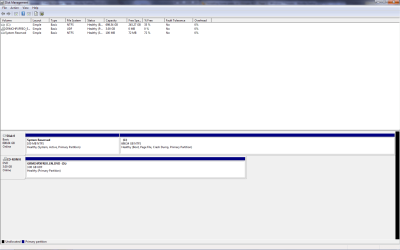
Could you please post a screenshot of your Disk Management windows? Then please explain exactly what you need to do with the partitions.

With the help of Partition Wizard, I am sure we can get this working.
 

My Computer My Computer

Computer Manufacturer/Model Number
Custom
OS
Windows 7 Professional x64
CPU
Intel i7 2600K OC'd @ 4620 MHz
Motherboard
Asus P8Z68-V Pro
Memory
16GB GSkill Sniper 2133 Mhz (4x4GB)
Graphics Card(s)
EVGA GeForce GTX 480 SuperClocked+
Sound Card
Realtek High Definition Audio
Monitor(s) Displays
2x Acer S273HLbmii 27"
Screen Resolution
2 x 1920x1080
Hard Drives
64GB Crucial M4 SSD

Storage: Hitachi 1TB 5400RPM, Samsung 1.5TB 5400RPM
PSU
Corsair HW Series 750w (modular)
Case
Cooler Master HAF 932 Advanced Blue Edition
Cooling
CM Hyper 212+ CPU cooler, 3x 230mm + 1x 140mm case fans
Keyboard
Logitech MK320 (wireless)
Mouse
Logitech MK320 (wireless)
Internet Speed
30 Mb/s : 2 Mb/s
yeah, I don't get it
10/7
 

My Computer My Computer

Computer Manufacturer/Model Number
Wally, Innc.
OS
Windows 7 x64 finally!
CPU
AMD Athlon II X2 240
Motherboard
Biostar TA790GX XE
Memory
OCZ Platinum 4GB DDR2 1066 (will not work past 800MHz)
Graphics Card(s)
MSI R4670-MD1G Radeon HD 4670 1GB 128-bit GDDR3
Sound Card
ATI High Definition Audio Device Realtek ALC888
Monitor(s) Displays
HP w19e
Screen Resolution
1440x900
Hard Drives
Western Digital Caviar Green WD5000AADS 500GB SATA
Western Digital Caviar Blue WD5000AAKS 500GB SATA
PSU
Athena Power Micro ATX 400W
Case
HEC 6T 6T10BB Black MicroATX Mini Tower
Cooling
stock
Keyboard
wired, many keys
Mouse
HP wireless, 2 buttons, 1 wheel
Internet Speed
DSL 2Mb (recently getting 1.65M!)
i plan on deleting the partitions and starting over
 

Attachments

  • disk m.png
    disk m.png
    25.1 KB · Views: 6

My Computer My Computer

Computer Manufacturer/Model Number
Custom
OS
Windows 7 Home Prem. 64-bit
CPU
Intel ivybridge something or rather...
Motherboard
MSi Z77A G43
Memory
8gb ddr3 g.skill
Graphics Card(s)
PNY 560 Ti
Monitor(s) Displays
Samsung SyncMaster 2253LW
Screen Resolution
1680x1050
Hard Drives
Seagate Barracuda 7200.11 750Gb
Seagate Barracuda 7200.11 1.5Tb
PSU
ULTRA 750watt
Case
white something and such
Cooling
Corsair H60
Keyboard
Logitech G15
Mouse
Logitech wireless contraption
Internet Speed
500kb/s~
Okay, that's not hard. Just install right over the C partition. Don't worry about the 100MB System Partition, we can remove that later.

When you're done, let us know, and we will give you instructions for removing the system partition and windows.old fold that will be created.

Good luck!
~JK
 

My Computer My Computer

Computer Manufacturer/Model Number
Custom
OS
Windows 7 Professional x64
CPU
Intel i7 2600K OC'd @ 4620 MHz
Motherboard
Asus P8Z68-V Pro
Memory
16GB GSkill Sniper 2133 Mhz (4x4GB)
Graphics Card(s)
EVGA GeForce GTX 480 SuperClocked+
Sound Card
Realtek High Definition Audio
Monitor(s) Displays
2x Acer S273HLbmii 27"
Screen Resolution
2 x 1920x1080
Hard Drives
64GB Crucial M4 SSD

Storage: Hitachi 1TB 5400RPM, Samsung 1.5TB 5400RPM
PSU
Corsair HW Series 750w (modular)
Case
Cooler Master HAF 932 Advanced Blue Edition
Cooling
CM Hyper 212+ CPU cooler, 3x 230mm + 1x 140mm case fans
Keyboard
Logitech MK320 (wireless)
Mouse
Logitech MK320 (wireless)
Internet Speed
30 Mb/s : 2 Mb/s
If you want to completely clean that hard disk, then
WIN | type cmd.exe | right-click on cmd.exe in the list that appears | choose "Run as administrator"
at the command prompt:
type DISKPART and hit enter
type list disk and hit enter
type Select Disk 0 (assuming that's what showed up as your HDD) and hit Enter
type CLEAN ALL and hit Enter
wait and wait and wait as your entire hdd is being written with zeros.
when it finishes
type EXIT and hit Enter

Put your DVD into the drive tray now.
type another EXIT , Enter, power off.
Close the DVD tray.
Power on your computer and enjoy a truly clean installation of Win7


I very seriously recommend that you see if you can boot from any DVD before you do that. You just might have a defective optical drive.
 

My Computer My Computer

Computer Manufacturer/Model Number
Toshiba Satellite S875D-S7239 laptop
OS
MS Windows 7 Ultimate SP1 64-bit
CPU
AMD A10-4600M
Motherboard
AMD Pumori (Socket FT1)
Memory
6.00 GB Dual-Channel DDR3 @ 798MHz (11-11-12-28)
Graphics Card(s)
AMD Radeon HD 7660G
Sound Card
High Definition Audio Device
Monitor(s) Displays
Generic PnP Monitor (1600x900@60Hz)
Screen Resolution
1600x900@60Hz
Hard Drives
SSD 119GB Corsair CSSD-V128GB2 ATA Device
Keyboard
Standard PS/2 Keyboard
Mouse
HP Wireless Optical Mobile Mouse Model FHA-3410
Internet Speed
What the local pub, local coffee shop offers.
Other Info
Optical Drive:MATSHITA BD-CMB UJ160B ATA Device


Also have an Asus ha1002xp netbook with Win 7 Ultimate installed.
If you want to completely clean that hard disk, then
WIN | type cmd.exe | right-click on cmd.exe in the list that appears | choose "Run as administrator"
at the command prompt:
type DISKPART and hit enter
type list disk and hit enter
type Select Disk 0 (assuming that's what showed up as your HDD) and hit Enter
type CLEAN ALL and hit Enter
wait and wait and wait as your entire hdd is being written with zeros.
when it finishes
type EXIT and hit Enter

Put your DVD into the drive tray now.
type another EXIT , Enter, power off.
Close the DVD tray.
Power on your computer and enjoy a truly clean installation of Win7


I very seriously recommend that you see if you can boot from any DVD before you do that. You just might have a defective optical drive.
I do not recommend this. First, I doubt you can format the partition you are running. Second, if he can't boot from the DVD, he is sunk. That is what he asked for help with in the first place.
 

My Computer My Computer

Computer Manufacturer/Model Number
Custom
OS
Windows 7 Professional x64
CPU
Intel i7 2600K OC'd @ 4620 MHz
Motherboard
Asus P8Z68-V Pro
Memory
16GB GSkill Sniper 2133 Mhz (4x4GB)
Graphics Card(s)
EVGA GeForce GTX 480 SuperClocked+
Sound Card
Realtek High Definition Audio
Monitor(s) Displays
2x Acer S273HLbmii 27"
Screen Resolution
2 x 1920x1080
Hard Drives
64GB Crucial M4 SSD

Storage: Hitachi 1TB 5400RPM, Samsung 1.5TB 5400RPM
PSU
Corsair HW Series 750w (modular)
Case
Cooler Master HAF 932 Advanced Blue Edition
Cooling
CM Hyper 212+ CPU cooler, 3x 230mm + 1x 140mm case fans
Keyboard
Logitech MK320 (wireless)
Mouse
Logitech MK320 (wireless)
Internet Speed
30 Mb/s : 2 Mb/s
You will notice that he needed to make sure that he can boot any dvd from his dvd drive.

Oh yes, I've been installing on completely clean systems since the Win 3 days. Simply the technique for truly cleaning the drive has changed over the years.

If he can not boot from a DVD, then he needs to determine why. Depending upon the technical experience level, then taking the computer to a repair shop to see if the dvd needs to be replaced or not would be wise. Testing at a repair shop shouldn't take 5 minutes.
 

My Computer My Computer

Computer Manufacturer/Model Number
Toshiba Satellite S875D-S7239 laptop
OS
MS Windows 7 Ultimate SP1 64-bit
CPU
AMD A10-4600M
Motherboard
AMD Pumori (Socket FT1)
Memory
6.00 GB Dual-Channel DDR3 @ 798MHz (11-11-12-28)
Graphics Card(s)
AMD Radeon HD 7660G
Sound Card
High Definition Audio Device
Monitor(s) Displays
Generic PnP Monitor (1600x900@60Hz)
Screen Resolution
1600x900@60Hz
Hard Drives
SSD 119GB Corsair CSSD-V128GB2 ATA Device
Keyboard
Standard PS/2 Keyboard
Mouse
HP Wireless Optical Mobile Mouse Model FHA-3410
Internet Speed
What the local pub, local coffee shop offers.
Other Info
Optical Drive:MATSHITA BD-CMB UJ160B ATA Device


Also have an Asus ha1002xp netbook with Win 7 Ultimate installed.
Back
Top