
You are using an out of date browser. It may not display this or other websites correctly.
You should upgrade or use an alternative browser.
You should upgrade or use an alternative browser.
Installing LightScribe support
- Thread starter MegaFixer
- Start date

My Computer
- Computer type
- PC/Desktop
- Computer Manufacturer/Model Number
- Alienware® ALX X58
- OS
- Win 7 Ult SP1/Win 10 Pro (all x64)
- CPU
- Intel® Core™ i7-975 Extreme O/C to 4.02 GHz, 8MB Cache
- Motherboard
- Asus® P6T Deluxe V2 X58 LGA1366
- Memory
- 24GB Corsair Vengeance DDR3 SDRAM at 1600MHz - 6 x 4096MB
- Graphics Card(s)
- 1792 MB NVIDIA® GeForce® GTX 295 Dual Core
- Sound Card
- Onboard Soundmax® High-Definition 7.1 Performance Audio
- Monitor(s) Displays
- Samsung XL2370 LED backlit 23" W/S 2ms response time
- Screen Resolution
- 1920 X 1080
- Hard Drives
- 2 x 500gb SATA II
1 x 1TB SATA II
1 external eSATA LaCie 3TB
(Non-RAID)
- PSU
- Alienware® 1200 Watt Multi-GPU
- Case
- Alienware® P2 ALX Chassis with AlienIce™ 3.0 Video Cooling
- Cooling
- Alienware® High-Perf. Liquid Cooling + Acoustic Dampening
- Keyboard
- Microsoft® Wireless Entertainment 8000 + Logitech® G15 Wired
- Mouse
- Microsoft® Wireless Laser 8000 + Logitech® G9 Wired
- Internet Speed
- 1Gb/s
- Antivirus
- McAfee LiveSafe
- Browser
- Firefox - latest
- Other Info
- Using non-RAID on purpose as I find RAID to be too temperamental.
Now set to AHCI

Thanks for posting this as I can't get lt to install from the website even using compatibility mode.
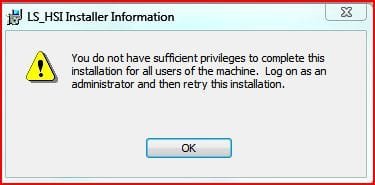
One problem however, see attached. It wont install. (LS-HSI.msi) - didn't even try the second one.
I am signed in as an Administrator.
you already tried compat. mode and run as administrator at the same time???
My Computer
- Computer Manufacturer/Model Number
- Tx2500z Tablet Pc/Homemade Server
- OS
- Windows 7 Ult x64(x2), HomePrem x32(x4), Server 08 (+VM), 08 R2 (VM) , SuSe 11.2 (VM), XP 32 (VM)
- CPU
- Turion X2 ultra (oh well came with laptop)/P4 @3.2 (yes P4)
- Motherboard
- IDK HP Motherboard / Intel DG965SS
- Memory
- OCZ Dual Channel 4GB kit/ 1gb Dual Channel
- Graphics Card(s)
- HD 3200 graphics /GMA x3100 (yay for intergrated!!)
- Sound Card
- Realtek HD Audio(mic working, well sort of)/Siig IC-70012
- Monitor(s) Displays
- built-in Hp 12" laptop screen/ Acer 19"
- Screen Resolution
- 1280x800 /1440x900
- Cooling
- All Air Cooled
- Mouse
- Logi MX Rev. /MS Wheel Optical 1.1A /Logitech Optical Mouse
- Internet Speed
- College baby but its still routed through vpn to 1536k...
- Other Info
- love my wacom pen and pressure sensitivity...
wished it worked in 7, SUSE for that matter though
I tried the regular .exe from Lightscribe's website in Admin + compatibility. A .msi file as provided above doesn't have the option to run in compatibility mode, or as an Administrator.
My Computer
- Computer type
- PC/Desktop
- Computer Manufacturer/Model Number
- Alienware® ALX X58
- OS
- Win 7 Ult SP1/Win 10 Pro (all x64)
- CPU
- Intel® Core™ i7-975 Extreme O/C to 4.02 GHz, 8MB Cache
- Motherboard
- Asus® P6T Deluxe V2 X58 LGA1366
- Memory
- 24GB Corsair Vengeance DDR3 SDRAM at 1600MHz - 6 x 4096MB
- Graphics Card(s)
- 1792 MB NVIDIA® GeForce® GTX 295 Dual Core
- Sound Card
- Onboard Soundmax® High-Definition 7.1 Performance Audio
- Monitor(s) Displays
- Samsung XL2370 LED backlit 23" W/S 2ms response time
- Screen Resolution
- 1920 X 1080
- Hard Drives
- 2 x 500gb SATA II
1 x 1TB SATA II
1 external eSATA LaCie 3TB
(Non-RAID)
- PSU
- Alienware® 1200 Watt Multi-GPU
- Case
- Alienware® P2 ALX Chassis with AlienIce™ 3.0 Video Cooling
- Cooling
- Alienware® High-Perf. Liquid Cooling + Acoustic Dampening
- Keyboard
- Microsoft® Wireless Entertainment 8000 + Logitech® G15 Wired
- Mouse
- Microsoft® Wireless Laser 8000 + Logitech® G9 Wired
- Internet Speed
- 1Gb/s
- Antivirus
- McAfee LiveSafe
- Browser
- Firefox - latest
- Other Info
- Using non-RAID on purpose as I find RAID to be too temperamental.
Now set to AHCI
I tried the regular .exe from Lightscribe's website in Admin + compatibility. A .msi file as provided above doesn't have the option to run in compatibility mode, or as an Administrator.
i would try a program called orca....
see if can find it in google....
its able to modify msi's....
well i have to get going
hope you get some luck with it as want lightscribe support....

My Computer
- Computer Manufacturer/Model Number
- Tx2500z Tablet Pc/Homemade Server
- OS
- Windows 7 Ult x64(x2), HomePrem x32(x4), Server 08 (+VM), 08 R2 (VM) , SuSe 11.2 (VM), XP 32 (VM)
- CPU
- Turion X2 ultra (oh well came with laptop)/P4 @3.2 (yes P4)
- Motherboard
- IDK HP Motherboard / Intel DG965SS
- Memory
- OCZ Dual Channel 4GB kit/ 1gb Dual Channel
- Graphics Card(s)
- HD 3200 graphics /GMA x3100 (yay for intergrated!!)
- Sound Card
- Realtek HD Audio(mic working, well sort of)/Siig IC-70012
- Monitor(s) Displays
- built-in Hp 12" laptop screen/ Acer 19"
- Screen Resolution
- 1280x800 /1440x900
- Cooling
- All Air Cooled
- Mouse
- Logi MX Rev. /MS Wheel Optical 1.1A /Logitech Optical Mouse
- Internet Speed
- College baby but its still routed through vpn to 1536k...
- Other Info
- love my wacom pen and pressure sensitivity...
wished it worked in 7, SUSE for that matter though
Possible causes:
1) you are not using built-in "Administrator" account
2) your Group Policy (gpedit.msc) has restricted Windows Installations
Try this:
1) copy the content of the archive to a folder in the root of drive "C" like C:\TMP
2) Start->Run->"msiexec /i c:\TMP\LS_HSI.msi"
1) you are not using built-in "Administrator" account
2) your Group Policy (gpedit.msc) has restricted Windows Installations
Try this:
1) copy the content of the archive to a folder in the root of drive "C" like C:\TMP
2) Start->Run->"msiexec /i c:\TMP\LS_HSI.msi"
My Computer
- OS
- Microsoft Windows 6.1 (Build 6801)
Possible causes:
1) you are not using built-in "Administrator" account
2) your Group Policy (gpedit.msc) has restricted Windows Installations
i believe he using a fresh install with no modifications to Group policy
im curious are these modified with orca???
or they the vanilla installations from the website???
My Computer
- Computer Manufacturer/Model Number
- Tx2500z Tablet Pc/Homemade Server
- OS
- Windows 7 Ult x64(x2), HomePrem x32(x4), Server 08 (+VM), 08 R2 (VM) , SuSe 11.2 (VM), XP 32 (VM)
- CPU
- Turion X2 ultra (oh well came with laptop)/P4 @3.2 (yes P4)
- Motherboard
- IDK HP Motherboard / Intel DG965SS
- Memory
- OCZ Dual Channel 4GB kit/ 1gb Dual Channel
- Graphics Card(s)
- HD 3200 graphics /GMA x3100 (yay for intergrated!!)
- Sound Card
- Realtek HD Audio(mic working, well sort of)/Siig IC-70012
- Monitor(s) Displays
- built-in Hp 12" laptop screen/ Acer 19"
- Screen Resolution
- 1280x800 /1440x900
- Cooling
- All Air Cooled
- Mouse
- Logi MX Rev. /MS Wheel Optical 1.1A /Logitech Optical Mouse
- Internet Speed
- College baby but its still routed through vpn to 1536k...
- Other Info
- love my wacom pen and pressure sensitivity...
wished it worked in 7, SUSE for that matter though
it's vanilla but extracted to change "SupressWrongOS=N" in setup.ini. No orca or whateverim curious are these modified with orca???
or they the vanilla installations from the website???
My Computer
- OS
- Microsoft Windows 6.1 (Build 6801)
it's vanilla but extracted to change "SupressWrongOS=N" in setup.ini. No orca or whatever
ohh ok...
i see will see what i can find toward Ex_brit's problem as im running as a regular admin..
My Computer
- Computer Manufacturer/Model Number
- Tx2500z Tablet Pc/Homemade Server
- OS
- Windows 7 Ult x64(x2), HomePrem x32(x4), Server 08 (+VM), 08 R2 (VM) , SuSe 11.2 (VM), XP 32 (VM)
- CPU
- Turion X2 ultra (oh well came with laptop)/P4 @3.2 (yes P4)
- Motherboard
- IDK HP Motherboard / Intel DG965SS
- Memory
- OCZ Dual Channel 4GB kit/ 1gb Dual Channel
- Graphics Card(s)
- HD 3200 graphics /GMA x3100 (yay for intergrated!!)
- Sound Card
- Realtek HD Audio(mic working, well sort of)/Siig IC-70012
- Monitor(s) Displays
- built-in Hp 12" laptop screen/ Acer 19"
- Screen Resolution
- 1280x800 /1440x900
- Cooling
- All Air Cooled
- Mouse
- Logi MX Rev. /MS Wheel Optical 1.1A /Logitech Optical Mouse
- Internet Speed
- College baby but its still routed through vpn to 1536k...
- Other Info
- love my wacom pen and pressure sensitivity...
wished it worked in 7, SUSE for that matter though
got the msi fixed....
i will upload in few min...
i will upload in few min...
My Computer
- Computer Manufacturer/Model Number
- Tx2500z Tablet Pc/Homemade Server
- OS
- Windows 7 Ult x64(x2), HomePrem x32(x4), Server 08 (+VM), 08 R2 (VM) , SuSe 11.2 (VM), XP 32 (VM)
- CPU
- Turion X2 ultra (oh well came with laptop)/P4 @3.2 (yes P4)
- Motherboard
- IDK HP Motherboard / Intel DG965SS
- Memory
- OCZ Dual Channel 4GB kit/ 1gb Dual Channel
- Graphics Card(s)
- HD 3200 graphics /GMA x3100 (yay for intergrated!!)
- Sound Card
- Realtek HD Audio(mic working, well sort of)/Siig IC-70012
- Monitor(s) Displays
- built-in Hp 12" laptop screen/ Acer 19"
- Screen Resolution
- 1280x800 /1440x900
- Cooling
- All Air Cooled
- Mouse
- Logi MX Rev. /MS Wheel Optical 1.1A /Logitech Optical Mouse
- Internet Speed
- College baby but its still routed through vpn to 1536k...
- Other Info
- love my wacom pen and pressure sensitivity...
wished it worked in 7, SUSE for that matter though
run as admin
replace the orig
---------------------link deleted-----------------------------
tell me if can install
edit: it has come to my attention that editing the msi is violating the EULA and against forum rules of "hacking" thx for understanding....
replace the orig
---------------------link deleted-----------------------------
tell me if can install
edit: it has come to my attention that editing the msi is violating the EULA and against forum rules of "hacking" thx for understanding....
Last edited:
My Computer
- Computer Manufacturer/Model Number
- Tx2500z Tablet Pc/Homemade Server
- OS
- Windows 7 Ult x64(x2), HomePrem x32(x4), Server 08 (+VM), 08 R2 (VM) , SuSe 11.2 (VM), XP 32 (VM)
- CPU
- Turion X2 ultra (oh well came with laptop)/P4 @3.2 (yes P4)
- Motherboard
- IDK HP Motherboard / Intel DG965SS
- Memory
- OCZ Dual Channel 4GB kit/ 1gb Dual Channel
- Graphics Card(s)
- HD 3200 graphics /GMA x3100 (yay for intergrated!!)
- Sound Card
- Realtek HD Audio(mic working, well sort of)/Siig IC-70012
- Monitor(s) Displays
- built-in Hp 12" laptop screen/ Acer 19"
- Screen Resolution
- 1280x800 /1440x900
- Cooling
- All Air Cooled
- Mouse
- Logi MX Rev. /MS Wheel Optical 1.1A /Logitech Optical Mouse
- Internet Speed
- College baby but its still routed through vpn to 1536k...
- Other Info
- love my wacom pen and pressure sensitivity...
wished it worked in 7, SUSE for that matter though
Thanks, I'll check it out later on.
OK, I'm booted into W7 now. Has it been changed? I can't tell just by looking at it.
Megaupload does not like IE8, had to use Firefox. I'll have to reboot into the Admin account to see if it works, will edit this post accordingly.
(Windows does not give the option to run a .msi files as the Admin)
Edit: Thanks Megafixer and Darkassain - it worked in the Administrator account. I got both of them uploaded. Now I'll go back to my regular account and see if I can upload templates.
The problem with .msi extensions is that there is no option to "Run as Administrator".
Edit 2: The templates install with no problem in the regular user account.
Darkassain...did you originally intend for your name to be Darkassassin by any chance? I've been meaning to ask for ages now. If so you should PM one of the MODs. (Just curious.....!!)
I forgot to mention that some process, not sure which - possibly the extraction - created a couple of dozen or so .ini files in my downloads folder, "configuration files" I think it said and they were all around 4kb. I deleted them and there doesn't seem to be any problem with that.
Anyway, thanks guys for fixing the Lightscribe installation issue. It works just fine now.
I'm wondering if I had turned off UAC altogether would it have worked in my regular Admin-status user account?
OK, I'm booted into W7 now. Has it been changed? I can't tell just by looking at it.
run as admin
replace the orig
MEGAUPLOAD - The leading online storage and file delivery service
tell me if can install
Megaupload does not like IE8, had to use Firefox. I'll have to reboot into the Admin account to see if it works, will edit this post accordingly.
(Windows does not give the option to run a .msi files as the Admin)
Edit: Thanks Megafixer and Darkassain - it worked in the Administrator account. I got both of them uploaded. Now I'll go back to my regular account and see if I can upload templates.
The problem with .msi extensions is that there is no option to "Run as Administrator".
Edit 2: The templates install with no problem in the regular user account.
Darkassain...did you originally intend for your name to be Darkassassin by any chance? I've been meaning to ask for ages now. If so you should PM one of the MODs. (Just curious.....!!)
I forgot to mention that some process, not sure which - possibly the extraction - created a couple of dozen or so .ini files in my downloads folder, "configuration files" I think it said and they were all around 4kb. I deleted them and there doesn't seem to be any problem with that.
Anyway, thanks guys for fixing the Lightscribe installation issue. It works just fine now.
I'm wondering if I had turned off UAC altogether would it have worked in my regular Admin-status user account?
Last edited by a moderator:
My Computer
- Computer type
- PC/Desktop
- Computer Manufacturer/Model Number
- Alienware® ALX X58
- OS
- Win 7 Ult SP1/Win 10 Pro (all x64)
- CPU
- Intel® Core™ i7-975 Extreme O/C to 4.02 GHz, 8MB Cache
- Motherboard
- Asus® P6T Deluxe V2 X58 LGA1366
- Memory
- 24GB Corsair Vengeance DDR3 SDRAM at 1600MHz - 6 x 4096MB
- Graphics Card(s)
- 1792 MB NVIDIA® GeForce® GTX 295 Dual Core
- Sound Card
- Onboard Soundmax® High-Definition 7.1 Performance Audio
- Monitor(s) Displays
- Samsung XL2370 LED backlit 23" W/S 2ms response time
- Screen Resolution
- 1920 X 1080
- Hard Drives
- 2 x 500gb SATA II
1 x 1TB SATA II
1 external eSATA LaCie 3TB
(Non-RAID)
- PSU
- Alienware® 1200 Watt Multi-GPU
- Case
- Alienware® P2 ALX Chassis with AlienIce™ 3.0 Video Cooling
- Cooling
- Alienware® High-Perf. Liquid Cooling + Acoustic Dampening
- Keyboard
- Microsoft® Wireless Entertainment 8000 + Logitech® G15 Wired
- Mouse
- Microsoft® Wireless Laser 8000 + Logitech® G9 Wired
- Internet Speed
- 1Gb/s
- Antivirus
- McAfee LiveSafe
- Browser
- Firefox - latest
- Other Info
- Using non-RAID on purpose as I find RAID to be too temperamental.
Now set to AHCI
Megaupload does not like IE8, had to use Firefox. I'll have to reboot into the Admin account to see if it works, will edit this post accordingly.
(Windows does not give the option to run a .msi files as the Admin)
Edit: Thanks Megafixer and Darkassain - it worked in the Administrator account. I got both of them uploaded. Now I'll go back to my regular account and see if I can upload templates.
The problem with .msi extensions is that there is no option to "Run as Administrator".
Edit 2: The templates install with no problem in the regular user account.
Darkassain...did you originally intend for your name to be Darkassassin by any chance? I've been meaning to ask for ages now. If so you should PM one of the MODs. (Just curious.....!!)
what i meant is to right click the msi and click on run as admin
what i did to the msi is delete the condition needed to install....
(in this case the condition check if you are an AdminUser...)
as for the name issue i think you were a little too late...lol
i explained it already here already...
http://www.sevenforums.com/chillout-room/131-bare-foot-kid-goes-crazy-2.html#post6808
My Computer
- Computer Manufacturer/Model Number
- Tx2500z Tablet Pc/Homemade Server
- OS
- Windows 7 Ult x64(x2), HomePrem x32(x4), Server 08 (+VM), 08 R2 (VM) , SuSe 11.2 (VM), XP 32 (VM)
- CPU
- Turion X2 ultra (oh well came with laptop)/P4 @3.2 (yes P4)
- Motherboard
- IDK HP Motherboard / Intel DG965SS
- Memory
- OCZ Dual Channel 4GB kit/ 1gb Dual Channel
- Graphics Card(s)
- HD 3200 graphics /GMA x3100 (yay for intergrated!!)
- Sound Card
- Realtek HD Audio(mic working, well sort of)/Siig IC-70012
- Monitor(s) Displays
- built-in Hp 12" laptop screen/ Acer 19"
- Screen Resolution
- 1280x800 /1440x900
- Cooling
- All Air Cooled
- Mouse
- Logi MX Rev. /MS Wheel Optical 1.1A /Logitech Optical Mouse
- Internet Speed
- College baby but its still routed through vpn to 1536k...
- Other Info
- love my wacom pen and pressure sensitivity...
wished it worked in 7, SUSE for that matter though
That's just what I am trying to explain...it isn't possible to right-click a .msi file and "run as administrator", there is no such option offered by windows. I have posted that at least 3 times already.
Windows only allows .exe files to be "run as administrator".
Anyway, it's irrelevant now as I got it installed, but I just want you to be clear on that for future reference. "Run as Administrator" is NOT an option when right-clicking a .msi file.
Thanks again.
Windows only allows .exe files to be "run as administrator".
Anyway, it's irrelevant now as I got it installed, but I just want you to be clear on that for future reference. "Run as Administrator" is NOT an option when right-clicking a .msi file.
Thanks again.
My Computer
- Computer type
- PC/Desktop
- Computer Manufacturer/Model Number
- Alienware® ALX X58
- OS
- Win 7 Ult SP1/Win 10 Pro (all x64)
- CPU
- Intel® Core™ i7-975 Extreme O/C to 4.02 GHz, 8MB Cache
- Motherboard
- Asus® P6T Deluxe V2 X58 LGA1366
- Memory
- 24GB Corsair Vengeance DDR3 SDRAM at 1600MHz - 6 x 4096MB
- Graphics Card(s)
- 1792 MB NVIDIA® GeForce® GTX 295 Dual Core
- Sound Card
- Onboard Soundmax® High-Definition 7.1 Performance Audio
- Monitor(s) Displays
- Samsung XL2370 LED backlit 23" W/S 2ms response time
- Screen Resolution
- 1920 X 1080
- Hard Drives
- 2 x 500gb SATA II
1 x 1TB SATA II
1 external eSATA LaCie 3TB
(Non-RAID)
- PSU
- Alienware® 1200 Watt Multi-GPU
- Case
- Alienware® P2 ALX Chassis with AlienIce™ 3.0 Video Cooling
- Cooling
- Alienware® High-Perf. Liquid Cooling + Acoustic Dampening
- Keyboard
- Microsoft® Wireless Entertainment 8000 + Logitech® G15 Wired
- Mouse
- Microsoft® Wireless Laser 8000 + Logitech® G9 Wired
- Internet Speed
- 1Gb/s
- Antivirus
- McAfee LiveSafe
- Browser
- Firefox - latest
- Other Info
- Using non-RAID on purpose as I find RAID to be too temperamental.
Now set to AHCI
That's just what I am trying to explain...it isn't possible to right-click a .msi file and "run as administrator", there is no such option offered by windows. I have posted that at least 3 times already.
Windows only allows .exe files to be "run as administrator".
Anyway, it's irrelevant now as I got it installed, but I just want you to be clear on that for future reference. "Run as Administrator" is NOT an option when right-clicking a .msi file.
Thanks again.
lol i guess i was sleepy or something....

glad you got it sorted...
so wait did you use the original or mine...
im just asking since thinking if this is usuable as tutorial...
My Computer
- Computer Manufacturer/Model Number
- Tx2500z Tablet Pc/Homemade Server
- OS
- Windows 7 Ult x64(x2), HomePrem x32(x4), Server 08 (+VM), 08 R2 (VM) , SuSe 11.2 (VM), XP 32 (VM)
- CPU
- Turion X2 ultra (oh well came with laptop)/P4 @3.2 (yes P4)
- Motherboard
- IDK HP Motherboard / Intel DG965SS
- Memory
- OCZ Dual Channel 4GB kit/ 1gb Dual Channel
- Graphics Card(s)
- HD 3200 graphics /GMA x3100 (yay for intergrated!!)
- Sound Card
- Realtek HD Audio(mic working, well sort of)/Siig IC-70012
- Monitor(s) Displays
- built-in Hp 12" laptop screen/ Acer 19"
- Screen Resolution
- 1280x800 /1440x900
- Cooling
- All Air Cooled
- Mouse
- Logi MX Rev. /MS Wheel Optical 1.1A /Logitech Optical Mouse
- Internet Speed
- College baby but its still routed through vpn to 1536k...
- Other Info
- love my wacom pen and pressure sensitivity...
wished it worked in 7, SUSE for that matter though
Actually I used yours as I wasn't sure if the original had been changed.
My Computer
- Computer type
- PC/Desktop
- Computer Manufacturer/Model Number
- Alienware® ALX X58
- OS
- Win 7 Ult SP1/Win 10 Pro (all x64)
- CPU
- Intel® Core™ i7-975 Extreme O/C to 4.02 GHz, 8MB Cache
- Motherboard
- Asus® P6T Deluxe V2 X58 LGA1366
- Memory
- 24GB Corsair Vengeance DDR3 SDRAM at 1600MHz - 6 x 4096MB
- Graphics Card(s)
- 1792 MB NVIDIA® GeForce® GTX 295 Dual Core
- Sound Card
- Onboard Soundmax® High-Definition 7.1 Performance Audio
- Monitor(s) Displays
- Samsung XL2370 LED backlit 23" W/S 2ms response time
- Screen Resolution
- 1920 X 1080
- Hard Drives
- 2 x 500gb SATA II
1 x 1TB SATA II
1 external eSATA LaCie 3TB
(Non-RAID)
- PSU
- Alienware® 1200 Watt Multi-GPU
- Case
- Alienware® P2 ALX Chassis with AlienIce™ 3.0 Video Cooling
- Cooling
- Alienware® High-Perf. Liquid Cooling + Acoustic Dampening
- Keyboard
- Microsoft® Wireless Entertainment 8000 + Logitech® G15 Wired
- Mouse
- Microsoft® Wireless Laser 8000 + Logitech® G9 Wired
- Internet Speed
- 1Gb/s
- Antivirus
- McAfee LiveSafe
- Browser
- Firefox - latest
- Other Info
- Using non-RAID on purpose as I find RAID to be too temperamental.
Now set to AHCI
Actually I used yours as I wasn't sure if the original had been changed.
yes i questioned that too and this was megafixers anwser...
it's vanilla but extracted to change "SupressWrongOS=N" in setup.ini. No orca or whatever
----------if you dont want an explanation as to what megafixer did dont read----------
so basically he made it so that even the OS gave the lightscribe installer an unexepected os code it will still run...
but much to my amazement it runs even with no .ini (so the the "SupressWrongOS=N" isnt required...)
i believe that it has to do in the msi since it specfies versionnt 500 (windows 2000) 502(xp) or higer than 601 (which im guessing w7)
Last edited:
My Computer
- Computer Manufacturer/Model Number
- Tx2500z Tablet Pc/Homemade Server
- OS
- Windows 7 Ult x64(x2), HomePrem x32(x4), Server 08 (+VM), 08 R2 (VM) , SuSe 11.2 (VM), XP 32 (VM)
- CPU
- Turion X2 ultra (oh well came with laptop)/P4 @3.2 (yes P4)
- Motherboard
- IDK HP Motherboard / Intel DG965SS
- Memory
- OCZ Dual Channel 4GB kit/ 1gb Dual Channel
- Graphics Card(s)
- HD 3200 graphics /GMA x3100 (yay for intergrated!!)
- Sound Card
- Realtek HD Audio(mic working, well sort of)/Siig IC-70012
- Monitor(s) Displays
- built-in Hp 12" laptop screen/ Acer 19"
- Screen Resolution
- 1280x800 /1440x900
- Cooling
- All Air Cooled
- Mouse
- Logi MX Rev. /MS Wheel Optical 1.1A /Logitech Optical Mouse
- Internet Speed
- College baby but its still routed through vpn to 1536k...
- Other Info
- love my wacom pen and pressure sensitivity...
wished it worked in 7, SUSE for that matter though
Well, thanks to you both.
My Computer
- Computer type
- PC/Desktop
- Computer Manufacturer/Model Number
- Alienware® ALX X58
- OS
- Win 7 Ult SP1/Win 10 Pro (all x64)
- CPU
- Intel® Core™ i7-975 Extreme O/C to 4.02 GHz, 8MB Cache
- Motherboard
- Asus® P6T Deluxe V2 X58 LGA1366
- Memory
- 24GB Corsair Vengeance DDR3 SDRAM at 1600MHz - 6 x 4096MB
- Graphics Card(s)
- 1792 MB NVIDIA® GeForce® GTX 295 Dual Core
- Sound Card
- Onboard Soundmax® High-Definition 7.1 Performance Audio
- Monitor(s) Displays
- Samsung XL2370 LED backlit 23" W/S 2ms response time
- Screen Resolution
- 1920 X 1080
- Hard Drives
- 2 x 500gb SATA II
1 x 1TB SATA II
1 external eSATA LaCie 3TB
(Non-RAID)
- PSU
- Alienware® 1200 Watt Multi-GPU
- Case
- Alienware® P2 ALX Chassis with AlienIce™ 3.0 Video Cooling
- Cooling
- Alienware® High-Perf. Liquid Cooling + Acoustic Dampening
- Keyboard
- Microsoft® Wireless Entertainment 8000 + Logitech® G15 Wired
- Mouse
- Microsoft® Wireless Laser 8000 + Logitech® G9 Wired
- Internet Speed
- 1Gb/s
- Antivirus
- McAfee LiveSafe
- Browser
- Firefox - latest
- Other Info
- Using non-RAID on purpose as I find RAID to be too temperamental.
Now set to AHCI
hello Ex_brit....
i am uploading the msi with the lastest version....
i am uploading the msi with the lastest version....
My Computer
- Computer Manufacturer/Model Number
- Tx2500z Tablet Pc/Homemade Server
- OS
- Windows 7 Ult x64(x2), HomePrem x32(x4), Server 08 (+VM), 08 R2 (VM) , SuSe 11.2 (VM), XP 32 (VM)
- CPU
- Turion X2 ultra (oh well came with laptop)/P4 @3.2 (yes P4)
- Motherboard
- IDK HP Motherboard / Intel DG965SS
- Memory
- OCZ Dual Channel 4GB kit/ 1gb Dual Channel
- Graphics Card(s)
- HD 3200 graphics /GMA x3100 (yay for intergrated!!)
- Sound Card
- Realtek HD Audio(mic working, well sort of)/Siig IC-70012
- Monitor(s) Displays
- built-in Hp 12" laptop screen/ Acer 19"
- Screen Resolution
- 1280x800 /1440x900
- Cooling
- All Air Cooled
- Mouse
- Logi MX Rev. /MS Wheel Optical 1.1A /Logitech Optical Mouse
- Internet Speed
- College baby but its still routed through vpn to 1536k...
- Other Info
- love my wacom pen and pressure sensitivity...
wished it worked in 7, SUSE for that matter though
Good !!
My Computer
- Computer type
- PC/Desktop
- Computer Manufacturer/Model Number
- Alienware® ALX X58
- OS
- Win 7 Ult SP1/Win 10 Pro (all x64)
- CPU
- Intel® Core™ i7-975 Extreme O/C to 4.02 GHz, 8MB Cache
- Motherboard
- Asus® P6T Deluxe V2 X58 LGA1366
- Memory
- 24GB Corsair Vengeance DDR3 SDRAM at 1600MHz - 6 x 4096MB
- Graphics Card(s)
- 1792 MB NVIDIA® GeForce® GTX 295 Dual Core
- Sound Card
- Onboard Soundmax® High-Definition 7.1 Performance Audio
- Monitor(s) Displays
- Samsung XL2370 LED backlit 23" W/S 2ms response time
- Screen Resolution
- 1920 X 1080
- Hard Drives
- 2 x 500gb SATA II
1 x 1TB SATA II
1 external eSATA LaCie 3TB
(Non-RAID)
- PSU
- Alienware® 1200 Watt Multi-GPU
- Case
- Alienware® P2 ALX Chassis with AlienIce™ 3.0 Video Cooling
- Cooling
- Alienware® High-Perf. Liquid Cooling + Acoustic Dampening
- Keyboard
- Microsoft® Wireless Entertainment 8000 + Logitech® G15 Wired
- Mouse
- Microsoft® Wireless Laser 8000 + Logitech® G9 Wired
- Internet Speed
- 1Gb/s
- Antivirus
- McAfee LiveSafe
- Browser
- Firefox - latest
- Other Info
- Using non-RAID on purpose as I find RAID to be too temperamental.
Now set to AHCI