Solved Installing OpenSource Sage Mathematical Software for Win7 Pro 64-bit

pete barnes

New member
Member
Local time
8:02 AM
Messages
63
I want to install this Sage Mathematica-type software on my PC (Win7 Pro 64-bit) but I am not sure whether it is available in a package that will run on my PC. First, I read the installation instructions for the Windows download and it seems to indicate that you must run it in a VM. Is that correct?

The Windows install download comes as a *.ova file. What kind of file is that? I don't know if I even have any wasy to open or run that file. Has anyone installed this software? Is it a good alternative to the exorbitantly-priced Mathematica software?

Here is a link to the software for reference:

Sage: Open Source Mathematics Software

Sage Download - microsoft_windows


Thanks
Pete B
 

My Computer

Computer type
PC/Desktop
Computer Manufacturer/Model Number
custom
OS
Microsoft Windows 7 Professional 64-bit 7601 Multiprocessor Free Service Pack 1
CPU
Intel(R) Pentium(R) CPU G645 @ 2.90GHz
Motherboard
Gigabyte Technology Co., Ltd. B75M-D3H
Memory
8.00 GB
Graphics Card(s)
Intel(R) HD Graphics
Sound Card
(1) Realtek High Definition Audio (2) Intel(R) Display Aud
Screen Resolution
1920 x 1080 x 32 bits (4294967296 colors) @ 60 Hz
Hard Drives
(1) WDC WD10EZEX-60ZF5A0 (2) HP Officejet J6400 USB Device (3) WD My Book 1130 USB Device
Antivirus
kasperskys
Browser
ie 10
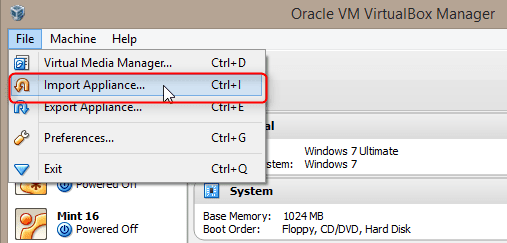
Pre-made virtual machines are called appliances. The Open Virtualization Format OVF standard uses the .ova extension (Open Virtual Appliance) for distribution of appliances.

If your Sage comes as an ova file, it means it can be imported as a virtual machine to standard virtualization platforms like VirtualBox or VMware. I suggest you download and install the free Oracle VirtualBox, download the Sage ova and simply import it to VirtualBox.

2014-02-06_16h50_26.png

Kari
 

My Computer

Computer type
Laptop
Computer Manufacturer/Model Number
HP ENVY 17-1150eg
OS
Windows 10 Pro x64 EN-GB
CPU
1.6 GHz Intel Core i7-720QM Processor
Memory
6 GB
Graphics Card(s)
ATI Mobility Radeon HD 5850 Graphics
Sound Card
Beats sound system with integrated subwoofer
Monitor(s) Displays
17" laptop display, 22" LED and 32" Full HD TV through HDMI
Screen Resolution
1600*900 (1), 1920*1080 (2&3)
Hard Drives
Internal: 2 x 500 GB SATA Hard Disk Drive 7200 rpm
External: 2TB for backups, 3TB USB3 network drive for media
Cooling
As Envy runs a bit warm, I have it on a Cooler Master pad
Keyboard
Logitech diNovo Media Desktop Laser (bluetooth)
Mouse
Logitech Performance Mouse MX
Internet Speed
50/10 Mbps VDSL
Antivirus
Windows Defender 4.3.9431.0
Browser
Maxthon 3.5.2., IE11
Thanks for the reply, that is what I surmised. Can this be done using instead the Win 7 VM, which I have installed to run WinXP Mode for such applications as VB 6 and VC++ 6? Or do I specifically need to use the Oracle or VMware VM you describe? Do you know wheteher the Sage package is worthwhile installing? And does that mean the Sage software is not available for 64-bit machines under Windows? I am just not sure if it would be easy to use the VM you describe from a Win 7 environment.

Thanks for the info

Pete B
 

My Computer

Computer type
PC/Desktop
Computer Manufacturer/Model Number
custom
OS
Microsoft Windows 7 Professional 64-bit 7601 Multiprocessor Free Service Pack 1
CPU
Intel(R) Pentium(R) CPU G645 @ 2.90GHz
Motherboard
Gigabyte Technology Co., Ltd. B75M-D3H
Memory
8.00 GB
Graphics Card(s)
Intel(R) HD Graphics
Sound Card
(1) Realtek High Definition Audio (2) Intel(R) Display Aud
Screen Resolution
1920 x 1080 x 32 bits (4294967296 colors) @ 60 Hz
Hard Drives
(1) WDC WD10EZEX-60ZF5A0 (2) HP Officejet J6400 USB Device (3) WD My Book 1130 USB Device
Antivirus
kasperskys
Browser
ie 10
Can this be done using instead the Win 7 VM, which I have installed to run WinXP Mode for such applications as VB 6 and VC++ 6?
I assume you mean Windows Virtual PC with "Win 7 vm", the virtualization platform needed to run Windows XP Mode?

Windows Virtual PC is a good and reliable platform to run Windows (XP and later) virtual machines but as the integration features only work on Windows virtual machines, it's not a good solution to run other virtual operating systems.


Or do I specifically need to use the Oracle or VMware VM you describe?
I recommend you use VirtualBox, based on that Sage seems to prefer it and has quite clear and precise instructions in using the Sage appliance on VirtualBox (SageAppliance - Sage Wiki).


Do you know wheteher the Sage package is worthwhile installing?
I have absolutely no clue. I do not use any mathematical special programs nor do I know them in general and Sage in particular.


And does that mean the Sage software is not available for 64-bit machines under Windows? I am just not sure if it would be easy to use the VM you describe from a Win 7 environment.
It is available for Windows machines but as it seems to run on its own modified operating system, it needs to be installed as a virtual appliance.

Using virtual machines is exactly as easy as to use the same operating system on a physical computer.

Kari
 

My Computer

Computer type
Laptop
Computer Manufacturer/Model Number
HP ENVY 17-1150eg
OS
Windows 10 Pro x64 EN-GB
CPU
1.6 GHz Intel Core i7-720QM Processor
Memory
6 GB
Graphics Card(s)
ATI Mobility Radeon HD 5850 Graphics
Sound Card
Beats sound system with integrated subwoofer
Monitor(s) Displays
17" laptop display, 22" LED and 32" Full HD TV through HDMI
Screen Resolution
1600*900 (1), 1920*1080 (2&3)
Hard Drives
Internal: 2 x 500 GB SATA Hard Disk Drive 7200 rpm
External: 2TB for backups, 3TB USB3 network drive for media
Cooling
As Envy runs a bit warm, I have it on a Cooler Master pad
Keyboard
Logitech diNovo Media Desktop Laser (bluetooth)
Mouse
Logitech Performance Mouse MX
Internet Speed
50/10 Mbps VDSL
Antivirus
Windows Defender 4.3.9431.0
Browser
Maxthon 3.5.2., IE11
Perhaps I did not express my concerns about VM problems clearly. When I used VMware in the past, I agree it had no problems running Linux under Windows, but it was very awkward ro get it to interface with the PC hardware directly in a way that could be accessed form Windows (for example, I had to use a virtusl HDD, and the interface to the network connection was complicated) whereas the Windows VM machine is very well integrated with the system hardware, which is why I asked about it.

But you have convinced me to try your suggestion. I will install VirtualBox and do as you suggest, I'll see how it goes. Thanks for the advice.

Pete B
 
Last edited:

My Computer

Computer type
PC/Desktop
Computer Manufacturer/Model Number
custom
OS
Microsoft Windows 7 Professional 64-bit 7601 Multiprocessor Free Service Pack 1
CPU
Intel(R) Pentium(R) CPU G645 @ 2.90GHz
Motherboard
Gigabyte Technology Co., Ltd. B75M-D3H
Memory
8.00 GB
Graphics Card(s)
Intel(R) HD Graphics
Sound Card
(1) Realtek High Definition Audio (2) Intel(R) Display Aud
Screen Resolution
1920 x 1080 x 32 bits (4294967296 colors) @ 60 Hz
Hard Drives
(1) WDC WD10EZEX-60ZF5A0 (2) HP Officejet J6400 USB Device (3) WD My Book 1130 USB Device
Antivirus
kasperskys
Browser
ie 10
Perhaps I did not express my concerns about VM problems clearly. When I used VMware in the past, I agree it had no problems running Linux under Windows, but it was very awkward ro get it to interface with the PC hardware directly in a way that could be accessed form Windows (for example, I had to use a virtusl HDD, and the interface to the network connection was complicated) whereas the Windows VM machine is very well integrated with the system hardware, which is why I asked about it.
You expressed your concerns very clearly, I tried to be as clear with my response: If you want to run Sage, you need to get the virtual appliance and install it as a virtual machine, whatever you think of virtual machines and virtualization.

Kari
 

My Computer

Computer type
Laptop
Computer Manufacturer/Model Number
HP ENVY 17-1150eg
OS
Windows 10 Pro x64 EN-GB
CPU
1.6 GHz Intel Core i7-720QM Processor
Memory
6 GB
Graphics Card(s)
ATI Mobility Radeon HD 5850 Graphics
Sound Card
Beats sound system with integrated subwoofer
Monitor(s) Displays
17" laptop display, 22" LED and 32" Full HD TV through HDMI
Screen Resolution
1600*900 (1), 1920*1080 (2&3)
Hard Drives
Internal: 2 x 500 GB SATA Hard Disk Drive 7200 rpm
External: 2TB for backups, 3TB USB3 network drive for media
Cooling
As Envy runs a bit warm, I have it on a Cooler Master pad
Keyboard
Logitech diNovo Media Desktop Laser (bluetooth)
Mouse
Logitech Performance Mouse MX
Internet Speed
50/10 Mbps VDSL
Antivirus
Windows Defender 4.3.9431.0
Browser
Maxthon 3.5.2., IE11
BTW, out of interest I downloaded the Sage appliance and imported it to VirtualBox.

2014-02-06_18h55_43.png

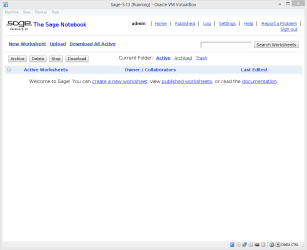
Seems to be built on a totally normal Fedora Linux. When the Sage vm is running, you can access it also from your Windows 7 host using any browser giving the local host address http://localhost:8000/

2014-02-06_18h57_30.png
 

My Computer

Computer type
Laptop
Computer Manufacturer/Model Number
HP ENVY 17-1150eg
OS
Windows 10 Pro x64 EN-GB
CPU
1.6 GHz Intel Core i7-720QM Processor
Memory
6 GB
Graphics Card(s)
ATI Mobility Radeon HD 5850 Graphics
Sound Card
Beats sound system with integrated subwoofer
Monitor(s) Displays
17" laptop display, 22" LED and 32" Full HD TV through HDMI
Screen Resolution
1600*900 (1), 1920*1080 (2&3)
Hard Drives
Internal: 2 x 500 GB SATA Hard Disk Drive 7200 rpm
External: 2TB for backups, 3TB USB3 network drive for media
Cooling
As Envy runs a bit warm, I have it on a Cooler Master pad
Keyboard
Logitech diNovo Media Desktop Laser (bluetooth)
Mouse
Logitech Performance Mouse MX
Internet Speed
50/10 Mbps VDSL
Antivirus
Windows Defender 4.3.9431.0
Browser
Maxthon 3.5.2., IE11
I seem to have lost my reply, so...

Yes, I followed your advice and everything went well, very smoth and quick. I now have Sage running.

Thanks again for your help

Pete B
 

My Computer

Computer type
PC/Desktop
Computer Manufacturer/Model Number
custom
OS
Microsoft Windows 7 Professional 64-bit 7601 Multiprocessor Free Service Pack 1
CPU
Intel(R) Pentium(R) CPU G645 @ 2.90GHz
Motherboard
Gigabyte Technology Co., Ltd. B75M-D3H
Memory
8.00 GB
Graphics Card(s)
Intel(R) HD Graphics
Sound Card
(1) Realtek High Definition Audio (2) Intel(R) Display Aud
Screen Resolution
1920 x 1080 x 32 bits (4294967296 colors) @ 60 Hz
Hard Drives
(1) WDC WD10EZEX-60ZF5A0 (2) HP Officejet J6400 USB Device (3) WD My Book 1130 USB Device
Antivirus
kasperskys
Browser
ie 10
You are welcome :).
 

My Computer

Computer type
Laptop
Computer Manufacturer/Model Number
HP ENVY 17-1150eg
OS
Windows 10 Pro x64 EN-GB
CPU
1.6 GHz Intel Core i7-720QM Processor
Memory
6 GB
Graphics Card(s)
ATI Mobility Radeon HD 5850 Graphics
Sound Card
Beats sound system with integrated subwoofer
Monitor(s) Displays
17" laptop display, 22" LED and 32" Full HD TV through HDMI
Screen Resolution
1600*900 (1), 1920*1080 (2&3)
Hard Drives
Internal: 2 x 500 GB SATA Hard Disk Drive 7200 rpm
External: 2TB for backups, 3TB USB3 network drive for media
Cooling
As Envy runs a bit warm, I have it on a Cooler Master pad
Keyboard
Logitech diNovo Media Desktop Laser (bluetooth)
Mouse
Logitech Performance Mouse MX
Internet Speed
50/10 Mbps VDSL
Antivirus
Windows Defender 4.3.9431.0
Browser
Maxthon 3.5.2., IE11
Back
Top