Installing programs on 64bit win7

kade119

New member
Local time
4:39 PM
Messages
20
I installed win7 64bit but i'm noticing everytime I install any software including software that uses 64bit it's installing under the x86 folder... why the heck is this? like my adobe suite went there.. and when i open my process manager they all say *32 by them.. how can i move them to reach their full potential as a 64 bit program?
 

My Computer

OS
win 7
Last edited:

My Computer

Computer type
PC/Desktop
Computer Manufacturer/Model Number
Dell XPS 420
OS
Windows 10, Home Clean Install
CPU
Intel Core2 processsor Q8200(2.33Ghz 1333FSB) Quad Core Tech
Motherboard
Dell
Memory
6 gb
Graphics Card(s)
ATI Radeon 256MB HD3650
Sound Card
Intergrated 7.1 Channel Audio
Monitor(s) Displays
Dell SP2009W 20"
Hard Drives
640 GB Serial ATA Hard drive
Cooling
Fan
Keyboard
Dell USB Keyboard
Mouse
Dell Premium Optical USB
Internet Speed
DSL 2.85
There are two Program Files folders, meant to keep true x64 apps separate from ones that aren't (and are just compatible with an x64 OS). Your system is working perfectly normal, and in the future, when you go to install new apps, let them go to the Program Files folder they default to.
 

My Computer

OS
Windows 7 Ultimate x64 SP1
CPU
Intel Core i7-2600
Motherboard
Gigabyte GA-P67A-UD3P-B3
Memory
12 GB Patriot Extreme DDR3-1333
Graphics Card(s)
Nvidia GTX 470
Monitor(s) Displays
Dell UltraSharp 2209WA
Hard Drives
OCZ Agility3 240 GB, WD5001AALS, WD7501AALS
PSU
OCZ ModStream 700W
Case
CoolerMaster HAF 912 Advanced
Cooling
CoolerMaster Hyper 212 Plus
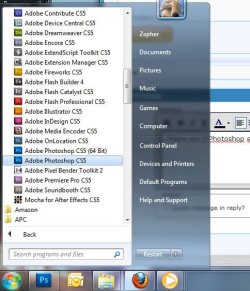
There are only 3 Adobe 64bit apps, Premiere Pro, After Effects, and Photoshop (which has both 32 and 64bit) the rest of the suite is 32bit only.
Adobe Media Encoder CS5 is in the Program Files Folder as well, so it may be 64bit too.
 

My Computer

Computer Manufacturer/Model Number
HAL-9000
OS
Windows 7 Ultimate 64bit
CPU
Intel i7 3770K
Motherboard
Asus Sabertooth Z77
Memory
16GB DDR3 1333 Corsair XMS3
Graphics Card(s)
XFX HD6950 2GB EyeFinity
Sound Card
Logitech G35 & Sennheiser PC135 & VIA HD
Monitor(s) Displays
23" HP 2310e, 23" Samsung B2230, 21.5" Viewsonic
Screen Resolution
5760x1080
Hard Drives
16TB of Storage
128GB & 256GB Crucial M4 SSD's, 2X 1TB WD Black, 3x 2TB WD, 3x 2TB Samsung F4, 1.5TB Seagate, WD 500GB,
PSU
Antec True Power New 650watt
Case
Cooler Master HAF-932
Cooling
Corsair H60 Hydro Cooler, 3x 230mm Fans, 2x120mm Fan
Keyboard
Logitech G15 and G13
Mouse
Logitech G700 Gaming Mouse
Internet Speed
50/10 Mbit
Other Info
Speakers : Alesis M1 Active Mk2 Studio Monitors , APC RS 1200 UPS, HP 4500DN Color Laser, HP P1006 mono Laser, Kodak 8500 Dye-Sub, Epson 1280 inkjet, Epson Worforce 610 MFC
X86/X64 programs

I installed win7 64bit but i'm noticing everytime I install any software including software that uses 64bit it's installing under the x86 folder... why the heck is this? like my adobe suite went there.. and when i open my process manager they all say *32 by them.. how can i move them to reach their full potential as a 64 bit program?
Welcome to Windows 7 Support Forums,
Kade, in order for Windows 7 in the 64 bit version its necessary for it to have backward compatability. When the RC version was released for testingabout 2 years ago, 64 bit machines were just starting to rollout of production. Since almost 99% of the existing software at that time was x86 based Windows needed to be able to run x86 software on a 64 bit paltform with a 64 bit OS, Hardware/software is starting to rollout of production in X64 but its still not in the majority, look at your Flash player, we still can't get a 64 bit flash player to operate in an ie64 bit environment.
 

My Computer

Computer Manufacturer/Model Number
Custom Build
OS
Windows 7 7600 1 X64
CPU
AMD PHENOM II X 550 PROCESSOR 3.1 ghz
Motherboard
ASUS M4A78-TE
Memory
Corsair 4 gig ddr 3
Graphics Card(s)
ati radeon 3300
Sound Card
ati hd
Monitor(s) Displays
syncmaster 2033sw
Screen Resolution
1600X900 60 hz refresh
Hard Drives
twin_seagates SATA's 1 TB & 500 Gig, hitachi_slimline 160 gig
PSU
antec_550 watt
Case
cooler master GLite
Cooling
stock_heat sink
Internet Speed
20mbs up/ 1.5mbs down
Other Info
favorite child "stewie"
favorite dog "brian"
I installed win7 64bit but i'm noticing everytime I install any software including software that uses 64bit it's installing under the x86 folder... why the heck is this? like my adobe suite went there.. and when i open my process manager they all say *32 by them.. how can i move them to reach their full potential as a 64 bit program?
Welcome to Windows 7 Support Forums,
Kade, in order for Windows 7 in the 64 bit version its necessary for it to have backward compatability. When the RC version was released for testingabout 2 years ago, 64 bit machines were just starting to rollout of production. Since almost 99% of the existing software at that time was x86 based Windows needed to be able to run x86 software on a 64 bit paltform with a 64 bit OS, Hardware/software is starting to rollout of production in X64 but its still not in the majority, look at your Flash player, we still can't get a 64 bit flash player to operate in an ie64 bit environment.

2003 was when 64bit CPU's were rolled out for Desktop use by AMD, 2005 is when Windows XP 64bit came out.

There isn't a 64bit Flash player available from Adobe yet, which is why you can't get it to work in a 64bit browser.
 

My Computer

Computer Manufacturer/Model Number
HAL-9000
OS
Windows 7 Ultimate 64bit
CPU
Intel i7 3770K
Motherboard
Asus Sabertooth Z77
Memory
16GB DDR3 1333 Corsair XMS3
Graphics Card(s)
XFX HD6950 2GB EyeFinity
Sound Card
Logitech G35 & Sennheiser PC135 & VIA HD
Monitor(s) Displays
23" HP 2310e, 23" Samsung B2230, 21.5" Viewsonic
Screen Resolution
5760x1080
Hard Drives
16TB of Storage
128GB & 256GB Crucial M4 SSD's, 2X 1TB WD Black, 3x 2TB WD, 3x 2TB Samsung F4, 1.5TB Seagate, WD 500GB,
PSU
Antec True Power New 650watt
Case
Cooler Master HAF-932
Cooling
Corsair H60 Hydro Cooler, 3x 230mm Fans, 2x120mm Fan
Keyboard
Logitech G15 and G13
Mouse
Logitech G700 Gaming Mouse
Internet Speed
50/10 Mbit
Other Info
Speakers : Alesis M1 Active Mk2 Studio Monitors , APC RS 1200 UPS, HP 4500DN Color Laser, HP P1006 mono Laser, Kodak 8500 Dye-Sub, Epson 1280 inkjet, Epson Worforce 610 MFC
I installed win7 64bit but i'm noticing everytime I install any software including software that uses 64bit it's installing under the x86 folder... why the heck is this? like my adobe suite went there.. and when i open my process manager they all say *32 by them.. how can i move them to reach their full potential as a 64 bit program?
Welcome to Windows 7 Support Forums,
Kade, in order for Windows 7 in the 64 bit version its necessary for it to have backward compatability. When the RC version was released for testingabout 2 years ago, 64 bit machines were just starting to rollout of production. Since almost 99% of the existing software at that time was x86 based Windows needed to be able to run x86 software on a 64 bit paltform with a 64 bit OS, Hardware/software is starting to rollout of production in X64 but its still not in the majority, look at your Flash player, we still can't get a 64 bit flash player to operate in an ie64 bit environment.

2003 was when 64bit CPU's were rolled out for Desktop use by AMD, 2005 is when Windows XP 64bit came out.
As I can painfully testify, I truly was happy with XP 64 Pro, support was virtually NIL. I still have my disk :geek:
 

My Computer

Computer Manufacturer/Model Number
Custom Build
OS
Windows 7 7600 1 X64
CPU
AMD PHENOM II X 550 PROCESSOR 3.1 ghz
Motherboard
ASUS M4A78-TE
Memory
Corsair 4 gig ddr 3
Graphics Card(s)
ati radeon 3300
Sound Card
ati hd
Monitor(s) Displays
syncmaster 2033sw
Screen Resolution
1600X900 60 hz refresh
Hard Drives
twin_seagates SATA's 1 TB & 500 Gig, hitachi_slimline 160 gig
PSU
antec_550 watt
Case
cooler master GLite
Cooling
stock_heat sink
Internet Speed
20mbs up/ 1.5mbs down
Other Info
favorite child "stewie"
favorite dog "brian"
first of off.. WOW this board is very supportive.. thanks to all of you.. the primary program I use is adobe photoshop and it's listed as 32bit.. even though it's 64bit.. why is that?
 

My Computer

OS
win 7
first of off.. WOW this board is very supportive.. thanks to all of you.. the primary program I use is adobe photoshop and it's listed as 32bit.. even though it's 64bit.. why is that?
Kade, while I'm not familiar w/adobe I can tell you that Itunes does pretty much the same, it comes in a 64 bit version but installs as a 32 bit program and resides in the 32 bit program folder.
 

My Computer

Computer Manufacturer/Model Number
Custom Build
OS
Windows 7 7600 1 X64
CPU
AMD PHENOM II X 550 PROCESSOR 3.1 ghz
Motherboard
ASUS M4A78-TE
Memory
Corsair 4 gig ddr 3
Graphics Card(s)
ati radeon 3300
Sound Card
ati hd
Monitor(s) Displays
syncmaster 2033sw
Screen Resolution
1600X900 60 hz refresh
Hard Drives
twin_seagates SATA's 1 TB & 500 Gig, hitachi_slimline 160 gig
PSU
antec_550 watt
Case
cooler master GLite
Cooling
stock_heat sink
Internet Speed
20mbs up/ 1.5mbs down
Other Info
favorite child "stewie"
favorite dog "brian"
first of off.. WOW this board is very supportive.. thanks to all of you.. the primary program I use is adobe photoshop and it's listed as 32bit.. even though it's 64bit.. why is that?
You are confusing the terms "64 bit compatible" with a true 64 bit application. Just because a program was developed and designed to run on an x64 OS, doesn't mean the actual executable it coded as an x64 app. What you are seeing is perfectly normal.
 

My Computer

OS
Windows 7 Ultimate x64 SP1
CPU
Intel Core i7-2600
Motherboard
Gigabyte GA-P67A-UD3P-B3
Memory
12 GB Patriot Extreme DDR3-1333
Graphics Card(s)
Nvidia GTX 470
Monitor(s) Displays
Dell UltraSharp 2209WA
Hard Drives
OCZ Agility3 240 GB, WD5001AALS, WD7501AALS
PSU
OCZ ModStream 700W
Case
CoolerMaster HAF 912 Advanced
Cooling
CoolerMaster Hyper 212 Plus
ah okay so photoshop might not actually be a true 64bit application just built to run on it...
 

My Computer

OS
win 7
so it's not taking advantage of ram above like 3.4 or something, correct
 

My Computer

OS
win 7
so it's not taking advantage of ram above like 3.4 or something, correct
Again, you're confusing concepts you've heard applied elsewhere. The OS determines how much memory is available for the system to use. So, if you have 8 GB for example, It could give 3 GB to Photoshop, 2 GB to VirtualBox, another GB to various apps and be fine. On an x86 system, you wouldn't be using that much memory without getting out of memory errors long before.

You're spending time worrying about issues that aren't really there. Your system is working just fine. My graphics designer has a similar setup, and has no issues using several of the Adobe CS4 apps at once, with only 4 GB of system memory.
 

My Computer

OS
Windows 7 Ultimate x64 SP1
CPU
Intel Core i7-2600
Motherboard
Gigabyte GA-P67A-UD3P-B3
Memory
12 GB Patriot Extreme DDR3-1333
Graphics Card(s)
Nvidia GTX 470
Monitor(s) Displays
Dell UltraSharp 2209WA
Hard Drives
OCZ Agility3 240 GB, WD5001AALS, WD7501AALS
PSU
OCZ ModStream 700W
Case
CoolerMaster HAF 912 Advanced
Cooling
CoolerMaster Hyper 212 Plus
so it's not taking advantage of ram above like 3.4 or something, correct
I'm not clear on what you are saying, your system utilises all the available physical ram because Windows 7 has a very high memory call. The older 32 bit machines using older OS had limited memory call. When I say memory call, this is what the O/S will call for physical memory, XP and so on would only call for 2-3 megs of physical memory, so the millions of folks that thought by upgrading and adding huge amounts of memory were wasting their money because their operating systems would only use a fraction.
 
Last edited:

My Computer

Computer Manufacturer/Model Number
Custom Build
OS
Windows 7 7600 1 X64
CPU
AMD PHENOM II X 550 PROCESSOR 3.1 ghz
Motherboard
ASUS M4A78-TE
Memory
Corsair 4 gig ddr 3
Graphics Card(s)
ati radeon 3300
Sound Card
ati hd
Monitor(s) Displays
syncmaster 2033sw
Screen Resolution
1600X900 60 hz refresh
Hard Drives
twin_seagates SATA's 1 TB & 500 Gig, hitachi_slimline 160 gig
PSU
antec_550 watt
Case
cooler master GLite
Cooling
stock_heat sink
Internet Speed
20mbs up/ 1.5mbs down
Other Info
favorite child "stewie"
favorite dog "brian"
There are 2 Photoshop exe's, one is 32bit and the other is 64bit.
 

Attachments

  • adobe start.jpg
    adobe start.jpg
    102.3 KB · Views: 2

My Computer

Computer Manufacturer/Model Number
HAL-9000
OS
Windows 7 Ultimate 64bit
CPU
Intel i7 3770K
Motherboard
Asus Sabertooth Z77
Memory
16GB DDR3 1333 Corsair XMS3
Graphics Card(s)
XFX HD6950 2GB EyeFinity
Sound Card
Logitech G35 & Sennheiser PC135 & VIA HD
Monitor(s) Displays
23" HP 2310e, 23" Samsung B2230, 21.5" Viewsonic
Screen Resolution
5760x1080
Hard Drives
16TB of Storage
128GB & 256GB Crucial M4 SSD's, 2X 1TB WD Black, 3x 2TB WD, 3x 2TB Samsung F4, 1.5TB Seagate, WD 500GB,
PSU
Antec True Power New 650watt
Case
Cooler Master HAF-932
Cooling
Corsair H60 Hydro Cooler, 3x 230mm Fans, 2x120mm Fan
Keyboard
Logitech G15 and G13
Mouse
Logitech G700 Gaming Mouse
Internet Speed
50/10 Mbit
Other Info
Speakers : Alesis M1 Active Mk2 Studio Monitors , APC RS 1200 UPS, HP 4500DN Color Laser, HP P1006 mono Laser, Kodak 8500 Dye-Sub, Epson 1280 inkjet, Epson Worforce 610 MFC
so it's not taking advantage of ram above like 3.4 or something, correct
Again, you're confusing concepts you've heard applied elsewhere. The OS determines how much memory is available for the system to use. So, if you have 8 GB for example, It could give 3 GB to Photoshop, 2 GB to VirtualBox, another GB to various apps and be fine. On an x86 system, you wouldn't be using that much memory without getting out of memory errors long before.

You're spending time worrying about issues that aren't really there. Your system is working just fine. My graphics designer has a similar setup, and has no issues using several of the Adobe CS4 apps at once, with only 4 GB of system memory.

Actually, if you use 32bit Adobe apps, the max ram available to any of the apps is up to 4GB, doesn't matter if you have 16GB, app will only use up to 4GB.
64bit Adobe Apps will use as much ram as the system has.
This is the main reason that Premiere and After Effects are 64bit only, it takes away the 4GB limit.

EDIT: it appears that the 32bit Photoshop will allow me to use up to 7GB of ram.
 

My Computer

Computer Manufacturer/Model Number
HAL-9000
OS
Windows 7 Ultimate 64bit
CPU
Intel i7 3770K
Motherboard
Asus Sabertooth Z77
Memory
16GB DDR3 1333 Corsair XMS3
Graphics Card(s)
XFX HD6950 2GB EyeFinity
Sound Card
Logitech G35 & Sennheiser PC135 & VIA HD
Monitor(s) Displays
23" HP 2310e, 23" Samsung B2230, 21.5" Viewsonic
Screen Resolution
5760x1080
Hard Drives
16TB of Storage
128GB & 256GB Crucial M4 SSD's, 2X 1TB WD Black, 3x 2TB WD, 3x 2TB Samsung F4, 1.5TB Seagate, WD 500GB,
PSU
Antec True Power New 650watt
Case
Cooler Master HAF-932
Cooling
Corsair H60 Hydro Cooler, 3x 230mm Fans, 2x120mm Fan
Keyboard
Logitech G15 and G13
Mouse
Logitech G700 Gaming Mouse
Internet Speed
50/10 Mbit
Other Info
Speakers : Alesis M1 Active Mk2 Studio Monitors , APC RS 1200 UPS, HP 4500DN Color Laser, HP P1006 mono Laser, Kodak 8500 Dye-Sub, Epson 1280 inkjet, Epson Worforce 610 MFC
Back
Top