Installing two Windows on a hard drive

marossity

New member
Local time
4:59 PM
Messages
16
Location
Beer Sheva, Israel
I have Windows XP Pro installed on my SONY laptop. It is in English.
I want to install another Windows XP in a different language, on a separate partition.
Can I do this, or does MS Windows demand to be installed on the C: drive?
 

My Computer

Computer Manufacturer/Model Number
HP All-in-One 200
OS
MS Windows 7 Home x64
CPU
Pentium(R) Dual-Core CPU E5400 @ 2.70 GHz
Motherboard
HP 2AA2 Chipset Intel G45/G43/P45/P43 Southbridge Intel ICH1
Memory
4 GB DDR3-SDRAM (1333 Mhz)
Graphics Card(s)
Intel(R) G45/G53 Express Chipset 1.76 GB memory
Sound Card
Realtek High Definition Audio
Monitor(s) Displays
Generic PnP Monitor 1920x1080 (32-bit) (60Hz)
Hard Drives
Samsung HD502HJ 500 GB 7200 RPM
Case
All-in-one
Keyboard
HP wireless
Mouse
HP wireless
Internet Speed
Down - 1.6 Mbps Up - 0.16 Mbps
Hello marossity, welcome to Seven Forums!


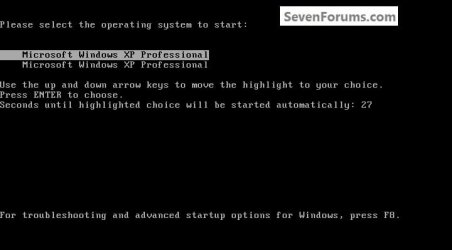
You can install a second XP to the same Hard Disk Drive (HDD) on a separate partition and XP will even configure a dual boot menu but I have not as yet been able to get the second XP to install ac C: so that may cause issues with some installed programs/apps that are hard-coded to look for C: during their installation process.


click to enlarge
XPDualBoot.jpg
 

My Computer

Computer Manufacturer/Model Number
* BFK Customs *
OS
W 7 64-bit Ultimate
CPU
Intel Q9550 Yorkfield
Motherboard
ASUS P5Q Pro
Memory
8GB Dominator 8500C5D
Graphics Card(s)
ATI : XFX 5870
Sound Card
Realtek HD Audio 7-1
Monitor(s) Displays
1x 47" LCD HDMI & 3x 26" LCD HDMI
Screen Resolution
1920x1080P & 1920x1200
Hard Drives
1x 80GB Intel X25-M G2 SSD : 1x 500GB & 1x 640GB WD Caviar Black(s)
PSU
Corsair 620HX
Case
Cooler Master RC-690
Cooling
Tuniq Tower 120, 2x 140mm and 3x 120mm case fans
Keyboard
Microsoft 500
Mouse
Razer Diamondback 3G
Internet Speed
14 Mb/s
Other Info
1x Koutech 3Gb/s SATA HDD Hot Swap Rack
Thank you for the reply -
Yes, I can see how that might be a problem, but I am going to give it a go anyway and see what develops. :geek:
Me thinks me is going to need a little luck, me thinks.;)
 

My Computer

Computer Manufacturer/Model Number
HP All-in-One 200
OS
MS Windows 7 Home x64
CPU
Pentium(R) Dual-Core CPU E5400 @ 2.70 GHz
Motherboard
HP 2AA2 Chipset Intel G45/G43/P45/P43 Southbridge Intel ICH1
Memory
4 GB DDR3-SDRAM (1333 Mhz)
Graphics Card(s)
Intel(R) G45/G53 Express Chipset 1.76 GB memory
Sound Card
Realtek High Definition Audio
Monitor(s) Displays
Generic PnP Monitor 1920x1080 (32-bit) (60Hz)
Hard Drives
Samsung HD502HJ 500 GB 7200 RPM
Case
All-in-one
Keyboard
HP wireless
Mouse
HP wireless
Internet Speed
Down - 1.6 Mbps Up - 0.16 Mbps
I know it's possible to install 2 separate XPs; be sure to post back to keep me informed. ;)


I'm still working to see if I can get the second to install as C: but am having no luck so far.
 

My Computer

Computer Manufacturer/Model Number
* BFK Customs *
OS
W 7 64-bit Ultimate
CPU
Intel Q9550 Yorkfield
Motherboard
ASUS P5Q Pro
Memory
8GB Dominator 8500C5D
Graphics Card(s)
ATI : XFX 5870
Sound Card
Realtek HD Audio 7-1
Monitor(s) Displays
1x 47" LCD HDMI & 3x 26" LCD HDMI
Screen Resolution
1920x1080P & 1920x1200
Hard Drives
1x 80GB Intel X25-M G2 SSD : 1x 500GB & 1x 640GB WD Caviar Black(s)
PSU
Corsair 620HX
Case
Cooler Master RC-690
Cooling
Tuniq Tower 120, 2x 140mm and 3x 120mm case fans
Keyboard
Microsoft 500
Mouse
Razer Diamondback 3G
Internet Speed
14 Mb/s
Other Info
1x Koutech 3Gb/s SATA HDD Hot Swap Rack
BFK,
I thought installing 2 OSs (both XP or otherwise) on two separate HDD BIOS booting was fine. But wouldn't this have the drive letter problem also you refer to when it comes to some applications?
 

My Computer

Computer type
PC/Desktop
Computer Manufacturer/Model Number
Own build
OS
Windows 7x64 Home Premium SP1
CPU
Intel i7 2600k
Motherboard
ASUS P8Z68 Deluxe
Memory
G.Skill Ripjaws (DDR3-1600) 2x4GB
Graphics Card(s)
Nvidia GeForce GTS 450; Intel HD Graphics 3000(GT2+)
Monitor(s) Displays
Dell Ultrasharp IPS panel U2311H, Samsung SyncMaster P2350
Screen Resolution
1920x1080
Hard Drives
Samsung 850 Pro SSD 256GB, Samsung SSD 840 120GB, Seagates 1TB Barracuda ST31000528AS x2
PSU
Seasonic M12II 520W
Case
Lian Li Lancool PC-K60
Cooling
Case: 1x120mm, 3x140mm CPU: Hyper 212+
Keyboard
Logitech MK520 (wireless)
Mouse
Logitech MK520
Internet Speed
6-7 Mbps
Antivirus
Norton Security Premium, Malwarebytes on 2 (MSE on 3rd PC)
Browser
FireFox
Other Info
Audio: Logitech Z523 2.1
Hello Michael.


Each could be C: if installed to separate HDDs, one connected at a time for each install and using the BIOS one-time boot menu but not the case on a single HDD.

The installer for the second XP install will 'see' the first installed XP and not allow the letter C: to be used for the second install; thankfully Windows 7 is more intelligent than that.

I even tried using the Windows 7 installer to boot to diskpart and create a new partition and assign it C: and format for it but that's not allowed either.


I tried this thinking creating a second partition in the first spot on the HDD, after the first install would 'fool' the second XP into thinking it was being installed as C: but that didn't work either.


click to enlarge
FirstXP.jpg
 

My Computer

Computer Manufacturer/Model Number
* BFK Customs *
OS
W 7 64-bit Ultimate
CPU
Intel Q9550 Yorkfield
Motherboard
ASUS P5Q Pro
Memory
8GB Dominator 8500C5D
Graphics Card(s)
ATI : XFX 5870
Sound Card
Realtek HD Audio 7-1
Monitor(s) Displays
1x 47" LCD HDMI & 3x 26" LCD HDMI
Screen Resolution
1920x1080P & 1920x1200
Hard Drives
1x 80GB Intel X25-M G2 SSD : 1x 500GB & 1x 640GB WD Caviar Black(s)
PSU
Corsair 620HX
Case
Cooler Master RC-690
Cooling
Tuniq Tower 120, 2x 140mm and 3x 120mm case fans
Keyboard
Microsoft 500
Mouse
Razer Diamondback 3G
Internet Speed
14 Mb/s
Other Info
1x Koutech 3Gb/s SATA HDD Hot Swap Rack
Hello Michael.


Each could be C: if installed to separate HDDs, one connected at a time for each install and using the BIOS one-time boot menu but not the case on a single HDD.

The installer for the second XP install will 'see' the first installed XP and not allow the letter C: to be used for the second install; thankfully Windows 7 is more intelligent than that.
OK but one of the HDDs installs would be assigned a "floating" letter assigned by Windows at boot I believe.

I wonder if multiple licenses would be required for OSs and third party software installed on different partitions of the same disk?
 
Last edited:

My Computer

Computer type
PC/Desktop
Computer Manufacturer/Model Number
Own build
OS
Windows 7x64 Home Premium SP1
CPU
Intel i7 2600k
Motherboard
ASUS P8Z68 Deluxe
Memory
G.Skill Ripjaws (DDR3-1600) 2x4GB
Graphics Card(s)
Nvidia GeForce GTS 450; Intel HD Graphics 3000(GT2+)
Monitor(s) Displays
Dell Ultrasharp IPS panel U2311H, Samsung SyncMaster P2350
Screen Resolution
1920x1080
Hard Drives
Samsung 850 Pro SSD 256GB, Samsung SSD 840 120GB, Seagates 1TB Barracuda ST31000528AS x2
PSU
Seasonic M12II 520W
Case
Lian Li Lancool PC-K60
Cooling
Case: 1x120mm, 3x140mm CPU: Hyper 212+
Keyboard
Logitech MK520 (wireless)
Mouse
Logitech MK520
Internet Speed
6-7 Mbps
Antivirus
Norton Security Premium, Malwarebytes on 2 (MSE on 3rd PC)
Browser
FireFox
Other Info
Audio: Logitech Z523 2.1
Use free Partition Wizard bootable CD to shrink your existing XP to make space for your Dual Boot XP.

Boot the XP installer, create a New Partition in the space you created and full format it NTFS.

After install, Install Easy BCD 2.0 to add the other XP to a Dual Boot menu. You'll need to install Net Framework 2.0 first to run Easy in XP.
 
Did you not see my #2 post above?


There's no need to use EasyBCD, the second XP added a dual boot menu without any out-side help.
 

My Computer

Computer Manufacturer/Model Number
* BFK Customs *
OS
W 7 64-bit Ultimate
CPU
Intel Q9550 Yorkfield
Motherboard
ASUS P5Q Pro
Memory
8GB Dominator 8500C5D
Graphics Card(s)
ATI : XFX 5870
Sound Card
Realtek HD Audio 7-1
Monitor(s) Displays
1x 47" LCD HDMI & 3x 26" LCD HDMI
Screen Resolution
1920x1080P & 1920x1200
Hard Drives
1x 80GB Intel X25-M G2 SSD : 1x 500GB & 1x 640GB WD Caviar Black(s)
PSU
Corsair 620HX
Case
Cooler Master RC-690
Cooling
Tuniq Tower 120, 2x 140mm and 3x 120mm case fans
Keyboard
Microsoft 500
Mouse
Razer Diamondback 3G
Internet Speed
14 Mb/s
Other Info
1x Koutech 3Gb/s SATA HDD Hot Swap Rack
Back
Top