Installing W7 on an ssd without deleting previous install

Pl4t0

New member
Local time
5:58 AM
Messages
1
Kind of a hard concept to impart in the title, but here's the gist of it:

I got an SSD for Christmas (:D), and plan to make it Windows' new home. I'm going to install the SSD, put Windows onto it, tell Windows (through the BIOS) to boot from the SSD over the drive that already has Windows installed, and then delete the previous Windows installation from there. So, I will be installing Windows on the SSD without first deleting the original Windows installation, and only getting rid of that installation once Windows is installed on the SSD. If that makes sense.

At least, that's the idea - computers being the way they are, I'm aware that if I carry through there may or may not be disastrous consequences during any one of those steps because of some unforeseen stipulation of SSD's or other hardware.

My question, then, is if there is anything I should know or otherwise do differently about reinstalling Windows in this way, without first deleting the other installation? Is there an easier way to accomplish this, or am I just plain doing it wrong? Please do not hesitate to point out the flaws in my plan. Thank you.

Edit: I just read that it's a good idea to keep the HDD unplugged while installing on the SSD, which makes a ton of sense. So, let me rephrase my question thusly: after installing on the SSD and plugging the HDD with Windows on it back in, will the two installations conflict with each other and cause problems (considering I have told Windows to boot from the SSD first)?
 

My Computer My Computer

At a glance

Windows 7 Home Premium 32bit
OS
Windows 7 Home Premium 32bit
If you don`t have anything you want on the old HD you can leave it plugged in while you install to your new drive. Just delete all partitions when you start the new install. If you don`t delete the old, then you should have the option to pick either W7 install when done.

Personally, I would add the old HD later. That is, if you even need it.
 

My Computer My Computer

At a glance

Windows 10 Pro x64Intel Core i7 6700KGSkill TridentZ RGB 16GB 3600 16-16-16-36EVGA GTX 980 Ti SC x2
Computer type
PC/Desktop
Computer Manufacturer/Model Number
Skylake Special #666
OS
Windows 10 Pro x64
CPU
Intel Core i7 6700K
Motherboard
Asus Sabertooth Z170 Mark 1
Memory
GSkill TridentZ RGB 16GB 3600 16-16-16-36
Graphics Card(s)
EVGA GTX 980 Ti SC x2
Sound Card
Realtek High Definition
Monitor(s) Displays
AOC G2460PG
Screen Resolution
1920 x 1080 144Hz
Hard Drives
Samsung 860 Pro 256GB, Seagate Barracuda 4TB x2
PSU
EVGA 1000 P2, EVGA White Custom Braided Cables
Case
Corsair Vengeance C70 Gunmetal Black
Cooling
Corsair H100i v2, Corsair ML120 x2, Thermal Grizzly Kryonaut
Keyboard
Logitech G910 Orion Spectrum
Mouse
Logitech G700s
Internet Speed
Verizon Fios Quantum Gateway 75/75
Antivirus
Windows Defender, Malwarebytes Free 3.8.3
Browser
Chrome
Other Info
Corsair SP120 x4, LG Blu-ray Drive, Durabrand HT-395 100 Watt Dolby Digital Amp, Corsair H2100 Wireless 7.1 Headset
Just make sure the SSD remains first to boot when replugging the HD after install. Then you can access its files from SSD and even boot HD when needed using the one-time BIOS Boot Menu key.

When ready delete Win7 on HD, to delete just its partition use Diskpart Delete Partition Override command (partition-specific) or to wipe the HD use Clean command.
Clean and Clean All with Diskpart Command
 
Similar situation

I hope this isn't a threadjack, but I have a very similar situation.

I'm building a whole new PC from scratch. The only thing coming over from this one is the (brand new) 1 TB HDD.

Can I install Win7 on the new SSD, in the new machine and then just move the old HDD drive over? This should retain all my data.

Can I then just point the Windows folders and libraries to the old HDD?

I realize I will still have to reinstall all the software, but I kept the install files on the old HDD. In fact, I might just download the most current versions of everything and then install them to the SSD from the HDD.

Thanks
 

My Computer My Computer

At a glance

Win 7-64 SP-1Intel Core 7, quad, 3.4ghz4 gig G.SkillGigabyte 440 - 1gig
Computer Manufacturer/Model Number
Me
OS
Win 7-64 SP-1
CPU
Intel Core 7, quad, 3.4ghz
Motherboard
Gigabyte GA-Z58M-D2H
Memory
4 gig G.Skill
Graphics Card(s)
Gigabyte 440 - 1gig
Sound Card
onboard
Monitor(s) Displays
Asus 24"
Hard Drives
Boot - Corsair 64gig SATA3 SSD
Data - Seagate 1 Tb SATA2
PSU
Corsair 650W
Case
Corsair Graphite
Cooling
4 case fans, video fan, oversized CPU fan and heatsink
Keyboard
Logitech
Mouse
Logitech
Internet Speed
DSL 6Mbps down
Other Info
never overclocked
I have surgically removed all of the Windows files from an OS before but it takes persistence and Take Ownership Shortcut.

Then you could indeed link the User folders to the old HD using this method: User Folders - Change Default Location

Better to move the data off and wipe the old HD as it could have code in the bootsector which can become corrupted and interfere even with all traces of Windows deleted off of it.

I regularly come across cases where a PC won't start until data HD is removed, and is only solved by wiping the HD which had corrupt code in bootsector blocking BIOS post.
 
I have surgically removed all of the Windows files from an OS before but it takes persistence and Take Ownership Shortcut.

Then you could indeed link the User folders to the old HD using this method: User Folders - Change Default Location

Better to move the data off and wipe the old HD as it could have code in the bootsector which can become corrupted and interfere even with all traces of Windows deleted off of it.

I regularly come across cases where a PC won't start until data HD is removed, and is only solved by wiping the HD which had corrupt code in bootsector blocking BIOS post.

Makes sense. Thanks.
 

My Computer My Computer

At a glance

Win 7-64 SP-1Intel Core 7, quad, 3.4ghz4 gig G.SkillGigabyte 440 - 1gig
Computer Manufacturer/Model Number
Me
OS
Win 7-64 SP-1
CPU
Intel Core 7, quad, 3.4ghz
Motherboard
Gigabyte GA-Z58M-D2H
Memory
4 gig G.Skill
Graphics Card(s)
Gigabyte 440 - 1gig
Sound Card
onboard
Monitor(s) Displays
Asus 24"
Hard Drives
Boot - Corsair 64gig SATA3 SSD
Data - Seagate 1 Tb SATA2
PSU
Corsair 650W
Case
Corsair Graphite
Cooling
4 case fans, video fan, oversized CPU fan and heatsink
Keyboard
Logitech
Mouse
Logitech
Internet Speed
DSL 6Mbps down
Other Info
never overclocked
To further piggyback here...

I jumped in feet-first with my new SSD. I installed Win7 with two other HDDs plugged in, one of which holds my old installation.

In my BIOS when I set my SSD to be the primary boot, the computer says something to the tune of "plug in acceptable boot device or attach removeable boot device and hit ok." However, when I set the old boot HDD to be primary, I get the screen letting me select which installation I want to boot.

I assume there's something in the system I need to change? It's probably significant that I did not install from a DVD, but just ran the executable from my old installation and pointed it to my newly attached SSD. Thanks.
 

My Computer My Computer

At a glance

7 Professional x64 - SP1Phenom II x4 955BE2 x 4GB GSkill Ripjaws DDR3-1333XFX Radeon 5770
OS
7 Professional x64 - SP1
CPU
Phenom II x4 955BE
Motherboard
Asus M4A88TD-V
Memory
2 x 4GB GSkill Ripjaws DDR3-1333
Graphics Card(s)
XFX Radeon 5770
Monitor(s) Displays
Samsung P2770HD - 27"; Samsung 953BW - 19"
Screen Resolution
1920x1080; 1440x900
Hard Drives
Corsair Force Series 3 180 GB; Samsung 7200RPM/500GB; Samsung 5400RPM/2TB (Backup)
PSU
Antec BP550 (80+ Cert.)
Case
Cooler Master HAF 912
Cooling
Cooler Master Hyper 212 Plus + 5x120mm fans
Keyboard
Logitech K750 Solar
Mouse
Razer Mamba
This is why it's best to unplug all other HD's when installing.

Win7 also should be installed from booted DVD media so that it always is C when booted into it. You locked out C by installing from another OS if it was C.

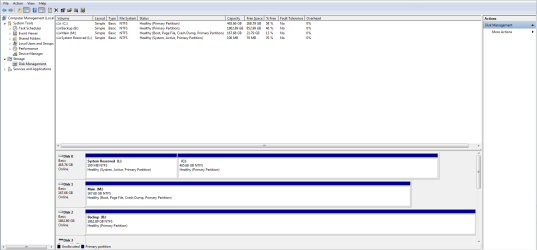
Please post back a screenshot of your maximized Disk mgmt drive map with listings using the Snipping Tool in Start menu. Use Snipping Tool to capture screen shots

Tell us what is on each drive and how you want them to boot.
 
LOL I usually learn by first failing. ;)

I assume you mean this. The 500GB is my old installation that I plan to nuke when possible. The 2TB is purely for backups. M: is my SSD and, eventually, the only boot drive I plan to have.

Thanks for the quick reply.
 

Attachments

  • Capture.PNG
    Capture.PNG
    28 KB · Views: 64

My Computer My Computer

At a glance

7 Professional x64 - SP1Phenom II x4 955BE2 x 4GB GSkill Ripjaws DDR3-1333XFX Radeon 5770
OS
7 Professional x64 - SP1
CPU
Phenom II x4 955BE
Motherboard
Asus M4A88TD-V
Memory
2 x 4GB GSkill Ripjaws DDR3-1333
Graphics Card(s)
XFX Radeon 5770
Monitor(s) Displays
Samsung P2770HD - 27"; Samsung 953BW - 19"
Screen Resolution
1920x1080; 1440x900
Hard Drives
Corsair Force Series 3 180 GB; Samsung 7200RPM/500GB; Samsung 5400RPM/2TB (Backup)
PSU
Antec BP550 (80+ Cert.)
Case
Cooler Master HAF 912
Cooling
Cooler Master Hyper 212 Plus + 5x120mm fans
Keyboard
Logitech K750 Solar
Mouse
Razer Mamba
M is booting off of the System Reserved partition on Disk0 as depicted by it holding the System Active flags. I would either clean reinstall to SSD using booted DVD with other HD's unplugged, or if you want to keep M, write the System boot files to following these steps:

Mark M Active: Partition - Mark as Active (Method Two)

Power down to unplug Disk0, swap its cable to SSD if possible so M becomes Disk0.

Boot into Win7 DVD or Repair CD System Recovery Options to run Startup Repair - Run 3 Separate Times until M boots on its own and holds the System Active flags.

You can now power down to plug back in HD to Disk1 cable, access your files from M, boot C if needed using one-time BIOS Boot Menu key, or wipe the HD using Diskpart Clean Command.
 
Thanks very much. I think I'll just do a clean install.
 

My Computer My Computer

At a glance

7 Professional x64 - SP1Phenom II x4 955BE2 x 4GB GSkill Ripjaws DDR3-1333XFX Radeon 5770
OS
7 Professional x64 - SP1
CPU
Phenom II x4 955BE
Motherboard
Asus M4A88TD-V
Memory
2 x 4GB GSkill Ripjaws DDR3-1333
Graphics Card(s)
XFX Radeon 5770
Monitor(s) Displays
Samsung P2770HD - 27"; Samsung 953BW - 19"
Screen Resolution
1920x1080; 1440x900
Hard Drives
Corsair Force Series 3 180 GB; Samsung 7200RPM/500GB; Samsung 5400RPM/2TB (Backup)
PSU
Antec BP550 (80+ Cert.)
Case
Cooler Master HAF 912
Cooling
Cooler Master Hyper 212 Plus + 5x120mm fans
Keyboard
Logitech K750 Solar
Mouse
Razer Mamba
I have done this. It is always a good idea for a clean install to a SSD to have it as the only hard drive connected and be sure to set your BIOS drive mode to AHCI first, likely you have them that way already.
That way you have a shiny new windows install and can re-attache the HDD to grab your files or and use it to put your user files on to save the SSD space.
As Greg suggests, wipe the HD before moving file to it.
 
Last edited:

My Computer My Computer

At a glance

Windows 7 Ultimate X64 SP1Intel i5-2550K, Differing ~4.4-4.8GHz No buil...16GB G.Skill Sniper 1866MHz @ 2133MHz 2x8GBASUS GTX650TIB-DC2OC-2GD5, (650TI Boost)
Computer type
PC/Desktop
Computer Manufacturer/Model Number
Home Built Desktop By DataTech
OS
Windows 7 Ultimate X64 SP1
CPU
Intel i5-2550K, Differing ~4.4-4.8GHz No built in GPU
Motherboard
ASUS P8Z68-V PRO/GEN3
Memory
16GB G.Skill Sniper 1866MHz @ 2133MHz 2x8GB
Graphics Card(s)
ASUS GTX650TIB-DC2OC-2GD5, (650TI Boost)
Sound Card
Onboard Realtek 5-1
Monitor(s) Displays
Samsung P2570HD
Screen Resolution
1920x1080
Hard Drives
Samsung 840 Pro 256GB SSD for OS, 500GB Seagate Constellation (Enterprise drive) for Data
PSU
Corsair HX650W
Case
Inwin Dragon Rider
Cooling
Hyper 212 EVO w/two Noctua fans, push-pull, @1300 RPM
Keyboard
E-Z Eyes, bright yellow keys with large characters
Mouse
steelseries SENSEI Laser Pro Gaming
Internet Speed
48-51Mbs Mbs down, 11 Mbs up Xfinity Cable
Antivirus
Norton Internet Security 2013
Browser
IE 10, Opera, Pale Moon if needed
Other Info
4 case fans, LG BluRay-RE, ASUS DVD-RW, Mr. Fusion power supply, 1.21 gigawatts.
As usual, I forgot to do one step and left all drives attached. Even though the other two drives were formatted with the CD partition manager, the "system" still installed in a 100MB partition on one. Fortunately, my SSD was already disk0 and labeled C:, so I just did the 3 startup repair trick and all is well. :D

Fixing these things is fun when you actually fix them and don't create too many headaches. :D
 

My Computer My Computer

At a glance

7 Professional x64 - SP1Phenom II x4 955BE2 x 4GB GSkill Ripjaws DDR3-1333XFX Radeon 5770
OS
7 Professional x64 - SP1
CPU
Phenom II x4 955BE
Motherboard
Asus M4A88TD-V
Memory
2 x 4GB GSkill Ripjaws DDR3-1333
Graphics Card(s)
XFX Radeon 5770
Monitor(s) Displays
Samsung P2770HD - 27"; Samsung 953BW - 19"
Screen Resolution
1920x1080; 1440x900
Hard Drives
Corsair Force Series 3 180 GB; Samsung 7200RPM/500GB; Samsung 5400RPM/2TB (Backup)
PSU
Antec BP550 (80+ Cert.)
Case
Cooler Master HAF 912
Cooling
Cooler Master Hyper 212 Plus + 5x120mm fans
Keyboard
Logitech K750 Solar
Mouse
Razer Mamba
Yes headaches are bad Emcee, glad you have it going.
 

My Computer My Computer

At a glance

Windows 7 Ultimate X64 SP1Intel i5-2550K, Differing ~4.4-4.8GHz No buil...16GB G.Skill Sniper 1866MHz @ 2133MHz 2x8GBASUS GTX650TIB-DC2OC-2GD5, (650TI Boost)
Computer type
PC/Desktop
Computer Manufacturer/Model Number
Home Built Desktop By DataTech
OS
Windows 7 Ultimate X64 SP1
CPU
Intel i5-2550K, Differing ~4.4-4.8GHz No built in GPU
Motherboard
ASUS P8Z68-V PRO/GEN3
Memory
16GB G.Skill Sniper 1866MHz @ 2133MHz 2x8GB
Graphics Card(s)
ASUS GTX650TIB-DC2OC-2GD5, (650TI Boost)
Sound Card
Onboard Realtek 5-1
Monitor(s) Displays
Samsung P2570HD
Screen Resolution
1920x1080
Hard Drives
Samsung 840 Pro 256GB SSD for OS, 500GB Seagate Constellation (Enterprise drive) for Data
PSU
Corsair HX650W
Case
Inwin Dragon Rider
Cooling
Hyper 212 EVO w/two Noctua fans, push-pull, @1300 RPM
Keyboard
E-Z Eyes, bright yellow keys with large characters
Mouse
steelseries SENSEI Laser Pro Gaming
Internet Speed
48-51Mbs Mbs down, 11 Mbs up Xfinity Cable
Antivirus
Norton Internet Security 2013
Browser
IE 10, Opera, Pale Moon if needed
Other Info
4 case fans, LG BluRay-RE, ASUS DVD-RW, Mr. Fusion power supply, 1.21 gigawatts.
Please post back a screenshot of your maximized Disk mgmt drive map with listings so we can look it over. Tell us what is on each partition.

If the reinstall wasn't marked Active, Startup Repair will not write the System boot files to it.
 
Back
Top