Installing Win 7 on a Win 8.1 pro laptop

Franky

New member
Member
VIP
Local time
3:39 AM
Messages
472
Location
Kurdistan
Hello all,

My hp envy 14-k008tx sleekbook has windows 8.1 pro. It doesn't have DVD drive. When I put Windows 7 ultimate to install and click on "Install now" button, it gives me an error saying
"A required cd/dvd drive device driver is missing. If you have driver floppy disk, Cd, DVD, or USB, please insert it now. Note: If the Windows installation media is in the cd/dvd drive, you can safely remove it for this step."
I don't know how to install that 7 on it. Any help will be appreciated.
 

My Computer My Computer

Computer type
PC/Desktop
OS
windows 7 32-bit
CPU
Intel(R) Core(TM) i3-2120 CPU @ 3.30GHz
Motherboard
Gigabyte Technology Co., Ltd. P61A-D3
Memory
4.00 GB
Graphics Card(s)
NVIDIA GeForce GTS 450
Sound Card
(1) NVIDIA High Definition Audio (2) NVIDIA Virtual Audio
Monitor(s) Displays
Samsung
Hard Drives
ST500DM002-1BC142 ATA Device
Internet Speed
1 Mbps
Antivirus
KIS 2013
Browser
chrome
I also tried to install 7 with a USB stick but exact problem :(
 

My Computer My Computer

Computer type
PC/Desktop
OS
windows 7 32-bit
CPU
Intel(R) Core(TM) i3-2120 CPU @ 3.30GHz
Motherboard
Gigabyte Technology Co., Ltd. P61A-D3
Memory
4.00 GB
Graphics Card(s)
NVIDIA GeForce GTS 450
Sound Card
(1) NVIDIA High Definition Audio (2) NVIDIA Virtual Audio
Monitor(s) Displays
Samsung
Hard Drives
ST500DM002-1BC142 ATA Device
Internet Speed
1 Mbps
Antivirus
KIS 2013
Browser
chrome
Installing Win 7 on a Win 8.1 pro laptop

YES & NO, down to your UEFI/BIOS firmware setting.

1) Downgrade to Windows 7.
Downgrade Windows 8 to Windows 7
Warning you must have the UEFI/BIOS firmware setting in Step Three set.

Make sure you read the NOTE at Step three.

2) If Using a USB Pen drive on a PC with a UEFI BIOS.
USB Pen drive need to be formatted to FAT32 as in
UEFI Bootable USB Flash Drive - Create in Windows
Take note of Step 11 for Windows 7.
Also you will need to use a USB 2.0 port, as there are no USB 3.0 drivers in Windows 7.
 

My Computer My Computer

OS
ME/XP/Vista/Win7
When I typed confirm-SecureBootUEFI got "is not recognized as an external or internal command"!!
In the "System Summary" also in the right part of "Secure Boot State" the "unsupported" is written!

And in inside of the Win 8.1 in Settings, there isn't any General item!!
Now how can I do please?
 

My Computer My Computer

Computer type
PC/Desktop
OS
windows 7 32-bit
CPU
Intel(R) Core(TM) i3-2120 CPU @ 3.30GHz
Motherboard
Gigabyte Technology Co., Ltd. P61A-D3
Memory
4.00 GB
Graphics Card(s)
NVIDIA GeForce GTS 450
Sound Card
(1) NVIDIA High Definition Audio (2) NVIDIA Virtual Audio
Monitor(s) Displays
Samsung
Hard Drives
ST500DM002-1BC142 ATA Device
Internet Speed
1 Mbps
Antivirus
KIS 2013
Browser
chrome
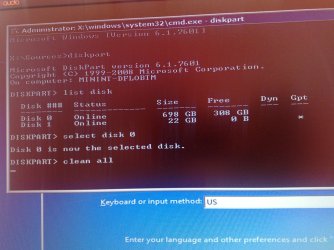
Thank you very much. I could to disable secure boot and install Win 7 but only on the 22GB SSD disk. I can't install on other 750 GB HDD because when installing the Nest button to choosing the HDD drives is gray and it seems that I only can install on that 22GB which is vey low for Win 7 and its apps!
I'm using DISKPART> clean all command in install start up page but don't know can it solve the issue or not!


This is my system specs:
http://h10025.www1.hp.com/ewfrf/wc/document?cc=us&lc=en&docname=c03867019
 

Attachments

  • 5.jpg
    5.jpg
    610.1 KB · Views: 1
Last edited:

My Computer My Computer

Computer type
PC/Desktop
OS
windows 7 32-bit
CPU
Intel(R) Core(TM) i3-2120 CPU @ 3.30GHz
Motherboard
Gigabyte Technology Co., Ltd. P61A-D3
Memory
4.00 GB
Graphics Card(s)
NVIDIA GeForce GTS 450
Sound Card
(1) NVIDIA High Definition Audio (2) NVIDIA Virtual Audio
Monitor(s) Displays
Samsung
Hard Drives
ST500DM002-1BC142 ATA Device
Internet Speed
1 Mbps
Antivirus
KIS 2013
Browser
chrome
Thank you :). I could install Win 7 after performing clean all command. But about that MSATA (SSD), what we can do with that? It's 22GB volume.
 

My Computer My Computer

Computer type
PC/Desktop
OS
windows 7 32-bit
CPU
Intel(R) Core(TM) i3-2120 CPU @ 3.30GHz
Motherboard
Gigabyte Technology Co., Ltd. P61A-D3
Memory
4.00 GB
Graphics Card(s)
NVIDIA GeForce GTS 450
Sound Card
(1) NVIDIA High Definition Audio (2) NVIDIA Virtual Audio
Monitor(s) Displays
Samsung
Hard Drives
ST500DM002-1BC142 ATA Device
Internet Speed
1 Mbps
Antivirus
KIS 2013
Browser
chrome
It explains how to deal with the 32gb SSD caching drive on an MSATA in the two tutorials Theog posted above.
 
Back
Top