
You are using an out of date browser. It may not display this or other websites correctly.
You should upgrade or use an alternative browser.
You should upgrade or use an alternative browser.
Installing win 7 on formatted in old laptop
- Thread starter TWardy
- Start date

- Local time
- 10:24 AM
- Messages
- 12,011
If you boot from the Windows 7 installation disc that you burned, can you get as far as the screen where you are asked to select your desired language?
If you can get that far, first disconnect all drives other than the one that will get Windows 7.
Boot from the installation disc.
When you get to the language screen, hit Shift F10 on the keyboard.
That should take you to a command prompt.
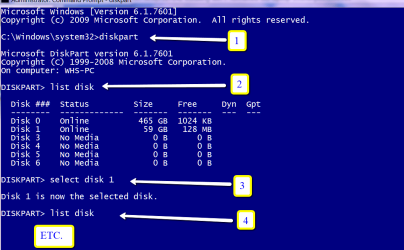
At that command prompt, enter the following commands one at a time, followed by the enter key. The words in parentheses are just comments to tell you what the command does. Do not type in the comments.
diskpart (opens the diskpart command)
list disk (to show the ID number of the hard disk to partition, normally Disk 0)
select disk 0 (change 0 to another number if applicable)
clean (this cleans the drive)
create partition primary (creates one primary partition on the drive)
select partition 1 (selects the partition you just made)
active (makes partition 1 active)
format fs=ntfs quick (formats partition 1 with NTFS)
exit (takes you out of diskpart and back to the Windows installation)
You may have to type exit twice?
Then proceed with the Windows installation. When you come to the screen asking about where you want to install Windows, direct the installation to the partition you just made.
If this does not work, post the EXACT error message you get and say where the error occurred.
If you can get that far, first disconnect all drives other than the one that will get Windows 7.
Boot from the installation disc.
When you get to the language screen, hit Shift F10 on the keyboard.
That should take you to a command prompt.
At that command prompt, enter the following commands one at a time, followed by the enter key. The words in parentheses are just comments to tell you what the command does. Do not type in the comments.
diskpart (opens the diskpart command)
list disk (to show the ID number of the hard disk to partition, normally Disk 0)
select disk 0 (change 0 to another number if applicable)
clean (this cleans the drive)
create partition primary (creates one primary partition on the drive)
select partition 1 (selects the partition you just made)
active (makes partition 1 active)
format fs=ntfs quick (formats partition 1 with NTFS)
exit (takes you out of diskpart and back to the Windows installation)
You may have to type exit twice?
Then proceed with the Windows installation. When you come to the screen asking about where you want to install Windows, direct the installation to the partition you just made.
If this does not work, post the EXACT error message you get and say where the error occurred.
My Computer
At a glance
Windows 7 Home Premium SP1, 64-bitIntel Skylake i5-6600K, not overclocked8 GB HyperX DDR4-2666 (2 x 4 GB)none; graphics are integrated on CPU
- Computer type
- PC/Desktop
- Computer Manufacturer/Model Number
- Ignatz Special; 4 speed manual gearbox; factory air conditioning; one of one
- OS
- Windows 7 Home Premium SP1, 64-bit
- CPU
- Intel Skylake i5-6600K, not overclocked
- Motherboard
- AsRock Z170M Extreme 4, micro ATX
- Memory
- 8 GB HyperX DDR4-2666 (2 x 4 GB)
- Graphics Card(s)
- none; graphics are integrated on CPU
- Sound Card
- onboard: Realtek ALC1150; external: USB Behringer UF0-202
- Monitor(s) Displays
- Dell S2340M 23 inch IPS
- Screen Resolution
- 1600 x 900
- Hard Drives
- System: Crucial MX100 series SSD, 128 GB;
Data: Samsung Spinpoint 103SJ, 1 TB;
Backup: WD Caviar Green WD30EZRX-00D8PB0, 3 TB
- PSU
- Rosewill SilentNight 500 watt fanless, semi-modular
- Case
- Antec Solo II
- Cooling
- Noctua NH-U12S; Noctua F12 intake, Noctua S12A exhaust
- Keyboard
- Microsoft 200 6JH-00001 USB
- Mouse
- Dell or Microsoft optical wired; USB
- Antivirus
- Microsoft Security Essentials and Malwarebytes Premium
- Browser
- Pale Moon
- Other Info
- All fans PWM; speeds at idle: CPU circa 500 rpm; intake circa 600 rpm; exhaust circa 600 rpm; CPU temps 27 idle and 47 C load in a warm room (27 C/81 F) when running Intel Extreme Tuning Utility stress test.
After writing the first command it doesnt leave any room to write the next command. Do I write one command get out of it, go back in write the next command?
My Computer
At a glance
Windows 7 ultimate 64 bit
- OS
- Windows 7 ultimate 64 bit

My Computer
At a glance
Vista, Windows7, Mint Mate, Zorin, Windows 8from 1.6GHz Duo to i7
- Computer Manufacturer/Model Number
- HP, Dell, Gateway, Toshiba - 4 laptops and 2 desktops
- OS
- Vista, Windows7, Mint Mate, Zorin, Windows 8
- CPU
- from 1.6GHz Duo to i7
- Monitor(s) Displays
- 2x HP w2207
- Hard Drives
- 5x HDD, 7x SSD, 12x Externals
- Keyboard
- with trackball - no mices
- Mouse
- Trackball mice
- Internet Speed
- DSL 6000
cmd will always tell you when it has executed the command.
My Computer
At a glance
Vista, Windows7, Mint Mate, Zorin, Windows 8from 1.6GHz Duo to i7
- Computer Manufacturer/Model Number
- HP, Dell, Gateway, Toshiba - 4 laptops and 2 desktops
- OS
- Vista, Windows7, Mint Mate, Zorin, Windows 8
- CPU
- from 1.6GHz Duo to i7
- Monitor(s) Displays
- 2x HP w2207
- Hard Drives
- 5x HDD, 7x SSD, 12x Externals
- Keyboard
- with trackball - no mices
- Mouse
- Trackball mice
- Internet Speed
- DSL 6000
mixed up posts. sorry.
My Computer
At a glance
MS Windows 7 Ultimate SP1 64-bitAMD A10-4600M6.00 GB Dual-Channel DDR3 @ 798MHz (11-11-12-28)AMD Radeon HD 7660G
- Computer Manufacturer/Model Number
- Toshiba Satellite S875D-S7239 laptop
- OS
- MS Windows 7 Ultimate SP1 64-bit
- CPU
- AMD A10-4600M
- Motherboard
- AMD Pumori (Socket FT1)
- Memory
- 6.00 GB Dual-Channel DDR3 @ 798MHz (11-11-12-28)
- Graphics Card(s)
- AMD Radeon HD 7660G
- Sound Card
- High Definition Audio Device
- Monitor(s) Displays
- Generic PnP Monitor (1600x900@60Hz)
- Screen Resolution
- 1600x900@60Hz
- Hard Drives
- SSD 119GB Corsair CSSD-V128GB2 ATA Device
- Keyboard
- Standard PS/2 Keyboard
- Mouse
- HP Wireless Optical Mobile Mouse Model FHA-3410
- Internet Speed
- What the local pub, local coffee shop offers.
- Other Info
- Optical Drive:MATSHITA BD-CMB UJ160B ATA Device
Also have an Asus ha1002xp netbook with Win 7 Ultimate installed.
You apparently did not type it in correctly. Copy/paste this:Everything worked fine until I tried to format it - Diskpart has encountered an error : the parameter is Incorrect?
format fs=ntfs quick
My Computer
At a glance
Vista, Windows7, Mint Mate, Zorin, Windows 8from 1.6GHz Duo to i7
- Computer Manufacturer/Model Number
- HP, Dell, Gateway, Toshiba - 4 laptops and 2 desktops
- OS
- Vista, Windows7, Mint Mate, Zorin, Windows 8
- CPU
- from 1.6GHz Duo to i7
- Monitor(s) Displays
- 2x HP w2207
- Hard Drives
- 5x HDD, 7x SSD, 12x Externals
- Keyboard
- with trackball - no mices
- Mouse
- Trackball mice
- Internet Speed
- DSL 6000
format fs=ntfs
will suffice.
however now, since you've got some of the steps behind you, I'll give a quick list:
DiskPart
Select Disk 0
Select Disk 1
Format fs=ntfs
exit
exit
will suffice.
however now, since you've got some of the steps behind you, I'll give a quick list:
DiskPart
Select Disk 0
Select Disk 1
Format fs=ntfs
exit
exit
My Computer
At a glance
MS Windows 7 Ultimate SP1 64-bitAMD A10-4600M6.00 GB Dual-Channel DDR3 @ 798MHz (11-11-12-28)AMD Radeon HD 7660G
- Computer Manufacturer/Model Number
- Toshiba Satellite S875D-S7239 laptop
- OS
- MS Windows 7 Ultimate SP1 64-bit
- CPU
- AMD A10-4600M
- Motherboard
- AMD Pumori (Socket FT1)
- Memory
- 6.00 GB Dual-Channel DDR3 @ 798MHz (11-11-12-28)
- Graphics Card(s)
- AMD Radeon HD 7660G
- Sound Card
- High Definition Audio Device
- Monitor(s) Displays
- Generic PnP Monitor (1600x900@60Hz)
- Screen Resolution
- 1600x900@60Hz
- Hard Drives
- SSD 119GB Corsair CSSD-V128GB2 ATA Device
- Keyboard
- Standard PS/2 Keyboard
- Mouse
- HP Wireless Optical Mobile Mouse Model FHA-3410
- Internet Speed
- What the local pub, local coffee shop offers.
- Other Info
- Optical Drive:MATSHITA BD-CMB UJ160B ATA Device
Also have an Asus ha1002xp netbook with Win 7 Ultimate installed.
Karl, if you do not add the 'quick', it will take forever because it does a full format.format fs=ntfs
will suffice.
however now, since you've got some of the steps behind you, I'll give a quick list:
DiskPart
Select Disk 0
Select Disk 1
Format fs=ntfs
exit
exit
My Computer
At a glance
Vista, Windows7, Mint Mate, Zorin, Windows 8from 1.6GHz Duo to i7
- Computer Manufacturer/Model Number
- HP, Dell, Gateway, Toshiba - 4 laptops and 2 desktops
- OS
- Vista, Windows7, Mint Mate, Zorin, Windows 8
- CPU
- from 1.6GHz Duo to i7
- Monitor(s) Displays
- 2x HP w2207
- Hard Drives
- 5x HDD, 7x SSD, 12x Externals
- Keyboard
- with trackball - no mices
- Mouse
- Trackball mice
- Internet Speed
- DSL 6000
precisely. And it formats the entire drive. Quick cuts some corners which one should not do when preparing a disk for an operating system.
You might get away with a quick instead of a full, but I do not take chances.
You might get away with a quick instead of a full, but I do not take chances.
My Computer
At a glance
MS Windows 7 Ultimate SP1 64-bitAMD A10-4600M6.00 GB Dual-Channel DDR3 @ 798MHz (11-11-12-28)AMD Radeon HD 7660G
- Computer Manufacturer/Model Number
- Toshiba Satellite S875D-S7239 laptop
- OS
- MS Windows 7 Ultimate SP1 64-bit
- CPU
- AMD A10-4600M
- Motherboard
- AMD Pumori (Socket FT1)
- Memory
- 6.00 GB Dual-Channel DDR3 @ 798MHz (11-11-12-28)
- Graphics Card(s)
- AMD Radeon HD 7660G
- Sound Card
- High Definition Audio Device
- Monitor(s) Displays
- Generic PnP Monitor (1600x900@60Hz)
- Screen Resolution
- 1600x900@60Hz
- Hard Drives
- SSD 119GB Corsair CSSD-V128GB2 ATA Device
- Keyboard
- Standard PS/2 Keyboard
- Mouse
- HP Wireless Optical Mobile Mouse Model FHA-3410
- Internet Speed
- What the local pub, local coffee shop offers.
- Other Info
- Optical Drive:MATSHITA BD-CMB UJ160B ATA Device
Also have an Asus ha1002xp netbook with Win 7 Ultimate installed.

Can you reboot and go into the BIOS? See if there is a there is a test you can run on the hard drive to check its health.
If you don't want to take that route, you could download Seatools and burn it to another CD, boot from it and run a full test on the drive.:
SeaTools | Seagate
It may even be advisable to check your memory via another iso download at: http://www.memtest.org/download/4.20/memtest86+-4.20.iso.zip
If you don't want to take that route, you could download Seatools and burn it to another CD, boot from it and run a full test on the drive.:
SeaTools | Seagate
It may even be advisable to check your memory via another iso download at: http://www.memtest.org/download/4.20/memtest86+-4.20.iso.zip
My Computer
At a glance
Windows 7 Ultimate x64
- OS
- Windows 7 Ultimate x64
For DOS:
SeaTools | Seagate
It will download an iso file that you can burn to disc, boot from it and test.
SeaTools | Seagate
It will download an iso file that you can burn to disc, boot from it and test.
My Computer
At a glance
Windows 7 Ultimate x64
- OS
- Windows 7 Ultimate x64

- Local time
- 10:24 AM
- Messages
- 50,634
Boot the DVD again, open a Command line as before, wipe the disk with Diskpart Clean Command.
Then when you get to the drive selection screen during install, just press Next to let installer create and format the partition for you.
If it errors again, post back the exact error text verbatim.
Then when you get to the drive selection screen during install, just press Next to let installer create and format the partition for you.
If it errors again, post back the exact error text verbatim.
Similar threads
- Replies
- 7
- Views
- 1K


