Solved Installing Win7 after end of support

@blue skies
First of all you must find out if the Lenovo problem is the HDD.
Does it start? Can you enter BIOS?
The Win 7 SLP license is tied to the Motherboard, not to any other component. But if you don't have a Lenovo installation disk to restore Win 7 SLP license you can use any Win 7 installation disk and the license on the COA sticker. Remember that any Win 7 installation disk has all types (HB, HP, Pro and ultimate). With a little trick you can make it universal.
I'm have used some Crucial BX500
They are fast and cheep. So far, so good.
Thank you very much for your reply Megahertz07! There may be additional problems with the Lenovo, but I figured I would definitely want to replace the hard drive even if I got it working... so I am relieved that that won't cause an issue with the Windows 7 license. (I don't know where I read that it would, but I'm glad it was misinformation.)

That is very good to know about the license on the COA sticker. I probably won't get a chance to get it out of the box and see what's going on with it for a while though. It's been years since it failed and I set it aside, but I think the hard drive went first and I was still able to get to the BIOS... but then I think the power supply was also having issues right around that time. I will try booting to my live Linux USB if I get it to start and get into BIOS.

I was reading this thread and thought I'd better ask now in case a lot of posters go away in January. I've loved Windows 7 and will never switch to Windows 10, so I hope this community sticks around a long time. (I've been very grateful for all the help and advice I've received here over the years, and Brink is the best!!)

I plan to keep my laptop, and my Lenovo if I can get it working, on Windows 7 long term. I bought a new mini computer on which I installed Linux Mint which has been fantastic, but I'm not ready to say goodbye to Windows 7 yet - which to me has been the best OS Microsoft has ever released.

Thanks again for your help! :)
 

My Computer My Computer

At a glance

Windows 7 Home Premium 64 bitIntel ® Core™ i5-3317U Processor6GB DDR3 1600MHzMobile Intel ® HD Graphics with 64MB-1696MB d...
Computer type
Laptop
Computer Manufacturer/Model Number
Toshiba Satellite U845W-S410
OS
Windows 7 Home Premium 64 bit
CPU
Intel ® Core™ i5-3317U Processor
Memory
6GB DDR3 1600MHz
Graphics Card(s)
Mobile Intel ® HD Graphics with 64MB-1696MB dynamically allo
Monitor(s) Displays
All-in-one -- Generic PnP Monitor
Screen Resolution
14.4” diagonal widescreen TruBrite ® TFT display at 1792 x 7
Hard Drives
500GB (5400 RPM, Serial ATA) with dedicated 32GB mSATA SSD disk
cache
Keyboard
Logitech
Mouse
Logitech
Just so you guys know, I haven't forgotten about this thread but I've been busy with family/holiday stuff for the last couple of weeks and recovering from that and working on a couple of other projects since.


1) I am relieved to know that this forum maintains an ISO of the most recent update of Win7 that I will be able to download and use after Jan 14 and that if I do that I won't need to worry about updating a fresh installation.
2) I fully intend to try what TechnoMage suggested in post #6 of this thread but at this point I think I'll wait for the final version of the ISO.


JFYI, I have several ISO's that I've downloaded, that will NOT fit on an 8GB Flash Drive.

Buying 8GB Flash Drives today, is just a waste of time and money.
I have some 8GB, 16GB and 64GB USB flash drives that I only use for stuff like that. I also have some 8 and 16 GB SD cards that are new in the packages and it is tempting to use one of those but I think I'll stick with a USB drive for this so that I don't have to work through a card reader.


As for smaller USB drives being a waste of money, that all depends on what you are going to use them for. My main use for USB drives is for playing audio while I drive (both of my bikes have stereos with USB/MP3 players). 1GB will hold about 10 hours of music or podcasts so I almost always have a 1GB USB drive in the player (usually with only an hour or 2 on it) and a few more handy. Yes, I could put 16 times as much on a 16 GB drive but it is a lot easier to pull one out and put another in than it is to browse through 160 hours of stuff to find what I want to listen to.
And yes, the 16GB ones you mentioned cost a lot less per GB than the 1GB ones but as long as I can get 1GB for about $1 CAD (75 cents US) including postage I'm not spending a lot for the convenience.
 

My Computer My Computer

At a glance

win7 several versions, Win10 home & proseveralvariesseveral
Computer type
PC/Desktop
Computer Manufacturer/Model Number
Several
OS
win7 several versions, Win10 home & pro
CPU
several
Motherboard
several
Memory
varies
Graphics Card(s)
several
Hard Drives
several
Antivirus
none
Browser
Firefox
My 'official' Win 7 SP1 isos were downloaded from MS in 2013. In following SIW2's "update your win 7 installation media", I'll be using these isos. Any issues using these isos that are 7 yrs old (I have all flavors)? Can win 7 isos even be downloaded these days?
 

My Computer My Computer

At a glance

windows 7 Pro 64 Biti5 4670K16GB DDR3@933mhzRadeon R9 390 8192mb
Computer type
PC/Desktop
Computer Manufacturer/Model Number
custom
OS
windows 7 Pro 64 Bit
CPU
i5 4670K
Motherboard
Asus Max Hero 1150 socket
Memory
16GB DDR3@933mhz
Graphics Card(s)
Radeon R9 390 8192mb
Monitor(s) Displays
Dell U2415 x3
Screen Resolution
1920 (5760) x 1200 x3
Hard Drives
System: Kingston 128GB SSD

Installing to Samsung 860 EVO 500GB
WD Black 2 TB & 1 TB
PSU
Corsair CX750M
Cooling
Hyper 312
Internet Speed
50mbps
If you have a Win 7 retail key, yes you can download from M$ Windows 7 ISO Files
The latest release is SP1
Any Win 7 installation disk edition (HB, HP, Pro or ultimate) has all versions on it so you can make it universal renaming ei.cfg from \sources.
 

My Computers My Computers

  • At a glance

    Windows 7 HP 64i5 6600K - 800MHz to 4200MHz4+4G GSkill DDR4 3000IG - Intel 530
    Computer type
    PC/Desktop
    Computer Manufacturer/Model Number
    custom build
    OS
    Windows 7 HP 64
    CPU
    i5 6600K - 800MHz to 4200MHz
    Motherboard
    GA-Z170-HD3P
    Memory
    4+4G GSkill DDR4 3000
    Graphics Card(s)
    IG - Intel 530
    Monitor(s) Displays
    Samsung 226BW
    Screen Resolution
    1680x1050
    Hard Drives
    (1) -1 SM951 – 128GB M.2 AHCI PCIe SSD drive for Windows 7 and Lubuntu
    (2) -1 WD SATA 3 - 1T for Data
    (3) -1 WD SATA 3 - 1T for backup
    PSU
    Thermaltake 450W TR2 gold
    Keyboard
    Old and good Chicony mechanical keyboard
    Mouse
    Logitech mX performance - 9 buttons (had to disable some)
    Internet Speed
    500Mb/s
    Browser
    Firefox 64
    Other Info
    TinyWall firewall
  • At a glance

    Windows 7 Proi7-4500U 800MHz to 3.0GHz(4+4)G DDR3 1600IG intel 4400 + NVIDIA GeForce GT 745M
    Computer type
    Laptop
    System Manufacturer/Model Number
    Asus Q550LF
    OS
    Windows 7 Pro
    CPU
    i7-4500U 800MHz to 3.0GHz
    Motherboard
    Asus Q550LF
    Memory
    (4+4)G DDR3 1600
    Graphics Card(s)
    IG intel 4400 + NVIDIA GeForce GT 745M
    Sound Card
    Realtek
    Monitor(s) Displays
    LG Display LP156WF4-SPH1
    Screen Resolution
    1920 x 1080
    Hard Drives
    BX500 120G SSD for Windows and programs +
    1T HDD for data
    Internet Speed
    500 Mb/s
    Browser
    Firefox
    Other Info
    TinyWall firewall
By "retail" you mean bought separately from the computer, as opposed to OEM? I'm putting my next one into a computer my friend built, but he passed on before adding the OS.
 

My Computer My Computer

At a glance

Win 7 Ult 64-bitG620 2.6GHZ Pentium R6 GB
Computer type
PC/Desktop
Computer Manufacturer/Model Number
HP p6-2020t
OS
Win 7 Ult 64-bit
CPU
G620 2.6GHZ Pentium R
Memory
6 GB
Monitor(s) Displays
25" HPLV2311
Screen Resolution
1920 x 1200
Hard Drives
1 SATA, 1 exterior SATA
Case
HP
Cooling
PSU
Antivirus
Glasswire
Browser
Waterfox; Firefox; Chrome for work
Other Info
Firewall--Glasswire
Similar specs in Gateway DX4200
Verizon FIOS Wired network

1 other Win7 computer-- has SSD
OEM install media has always been the responsibility of the specific oem, not Microsoft. This can be an issue if the oem is no longer trading, and of course they will usually supply recovery DVD complete with all the bloat.

Best solution for those with an oem licence is to create your own recovery media for you system, with all you mods.

There are many software options available for this, macrium reflect is one but others are available some will even allow transfer to new hardware should the old fail, and you can obtain a suitable device
 

My Computers My Computers

  • At a glance

    Windows 11 Pro x64 [Latest Release and Releas...Ryzen 9 5950X, 3.8 - 5.2 MHz64GB [2 x 32GB] DDR4 3200MHz4GB NVIDIA GEFORCE GTX 1650 Ti
    Computer type
    PC/Desktop
    Computer Manufacturer/Model Number
    ChillBlast - Custom to my design
    OS
    Windows 11 Pro x64 [Latest Release and Release Preview]
    CPU
    Ryzen 9 5950X, 3.8 - 5.2 MHz
    Motherboard
    Asus Prime X570-Pro
    Memory
    64GB [2 x 32GB] DDR4 3200MHz
    Graphics Card(s)
    4GB NVIDIA GEFORCE GTX 1650 Ti
    Sound Card
    On-board SPDIF to 5.1 System + HDMI [5.1 system]
    Monitor(s) Displays
    32" UHD 32 Bit HDR Monitor + 43" UHD 4K 32Bit HDR TV
    Screen Resolution
    2 x 3840 x 2160 @60Hz
    Hard Drives
    1TB M2 SSD OS, 500GB Fast Access SSD, 2 x 8TB Data + Various Externals from 1TB to 4TB, 10TB NAS
    PSU
    NZXT C750 80 PLUS Gold 750W Modular PSU
    Case
    Workstation Case [Matt Black]
    Cooling
    NZXT Kraken X63 280mm CPU Cooler +2x Quiet Case fans
    Keyboard
    Logitech Wireless MX Keys & K400 + others
    Mouse
    Logitech Wireless MX Master 3S
    Internet Speed
    920 MB Down 50 MB Up
    Antivirus
    BitDefender Total Security Pro
    Browser
    Chrome (always run latest Non-Beta)
    Other Info
    Also run ...
    Laptop - Quad 8GB - Windows 10 Pro x64
    Nexus 7 Android tablet x2
    Samsung 10.2" tablet
    Blackview TAB 8 4G Android Tablet c/w Keyboard
    Wacom Intuos Pro Medium Pen Pad
    Wacom Intuos Pro Small Pen Pad
    Wacom Expresskeys Remote
    Loopdeck+ Graphics Controller
    Shuttle Pro v2 Control
  • At a glance

    Windows 11 Pro x64 Latest RPIntel I7 10750H 5.0GHz32GB [2x16GB] DDR4 2933 MHznVidia GTX1650Ti 4 GB GDDR6
    Computer type
    Laptop
    System Manufacturer/Model Number
    Dell XPS 17 10750H
    OS
    Windows 11 Pro x64 Latest RP
    CPU
    Intel I7 10750H 5.0GHz
    Motherboard
    Dell XPS
    Memory
    32GB [2x16GB] DDR4 2933 MHz
    Graphics Card(s)
    nVidia GTX1650Ti 4 GB GDDR6
    Sound Card
    Stock [Realtek] 4 Speaker
    Monitor(s) Displays
    17" IPS UHD+ Infinity Edge Touchscreen
    Screen Resolution
    3840 x 2400
    Hard Drives
    2TB M2 NVMe, 4TB External + various 500GB & 1TB External NVMe (also have access to spinner HDD from
    PSU
    Stock
    Case
    Stock XPS Aluminium & Carbon Fibre
    Cooling
    Stock - Active Fan Control
    Keyboard
    Backlit + Various Logitech
    Mouse
    Stock Track Pad + Logitech MX Trackball
    Internet Speed
    72 MB Down 18MB Up
    Browser
    Chrome
    Other Info
    Also run ...
    Laptop - Quad 8GB - Windows 10 Pro x64
    Nexus 7 Android tablet x2
    10.2" tablet
    Sony Z3 Android Smartphone
    Wacom Intuos Pro Medium Pen Pad
    Wacom Intuos Pro Small Pen Pad
    Wacom Expresskeys Remote
    Loopdeck+ Graphics Controller
    Shuttle Pro v2 Control Pad
    10TB NAS
It's not OEM, it was bought separately for a build when they were still available.
 
Last edited:

My Computer My Computer

At a glance

Win 7 Ult 64-bitG620 2.6GHZ Pentium R6 GB
Computer type
PC/Desktop
Computer Manufacturer/Model Number
HP p6-2020t
OS
Win 7 Ult 64-bit
CPU
G620 2.6GHZ Pentium R
Memory
6 GB
Monitor(s) Displays
25" HPLV2311
Screen Resolution
1920 x 1200
Hard Drives
1 SATA, 1 exterior SATA
Case
HP
Cooling
PSU
Antivirus
Glasswire
Browser
Waterfox; Firefox; Chrome for work
Other Info
Firewall--Glasswire
Similar specs in Gateway DX4200
Verizon FIOS Wired network

1 other Win7 computer-- has SSD
If you have a few systems it may be worthwhile getting some external drives and creating images of the installs including all the software, using something like Macrium reflect. You could then be completely back working after a failure in less than an hour. I would still advise keeping the images up to date when application software updates but with Win7 itself this is not being updated so you could just make the images and store them. If you have to restore the applications could be restored, and updated later.
Of course with Win7 at EOL it may be that applications may not work after they are updated so a fully working backup of system and applications is even more important.
 

My Computers My Computers

  • At a glance

    Windows 11 Pro x64 [Latest Release and Releas...Ryzen 9 5950X, 3.8 - 5.2 MHz64GB [2 x 32GB] DDR4 3200MHz4GB NVIDIA GEFORCE GTX 1650 Ti
    Computer type
    PC/Desktop
    Computer Manufacturer/Model Number
    ChillBlast - Custom to my design
    OS
    Windows 11 Pro x64 [Latest Release and Release Preview]
    CPU
    Ryzen 9 5950X, 3.8 - 5.2 MHz
    Motherboard
    Asus Prime X570-Pro
    Memory
    64GB [2 x 32GB] DDR4 3200MHz
    Graphics Card(s)
    4GB NVIDIA GEFORCE GTX 1650 Ti
    Sound Card
    On-board SPDIF to 5.1 System + HDMI [5.1 system]
    Monitor(s) Displays
    32" UHD 32 Bit HDR Monitor + 43" UHD 4K 32Bit HDR TV
    Screen Resolution
    2 x 3840 x 2160 @60Hz
    Hard Drives
    1TB M2 SSD OS, 500GB Fast Access SSD, 2 x 8TB Data + Various Externals from 1TB to 4TB, 10TB NAS
    PSU
    NZXT C750 80 PLUS Gold 750W Modular PSU
    Case
    Workstation Case [Matt Black]
    Cooling
    NZXT Kraken X63 280mm CPU Cooler +2x Quiet Case fans
    Keyboard
    Logitech Wireless MX Keys & K400 + others
    Mouse
    Logitech Wireless MX Master 3S
    Internet Speed
    920 MB Down 50 MB Up
    Antivirus
    BitDefender Total Security Pro
    Browser
    Chrome (always run latest Non-Beta)
    Other Info
    Also run ...
    Laptop - Quad 8GB - Windows 10 Pro x64
    Nexus 7 Android tablet x2
    Samsung 10.2" tablet
    Blackview TAB 8 4G Android Tablet c/w Keyboard
    Wacom Intuos Pro Medium Pen Pad
    Wacom Intuos Pro Small Pen Pad
    Wacom Expresskeys Remote
    Loopdeck+ Graphics Controller
    Shuttle Pro v2 Control
  • At a glance

    Windows 11 Pro x64 Latest RPIntel I7 10750H 5.0GHz32GB [2x16GB] DDR4 2933 MHznVidia GTX1650Ti 4 GB GDDR6
    Computer type
    Laptop
    System Manufacturer/Model Number
    Dell XPS 17 10750H
    OS
    Windows 11 Pro x64 Latest RP
    CPU
    Intel I7 10750H 5.0GHz
    Motherboard
    Dell XPS
    Memory
    32GB [2x16GB] DDR4 2933 MHz
    Graphics Card(s)
    nVidia GTX1650Ti 4 GB GDDR6
    Sound Card
    Stock [Realtek] 4 Speaker
    Monitor(s) Displays
    17" IPS UHD+ Infinity Edge Touchscreen
    Screen Resolution
    3840 x 2400
    Hard Drives
    2TB M2 NVMe, 4TB External + various 500GB & 1TB External NVMe (also have access to spinner HDD from
    PSU
    Stock
    Case
    Stock XPS Aluminium & Carbon Fibre
    Cooling
    Stock - Active Fan Control
    Keyboard
    Backlit + Various Logitech
    Mouse
    Stock Track Pad + Logitech MX Trackball
    Internet Speed
    72 MB Down 18MB Up
    Browser
    Chrome
    Other Info
    Also run ...
    Laptop - Quad 8GB - Windows 10 Pro x64
    Nexus 7 Android tablet x2
    10.2" tablet
    Sony Z3 Android Smartphone
    Wacom Intuos Pro Medium Pen Pad
    Wacom Intuos Pro Small Pen Pad
    Wacom Expresskeys Remote
    Loopdeck+ Graphics Controller
    Shuttle Pro v2 Control Pad
    10TB NAS
I guess I've missed something along the way, in the last 40 years that I've been a PC Tech.


I've never noticed that installing an OS had anything to do with MS Updates. At least not for me.
I guess I'm just different. Eh?


Windows 7 is still my favorite OS, but if need be, I can get along with Windows 10, after I spend an hour or so, tweaking and tuning it to look and act like Win-7, and after killing WUDO and disabling Cortana.


Oh, and I permanently disable MS Updates.


Having fun in the Sunshine state!


:cool:
 

My Computer My Computer

At a glance

Win 7 Pro, SP1, x86, Win-11/Pro/64AMD8GB CrucialVarious
Computer type
PC/Desktop
Computer Manufacturer/Model Number
Various
OS
Win 7 Pro, SP1, x86, Win-11/Pro/64
CPU
AMD
Motherboard
Various
Memory
8GB Crucial
Graphics Card(s)
Various
Sound Card
OnBoard
Monitor(s) Displays
Acer 21.5"
Hard Drives
Crucial SSD, 500 GB
PSU
OEM
Case
SFF Slim Line Case
Cooling
OEM
Keyboard
eMachines
Mouse
Logitech Wireless
Internet Speed
varies
Antivirus
Windows Defender/Super Anti-Spyware
Browser
Firefox
NVM
 

My Computer My Computer

At a glance

Win 7 Ult 64-bitG620 2.6GHZ Pentium R6 GB
Computer type
PC/Desktop
Computer Manufacturer/Model Number
HP p6-2020t
OS
Win 7 Ult 64-bit
CPU
G620 2.6GHZ Pentium R
Memory
6 GB
Monitor(s) Displays
25" HPLV2311
Screen Resolution
1920 x 1200
Hard Drives
1 SATA, 1 exterior SATA
Case
HP
Cooling
PSU
Antivirus
Glasswire
Browser
Waterfox; Firefox; Chrome for work
Other Info
Firewall--Glasswire
Similar specs in Gateway DX4200
Verizon FIOS Wired network

1 other Win7 computer-- has SSD
Hi Bob,

there are 2 threads in the installation and set up sub-forum where Up to date "iso's" are currently maintained.
supported by these users SIW2 & Wkeller
Hopefully these will become pinned at that time, @Brink

Once that date is reached you could use either as your input media

Roy
OK, so I finally got around to trying this. I started looking at the pinned threads from those users but there are a lot of pages to sift through and I have no idea what I need to download for Rufus to work with. As I said before, I'm pretty advanced in some areas but I have no clue about others. Can someone please explain it to me in simple terms?
 

My Computer My Computer

At a glance

win7 several versions, Win10 home & proseveralvariesseveral
Computer type
PC/Desktop
Computer Manufacturer/Model Number
Several
OS
win7 several versions, Win10 home & pro
CPU
several
Motherboard
several
Memory
varies
Graphics Card(s)
several
Hard Drives
several
Antivirus
none
Browser
Firefox

My Computer My Computer

At a glance

win7 several versions, Win10 home & proseveralvariesseveral
Computer type
PC/Desktop
Computer Manufacturer/Model Number
Several
OS
win7 several versions, Win10 home & pro
CPU
several
Motherboard
several
Memory
varies
Graphics Card(s)
several
Hard Drives
several
Antivirus
none
Browser
Firefox
I'm installing a legit copy of Win7 (after the MS cutoff date) onto a second hand i3-5 machine as a backup redundancy machine. This was suggested by a comment earlier, and which I thought quite a good idea if one wants to avoid Win10 for some years yet.


I wemt through the excellent tutorials on how to generate a bootable USB install, slipstreaming all the updates, usb3 drivers etc. One contribution in particular attracted me:


Integrate7 script – automatically download and slipstream all updates!


Seems to have it all, so I ran the script on the legit Win7 install iso. Everything seemed to run ok, with the resulting modified iso at over 5Gb, with an install.wim at over 4Gb. But I could not get it to install completely off the USB card using Rufus 3.8 as the iso burner. The installation attempt would simply reach a point where it insisted a DVD file was needed. Eventually I concluded that the clean Win7 iso that I'd modified was coded to install only off a DVD. That may not be accurate but it seems adequate.


That presented a problem as the modified install.wim at 4+Gb was too big. So I could install off the initial Win7 iso off a DVD but without the updates or drivers.


Again, the excellent tutorials here helped enormously. There is a freeware programme noted in one of the tutorials at wsusoffline.net. Easily installed, this automates the update process almost completely. It certainly reduces a great deal of the tedium. The most recent version names Win7 as "Legacy Windows". :-)


This programme is running on my redundancy machine now. If it falls over, I'll post that as comment. On the expectation that it will work ok, the last step is to remove the telemetry updates - and again there are great tutorials and command scripts here for that.


The wsusoffline.net site has a YouTube that takes one right through the process here:


YouTube


Thanking this forum for those wonderful tutorials.
 

My Computer My Computer

At a glance

Windows 7 Pro x64Intel i5-8265U8gbIntel Iris Plus 655
Computer type
Laptop
Computer Manufacturer/Model Number
HP 250 G7
OS
Windows 7 Pro x64
CPU
Intel i5-8265U
Motherboard
Intel Coffee Lake
Memory
8gb
Graphics Card(s)
Intel Iris Plus 655
Sound Card
Realtek HDA
Monitor(s) Displays
Generic
Screen Resolution
1366 x 768
Hard Drives
Crucial P5 NVMe 1Tb internal
WD's 4Tb, 3Tb, 2 x 2Tb external
Mouse
Logi wireless
Internet Speed
45 Mbps
Antivirus
AVG
Browser
Firefox 88, Pale Moon 29, Brave 129
Other Info
Combination of i5-8265U with Crucial P5 achieves Crystal Bench scores > 5000

Iris Plus GPU (Whiskey Lake) driver from BioStar

HP 250 G7 is a budget machine
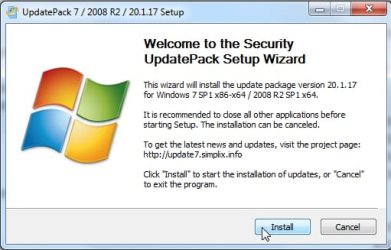
Easiest way is to download and run simplix updatepack. No telemetry or other junk.

UpdatePack7R2-20.1.17.exe

Just click install and off it goes

simplix-run20-1--17.jpg
 

My Computers My Computers

  • At a glance

    7 X64i5 84002x8gb 3200mhz
    Computer type
    PC/Desktop
    OS
    7 X64
    CPU
    i5 8400
    Motherboard
    gigabyte b365m ds3h
    Memory
    2x8gb 3200mhz
    Hard Drives
    various
    PSU
    pure power 11 400w cm
    Case
    Coolermaster
    Cooling
    cryorig m9i
  • At a glance

    7x64g54008gb ddr4 2400
    Computer type
    PC/Desktop
    OS
    7x64
    CPU
    g5400
    Motherboard
    ga b365m ds3h
    Memory
    8gb ddr4 2400
    PSU
    xfx pro 450w
Thanks SIW2
 

My Computer My Computer

At a glance

Windows 7 Pro x64Intel i5-8265U8gbIntel Iris Plus 655
Computer type
Laptop
Computer Manufacturer/Model Number
HP 250 G7
OS
Windows 7 Pro x64
CPU
Intel i5-8265U
Motherboard
Intel Coffee Lake
Memory
8gb
Graphics Card(s)
Intel Iris Plus 655
Sound Card
Realtek HDA
Monitor(s) Displays
Generic
Screen Resolution
1366 x 768
Hard Drives
Crucial P5 NVMe 1Tb internal
WD's 4Tb, 3Tb, 2 x 2Tb external
Mouse
Logi wireless
Internet Speed
45 Mbps
Antivirus
AVG
Browser
Firefox 88, Pale Moon 29, Brave 129
Other Info
Combination of i5-8265U with Crucial P5 achieves Crystal Bench scores > 5000

Iris Plus GPU (Whiskey Lake) driver from BioStar

HP 250 G7 is a budget machine
From SWI2:


UpdatePack7R2-20.1.17.exe


Works perfectly. Streamlined so that the programme installs all the useful updates and reboots for you.


Thanks SWI2 and the wonderful, sharp tutorials here.
 

My Computer My Computer

At a glance

Windows 7 Pro x64Intel i5-8265U8gbIntel Iris Plus 655
Computer type
Laptop
Computer Manufacturer/Model Number
HP 250 G7
OS
Windows 7 Pro x64
CPU
Intel i5-8265U
Motherboard
Intel Coffee Lake
Memory
8gb
Graphics Card(s)
Intel Iris Plus 655
Sound Card
Realtek HDA
Monitor(s) Displays
Generic
Screen Resolution
1366 x 768
Hard Drives
Crucial P5 NVMe 1Tb internal
WD's 4Tb, 3Tb, 2 x 2Tb external
Mouse
Logi wireless
Internet Speed
45 Mbps
Antivirus
AVG
Browser
Firefox 88, Pale Moon 29, Brave 129
Other Info
Combination of i5-8265U with Crucial P5 achieves Crystal Bench scores > 5000

Iris Plus GPU (Whiskey Lake) driver from BioStar

HP 250 G7 is a budget machine
I have marked this solved. With the help of SIW2 (& TechnoMage's suggestion to use Rufus) I have prepared a fully updated Win7 ISO and used it to install windows on 2 computers 18 days after EOS.


Thanks again to everyone who replied and made suggestions.
 

My Computer My Computer

At a glance

win7 several versions, Win10 home & proseveralvariesseveral
Computer type
PC/Desktop
Computer Manufacturer/Model Number
Several
OS
win7 several versions, Win10 home & pro
CPU
several
Motherboard
several
Memory
varies
Graphics Card(s)
several
Hard Drives
several
Antivirus
none
Browser
Firefox
Good - Rufus with the updates added to the USB install package, or a DVD installation with the simplix update package following installation, are distilled wisdom from this website.


I successfully installed on a backup redundancy machine some days ago after EOL. Activation worked within a few seconds, so we know the answer to that question now.


Was your install iso MS Retail or OEM ? Mine was OEM, with a name including the DVD term. It would not complete installation off the USB file I generated. This required a DVD installation then updating with the simplix package. Still relatively painless and smooth though.
 

My Computer My Computer

At a glance

Windows 7 Pro x64Intel i5-8265U8gbIntel Iris Plus 655
Computer type
Laptop
Computer Manufacturer/Model Number
HP 250 G7
OS
Windows 7 Pro x64
CPU
Intel i5-8265U
Motherboard
Intel Coffee Lake
Memory
8gb
Graphics Card(s)
Intel Iris Plus 655
Sound Card
Realtek HDA
Monitor(s) Displays
Generic
Screen Resolution
1366 x 768
Hard Drives
Crucial P5 NVMe 1Tb internal
WD's 4Tb, 3Tb, 2 x 2Tb external
Mouse
Logi wireless
Internet Speed
45 Mbps
Antivirus
AVG
Browser
Firefox 88, Pale Moon 29, Brave 129
Other Info
Combination of i5-8265U with Crucial P5 achieves Crystal Bench scores > 5000

Iris Plus GPU (Whiskey Lake) driver from BioStar

HP 250 G7 is a budget machine
I used a home burned install disc I inherited from my son and the files supplied by SIW2 to produce the ISO.

- I installed from the USB on a computer with an empty HDD and it worked perfectly the first time.

- I had installed Win7 on another computer from the original disc a few weeks ago and let it spend a couple of days updating; I decided this would be better and I wanted to learn how to burn a bootable disc so I did and used it to re-install on that machine. It also worked perfectly.


I don't know if this will get me into trouble here but I used something called Windows Loader (also from my son) to activate. This also worked perfectly.
 

My Computer My Computer

At a glance

win7 several versions, Win10 home & proseveralvariesseveral
Computer type
PC/Desktop
Computer Manufacturer/Model Number
Several
OS
win7 several versions, Win10 home & pro
CPU
several
Motherboard
several
Memory
varies
Graphics Card(s)
several
Hard Drives
several
Antivirus
none
Browser
Firefox
To legit activate:

1. Use the coa key from a sticker - often in the battery compartment on a laptop.

Or

2. Backup the current activation using e.g. dism++. Then restore the activation after reinstalling the operating system. This works for the same edition on the same machine.
View attachment Dism++10.1.1001.10.zip

:ar: SCREENSHOTS activebackup

Or

3. Use 7oeminstaller. This will work only if the machine originally had what is called an oem preinstall. It matches a marker in the bios and activates offline. ( nearly all laptops and some desktops from the big oems - Acer, Packard Bell, eMachines, Advent, Asus, Dell, Fujitsu, Gigabyte, HP, Compaq, Lenovo, IBM, Medion, MSI, Samsung, Sony and Toshiba)

7oeminstaller
 

My Computers My Computers

  • At a glance

    7 X64i5 84002x8gb 3200mhz
    Computer type
    PC/Desktop
    OS
    7 X64
    CPU
    i5 8400
    Motherboard
    gigabyte b365m ds3h
    Memory
    2x8gb 3200mhz
    Hard Drives
    various
    PSU
    pure power 11 400w cm
    Case
    Coolermaster
    Cooling
    cryorig m9i
  • At a glance

    7x64g54008gb ddr4 2400
    Computer type
    PC/Desktop
    OS
    7x64
    CPU
    g5400
    Motherboard
    ga b365m ds3h
    Memory
    8gb ddr4 2400
    PSU
    xfx pro 450w
Back
Top