Installing win7 on pre inst. win 8 laptop - boot\bcd error

nickeh

New member
Local time
9:15 PM
Messages
4

Attachments

  • bootbcd.jpg
    bootbcd.jpg
    453.6 KB · Views: 7

My Computer My Computer

Computer type
PC/Desktop
OS
Windows 7 Ultimate x64
Check again for all of the UEFI, CSM or LEgacy BIOS settings you have on any of the BIOS setup tabs, expanding them so we can see every choice. If you can take camera snaps and post them back using the paper clip icon, we can help you better. Otherwise type the choices out in full.

In many cases it requires a Legacy or CSM setting to even install Win7 in UEFI mode.

Edit: Anshad provides a BIOS update below to give you the needed settings. Watch the video to understand how to apply them.

Better to Bypass UEFI to Install WIn7 since UEFI confers almost no benefits and plenty of headaches we see every day here.

How is the USB stick formatted? If stuck with UEFI, use Option One from UEFI Bootable USB Flash Drive - Create in Windows.
 
Last edited:

My Computer My Computer

Computer type
PC/Desktop
OS
Windows 7 Ultimate x64
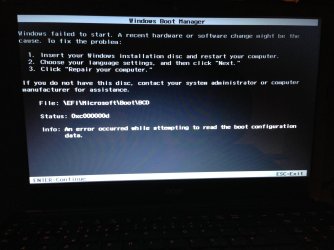
I got this exact issue on my laptop (my pc is mostly work)

Inserted my Installation disk and clicked Repair but I installed off of usb so I had to make one but it only took about 5 hours.
 

My Computer My Computer

Computer type
PC/Desktop
Computer Manufacturer/Model Number
Custom
OS
Windows Ultimate 64bit
CPU
Intel Xeon
Memory
190GB (been adding since 2010 and I get extra from my job)
Monitor(s) Displays
3 Monitors
Screen Resolution
1920x1220
Hard Drives
1TB-C- Main Drive
1TB-D- Data and restore tools
2TB-J- Videos and movies
4TB-L- Work things and private things
Keyboard
Microsoft Sculpt Ergononic
Mouse
Logitech..... (Unsure)
Antivirus
Norton Anti Virus and Malwarebites
Browser
Mozilla Firefox, Chrome and IE
@Anshad Edavana - i will try that right away, thank you in advance.


Thanks !!
 

My Computer My Computer

Computer type
PC/Desktop
OS
Windows 7 Ultimate x64
So i have installed the bios mentioned above, changed to legacy bios.
Cant install windows from USB = No bootable device -- insert boot disk.

Changed back to UEFI, and now windows loading files, but as soon as i get to windows loading, i get a red bar in the top of the screen, and it freezes.

any thoughts on that ?
 

My Computer My Computer

Computer type
PC/Desktop
OS
Windows 7 Ultimate x64
Please reply to multiple steps I gave you which were ignored. It would be installed now if you'd interacted like thousands before.
 
Since you edited your post, i thought you didnt want to see Gregrocker!

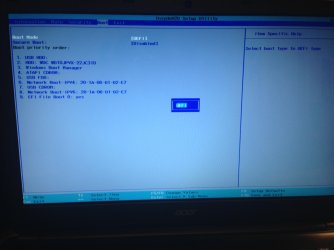
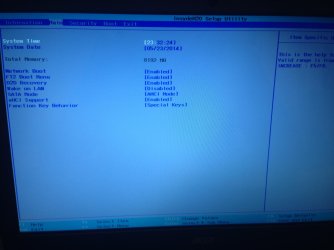
Boot mode: UEFI - ( and now legacy cause of the update )
Sata mode: AHCI ( nothing else )

No csm available.

USB stick is formatted with Rufus in this post -> UEFI Bootable USB Flash Drive - Create in Windows

1st attempt. ( Legacy boot mode )
After i updated bios to also support Legacy, the usb stick used as above gives the error " no bootable device "

2nd attempt. ( Legacy boot mode )
Formatted usb stick with rufus to " MBR partition scheme for bios or uefi " this worked on another laptop i have with CSM enabled.

But with the E1-510 acer, it said " no bootable device ".

It seems that when i switch to " legacy mode " it cant see my HDD

3rd attempt: ( Uefi boot mode )
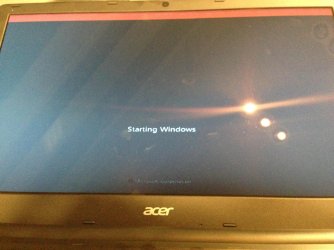
Changed back to UEFI, now the usb stick is loading windows files, but freezes up at " windows loading " with a red bar in the top, see picture.

I cant follow the guide " bypass uefi to install win7 " since the installation progress freezes up at loading windows screen"

I hope this answer your questions, and thanks for helping
 

Attachments

  • foto 2.jpg
    foto 2.jpg
    370.4 KB · Views: 1
  • foto 3.jpg
    foto 3.jpg
    536.1 KB · Views: 1
  • loadingfail.jpg
    loadingfail.jpg
    652.3 KB · Views: 0

My Computer My Computer

Computer type
PC/Desktop
OS
Windows 7 Ultimate x64
It says UEFI Boot for the mode but there are no UEFI devices to choose in Boot Priority order. There should be a UEFI flash stick or DVD choice to boot or it will not install.

What choices appear when you select Legacy BIOS?

Try DVD install.

If you can't get to the step to delete all partitions then boot Partition Wizard CD to Quick Wipe the HD for MBR Legacy install, create Primary NTFS partition to Modify>Set to Active then try Legacy install from DVD.
 
what I did

Hello,
I was having all sorts of weird driver issues, and I solved them by using my 2.0 usb port instead of the 3.0, or eSata port. Hope it helps.
 

My Computer My Computer

Computer type
PC/Desktop
Computer Manufacturer/Model Number
toshiba
OS
windows 7 ultimate x86
CPU
satellite c50d
Motherboard
amd
Graphics Card(s)
ati
Back
Top