
Solved Installing Windows 7 64bit from DVD-RW onto SSD problem

forte805

New member
Local time
10:44 PM
Messages
3
Hey there, new to the forum n' stuff. I already did a check of the topics and didn't quite find one that matched my issue so here it is.

I'm currently running Windows Vista 32bit on my 250gb HD. I also have a 80gb SSD I just purchased plugged in as well, my computer can see it but is completely unformated and untouched.
After I bought the "Windows 7 64bit Professional Upgrade" I download the package from Microsoft and got the 3 files you see on the right which I then extracted to the left...

thereyago.jpg


I then used PowerISO and burned the extracted files onto a DVD-RW...
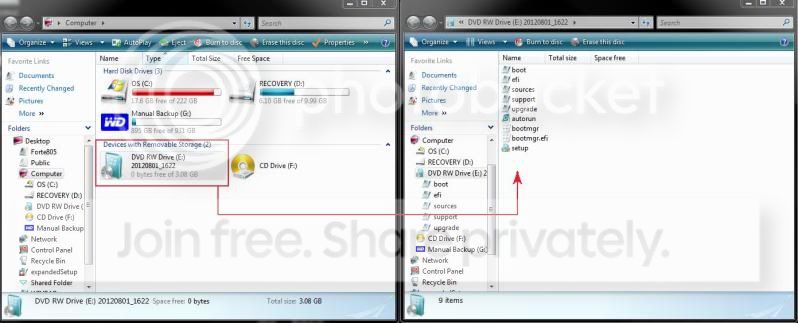
Untitled.jpg


I then restarted my computer, held F8 and booted from my CD drive. When I did so my computer just started up like it always does from my standard HD and nothing happened. Rather confused as to what I need to do.

Any insight as to what the problem is?
My goal is to Install Win7 onto my blank SSD and wipe my existing HD clean (the one that holds my existing Win-Vista)
 

My Computer My Computer

OS
Windows 7 64bit Professional Edition

My Computer My Computer

Computer type
PC/Desktop
Computer Manufacturer/Model Number
Self Built
OS
Win 10 Pro x64
CPU
Intel I5-2500K @3.3GHz
Motherboard
Asrock P67 Extreme4
Memory
16GB G.Skill Ripjaws X (4x4GB)
Graphics Card(s)
EVGA GeForce 750 Ti SC 2GB
Sound Card
ASUS Xonar DG 5.1 Channels 24-bit 96KHz PCI Interface Sound
Monitor(s) Displays
auria eq2367
Screen Resolution
1920 x 1080
Hard Drives
250GB Samsung 850 EVO SSD
1TB WD Blue
1TB Hitachi
PSU
SeaSonic X 650W 80 Plus Gold
Case
Corsair Obsidian 750D
Cooling
Corsair H60, Three 140mm case fans
Keyboard
Logitech Wireless Keyboard K520
Mouse
Logitech Wireless Mouse M310
Internet Speed
Wave Broadband ~ 100 dn 5 up
Antivirus
Windows Defender, Malwarebytes Premium
Browser
Edge, IE11, Chrome
Other Info
Laptop specs: HP g7-1365dx /
CPU: AMD A6-3420M APU with Radeon(tm) HD Graphics /
RAM: Crucial 8Gb (2x4Gb) /
SSD: Crucial M4-CT128M4SSD2 ATA Device/ FW 000F /
GFX: AMD Radeon HD 6520G /
OS: Windows 10 Pro x64
kk that 'seems' to be the fix, I'm downloading the .iso file now.
I'll burn that and attempt a boot from that DVD, will post here with the results later
 

My Computer My Computer

OS
Windows 7 64bit Professional Edition
Yes, you'll need the ISO file burned to DVD with ImgBurn at 4x speed which never fails. Other best practices are here for Clean Reinstall - Factory OEM Windows 7 which apply to retail as well.

When you boot the installer with only the SSD plugged in, it won't see a qualifying OS so leave the Product Key blank during install, then afterwards do the quick workaround in Option 2 or 3 in the tutorial Derek linked. The allows activating Upgrade version on a new or wiped HD.
 
thankyou, that completely solved the problem, writing this response from my newly installed Win7 OS, thx again for the help ^_^
 

My Computer My Computer

OS
Windows 7 64bit Professional Edition
Thanks for posting back, glad to hear you're up and running. :)
 

My Computer My Computer

Computer type
PC/Desktop
Computer Manufacturer/Model Number
Self Built
OS
Win 10 Pro x64
CPU
Intel I5-2500K @3.3GHz
Motherboard
Asrock P67 Extreme4
Memory
16GB G.Skill Ripjaws X (4x4GB)
Graphics Card(s)
EVGA GeForce 750 Ti SC 2GB
Sound Card
ASUS Xonar DG 5.1 Channels 24-bit 96KHz PCI Interface Sound
Monitor(s) Displays
auria eq2367
Screen Resolution
1920 x 1080
Hard Drives
250GB Samsung 850 EVO SSD
1TB WD Blue
1TB Hitachi
PSU
SeaSonic X 650W 80 Plus Gold
Case
Corsair Obsidian 750D
Cooling
Corsair H60, Three 140mm case fans
Keyboard
Logitech Wireless Keyboard K520
Mouse
Logitech Wireless Mouse M310
Internet Speed
Wave Broadband ~ 100 dn 5 up
Antivirus
Windows Defender, Malwarebytes Premium
Browser
Edge, IE11, Chrome
Other Info
Laptop specs: HP g7-1365dx /
CPU: AMD A6-3420M APU with Radeon(tm) HD Graphics /
RAM: Crucial 8Gb (2x4Gb) /
SSD: Crucial M4-CT128M4SSD2 ATA Device/ FW 000F /
GFX: AMD Radeon HD 6520G /
OS: Windows 10 Pro x64
Back
Top