Installing Windows 7 alongside Windows 8

dimm0k

New member
Local time
3:13 PM
Messages
1
So I purchased a new Thinkpad and had it pre-loaded with Windows 8. Now I regret that decision for many reasons and would like to install Windows 7 while keeping Windows 8 intact. The partition Windows 8 is sitting was quite large so I shrunk the volume via 'Disk Management' and allocated more than enough to run both operating systems in their own partition. Everything looked good from there and I was ready to proceed with the install of Windows 7 with the use of my DVD until it got to the section where setup asks which partition to install to. Choosing the empty NTFS partition setup gives me the following message and I can't proceed, "Windows cannot be installed to this disk. The selected disk is of the GPT partition style." Is there any easy way around this? I'm guessing this is because Windows 8 was installed via UEFI and GPT...
 

My Computer

OS
Windows 7 x64
Try to boot installation DVD the EFI way - see options in firmware.

You boot installation media the EFI way - GPT disk is expected as target
or
you boot installation media BIOS/legacy way - MBR disk is expected as target.

NOTE:
a) Dual-boot setup for BIOS way is widely known and there are plenty of tutorials.
b) EFI dual-boot is new teritory - you cannot find many tutorials on the subject.

If you think you are technically advanced go for EFI/GPT - you have W8 already installed.
After you install W7 you will have to repair boot environment / reinstall W8 boot environment / and hopefully after that you will have a dual-boot menu.

Reinstalling boot environment is usually done with "bcdboot.exe" command - for EFI maybe one additional command is needed. Will post a link later on subject or just post the commands needed.
 

My Computer

Computer Manufacturer/Model Number
Acer Notebook
OS
Win 8 RP, Win 7, XP
CPU
Intel
After you install W7 you will have to repair boot environment / reinstall W8 boot environment / and hopefully after that you will have a dual-boot menu.

Reinstalling boot environment is usually done with "bcdboot.exe" command - for EFI maybe one additional command is needed. Will post a link later on subject or just post the commands needed.


NO, repairs are need.

Delete Win 7-007.PNG
 

My Computer

OS
ME/XP/Vista/Win7
q.gif
Quote: Originally Posted by boyans
After you install W7 you will have to repair boot environment / reinstall W8 boot environment / and hopefully after that you will have a dual-boot menu.

Reinstalling boot environment is usually done with "bcdboot.exe" command - for EFI maybe one additional command is needed. Will post a link later on subject or just post the commands needed.

NO, repairs are need.
Thanks, could you post an attachment of "bcdedit /enum all /v" corresponding to layout posted ?

Do I understand right the proposed solution (all EFI mode):
1) clean existing Win 8
2) install Win 7
3) install Win 8
or am I wrong ?
 
Last edited:

My Computer

Computer Manufacturer/Model Number
Acer Notebook
OS
Win 8 RP, Win 7, XP
CPU
Intel
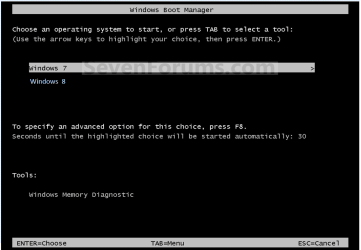
When Windows 8 is install first, than Windows 7.

use-4.PNG


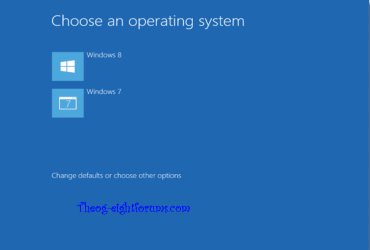
When Windows 7 is install first, than Windows 8.

use-5.PNG
 

My Computer

OS
ME/XP/Vista/Win7
Thank you for posting screenshots.
This does not answer completely the question.

Does it mean you install W7 after W8, both in EFI mode, and you can dual-boot without problems ?
 

My Computer

Computer Manufacturer/Model Number
Acer Notebook
OS
Win 8 RP, Win 7, XP
CPU
Intel
When Windows 8 is install first, than Windows 7, both in EFI mode.
When Windows 7 is install first, than Windows 8, both in EFI mode.

& on new OEM PC with Windows 8, with Secure Boot disabled
 

My Computer

OS
ME/XP/Vista/Win7
Ok. This is perfect.
No more dual-boot problems with newer Windows versions on UEFI.

Seems Microsoft has done a good implementation of UEFI loaders/boot managers.

Thank you.
 

My Computer

Computer Manufacturer/Model Number
Acer Notebook
OS
Win 8 RP, Win 7, XP
CPU
Intel
Backup & partitioning.

The only 3rd party software that I know of, that fully supports Windows 8 is PARAGON.


Paragon 12 now supports Windows 8 uEFI, GPT & Secure Boot.

PARAGON Software Group - News: Significant booting challenges on EFI systems when upgrading to Windows 8

FREIBURG, Germany, December 11, 2012 - Paragon Software Group (PSG), a leader in data backup, disaster recovery, and data migration solutions reveals the market educational article about possible Windows 8 booting issues and explanations on how the user can solve these problems: "The new Windows 8 and Server 2012 will be the base operating systems for upcoming new computers, laptops and servers. UEFI is the recommended platform for all of them. In spite of all of its advantages, many users are still not familiar with UEFI. There are known issues which may arise when you decide to manage EFI boot options or migrate to an EFI-based computer from another one. In most of these cases, your OS will simply not boot".


Download the market educational article below.
 

My Computer

OS
ME/XP/Vista/Win7
Fedora to be signed by Microsoft | TechRepublic


Fedora 18 will support UEFI’s Secure Boot feature by using Microsoft’s sysdev signing service, to sign its initial bootloader.

If every new firmware will include a Microsoft key for checking boot managers and loaders what else can you do ? But the option to switch off Secure Boot will be always there.

I don't remember exactly where I have read about that the extension of GRUB towards UEFI will create a monster boot loader/manager. I bet Microsoft was not happy that GRUB can automatically load almost any OS including all versions of Windows.
 

My Computer

Computer Manufacturer/Model Number
Acer Notebook
OS
Win 8 RP, Win 7, XP
CPU
Intel
Back
Top