Installing Windows 7 english

bhellim

New member
Local time
5:46 PM
Messages
10
HI

Good day,I just want to ask if it is possible to install 2 windows 7 OS on the same computer? Cause I have a pc with Windows 7 Chinese OS preinstalled but hoping that I won't have to delete that OS and instead install an English version of Windows 7,I was hoping to dual boot it,is it possible and if it is can you help me on step by step on how to do it? many thanks
 

My Computer

Computer Manufacturer/Model Number
Acer Ferrari One
OS
Windows 7 64 bits Home Premium
CPU
AMd
Memory
3GB
Monitor(s) Displays
23 inch Viewsonic
Hard Drives
500gb
Yes, it's easy.

Just make a partition for your new install.

Boot the install dvd - foolow instructions and point the installer at your new partition.

The only issue you may have - as that is an oem machine - you probably have 4 partitions already on there.

If you post a screenshot of Disk Management window - someone will show you how to get rid of the annoying 100mb partition ( assuming you have one ).

http://www.sevenforums.com/tutorials/9733-how-post-screenshot-seven-forums.html
 

My Computers

System One System Two

  • Computer type
    PC/Desktop
    OS
    7 X64
    CPU
    i5 8400
    Motherboard
    gigabyte b365m ds3h
    Memory
    2x8gb 3200mhz
    Hard Drives
    various
    PSU
    pure power 11 400w cm
    Case
    Coolermaster
    Cooling
    cryorig m9i
  • Computer type
    PC/Desktop
    OS
    7x64
    CPU
    g5400
    Motherboard
    ga b365m ds3h
    Memory
    8gb ddr4 2400
    PSU
    xfx pro 450w
Thanks for the reply gonna have the pc by tomorrow afternoon gonna see the disk management window and what is that 100mb partition? is that the hidden recovery system I don't want to delete anything on the pc just in case for warranty purposes.
 

My Computer

Computer Manufacturer/Model Number
Acer Ferrari One
OS
Windows 7 64 bits Home Premium
CPU
AMd
Memory
3GB
Monitor(s) Displays
23 inch Viewsonic
Hard Drives
500gb
I see - well there is another way - may have to make one of the partitions extended - you can always change it back at a later date if you need to

We will know when we see the screenshot.
 

My Computers

System One System Two

  • Computer type
    PC/Desktop
    OS
    7 X64
    CPU
    i5 8400
    Motherboard
    gigabyte b365m ds3h
    Memory
    2x8gb 3200mhz
    Hard Drives
    various
    PSU
    pure power 11 400w cm
    Case
    Coolermaster
    Cooling
    cryorig m9i
  • Computer type
    PC/Desktop
    OS
    7x64
    CPU
    g5400
    Motherboard
    ga b365m ds3h
    Memory
    8gb ddr4 2400
    PSU
    xfx pro 450w
Hello bhellim.


Here's some info on posting images here at Seven Forums.
   Note

In the Windows start menu right click computer and click manage, in the left pane of the "Computer Management" window that opens click disk management and post a maximized snip of that.

How to Upload and Post a Screenshot and File in Seven Forums


If need be Method Two of this tutorial at the link below may be what you are needing but post the snip / screen-shot of Windows disk management so we can make sure before you proceede.

Partition / Extended : Logical Drives
 

My Computer

Computer Manufacturer/Model Number
* BFK Customs *
OS
W 7 64-bit Ultimate
CPU
Intel Q9550 Yorkfield
Motherboard
ASUS P5Q Pro
Memory
8GB Dominator 8500C5D
Graphics Card(s)
ATI : XFX 5870
Sound Card
Realtek HD Audio 7-1
Monitor(s) Displays
1x 47" LCD HDMI & 3x 26" LCD HDMI
Screen Resolution
1920x1080P & 1920x1200
Hard Drives
1x 80GB Intel X25-M G2 SSD : 1x 500GB & 1x 640GB WD Caviar Black(s)
PSU
Corsair 620HX
Case
Cooler Master RC-690
Cooling
Tuniq Tower 120, 2x 140mm and 3x 120mm case fans
Keyboard
Microsoft 500
Mouse
Razer Diamondback 3G
Internet Speed
14 Mb/s
Other Info
1x Koutech 3Gb/s SATA HDD Hot Swap Rack
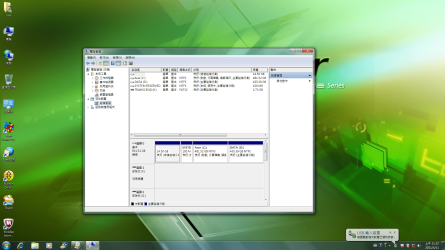
please see attach files sorry if it's too small and please advise what to do,thanks
 

Attachments

  • 未命名.png
    未命名.png
    433.8 KB · Views: 30

My Computer

Computer Manufacturer/Model Number
Acer Ferrari One
OS
Windows 7 64 bits Home Premium
CPU
AMd
Memory
3GB
Monitor(s) Displays
23 inch Viewsonic
Hard Drives
500gb
Since you already have four Primary Partitions on the HD, in order to shrink one to make another partition you would have to convert it to Logical using free Partition Wizard bootable CD. Then you could create a new Logical sub-partition to install the other Win7 onto.

An easier way would be to move the Data off of D onto C, then boot the Win7 DVD to CUstom install onto D, using the Drive Tools to format the partition first as shown here: Clean Install Windows 7

THe WIn7 installer will configure a Dual Boot menu. Each Win7 will assume C when you are booted into it.
 
Last edited:
Hello again.


As Greg has mentioned, there is a four (4) partition limit using this partition structure; have a thorough look at Method Two of this tutorial at the link below, being sure to heed the Warning about the "System" partition.


Partition / Extended : Logical Drives
 

My Computer

Computer Manufacturer/Model Number
* BFK Customs *
OS
W 7 64-bit Ultimate
CPU
Intel Q9550 Yorkfield
Motherboard
ASUS P5Q Pro
Memory
8GB Dominator 8500C5D
Graphics Card(s)
ATI : XFX 5870
Sound Card
Realtek HD Audio 7-1
Monitor(s) Displays
1x 47" LCD HDMI & 3x 26" LCD HDMI
Screen Resolution
1920x1080P & 1920x1200
Hard Drives
1x 80GB Intel X25-M G2 SSD : 1x 500GB & 1x 640GB WD Caviar Black(s)
PSU
Corsair 620HX
Case
Cooler Master RC-690
Cooling
Tuniq Tower 120, 2x 140mm and 3x 120mm case fans
Keyboard
Microsoft 500
Mouse
Razer Diamondback 3G
Internet Speed
14 Mb/s
Other Info
1x Koutech 3Gb/s SATA HDD Hot Swap Rack
Hello hmm if ever D: drive doesn't have any files on it can I possibly say it's ok to install Windows 7 on it without having to change it? I'm not at home right now but I think they partition the 1TB HD to 2 500GB as seen on the attach file.Having C: windows and D: just free space.
 

My Computer

Computer Manufacturer/Model Number
Acer Ferrari One
OS
Windows 7 64 bits Home Premium
CPU
AMd
Memory
3GB
Monitor(s) Displays
23 inch Viewsonic
Hard Drives
500gb
Yes, you can install onto DATA D if you have nothing on there you want to keep.

Be careful you pick the right one to install onto - when you have booted to the installation environment - drive letters may be different.
 

My Computers

System One System Two

  • Computer type
    PC/Desktop
    OS
    7 X64
    CPU
    i5 8400
    Motherboard
    gigabyte b365m ds3h
    Memory
    2x8gb 3200mhz
    Hard Drives
    various
    PSU
    pure power 11 400w cm
    Case
    Coolermaster
    Cooling
    cryorig m9i
  • Computer type
    PC/Desktop
    OS
    7x64
    CPU
    g5400
    Motherboard
    ga b365m ds3h
    Memory
    8gb ddr4 2400
    PSU
    xfx pro 450w
thank you very much for all the help,will try later at home :).
 

My Computer

Computer Manufacturer/Model Number
Acer Ferrari One
OS
Windows 7 64 bits Home Premium
CPU
AMd
Memory
3GB
Monitor(s) Displays
23 inch Viewsonic
Hard Drives
500gb
Back
Top