Installing windows 7 from a USB stick

wizkid005

New member
Local time
7:59 AM
Messages
10
Hi there, My laptop has a DVD drive and installed Windows 7 because of this, but my sisters laptop only have a CD rom drive, and because the install rom is DVD format, i have to find other ways to install it, i managed to get the install to boot off my USB stick, but when i get to the point of choosing a partition it fails it says 'setup was unable to create new system partition'.

Now i have google'd this problem and people seem to be getting round it by removing there usb connections, but of course i cant otherwise install cant do anything, i tryed using a different program to re format the hard drive but still nothing, and i have noticed people havent had a problem with installing from usb.

Can anyone help??

Thanks Wizkid005 :D


My Computer

Computer Manufacturer/Model Number
XBLADE
OS
Windows 7
CPU
Athlom Dual Core
Motherboard
Nvidia
Memory
2 gb
Hard Drives
1 230 GB
Case
XBLADE
There are other methods to get a bootable USB flash key installer that might work for you.

Besides the one Corrine posted above, here is a MS tool for writing the ISO to stick: http://www.sevenforums.com/tutorials/31541-windows-7-usb-dvd-download-tool.html?filter[2]=General%20Tips

Then there is the Win2Flash method which works for some: http://www.youtube.com/watch?v=srOoGhm-jcI

What worked for my Kingston Data Traveler is formatting it Primary FAT32 in Disk Mgmt., then copying the DVD's files over exactly as they appear when you Open DVD. It boots from BIOS under HD's in boot order listings..

If none of these 4 methods work, try copying the DVD files over network to your sister's netbook, then run Setup from desktop to overwrite the current OS.
 
Hi guys thanks for the quick replys, i have tried everything everyone has suggested here and on google, i have re formatted my memory stick in different ways and i tried using gpart to re format my hdd, i also tried different mmethods of putting windows 7 onto my memory stick, still nothing.
 

My Computer

Computer Manufacturer/Model Number
XBLADE
OS
Windows 7
CPU
Athlom Dual Core
Motherboard
Nvidia
Memory
2 gb
Hard Drives
1 230 GB
Case
XBLADE
and i cant do anything with it because i deleted all the partition there is no OS on the laptop
 

My Computer

Computer Manufacturer/Model Number
XBLADE
OS
Windows 7
CPU
Athlom Dual Core
Motherboard
Nvidia
Memory
2 gb
Hard Drives
1 230 GB
Case
XBLADE
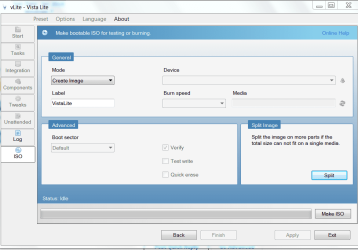
Then you could use Vlite to split the ISO into multiple parts to fit on CD's.

There is a tutorial on how to use Vlite here: http://www.sevenforums.com/tutorials/32055-bootable-iso-create-installation-files.html

It is fully automated: just load the files from DVD into Vlite, let it recompile ISO, then on ISO page use Split ISO Image wizard at bottom right.

It will be set by default to 700mb, which is size of CD and split the ISO into parts to burn separately.
 

Attachments

  • Capture.PNG
    Capture.PNG
    32.8 KB · Views: 41
Is there anything else i can do?? surely if other people can do it, why cant i?
 

My Computer

Computer Manufacturer/Model Number
XBLADE
OS
Windows 7
CPU
Athlom Dual Core
Motherboard
Nvidia
Memory
2 gb
Hard Drives
1 230 GB
Case
XBLADE
Did you look over your BIOS settings carefully to make sure USB flash drive is selected 1st boot device. It's usually listed under Hard Drives.

Try clearing the BIOS CMOS: http://pcsupport.about.com/od/fixtheproblem/tp/clearcmos.htm

Did you look for all related USB settings to make sure they are enabled in BIOS?

What is the SATA controller setting: AHCI, IDE or RAID? Try the first two in that order.

Use Win7 own formatting. Boot into Win7 DVD, choose Repair on second screen, click through to Recovery Tools list and open a command line, type:

DISKPART
LIST DISK
SELECT DISK # (for Windows 7 disk)
clean all
create partition primary
select partition 1
assign letter=c:
active
format
exit
 
its stuck on clean all
 

My Computer

Computer Manufacturer/Model Number
XBLADE
OS
Windows 7
CPU
Athlom Dual Core
Motherboard
Nvidia
Memory
2 gb
Hard Drives
1 230 GB
Case
XBLADE
CLEAN ALL is zeroing the drive which takes a long time. You want the deepest possible clean.

If you cannot wait then use CLEAN without ALL.
 
Back
Top