Installing Windows 7 on a new HD

saints

New member
Local time
5:29 AM
Messages
6
Hi all,

I have a new HP Pavillion Laptop that I would like to put a new hard drive in. It currently has Windows 7 preloaded from the factory, but does not have any recovery or installation cds with it. I want to install a 500GB Western Digital Internal Hard Drive. I have also purchased a USB drive with 32GB of memory and an external drive with 250GB of memory.
Correct me if I'm wrong, but I have to image my hard drive to the external drive (250GB) which I will boot from with the new internal drive in the computer. Then this will install Windows 7 on the new internal hard drive.
I made a "recovery" disk on the thumbdrive mentioned above, but it would not load Windows on the new drive. It seems extremely excessive that I had to buy all of these extra items just because there was no CD supplied to install Windows on a new hard drive. Am I missing anything here? Thanks in advance.
 

My Computer

OS
64
Hello saints, welcome to Seven Forums!


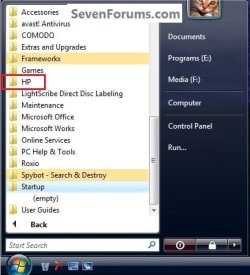
Have you looked around in the Windows start menu for an entry that will let you burn a set of recover disks?

click to enlarge
HP Start Menu.jpg
 

My Computer

Computer Manufacturer/Model Number
* BFK Customs *
OS
W 7 64-bit Ultimate
CPU
Intel Q9550 Yorkfield
Motherboard
ASUS P5Q Pro
Memory
8GB Dominator 8500C5D
Graphics Card(s)
ATI : XFX 5870
Sound Card
Realtek HD Audio 7-1
Monitor(s) Displays
1x 47" LCD HDMI & 3x 26" LCD HDMI
Screen Resolution
1920x1080P & 1920x1200
Hard Drives
1x 80GB Intel X25-M G2 SSD : 1x 500GB & 1x 640GB WD Caviar Black(s)
PSU
Corsair 620HX
Case
Cooler Master RC-690
Cooling
Tuniq Tower 120, 2x 140mm and 3x 120mm case fans
Keyboard
Microsoft 500
Mouse
Razer Diamondback 3G
Internet Speed
14 Mb/s
Other Info
1x Koutech 3Gb/s SATA HDD Hot Swap Rack
I have. HP had a program that lets you create recovery disks, I assumed this is the same thing the Windows option does. This is what I saved on the thumbdrive, which looked like it would install Windows but failed. Will a set of recovery disks give me everything I need to install Windows? Or would it be easier to save the recovery disks to the external HD and boot from there? And will that be everything I need to install to an HD with nothing on it? Thanks again.
 

My Computer

OS
64
So in summary, is the system recovery cd or thumbdrive all you need to install windows 7? Or do I have to do a complete system image?
 

My Computer

OS
64
The recovery discs will be DVDs and there are usually two or three of them. I've never seen them created to a USB flash drive. Go ahead and create the set of DVDs then you will have all you need to reinstall Win 7 on the new hard drive.

It would be simpler and faster though to image the current drive to your new external drive then swap drives and restore it. Additionally, you would not lose any data which you will do if you install using the recovery discs.

Edit: Did the new 350GB WD drive come with a CD? If so you may be able to use it to clone the existing drive to the new one. Just install the new drive along with the existing drive and boot the CD.

See here: Acronis True Image WD Edition Software

Acronis True Image WD Edition Software

Acronis True Image WD Edition Software helps you to completely clone your current system drive onto your new WD hard drive. Cloning makes an exact copy of your old system drive on your new WD hard drive, including the operating system, applications, data, preferences, and email settings. Everything will be present and operate exactly as it did on your old hard drive. Acronis True Image WD Edition now supports WD Advanced Format Drives and ensures that all partitions are optimally aligned.
You can download it from the above link if there was no CD.
 

My Computer

Computer type
PC/Desktop
Computer Manufacturer/Model Number
Lenovo IdeaCenter 450
OS
Windows 10 Pro X64
CPU
Intel Quad Core i7-4770 @ 3.4Ghz
Memory
16.0GB PC3-12800 DDR3 SDRAM 1600 MHz
Graphics Card(s)
Intel Integrated HD Graphics
Sound Card
Realtek HD Audio
Monitor(s) Displays
HP 22" LCD
Screen Resolution
1680 x 1050
Hard Drives
250GB Samsung EVO SATA-3 SSD
2TB Seagate ST2000DM001 SATA-2
1.5TB Seagate ST3150041AS SATA
Keyboard
Dell USB
Mouse
Lenovo USB
Internet Speed
Cable via Road Runner 3MB Upload, 30MB Download
Antivirus
Windows Defender, MBAM Pro, MBAE
Browser
Seamonkey
Other Info
UEFI/GPT
PLDS DVD-RW DH16AERSH
Thanks for the replys. The new internal HD did not come with any software. I used the thumbdrive to save the HP recovery software, but I'm unable to get it to load on the new HD. Thanks for reccommending the program for cloning. I'm currently using Macrium to try and clone the HD. Hopefully that will work. It seems like a lot of work just to get an OS on an HD.

Once cloned to the external HD, I should be able to install the new internal HD and have windows load, correct? Then I can move files off of the external HD to the new internal HD?

Thanks for the advice.
 

My Computer

OS
64
What version of x64, Home Prem, Prof, Ultimate ?

Does you HP laptop have a DVD R/W drive ?
 

My Computer

Computer type
PC/Desktop
Computer Manufacturer/Model Number
Built them myself, Science Experiments !
OS
Win7 Enterprise, Win7 x86 (Ult 7600), Win7 x64 Ult 7600, TechNet RTM on AMD x64 (2.8Ghz)
CPU
AMD fx8350 4ghz, AMD-32 2400mhz, AMD-64 3200mhz, AMDx64 2.8G
Motherboard
SIS 755, ECS-K8M890M-M (Ult 7600), GigaByte & others
Memory
2gb, 4gb on the Ult 7600, 4gb on Technet RTM, 32gb on FX8350
Graphics Card(s)
Draw my own Graphics, several nVidia cards
Sound Card
on motherboard
Monitor(s) Displays
19" flat scr, 28" I-Inc widescr,22" Emprex Widescr, 23" Acer
Screen Resolution
1280 x 1024, 1440 x 900, 1920 x 1080
Hard Drives
6 pata Ide HD's & 2 Sata HD's
added 80gb external on Ult 7600 computer,
numerous extra 1tb, 2TB, 3Tb SATA HD's
A collection of ext HD Docks w/ HDs
PSU
430w, 550w, 600w, 700, 800, etc
Case
All Generic Full Towers
Cooling
Open Air & a few fans, some w/ colored LEDs
Keyboard
Compaq & Dell recycled from GoodWill
Mouse
Made in China Optical Wired Mouse
Internet Speed
Fast Cable InterNet
Antivirus
AVG Free on 24 different Desktops, NO Problems!
Browser
IE 8 is preferred, but use FireFox sometimes
Other Info
Linksys Routers, switches, & Hubs
Too Many USB Flash Drives to count, Biggest is 64GB !
Eight computers in my home network.
Sixteen computers at my business network.
Linked via TeamViewer !
Lots of old used spare computer parts everywhere!
I'm currently running windows 7 home premium. Yes I do have a cd/dvd drive.
 

My Computer

OS
64

My Computer

Computer type
PC/Desktop
Computer Manufacturer/Model Number
Built them myself, Science Experiments !
OS
Win7 Enterprise, Win7 x86 (Ult 7600), Win7 x64 Ult 7600, TechNet RTM on AMD x64 (2.8Ghz)
CPU
AMD fx8350 4ghz, AMD-32 2400mhz, AMD-64 3200mhz, AMDx64 2.8G
Motherboard
SIS 755, ECS-K8M890M-M (Ult 7600), GigaByte & others
Memory
2gb, 4gb on the Ult 7600, 4gb on Technet RTM, 32gb on FX8350
Graphics Card(s)
Draw my own Graphics, several nVidia cards
Sound Card
on motherboard
Monitor(s) Displays
19" flat scr, 28" I-Inc widescr,22" Emprex Widescr, 23" Acer
Screen Resolution
1280 x 1024, 1440 x 900, 1920 x 1080
Hard Drives
6 pata Ide HD's & 2 Sata HD's
added 80gb external on Ult 7600 computer,
numerous extra 1tb, 2TB, 3Tb SATA HD's
A collection of ext HD Docks w/ HDs
PSU
430w, 550w, 600w, 700, 800, etc
Case
All Generic Full Towers
Cooling
Open Air & a few fans, some w/ colored LEDs
Keyboard
Compaq & Dell recycled from GoodWill
Mouse
Made in China Optical Wired Mouse
Internet Speed
Fast Cable InterNet
Antivirus
AVG Free on 24 different Desktops, NO Problems!
Browser
IE 8 is preferred, but use FireFox sometimes
Other Info
Linksys Routers, switches, & Hubs
Too Many USB Flash Drives to count, Biggest is 64GB !
Eight computers in my home network.
Sixteen computers at my business network.
Linked via TeamViewer !
Lots of old used spare computer parts everywhere!
I feel like a tool. It looks like the thumbdrive copy was bad, so when I reloaded it installed Windows. I still used the external HD to store some things not originally shipped with the pc, so buying it wasn't a complete waste. Thanks for the advice, and for future reference it can be done from a thumbdrive as long as the copy of the recovery software is good :)
 

My Computer

OS
64

My Computer

Computer type
PC/Desktop
Computer Manufacturer/Model Number
Built them myself, Science Experiments !
OS
Win7 Enterprise, Win7 x86 (Ult 7600), Win7 x64 Ult 7600, TechNet RTM on AMD x64 (2.8Ghz)
CPU
AMD fx8350 4ghz, AMD-32 2400mhz, AMD-64 3200mhz, AMDx64 2.8G
Motherboard
SIS 755, ECS-K8M890M-M (Ult 7600), GigaByte & others
Memory
2gb, 4gb on the Ult 7600, 4gb on Technet RTM, 32gb on FX8350
Graphics Card(s)
Draw my own Graphics, several nVidia cards
Sound Card
on motherboard
Monitor(s) Displays
19" flat scr, 28" I-Inc widescr,22" Emprex Widescr, 23" Acer
Screen Resolution
1280 x 1024, 1440 x 900, 1920 x 1080
Hard Drives
6 pata Ide HD's & 2 Sata HD's
added 80gb external on Ult 7600 computer,
numerous extra 1tb, 2TB, 3Tb SATA HD's
A collection of ext HD Docks w/ HDs
PSU
430w, 550w, 600w, 700, 800, etc
Case
All Generic Full Towers
Cooling
Open Air & a few fans, some w/ colored LEDs
Keyboard
Compaq & Dell recycled from GoodWill
Mouse
Made in China Optical Wired Mouse
Internet Speed
Fast Cable InterNet
Antivirus
AVG Free on 24 different Desktops, NO Problems!
Browser
IE 8 is preferred, but use FireFox sometimes
Other Info
Linksys Routers, switches, & Hubs
Too Many USB Flash Drives to count, Biggest is 64GB !
Eight computers in my home network.
Sixteen computers at my business network.
Linked via TeamViewer !
Lots of old used spare computer parts everywhere!
I sense some confusion between recovery/repair disc and installation disc. Not sure how you created this disk (or flash drive). But it may not be suitable for a reinstallation.

With imaging you can, of course, transfer the OS. But if you have the 100MB active boot partition on your current drive, it gets a bit more involved.

If you want to make your life really easy, spend $19.95 and use this: Paragon Migrate OS to SSD - Overview Works perfectly and is very easy to use. I have tested it.
 

My Computer

Computer Manufacturer/Model Number
HP, Dell, Gateway, Toshiba - 4 laptops and 2 desktops
OS
Vista, Windows7, Mint Mate, Zorin, Windows 8
CPU
from 1.6GHz Duo to i7
Monitor(s) Displays
2x HP w2207
Hard Drives
5x HDD, 7x SSD, 12x Externals
Keyboard
with trackball - no mices
Mouse
Trackball mice
Internet Speed
DSL 6000
Here are tips for cleaning up the HP pre-installed sponsor's bloatware: http://www.sevenforums.com/installa...p-all-four-primary-partitions.html#post952573

All manufacturers have now stopped providing clean-copy Intallation DVD's with consumer models as the sponsored bloatware provides most of their profit margin. So they try to enforce it by not providing the DVD required by MS, just a Recovery partition which can generate disks that restore the full bloatware install.

Many tech enthusiasts find a clean-copy Installation DVD to reinstall with Product Key on the COA sticker. Here are tips for getting a perfect install for those ready to shrug off the factory bloat and let the best OS ever run free: http://www.sevenforums.com/installation-setup/125874-re-install-windows-7-a.html#post1086729
 
Good to see you got it running and thanks for the update.
 

My Computer

Computer Manufacturer/Model Number
* BFK Customs *
OS
W 7 64-bit Ultimate
CPU
Intel Q9550 Yorkfield
Motherboard
ASUS P5Q Pro
Memory
8GB Dominator 8500C5D
Graphics Card(s)
ATI : XFX 5870
Sound Card
Realtek HD Audio 7-1
Monitor(s) Displays
1x 47" LCD HDMI & 3x 26" LCD HDMI
Screen Resolution
1920x1080P & 1920x1200
Hard Drives
1x 80GB Intel X25-M G2 SSD : 1x 500GB & 1x 640GB WD Caviar Black(s)
PSU
Corsair 620HX
Case
Cooler Master RC-690
Cooling
Tuniq Tower 120, 2x 140mm and 3x 120mm case fans
Keyboard
Microsoft 500
Mouse
Razer Diamondback 3G
Internet Speed
14 Mb/s
Other Info
1x Koutech 3Gb/s SATA HDD Hot Swap Rack
Back
Top