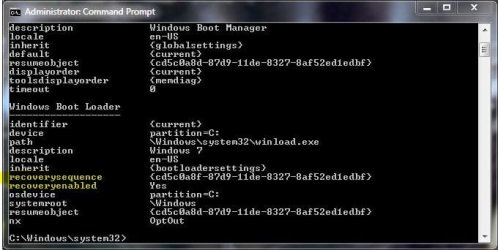
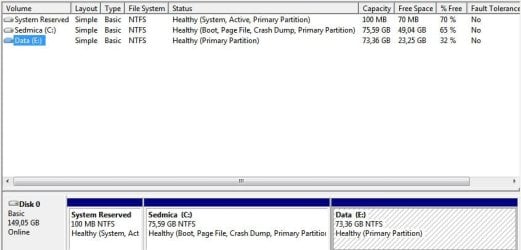
If you delete all the partitions on your disk, except, say, a for-data partition you had before, and perform a clean install of Windows 7 on unallocated space, it will automatically partition and format the space it has on its disposal.
It did in my case, and this brings some tangible benefits - the System Reserved mini-partition that is created this way has the Recovery Options loaded on it (no need for your installation disc for startup repairs and such), and it also makes it possible for you to use BitLocker on your system partition without having to go through the procedure of creating a BitLocker partition later.
Would it be wise then to have a recommendation here on this forum to install Win 7 this way, especially if someone has Windows 7 Ultimate?
This is what it looks like on my rig:
It did in my case, and this brings some tangible benefits - the System Reserved mini-partition that is created this way has the Recovery Options loaded on it (no need for your installation disc for startup repairs and such), and it also makes it possible for you to use BitLocker on your system partition without having to go through the procedure of creating a BitLocker partition later.
Would it be wise then to have a recommendation here on this forum to install Win 7 this way, especially if someone has Windows 7 Ultimate?
This is what it looks like on my rig:
Attachments
My Computer
- Computer Manufacturer/Model Number
- Asus N73SV
- OS
- Windows 7 x64 Ultimate SP1
- CPU
- Core i7-2630QM
- Motherboard
- Intel HM 65
- Memory
- 6 GB DDR3
- Graphics Card(s)
- Nvidia GT 540M / Intel HD 3000 - Optimus switching
- Sound Card
- HD Audio (Intel Azalia/Realtek) ALC269
- Monitor(s) Displays
- LED flat panel
- Screen Resolution
- 1920 x 1080
- Hard Drives
- 2x Seagate Momentus 640 GB - 1,28 TB in total
- Internet Speed
- 4 MB/256 kbps
- Other Info
- External HDs
WD Elements 1,5 TB
WD MyBook 500 GB