Installing Windows 7 Question

Bruce3431

New member
Local time
6:03 PM
Messages
3
Hi ... new to the forum.

I pulled out an old (2009) ASUS Eee PC 1005 HA, a netbook which we bought for one of our children and was rarely used. It currently has Windows XP as an operating system. I would like to put Windows 7 32 bit on this machine; I have the original W7 installation disc. I checked with the ASUS website and it provided a tutorial on how to upgrade this specific machine to W7. I am somewhat confused about one thing (not being terribly computer savvy) ... the tutorial tells you to download the latest BIOS onto the machine while XP is still on the machine. It says "prior to upgrading to Windows 7, download the following" and lists 12 different drivers. These drivers are all available on their support site. It then tells you to install W7.

My question ... if I download all these drivers to a folder and then install W7, won't this folder be wiped out? Should I download the drivers to an external or flash drive? As I mentioned, I'm really not all that computer literate ... I know enough to get me to this forum but I don't really know how drivers are installed.

Thanks in advance for any comments or suggestions!
 

My Computer

Computer type
PC/Desktop
Computer Manufacturer/Model Number
Asus Eec PC 1005HA
OS
Windows 7 32 bit
Hi and welcome to SevenForums,
Yes you should download the drivers and if they come as a zip folder download right click them one at a time and Extract all to a flash drive

Then you can have that for after the install completes
The install should install most basic drivers but you can install the rest after

The bios is the risky one can't help you there you may or may not need to flash the bios
If you have issues you can always flash them after installing 7.
 

My Computer

Computer type
PC/Desktop
Computer Manufacturer/Model Number
Custom assembled by me :}
OS
Win-7-Pro64bit 7-H-Prem-64bit
CPU
i7-5930K 2nd i9-9940x both water blocked VRM's too
Motherboard
ASUS SABERTOOTH X99 2nd ASUS x299 Apex
Memory
Trident-z 3200C14 2nd Trident-z 3600C16
Graphics Card(s)
EVGA 1080ti ftw3 2nd Titan Xp both water blocked
Sound Card
Built-in Realtek
Monitor(s) Displays
1-AOC G2460PG 24"G-Sync 144Hz/ 2nd 1-ASUS VG248QE 24" 144Hz
Screen Resolution
1920 x 1080 144Hz
Hard Drives
2-Samsung M.2 Evo & Evo Plus
2-Samsung 850 EVO 500GB SSD's/ 3-2.5 W.D. Black 1tb-&3-1tb/3-3.5 WD Black 1tb hdd's
PSU
EVGA SuperNOVA 1000-P2 2nd 1200-P2
Case
2-Corsair Obsidian Series 450D Black ATX Mid Tower
Cooling
Custom water loops
Keyboard
Logitech G710+/ 2nd Logitech G910
Mouse
2-RedDragon M901 Perdition 16400 dpi Gaming mouse = wired
Internet Speed
Comcast Ping 19ms 89.31mbps download speed 6.12mbps upload
Antivirus
Malwarebytes Pro/ Superantispyware Pro
Browser
FireFox & Pale moon
Other Info
2nd ASUS X299 Apex/Intel i9-9940x with Custom water loop/7H-Prem-x64/Corsair 450D case/Ram Trident-z 3600C16 4x8gb / Samsung970Evo plus 500gb SSD/Dual ssd EZ swap evo/PSU EVGA SuperNova 1200w-P2 80+Platinum/GPU Titan Xp /8-ML-140 on push-pull on 2-280GTX rads
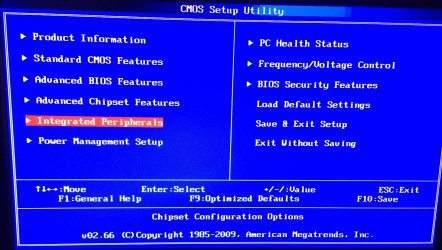
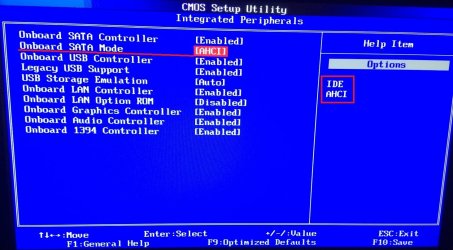
Hi again one snag might be you need to see what your bios has listed for this,
IDE is most likely the only thing listed ?
Acer Bios Integrated P-1.JPG
Acer Bios Integrated P-2 ahci.JPG
 

My Computer

Computer type
PC/Desktop
Computer Manufacturer/Model Number
Custom assembled by me :}
OS
Win-7-Pro64bit 7-H-Prem-64bit
CPU
i7-5930K 2nd i9-9940x both water blocked VRM's too
Motherboard
ASUS SABERTOOTH X99 2nd ASUS x299 Apex
Memory
Trident-z 3200C14 2nd Trident-z 3600C16
Graphics Card(s)
EVGA 1080ti ftw3 2nd Titan Xp both water blocked
Sound Card
Built-in Realtek
Monitor(s) Displays
1-AOC G2460PG 24"G-Sync 144Hz/ 2nd 1-ASUS VG248QE 24" 144Hz
Screen Resolution
1920 x 1080 144Hz
Hard Drives
2-Samsung M.2 Evo & Evo Plus
2-Samsung 850 EVO 500GB SSD's/ 3-2.5 W.D. Black 1tb-&3-1tb/3-3.5 WD Black 1tb hdd's
PSU
EVGA SuperNOVA 1000-P2 2nd 1200-P2
Case
2-Corsair Obsidian Series 450D Black ATX Mid Tower
Cooling
Custom water loops
Keyboard
Logitech G710+/ 2nd Logitech G910
Mouse
2-RedDragon M901 Perdition 16400 dpi Gaming mouse = wired
Internet Speed
Comcast Ping 19ms 89.31mbps download speed 6.12mbps upload
Antivirus
Malwarebytes Pro/ Superantispyware Pro
Browser
FireFox & Pale moon
Other Info
2nd ASUS X299 Apex/Intel i9-9940x with Custom water loop/7H-Prem-x64/Corsair 450D case/Ram Trident-z 3600C16 4x8gb / Samsung970Evo plus 500gb SSD/Dual ssd EZ swap evo/PSU EVGA SuperNova 1200w-P2 80+Platinum/GPU Titan Xp /8-ML-140 on push-pull on 2-280GTX rads
Can you give us a link to the tutorial you're trying to follow?

Also, does the machine have 1GB RAM? If so then you really want to upgrade it to 2GB, especially if you're installing Windows 7 Home Premium and not Windows 7 Starter.
 

My Computer

Computer type
Laptop
Computer Manufacturer/Model Number
Medion
OS
Windows 10 x64
CPU
Intel i5 4210M
Motherboard
N/A
Memory
6GB DDRIII
Graphics Card(s)
Intel HD4600/Nvidia GeForce 825M
Monitor(s) Displays
15.6"
Screen Resolution
1366x768
Hard Drives
Samsung EVO 850 500GB
PSU
N/A
Case
N/A
Cooling
N/A
Keyboard
N/A
Mouse
N/A
Internet Speed
13Mbps (actual)
Antivirus
N/A
Browser
Firefox ;)
Hello ...

I did upgrade to 2 gigs shortly after we got the machine. The tutorial I was following can be located at
https://nbtsd.asustreiber.de/Handbuecher/Windows7Self-upgradeGuide.pdf.

I'm not certain exactly what it means to "flash" the BIOS. Does that mean upgrade the BIOS as suggested in the tutorial?

Thank you both so much for your responses!!
 

My Computer

Computer type
PC/Desktop
Computer Manufacturer/Model Number
Asus Eec PC 1005HA
OS
Windows 7 32 bit
I'm not certain exactly what it means to "flash" the BIOS. Does that mean upgrade the BIOS as suggested in the tutorial?

Yes, flashing the BIOS can be viewed as upgrading the BIOS. You download the new BIOS and then "install" it. The installation process is generally referred to as "flashing".

It's not to be taken lightly. If it goes wrong, the machine could be effectively ruined permanently if you aren't willing to pay a considerable amount of money to undo the damage.

What could go wrong:

You download the wrong new BIOS.
You don't understand the menu choices or keystrokes necessary to flash the BIOS properly.
You have a power outage during the flash attempt.

That's why it's not to be taken lightly and why you should seek very clear instructions.

It's normally completed within 1 minute if you know the correct procedure.

Yes--download those drivers and any new BIOS to a flash drive.

It's generally best to flash outside of Windows although there are methods to do it from within Windows on most motherboards.

It won't "wipe" your hard drive, but it can render you dead in the water if it goes haywire.
 

My Computer

Computer type
PC/Desktop
Computer Manufacturer/Model Number
Ignatz Special; 4 speed manual gearbox; factory air conditioning; one of one
OS
Windows 7 Home Premium SP1, 64-bit
CPU
Intel Skylake i5-6600K, not overclocked
Motherboard
AsRock Z170M Extreme 4, micro ATX
Memory
8 GB HyperX DDR4-2666 (2 x 4 GB)
Graphics Card(s)
none; graphics are integrated on CPU
Sound Card
onboard: Realtek ALC1150; external: USB Behringer UF0-202
Monitor(s) Displays
Dell S2340M 23 inch IPS
Screen Resolution
1600 x 900
Hard Drives
System: Crucial MX100 series SSD, 128 GB;
Data: Samsung Spinpoint 103SJ, 1 TB;
Backup: WD Caviar Green WD30EZRX-00D8PB0, 3 TB
PSU
Rosewill SilentNight 500 watt fanless, semi-modular
Case
Antec Solo II
Cooling
Noctua NH-U12S; Noctua F12 intake, Noctua S12A exhaust
Keyboard
Microsoft 200 6JH-00001 USB
Mouse
Dell or Microsoft optical wired; USB
Antivirus
Microsoft Security Essentials and Malwarebytes Premium
Browser
Pale Moon
Other Info
All fans PWM; speeds at idle: CPU circa 500 rpm; intake circa 600 rpm; exhaust circa 600 rpm; CPU temps 27 idle and 47 C load in a warm room (27 C/81 F) when running Intel Extreme Tuning Utility stress test.

My Computer

Computer type
PC/Desktop
Computer Manufacturer/Model Number
Skylake Special #666
OS
Windows 10 Pro x64
CPU
Intel Core i7 6700K
Motherboard
Asus Sabertooth Z170 Mark 1
Memory
GSkill TridentZ RGB 16GB 3600 16-16-16-36
Graphics Card(s)
EVGA GTX 980 Ti SC x2
Sound Card
Realtek High Definition
Monitor(s) Displays
AOC G2460PG
Screen Resolution
1920 x 1080 144Hz
Hard Drives
Samsung 860 Pro 256GB, Seagate Barracuda 4TB x2
PSU
EVGA 1000 P2, EVGA White Custom Braided Cables
Case
Corsair Vengeance C70 Gunmetal Black
Cooling
Corsair H100i v2, Corsair ML120 x2, Thermal Grizzly Kryonaut
Keyboard
Logitech G910 Orion Spectrum
Mouse
Logitech G700s
Internet Speed
Verizon Fios Quantum Gateway 75/75
Antivirus
Windows Defender, Malwarebytes Free 3.8.3
Browser
Chrome
Other Info
Corsair SP120 x4, LG Blu-ray Drive, Durabrand HT-395 100 Watt Dolby Digital Amp, Corsair H2100 Wireless 7.1 Headset
Hi,
Yep definitely consider 32 bit for that much ram 2gb's

We have similar both are legacy so no worries about messing with updating the bios

I would however replace the existing hdd and upgrade to ssd 250gb ssd's are running at around 80.us worth every penny in performance :)
 

My Computer

Computer type
PC/Desktop
Computer Manufacturer/Model Number
Custom assembled by me :}
OS
Win-7-Pro64bit 7-H-Prem-64bit
CPU
i7-5930K 2nd i9-9940x both water blocked VRM's too
Motherboard
ASUS SABERTOOTH X99 2nd ASUS x299 Apex
Memory
Trident-z 3200C14 2nd Trident-z 3600C16
Graphics Card(s)
EVGA 1080ti ftw3 2nd Titan Xp both water blocked
Sound Card
Built-in Realtek
Monitor(s) Displays
1-AOC G2460PG 24"G-Sync 144Hz/ 2nd 1-ASUS VG248QE 24" 144Hz
Screen Resolution
1920 x 1080 144Hz
Hard Drives
2-Samsung M.2 Evo & Evo Plus
2-Samsung 850 EVO 500GB SSD's/ 3-2.5 W.D. Black 1tb-&3-1tb/3-3.5 WD Black 1tb hdd's
PSU
EVGA SuperNOVA 1000-P2 2nd 1200-P2
Case
2-Corsair Obsidian Series 450D Black ATX Mid Tower
Cooling
Custom water loops
Keyboard
Logitech G710+/ 2nd Logitech G910
Mouse
2-RedDragon M901 Perdition 16400 dpi Gaming mouse = wired
Internet Speed
Comcast Ping 19ms 89.31mbps download speed 6.12mbps upload
Antivirus
Malwarebytes Pro/ Superantispyware Pro
Browser
FireFox & Pale moon
Other Info
2nd ASUS X299 Apex/Intel i9-9940x with Custom water loop/7H-Prem-x64/Corsair 450D case/Ram Trident-z 3600C16 4x8gb / Samsung970Evo plus 500gb SSD/Dual ssd EZ swap evo/PSU EVGA SuperNova 1200w-P2 80+Platinum/GPU Titan Xp /8-ML-140 on push-pull on 2-280GTX rads
Thank you all for your replies. I'll let you know how it went!
 

My Computer

Computer type
PC/Desktop
Computer Manufacturer/Model Number
Asus Eec PC 1005HA
OS
Windows 7 32 bit
Back
Top