
Installing windows 7 sp1 64 bit on ultimate 32bit

jpchint

New member
Member
VIP
Local time
11:46 AM
Messages
166
Location
India
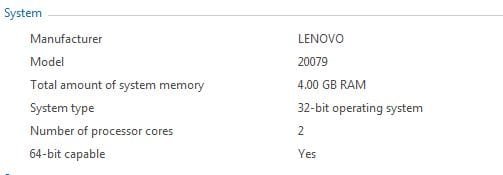
Hi sevenforums,i want to install windows 7 sp1 64 bit upgradable on my existing 7 ultimate 32bit especially for gaming purpose,coz mine is x86 based pc.My laptop is 64bit capable.
Should i install ultimate 64 bit first,then sp1 or directly sp1 64bit??How can i proceed?
Any help can be appreciated....Thanks in advance!!
 

Attachments
  • Capture.JPG
    Capture.JPG
    13.7 KB · Views: 17

My Computer My Computer

At a glance

windows 7 ultimate 64 bitIntel core i3-2350M cpu@!2.30 Ghz4.00 GBAMD RADEON HD 6370M(1GB)
Computer type
Laptop
Computer Manufacturer/Model Number
LENOVO G570
OS
windows 7 ultimate 64 bit
CPU
Intel core i3-2350M cpu@!2.30 Ghz
Motherboard
Lenovo
Memory
4.00 GB
Graphics Card(s)
AMD RADEON HD 6370M(1GB)
Monitor(s) Displays
Generic pnp Monitor
Screen Resolution
1366*768
Hard Drives
ST9500325AS ATA device(500GB) NTFS
Keyboard
Standard ps/2 keyboard
Mouse
synaptics ps/2 port Touchpad
Internet Speed
921.6 kbps(Dial up Connection)
Antivirus
Quick Heal,MSE
Browser
Opera,Chrome
Should i install ultimate 64 bit first,then sp1 or directly sp1 64bit??

Either way will work. You can install Ultimate without SP1 and then add SP1 or you can install directly to Ultimate SP1 if you have that.

There's usually no big benefit from upgrading to 64 bit if you have only 4 GB of RAM, but it certainly works fine.
 

My Computer My Computer

At a glance

Windows 7 Home Premium SP1, 64-bitIntel Skylake i5-6600K, not overclocked8 GB HyperX DDR4-2666 (2 x 4 GB)none; graphics are integrated on CPU
Computer type
PC/Desktop
Computer Manufacturer/Model Number
Ignatz Special; 4 speed manual gearbox; factory air conditioning; one of one
OS
Windows 7 Home Premium SP1, 64-bit
CPU
Intel Skylake i5-6600K, not overclocked
Motherboard
AsRock Z170M Extreme 4, micro ATX
Memory
8 GB HyperX DDR4-2666 (2 x 4 GB)
Graphics Card(s)
none; graphics are integrated on CPU
Sound Card
onboard: Realtek ALC1150; external: USB Behringer UF0-202
Monitor(s) Displays
Dell S2340M 23 inch IPS
Screen Resolution
1600 x 900
Hard Drives
System: Crucial MX100 series SSD, 128 GB;
Data: Samsung Spinpoint 103SJ, 1 TB;
Backup: WD Caviar Green WD30EZRX-00D8PB0, 3 TB
PSU
Rosewill SilentNight 500 watt fanless, semi-modular
Case
Antec Solo II
Cooling
Noctua NH-U12S; Noctua F12 intake, Noctua S12A exhaust
Keyboard
Microsoft 200 6JH-00001 USB
Mouse
Dell or Microsoft optical wired; USB
Antivirus
Microsoft Security Essentials and Malwarebytes Premium
Browser
Pale Moon
Other Info
All fans PWM; speeds at idle: CPU circa 500 rpm; intake circa 600 rpm; exhaust circa 600 rpm; CPU temps 27 idle and 47 C load in a warm room (27 C/81 F) when running Intel Extreme Tuning Utility stress test.
Should i install ultimate 64 bit first,then sp1 or directly sp1 64bit??

Either way will work. You can install Ultimate without SP1 and then add SP1 or you can install directly to Ultimate SP1 if you have that.

There's usually no big benefit from upgrading to 64 bit if you have only 4 GB of RAM, but it certainly works fine.

But certain games like assasins creed unity,dying light etc requires 64 bit processor!
??
 

My Computer My Computer

At a glance

windows 7 ultimate 64 bitIntel core i3-2350M cpu@!2.30 Ghz4.00 GBAMD RADEON HD 6370M(1GB)
Computer type
Laptop
Computer Manufacturer/Model Number
LENOVO G570
OS
windows 7 ultimate 64 bit
CPU
Intel core i3-2350M cpu@!2.30 Ghz
Motherboard
Lenovo
Memory
4.00 GB
Graphics Card(s)
AMD RADEON HD 6370M(1GB)
Monitor(s) Displays
Generic pnp Monitor
Screen Resolution
1366*768
Hard Drives
ST9500325AS ATA device(500GB) NTFS
Keyboard
Standard ps/2 keyboard
Mouse
synaptics ps/2 port Touchpad
Internet Speed
921.6 kbps(Dial up Connection)
Antivirus
Quick Heal,MSE
Browser
Opera,Chrome
If you have 4 GB of RAM and a dedicated video card with it's own onboard RAM, going 64 bit is advantages. When running 32 bit the video cards RAM will subtract from your 4 GB max usable memory.
 

My Computer My Computer

At a glance

Windows 10 Education 64 bitAMD Phenom II X4 980 Black Edition Deneb 3.7GHz8GB 4GBx2 Kingston PC10600 DDR3 1333 MemoryZotac NVIDIA Geforce GT640 2 Gig DDR3 PCIe
Computer type
PC/Desktop
Computer Manufacturer/Model Number
Home Built
OS
Windows 10 Education 64 bit
CPU
AMD Phenom II X4 980 Black Edition Deneb 3.7GHz
Motherboard
Asus M4N68T-M V2 µATX Motherboard
Memory
8GB 4GBx2 Kingston PC10600 DDR3 1333 Memory
Graphics Card(s)
Zotac NVIDIA Geforce GT640 2 Gig DDR3 PCIe
Sound Card
VIA VT1708s High Definition Audio 8-channel Onboard
Monitor(s) Displays
22" LG E2242 1080p and 2 19" I-INC AG191D
Screen Resolution
1280x1024 - 1920x1080 - 1280x1024
Hard Drives
Crucial M100 256 GB SSD and 500 GB WD Blue SATA
PSU
Thermaltake TR 620
Case
Power Up Black ATX Mid-Tower Case
Cooling
Stock heatsink and fan
Keyboard
Logitech Wireless K350 Wave
Mouse
Logitech Wireless M570 Trackman Wheel
Internet Speed
80 Mbps Down 30 Mbps Up
Antivirus
Windows Defender
Browser
Internet Explorer 11
Other Info
HP DVD1040e Lightscribe - External USB2
I think what I would do in your situation is shrink C on my laptop, boot the 64 bit installation media and do a test install to the space you shrunk. This will configure a Dual Boot menu so you can compare the difference in performance on that hardware for the thirty days allowed before the new install would either need to be activated with the Product Key or deleted in Disk mgmt.

The reason I'd do it this way is because while I once flatly advised 32 bit for 4gb RAM, I now have reservations. I have watched 32 bit show some deficiencies in Resource management that make it less favorable on some CPU's with 4gb RAM. The performance difference with 64 bit is noticeable.
 
What I didn't see mentioned, or missed it, is that changing from 32-bit to 64-bit, or vice versa, requires a clean install, can't upgrade.
 

My Computer My Computer

At a glance

Windows 7 Ultimate 64-bit, Windows 8.1 64-bit...
Computer type
PC/Desktop
Computer Manufacturer/Model Number
Customs, Dell, Gateway, HP, Toshiba, Acer, ASUS
OS
Windows 7 Ultimate 64-bit, Windows 8.1 64-bit, Mac OS X 10.10, Linux Mint 17, Windows 10 Pro TP
Keyboard
Microsoft
Mouse
Microsoft
Guess I missed it in the wording.
 

My Computer My Computer

At a glance

Windows 7 Ultimate 64-bit, Windows 8.1 64-bit...
Computer type
PC/Desktop
Computer Manufacturer/Model Number
Customs, Dell, Gateway, HP, Toshiba, Acer, ASUS
OS
Windows 7 Ultimate 64-bit, Windows 8.1 64-bit, Mac OS X 10.10, Linux Mint 17, Windows 10 Pro TP
Keyboard
Microsoft
Mouse
Microsoft
I think what I would do in your situation is shrink C on my laptop, boot the 64 bit installation media and do a test install to the space you shrunk. This will configure a Dual Boot menu so you can compare the difference in performance on that hardware for the thirty days allowed before the new install would either need to be activated with the Product Key or deleted in Disk mgmt.

The reason I'd do it this way is because while I once flatly advised 32 bit for 4gb RAM, I now have reservations. I have watched 32 bit show some deficiencies in Resource management that make it less favorable on some CPU's with 4gb RAM. The performance difference with 64 bit is noticeable.

Mr gregrocker,what i understand from your post is,"I should install 7 ultimate sp1 in a separate partition say D drive(Dual boot win7 ult 32bit in C and 7ult SP1 64bit in D) and should do a test on 64 bit in gaming.thats it?
Please confirm??
 

My Computer My Computer

At a glance

windows 7 ultimate 64 bitIntel core i3-2350M cpu@!2.30 Ghz4.00 GBAMD RADEON HD 6370M(1GB)
Computer type
Laptop
Computer Manufacturer/Model Number
LENOVO G570
OS
windows 7 ultimate 64 bit
CPU
Intel core i3-2350M cpu@!2.30 Ghz
Motherboard
Lenovo
Memory
4.00 GB
Graphics Card(s)
AMD RADEON HD 6370M(1GB)
Monitor(s) Displays
Generic pnp Monitor
Screen Resolution
1366*768
Hard Drives
ST9500325AS ATA device(500GB) NTFS
Keyboard
Standard ps/2 keyboard
Mouse
synaptics ps/2 port Touchpad
Internet Speed
921.6 kbps(Dial up Connection)
Antivirus
Quick Heal,MSE
Browser
Opera,Chrome
Yes, but don't worry about drive letters. Just shrink C by as much as you want, then boot the 64 boot installer, choose the space you shrunk, click Next and win7 will create and format a partition there and begin install.

Each OS will be C when booted and another letter (doesn't matter) when not booted. You can access your files from the other OS, even link the 32 bit User folders to the new Install's Library - Include a Folder - Windows 7 Forums.

Afterwards choose either OS from a Dual Boot menu. If you decide to get rid of 64 bit, just delete it in Disk Mgmt and Extend C again. If you want to keep 64 bit and delete 32 bit, then after you've moved everything over we will help you Recover Partition Space Used by an Older OS and adjust the partition sizes however you want.

But before you jump into that I want you to carefully read over how to get a perfect Clean Reinstall Windows 7 so that the 64 bit install is done perfectly. Ask back any questions and follow those steps closely because you will have a perfect install to the exact extent you do.
 
Back
Top