Installing Windows 7 Professional 64-bit on a Asus UEFI-Based Computer

Budnarrow

New member
Local time
4:37 PM
Messages
8
Hello friends,
-I am used to installing windows on the M5A99X EVO but it looks to be a whole different thing when it comes to the M5A99FX PRO R2.0.
-I am trying to install windows 7 Professional 64-bit OEM DVD with a M5A99FX PRO R2.0 motherboard onto a Samsung EVO 1tb SSD. this is a AMD Computer not Intel. the CPU for this build is the AMD FX-9590. the bios is up to date with Bios #2501
-I tried to install windows 7 professional 64-Bit OEM with the legacy settings and non-UEFI in the bios because I couldn't get the installation drive seen and ask to boot from the DVD. with legacy settings i was able to install windows but as soon as i tried to install SP1 the computer Blue Screened with code: 0X000000F4. and i wasn't logged on for very long.
-I wrote a forum post in Asus ROG and was directed here to these forums.
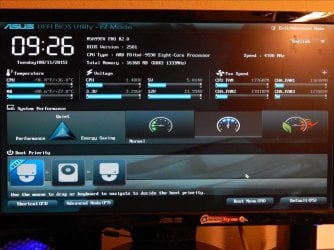
after trying to read some of the forums here it was difficult to know what is the proper settings and what else is required to get the computer to operate properly. some say to enable some say to have it disabled etc. It says to disable secure boot but in the bios of the ASUS M5A99FX PRO R2.0 there is no enable or disable option. I put it into UEFI mode and put CSM into auto and tried to boot both from the UEFI optical drive option and the non-UEFI optical drive option. and both times it would load the windows files for installation and as soon as it got to the starting windows splash screen the computer would completely shut off and then restart.
-some people say to disable CSM and some say to enable it.
-I understand from what I have read that I am supposed to get the drive formatted into a GPT format and there is two ways to do this (1 is to do it with diskpsrt and the other (2 is to delete the partitions just before installing windows. it will supposedly recognize that it is in UEFI mode. the problem is, is I cant get the windows installation to start in UEFI mode.
-I tried to read this TechNet post; https://technet.microsoft.com/en-us/library/hh290675(v=ws.10).aspx about it but it went off into other areas and wasn't a complete step-by-step.
-I can get photo's of the bios but I don't have a Roxio Game Capture Pro yet.
-My question is what are the complete steps to install windows on this UEFI Based Computer? CSM?, Legacy? UEFI?,

I am excited to use this new computer because I rebuilt it with some new parts. the only old parts are the cooler and one optical drive with light scribe(no longer made).
thank you in advance.
 

Attachments
  • DSCN2243.JPG
    DSCN2243.JPG
    112.3 KB · Views: 1
Last edited:

My Computer My Computer

Computer type
PC/Desktop
Computer Manufacturer/Model Number
Custom Build
OS
Windows 7 Professional 64-bit
CPU
AMD FX-9590
Motherboard
Asus M5A99FX PRO R2.0
Memory
Corsair Dominator Platinum 1866mhz
Graphics Card(s)
EVGA Ge-force 770 Classified
Sound Card
Creative Sound Blaster X-fi Titanium
Monitor(s) Displays
Westinghouse 50" Main display, Asus 22" Side monitor
Screen Resolution
1920x1080
Hard Drives
1tb Samsung EVO SSD
2tb Seagate Hard drive
PSU
Corsiar RM-850 850 Watt
Case
Antec Eleven-Hundred V2
Cooling
Cooler Master Hyper 212 with two Cooler Master Jetflo 120mm
Keyboard
Logitech K470
Mouse
AZIO GM2400
Antivirus
System Mechanic
Browser
I.E.11
-My question is what are the complete steps to install windows on this UEFI Based Computer? CSM?, Legacy? UEFI?

You should be able to install Windows 7/8/10 with the default UEFI firmware (BIOS) settings.

Asus UEFI setups allow for both UEFI and Legacy BIOS (aka CSM) booting to be enabled. In that case, Windows 7 can normally be booted with the motherboard's Secure Boot feature enabled as well, but without actually using it.

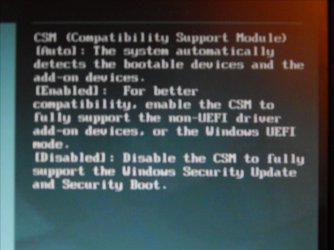
CSM (Compatibility Support Module) > Launch CSM
- [Auto]: The system automatically detects the bootable devices and the add-on devices.
- [Enabled]: For better compatibility, enable the CSM to fully support the non-UEFI driver add-on devices or the Windows UEFI mode.
- [Disabled]: Disable the CSM to fully support the Windows Security Update and Security Boot.

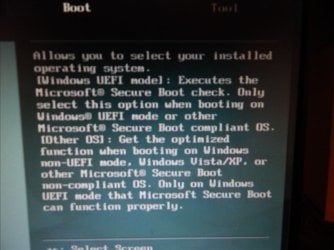
Secure Boot > OS Type
- [Windows UEFI Mode]: Execute the Microsoft Secure Boot check. Only select this option when booting on Windows UEFI mode or other Microsoft Secure Boot compliant OS.
- [Other OS]: Get the optimized function when booting on Windows non-UEFI mode, Windows Vista/XP, or other Microsoft Secure Boot non-compliant OS.

For more info look here:

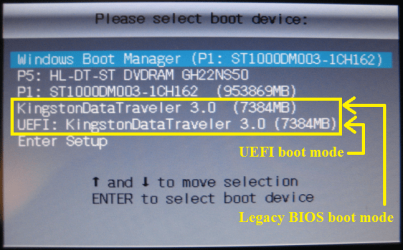
- Asus motherboard with UEFI firmware. How to install Windows 7/8/10 64-bit in UEFI Boot Mode. -> link
- UEFI Boot Mode (installing using the GPT partition style) and Legacy BIOS Boot Mode (installing using the MBR partition style). -> link

Asus boot menu.png
 

My Computer My Computer

Computer type
Laptop
Computer Manufacturer/Model Number
Lenovo IdeaPad G580
OS
Windows 8.1/10 x64
CPU
Intel Core i5-3230M
Memory
8 GB
Graphics Card(s)
Intel HD Graphics 4000
Antivirus
Windows Defender, EMET, standard user account
Browser
Internet Explorer
Thank you for responding genet,
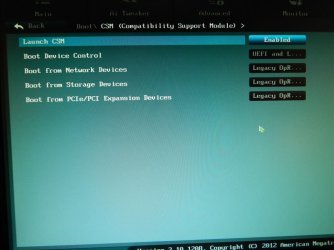
-When CSM is enabled there are other settings also.
-Launch CSM:
[Auto] or[Enabled] or [Disabled]
when that is enabled then these appear;

-Boot Device Control:
[UEFI and Legacy OpROM] or [Legacy OpROM only] or [UEFI Only]

-Boot from network devices:
[Legacy OpROM first] or [UEFI driver first] or [Ignore]

-Boot from storage devices:
[Both, Legacy OpROM first] or [Both, UEFI first] or ]LegacyOpROM first] or [UEFI driver first] or [Ignore]

-Boot from PCIe/PCI Expansion Devices:
[Legacy OpROM first] or [UEFI driver first]

I am guessing I need boot device and boot from storage device configured but my drive c: wont be a storage drive I have another drive for that.

I am trying to add photo's but it wont let me. had to use Winzip

thanks
 

Attachments

  • DSCN2264.JPG
    DSCN2264.JPG
    75.5 KB · Views: 1
  • DSCN2250.JPG
    DSCN2250.JPG
    80.2 KB · Views: 1
Last edited:

My Computer My Computer

Computer type
PC/Desktop
Computer Manufacturer/Model Number
Custom Build
OS
Windows 7 Professional 64-bit
CPU
AMD FX-9590
Motherboard
Asus M5A99FX PRO R2.0
Memory
Corsair Dominator Platinum 1866mhz
Graphics Card(s)
EVGA Ge-force 770 Classified
Sound Card
Creative Sound Blaster X-fi Titanium
Monitor(s) Displays
Westinghouse 50" Main display, Asus 22" Side monitor
Screen Resolution
1920x1080
Hard Drives
1tb Samsung EVO SSD
2tb Seagate Hard drive
PSU
Corsiar RM-850 850 Watt
Case
Antec Eleven-Hundred V2
Cooling
Cooler Master Hyper 212 with two Cooler Master Jetflo 120mm
Keyboard
Logitech K470
Mouse
AZIO GM2400
Antivirus
System Mechanic
Browser
I.E.11
Secure Boot > OS Type
- [Windows UEFI Mode]: Execute the Microsoft Secure Boot check. Only select this option when booting on Windows UEFI mode or other Microsoft Secure Boot compliant OS.
- [Other OS]: Get the optimized function when booting on Windows non-UEFI mode, Windows Vista/XP, or other Microsoft Secure Boot non-compliant OS.
View attachment 368771[/QUOTE]


Shown like this:
 

Attachments

  • DSCN2257.JPG
    DSCN2257.JPG
    63.9 KB · Views: 0
  • DSCN2258.JPG
    DSCN2258.JPG
    78.4 KB · Views: 0

My Computer My Computer

Computer type
PC/Desktop
Computer Manufacturer/Model Number
Custom Build
OS
Windows 7 Professional 64-bit
CPU
AMD FX-9590
Motherboard
Asus M5A99FX PRO R2.0
Memory
Corsair Dominator Platinum 1866mhz
Graphics Card(s)
EVGA Ge-force 770 Classified
Sound Card
Creative Sound Blaster X-fi Titanium
Monitor(s) Displays
Westinghouse 50" Main display, Asus 22" Side monitor
Screen Resolution
1920x1080
Hard Drives
1tb Samsung EVO SSD
2tb Seagate Hard drive
PSU
Corsiar RM-850 850 Watt
Case
Antec Eleven-Hundred V2
Cooling
Cooler Master Hyper 212 with two Cooler Master Jetflo 120mm
Keyboard
Logitech K470
Mouse
AZIO GM2400
Antivirus
System Mechanic
Browser
I.E.11
[Quote genet]
- Asus motherboard with UEFI firmware. How to install Windows 7/8/10 64-bit in UEFI Boot Mode. -> link
- UEFI Boot Mode (installing using the GPT partition style) and Legacy BIOS Boot Mode (installing using the MBR partition style). [quote genet]


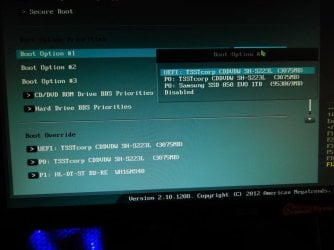
Here is what the boot menu looks like. the TSSTcorp SH-S223L is the same optical drive the PO: Samsung SSD 850 EVO 1tb is where I am trying to install windows 7. I have my storage drive unplugged.
 

Attachments

  • DSCN2260.JPG
    DSCN2260.JPG
    76.1 KB · Views: 0

My Computer My Computer

Computer type
PC/Desktop
Computer Manufacturer/Model Number
Custom Build
OS
Windows 7 Professional 64-bit
CPU
AMD FX-9590
Motherboard
Asus M5A99FX PRO R2.0
Memory
Corsair Dominator Platinum 1866mhz
Graphics Card(s)
EVGA Ge-force 770 Classified
Sound Card
Creative Sound Blaster X-fi Titanium
Monitor(s) Displays
Westinghouse 50" Main display, Asus 22" Side monitor
Screen Resolution
1920x1080
Hard Drives
1tb Samsung EVO SSD
2tb Seagate Hard drive
PSU
Corsiar RM-850 850 Watt
Case
Antec Eleven-Hundred V2
Cooling
Cooler Master Hyper 212 with two Cooler Master Jetflo 120mm
Keyboard
Logitech K470
Mouse
AZIO GM2400
Antivirus
System Mechanic
Browser
I.E.11

My Computer My Computer

Computer type
PC/Desktop
Computer Manufacturer/Model Number
Custom Build
OS
Windows 7 Professional 64-bit
CPU
AMD FX-9590
Motherboard
Asus M5A99FX PRO R2.0
Memory
Corsair Dominator Platinum 1866mhz
Graphics Card(s)
EVGA Ge-force 770 Classified
Sound Card
Creative Sound Blaster X-fi Titanium
Monitor(s) Displays
Westinghouse 50" Main display, Asus 22" Side monitor
Screen Resolution
1920x1080
Hard Drives
1tb Samsung EVO SSD
2tb Seagate Hard drive
PSU
Corsiar RM-850 850 Watt
Case
Antec Eleven-Hundred V2
Cooling
Cooler Master Hyper 212 with two Cooler Master Jetflo 120mm
Keyboard
Logitech K470
Mouse
AZIO GM2400
Antivirus
System Mechanic
Browser
I.E.11
I wonder if I still have to install the AHCI driver just before the windows installation
 

My Computer My Computer

Computer type
PC/Desktop
Computer Manufacturer/Model Number
Custom Build
OS
Windows 7 Professional 64-bit
CPU
AMD FX-9590
Motherboard
Asus M5A99FX PRO R2.0
Memory
Corsair Dominator Platinum 1866mhz
Graphics Card(s)
EVGA Ge-force 770 Classified
Sound Card
Creative Sound Blaster X-fi Titanium
Monitor(s) Displays
Westinghouse 50" Main display, Asus 22" Side monitor
Screen Resolution
1920x1080
Hard Drives
1tb Samsung EVO SSD
2tb Seagate Hard drive
PSU
Corsiar RM-850 850 Watt
Case
Antec Eleven-Hundred V2
Cooling
Cooler Master Hyper 212 with two Cooler Master Jetflo 120mm
Keyboard
Logitech K470
Mouse
AZIO GM2400
Antivirus
System Mechanic
Browser
I.E.11
[Quote Genet]
- Asus motherboard with UEFI firmware. How to install Windows 7/8/10 64-bit in UEFI Boot Mode. -> link
- UEFI Boot Mode (installing using the GPT partition style) and Legacy BIOS Boot Mode (installing using the MBR partition style). -> link[Quote Genet]

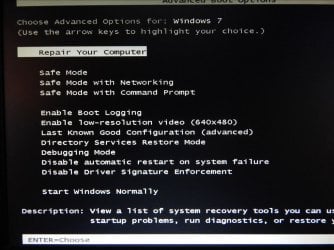
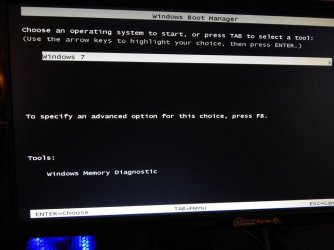
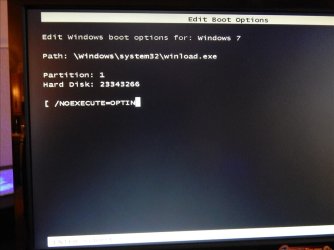
-in both of your links it says to press F8,F9,F10,F11 and F12

well here are those in order as above
 

Attachments

  • F8.JPG
    F8.JPG
    90.3 KB · Views: 0
  • F9.JPG
    F9.JPG
    64.1 KB · Views: 0
  • F10.JPG
    F10.JPG
    73.2 KB · Views: 0
  • F11.JPG
    F11.JPG
    82.4 KB · Views: 0
  • F12.JPG
    F12.JPG
    79 KB · Views: 0

My Computer My Computer

Computer type
PC/Desktop
Computer Manufacturer/Model Number
Custom Build
OS
Windows 7 Professional 64-bit
CPU
AMD FX-9590
Motherboard
Asus M5A99FX PRO R2.0
Memory
Corsair Dominator Platinum 1866mhz
Graphics Card(s)
EVGA Ge-force 770 Classified
Sound Card
Creative Sound Blaster X-fi Titanium
Monitor(s) Displays
Westinghouse 50" Main display, Asus 22" Side monitor
Screen Resolution
1920x1080
Hard Drives
1tb Samsung EVO SSD
2tb Seagate Hard drive
PSU
Corsiar RM-850 850 Watt
Case
Antec Eleven-Hundred V2
Cooling
Cooler Master Hyper 212 with two Cooler Master Jetflo 120mm
Keyboard
Logitech K470
Mouse
AZIO GM2400
Antivirus
System Mechanic
Browser
I.E.11

My Computer My Computer

Computer type
Laptop
Computer Manufacturer/Model Number
Lenovo IdeaPad G580
OS
Windows 8.1/10 x64
CPU
Intel Core i5-3230M
Memory
8 GB
Graphics Card(s)
Intel HD Graphics 4000
Antivirus
Windows Defender, EMET, standard user account
Browser
Internet Explorer
Hi,
Sounds like to me the installation media is weird
I just installed 7 home premium 64bit system builders disk to a asus x99 in easy mode without switching to Other os in bios and it went without any issues :/
os was installed on a 500gb evo ssd though.
 

My Computer My Computer

Computer type
PC/Desktop
Computer Manufacturer/Model Number
Custom assembled by me :}
OS
Win-7-Pro64bit 7-H-Prem-64bit
CPU
i7-5930K 2nd i9-9940x both water blocked VRM's too
Motherboard
ASUS SABERTOOTH X99 2nd ASUS x299 Apex
Memory
Trident-z 3200C14 2nd Trident-z 3600C16
Graphics Card(s)
EVGA 1080ti ftw3 2nd Titan Xp both water blocked
Sound Card
Built-in Realtek
Monitor(s) Displays
1-AOC G2460PG 24"G-Sync 144Hz/ 2nd 1-ASUS VG248QE 24" 144Hz
Screen Resolution
1920 x 1080 144Hz
Hard Drives
2-Samsung M.2 Evo & Evo Plus
2-Samsung 850 EVO 500GB SSD's/ 3-2.5 W.D. Black 1tb-&3-1tb/3-3.5 WD Black 1tb hdd's
PSU
EVGA SuperNOVA 1000-P2 2nd 1200-P2
Case
2-Corsair Obsidian Series 450D Black ATX Mid Tower
Cooling
Custom water loops
Keyboard
Logitech G710+/ 2nd Logitech G910
Mouse
2-RedDragon M901 Perdition 16400 dpi Gaming mouse = wired
Internet Speed
Comcast Ping 19ms 89.31mbps download speed 6.12mbps upload
Antivirus
Malwarebytes Pro/ Superantispyware Pro
Browser
FireFox & Pale moon
Other Info
2nd ASUS X299 Apex/Intel i9-9940x with Custom water loop/7H-Prem-x64/Corsair 450D case/Ram Trident-z 3600C16 4x8gb / Samsung970Evo plus 500gb SSD/Dual ssd EZ swap evo/PSU EVGA SuperNova 1200w-P2 80+Platinum/GPU Titan Xp /8-ML-140 on push-pull on 2-280GTX rads
In the introduction I wrote that I got windows installed but it Blue Screen I am guessing it is because it isn't in the GPT format. so the above F # are from that install. I still need to get into the installation command prompt format the drive and get it into GPT format. I am having trouble doing that because its showing the same optical drive in both UEFI and Non-UEFI.

thank you again genet.
 

My Computer My Computer

Computer type
PC/Desktop
Computer Manufacturer/Model Number
Custom Build
OS
Windows 7 Professional 64-bit
CPU
AMD FX-9590
Motherboard
Asus M5A99FX PRO R2.0
Memory
Corsair Dominator Platinum 1866mhz
Graphics Card(s)
EVGA Ge-force 770 Classified
Sound Card
Creative Sound Blaster X-fi Titanium
Monitor(s) Displays
Westinghouse 50" Main display, Asus 22" Side monitor
Screen Resolution
1920x1080
Hard Drives
1tb Samsung EVO SSD
2tb Seagate Hard drive
PSU
Corsiar RM-850 850 Watt
Case
Antec Eleven-Hundred V2
Cooling
Cooler Master Hyper 212 with two Cooler Master Jetflo 120mm
Keyboard
Logitech K470
Mouse
AZIO GM2400
Antivirus
System Mechanic
Browser
I.E.11
Back
Top