I bought the install disk for Windows 7 Professional 64bit and I installed it on my custom build on an ssd. Ever since I did that my internet has been really slow with both my wired and wireless connections.
My question is if I do the free Windows 10 upgrade they keep asking me to do can I reinstall my windows 7 with the disk at anytime if I decide I want to go back to it?
Thanks in advance.
Dillon
My Computer
At a glance
Windows 7 Professional 64bitIntel i5-4690K16.0 GB RamNVIDIA GeForce GTX 970
Windows 10 use the win7 license, that means that you can only (legally) use them on one computer. Yes, you can go back to Win7.
In my opinion, Win7 Pro 64 is a better OS than Win 10.
If your devices are working well, with correct drive and no software issues, installing win10 wont make your internet run faster. You have to search on other possibility's like router, antivirus, firewall, spywares or even your ISP. Run Speedtest by Ookla
Hi,
yea it's a lot better to create a system image before upgrading that way none of the roll back bugs will exist and you won't have to reupdate win-7 from scratch just for the time period you used win-10
I would how ever put the win-7 system image on a totally separate hard drive and disconnect it from the system before the upgrade.
Win-7-Pro64bit 7-H-Prem-64biti7-5930K 2nd i9-9940x both water blocked VRM'...Trident-z 3200C14 2nd Trident-z 3600C16EVGA 1080ti ftw3 2nd Titan Xp both water blocked
Computer type
PC/Desktop
Computer Manufacturer/Model Number
Custom assembled by me :}
OS
Win-7-Pro64bit 7-H-Prem-64bit
CPU
i7-5930K 2nd i9-9940x both water blocked VRM's too
2nd ASUS X299 Apex/Intel i9-9940x with Custom water loop/7H-Prem-x64/Corsair 450D case/Ram Trident-z 3600C16 4x8gb / Samsung970Evo plus 500gb SSD/Dual ssd EZ swap evo/PSU EVGA SuperNova 1200w-P2 80+Platinum/GPU Titan Xp /8-ML-140 on push-pull on 2-280GTX rads
I recently put this windows 7 on my new build so I don't have any important files on it. Can I just skip the imaging process for my windows 7 and if I decide I want to go back to it, can I just clean install it from the disk again? and If I do it that way will the activation key or whatever you call that still work? The key that came with it.
My Computer
At a glance
Windows 7 Professional 64bitIntel i5-4690K16.0 GB RamNVIDIA GeForce GTX 970
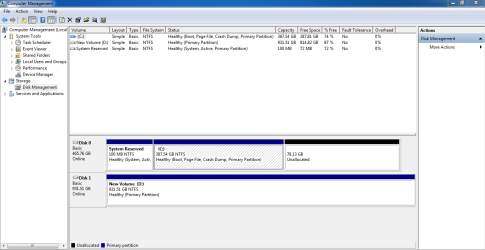
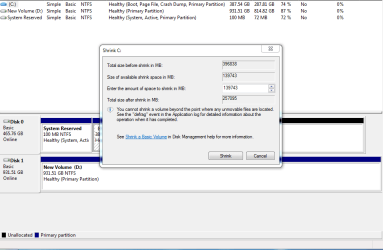
On Win 7, right click on My Computer - Manage - Disk Management and shrink your Win 7 partition on 80G and do a clean Win 10 install on it using the Win 7 key. You then will have Win 7 and Win 10.
If you have only installed win 7, you should have 3 partitions on the SSD:
- One 100 MB UEFI (if you installed as UEFI)
- One 120 MB MS reserved
- One big Win 7 partition.
On Win 7, right click on My Computer - Manage - Disk Management and shrink your Win 7 partition on 80G (you going to create another 80G partition, Win7 partition will be about 420G) and do a clean Win 10 install on it using the Win 7 key. You then will have Win 7 and Win 10 to choose from when you boot.
Clean install is when you boot from a media (DVD or USB flash drive) and do a new install on the SSD. It is not a Win 7 upgrade.
Did you notice you had a 78G unallocated? How many times did you shrink your Win7 partition?
Now, remove your HDD, boot from your Win 10 installation media and install on the blank (raw) partition.
All I've done so far is shrunk that SSD by 80,000mbs. I was going to do the free windows 10 upgrade they are offering everyone and I haven't even downloaded it yet.
My Computer
At a glance
Windows 7 Professional 64bitIntel i5-4690K16.0 GB RamNVIDIA GeForce GTX 970
Hi,
I wouldn't make a habit of going back and forth
No telling when Micro... will enforce reactivating the same key that was used to upgrade with
To dual boot 7 and 10 legally you'd need 2 completely separate activation keys so if that is your intention buy win-10 or another win-7 and dual boot away
My Computer
At a glance
Win-7-Pro64bit 7-H-Prem-64biti7-5930K 2nd i9-9940x both water blocked VRM'...Trident-z 3200C14 2nd Trident-z 3600C16EVGA 1080ti ftw3 2nd Titan Xp both water blocked
Computer type
PC/Desktop
Computer Manufacturer/Model Number
Custom assembled by me :}
OS
Win-7-Pro64bit 7-H-Prem-64bit
CPU
i7-5930K 2nd i9-9940x both water blocked VRM's too
2nd ASUS X299 Apex/Intel i9-9940x with Custom water loop/7H-Prem-x64/Corsair 450D case/Ram Trident-z 3600C16 4x8gb / Samsung970Evo plus 500gb SSD/Dual ssd EZ swap evo/PSU EVGA SuperNova 1200w-P2 80+Platinum/GPU Titan Xp /8-ML-140 on push-pull on 2-280GTX rads
I just went ahead and upgraded my windows 7 to 10 and used my 7 activation key and then reverted back to 7. I made a partition for Windows 10 and downloaded it to a bootable usb drive and then installed it into that partition I made. So now I can dual boot between the 2. Legal or not that's the way I did it.
My Computer
At a glance
Windows 7 Professional 64bitIntel i5-4690K16.0 GB RamNVIDIA GeForce GTX 970
So far it's been working fine for me. I still never was able to fix my slowed down internet speeds on my windows 7 but when I boot into windows 10 the internet speed is fast again. I have another thread posted about that and I never found a fix for it. It's almost a lost cause for me at this point.
My Computer
At a glance
Windows 7 Professional 64bitIntel i5-4690K16.0 GB RamNVIDIA GeForce GTX 970