Installing Windows XP after Windows 7

ggp759

New member
Local time
4:56 AM
Messages
9
Hi am new to the forums and i have a question. I have Windows 7 Pro 64 running from a Vertex 3. I also have a spare hard drive ( Seagate Momentus XT) that i use for storage and i want to install Windows XP on it. Are there any potential risks in doing that? Will it mess up my Windows 7 installation? I tried installing XP(SP3 and SATA drivers integrated) with a bootable CD. While it sees my drives it does not recognize that there is data on the Seagate and wants me to delete the partition. Is there a way around that? Also will the installation of XP be safer if i unplug the SSD while installing XP? Thanks very much in advance.

PS: also the seagate drive has a 100MB EFI system partition. Is that needed to boot win 7?
 

My Computer

OS
Windows 7 Pro 64
Hello ggp759 -

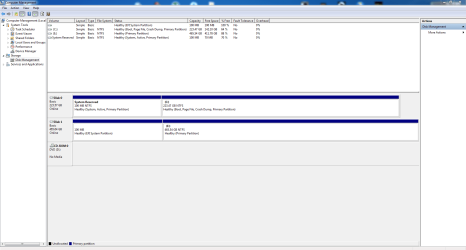
EDIT: didn't see your edit before I started my reply. Can you post a screen shot of your disk manager screen so we can see the current setup?

You're on the right path to unplug the Win7 Vertex drive, plug in the Seagate, boot to your XP install disk and go for it.

Suggestion (should work):

Before doing the above, using Win7 and a disk manager program, resize and partition the Seagate so there are two partitions.

Resize from the head (front) of the drive to create a blank space for your XP install. You could then format the new partition as FAT32. Last, make the new empty partition ACTIVE.

Now unplug the Vertex, boot to the XP install disk and go from there.


Regards,
GEWB
 

My Computer

Computer type
PC/Desktop
Computer Manufacturer/Model Number
(7 different computers booting up to 10 systems)
OS
Linux Mint / XP / Win7 Home, Pro, Ultimate / Win8.1 / Win10
Other Info
Four desktops, two laptops, one notebook and one tablet
Thanks i will post a screenshot in a sec
 

My Computer

OS
Windows 7 Pro 64
This is the screenshot. Drive C is the Vertex 3 and and drive E is the Seagate.
 

Attachments

  • Capture.PNG
    Capture.PNG
    37.6 KB · Views: 50

My Computer

OS
Windows 7 Pro 64
You can not install Win Xp 32bit to a uEFI Hd Drive set up. 32bit will only install to a MBR setup, & not a GPT.
 

My Computer

OS
ME/XP/Vista/Win7
You can not install Win Xp 32bit to a uEFI Hd Drive set up. 32bit will only install to a MBR setup, & not a GPT.

^^^^^^^^^^^^^^^^^^^ There's your answer ^^^^^^^^^^^^^^^^^^

Regards,
GEWB
 

My Computer

Computer type
PC/Desktop
Computer Manufacturer/Model Number
(7 different computers booting up to 10 systems)
OS
Linux Mint / XP / Win7 Home, Pro, Ultimate / Win8.1 / Win10
Other Info
Four desktops, two laptops, one notebook and one tablet
You can not install Win Xp 32bit to a uEFI Hd Drive set up. 32bit will only install to a MBR setup, & not a GPT.
Sorry i dont understand what you mean. what is a uefi hard drive setup? Is there anything i can do? go the XP 64 bit edition?
 

My Computer

OS
Windows 7 Pro 64
You'll need to reinitialize the HD in Disk Mgmt (by right clicking on it's identifier on the drive map you scroll down) from GPT to MBR disk. Then you can boot 32 bit XP to try install. It may still require providing the SATA drivers if it doesn't see the HD. Best to see if XP Mode or Virtual Drive works well enough first.
 
You'll need to reinitialize the HD in Disk Mgmt (by right clicking on it's identifier on the drive map you scroll down) from GPT to MBR disk. Then you can boot 32 bit XP to try install. It may still require providing the SATA drivers if it doesn't see the HD. Best to see if XP Mode or Virtual Drive works well enough first.
Thanks the only option i get when i right click is "Convert to Dynamic disk". The "convert to MBR" is greyed out. DO i have to format before trying to convert? Thanks again.
 

My Computer

OS
Windows 7 Pro 64
Converting your uEFI/GPT HD Drive setup, will damage the uEFI BIOS & Windows 7 boot.
 

My Computer

OS
ME/XP/Vista/Win7
thanks decided not to install xp after all. Its a shame though because windows xp mode is not nearly as good. I guess there is no way of having win 7 and win xp on separate hdd on the same machine?
 

My Computer

OS
Windows 7 Pro 64
Back
Top