
Onomanatee
New member
- Local time
- 3:08 AM
- Messages
- 2
Hello. It appears I'm unable to update my Windows Home Premium 64bit.
It's a problem I've had for a long time, and stupidly enough, forgot about. I just recently noticed
again that my pc never has Windows Updates, and when I tried to click the Windows Update button,
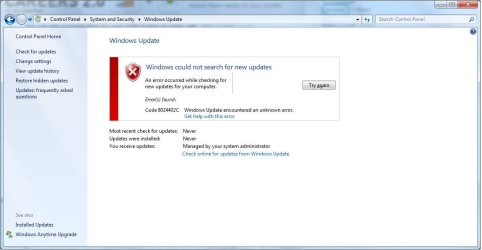
I get: Windows Update encountered and unknown error. Code 8024402C
Screenshot of the error:
Zipped CBS folder:
View attachment 283145
Also of note: I've experienced a startup issue twice now this week. Windows appeared to be unable
to start up, and I had to use Startup Repair. Might be related.
Thanks in advance for the help!
It's a problem I've had for a long time, and stupidly enough, forgot about. I just recently noticed
again that my pc never has Windows Updates, and when I tried to click the Windows Update button,
I get: Windows Update encountered and unknown error. Code 8024402C
Screenshot of the error:
Zipped CBS folder:
View attachment 283145
Also of note: I've experienced a startup issue twice now this week. Windows appeared to be unable
to start up, and I had to use Startup Repair. Might be related.
Thanks in advance for the help!
My Computer
- Computer type
- PC/Desktop
- Computer Manufacturer/Model Number
- custom build
- OS
- Windows 7 Home Premium 64bit
- CPU
- Intel Core i5 2500K @ 3300 MHz
- Motherboard
- ASRock Z68 Extreme3 Gen3
- Memory
- 8129 MB (2 x 4096 DDR3-SDRAM)
- Graphics Card(s)
- NVIDIA GeForce GTX 560 Ti
- Hard Drives
- OCZ-AGILITY3 (120GB) (Windows installed here)
Seagate ST31000524AS (1000 GB)
- Antivirus
- Norton Antivirus
- Browser
- Google Chrome
