I have been trying to change the preview pane in the search options so that I do not have to open the document and just have a preview down the side.
It at the moment says' that previewer has an error'
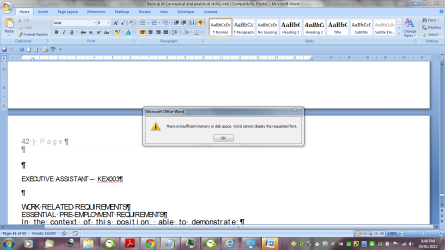
I am also having issues with the font displaying on my desktop - I am doing this as I have instructed that in order to get my documents from my computer - I have to go to the location and upload the files and transfer to a new location if my old USB drive can not be revived.
I just want to be able to view the documents and not have errors constantly.
Would the forum also mind looking at the document regarding my USB Hard Drives Manufacturer on how to go about restoring the data?
Melissa, I suggest you get more system memory. Also you might fill out your system specifications so that anyone that might have some ideas will be better tuned to give you advice.
Select user cp and fill out your system specifications.
Thanks
rich
My Computer
Computer type
Laptop
Computer Manufacturer/Model Number
Toshiba Laptop Qosimo X870
OS
Windows 7 Pro x64 SP1
CPU
Intel Core I7
Motherboard
Toshiba Qosmio
Memory
16 Gigs
Graphics Card(s)
NVIDIA GeForce GTX 670M
Monitor(s) Displays
17.7" laptop
Screen Resolution
1600 x 900
Hard Drives
256 Gig SanDisk SSD for C
256 Gig Intel SSD for D
Internet Speed
50/25 FIOS
Antivirus
Vipre (all you can eat for 10 machines)
Browser
IE and FF
Other Info
I have dos 6.22, wfwg 3.11, win98, 2000 and xp VHD's available for testing. MS's Virtual PC works great.
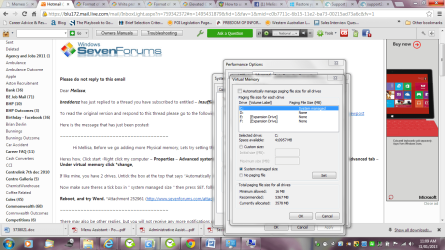
Hi Mellisa, Before we go adding more Physical memory, Lets try setting the Virtual Memory to System managed size.
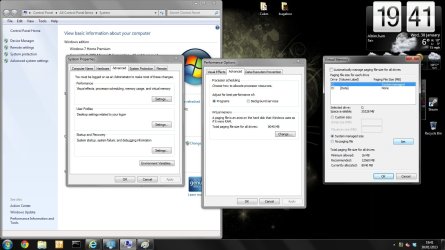
Heres how, Click start -Right click my computer - Properties - Advanced system Settings - Under Performance, click on settings - then click on the advanced tab - Under virtual memory click change,
If like mine, you have 2 drives, Untick the box at the top that says "Automatically manage paging file size for all drives"
Now make sure theres a tick box in " system managed size " then press SET. followed by OK.
Yes, That is how mine is configured. You do seem to have lots of things open on your computer at once, using lots of RAM, if your finished with something, close it