
I received the "Insufficient memory or disk space" message on my laptop after the OS (C Hard Drive reached capacity. I had to remove programs and I have been unable to load anything new due to this situation. There are over 700GB of unused memory between 2 hard drives listed as follows:
Model: Asus Notebook N73SV
OS: Microsoft Windows 7 Home Premium 64-bit
CPU: Intel(R) Core(TM) i7-2630QM CPU @ 2.00GHz
Memory: 8GB SODIMM
Hard Drives
1. ST9500420AS 465.78GB w/ 3 Partitions
2. ST9500420AS 465.76GB w/ 2 Partitions
Logical Disks (1-4 Local Fixed Disk)
1. C: OS NTFS 197.55GB w/ 8.85GB Free
2. D: Data NTFS 243.21GB unused
3. E: SDATA1 NTFS 232.88GB unused
4. F: SDATA2 NTFS 232.87GB unused
I know the answer is basically in this and other forums and I assure you that I researched setting up partitions and this error message with multiple confusing results. I am fairly capable with a computer, but I do not wish to loose any data nor crash the system by doing the incorrect process in order to use all of my usable memory. Please assist me if possible or direct me to where I may find the correct process. I know that Asus tech support wasn't the right way to find the answer. I appreciate your help.
If this thread is in the wrong category please let me know and I will move it immediately.
Hard Drive reached capacity. I had to remove programs and I have been unable to load anything new due to this situation. There are over 700GB of unused memory between 2 hard drives listed as follows:Model: Asus Notebook N73SV
OS: Microsoft Windows 7 Home Premium 64-bit
CPU: Intel(R) Core(TM) i7-2630QM CPU @ 2.00GHz
Memory: 8GB SODIMM
Hard Drives
1. ST9500420AS 465.78GB w/ 3 Partitions
2. ST9500420AS 465.76GB w/ 2 Partitions
Logical Disks (1-4 Local Fixed Disk)
1. C: OS NTFS 197.55GB w/ 8.85GB Free
2. D: Data NTFS 243.21GB unused
3. E: SDATA1 NTFS 232.88GB unused
4. F: SDATA2 NTFS 232.87GB unused
I know the answer is basically in this and other forums and I assure you that I researched setting up partitions and this error message with multiple confusing results. I am fairly capable with a computer, but I do not wish to loose any data nor crash the system by doing the incorrect process in order to use all of my usable memory. Please assist me if possible or direct me to where I may find the correct process. I know that Asus tech support wasn't the right way to find the answer. I appreciate your help.
If this thread is in the wrong category please let me know and I will move it immediately.
My Computer
At a glance
Microsoft Windows 7 Home Premium 64-bitIntel(R) Core(TM) i7-2630QM CPU @ 2.00GHz8GB SODIMM (4GB in two banks)(1) Intel(R) HD Graphics Family (2) NVIDIA Ge...
- Computer Manufacturer/Model Number
- Asus Notebook N73SV
- OS
- Microsoft Windows 7 Home Premium 64-bit
- CPU
- Intel(R) Core(TM) i7-2630QM CPU @ 2.00GHz
- Motherboard
- AsusTek Computer Inc. N73SV
- Memory
- 8GB SODIMM (4GB in two banks)
- Graphics Card(s)
- (1) Intel(R) HD Graphics Family (2) NVIDIA GeForce GT 540M
- Sound Card
- (1) Realtek High Definition Audio (2) Intel(R) Display Aud
- Hard Drives
- 1. ST9500420AS 465.78GB w/ 3 Partitions
2. ST9500420AS 465.76GB w/ 2 Partitions
- Case
- N/A
- Cooling
- N/A
- Keyboard
- QWERTY
- Mouse
- N/A
- Internet Speed
- Cable DSL
- Other Info
- BIOS Date: 03/21/11 11:18:03 Ver: 04.06.03
Logical Disks (1-4 Local Fixed Disk)
1. C: OS NTFS 197.55GB
2. D: Data NTFS 243.21GB
3. E: SDATA1 NTFS 232.88GB
4. F: SDATA2 NTFS 232.87GB
5. G: CD-ROM Disc removable


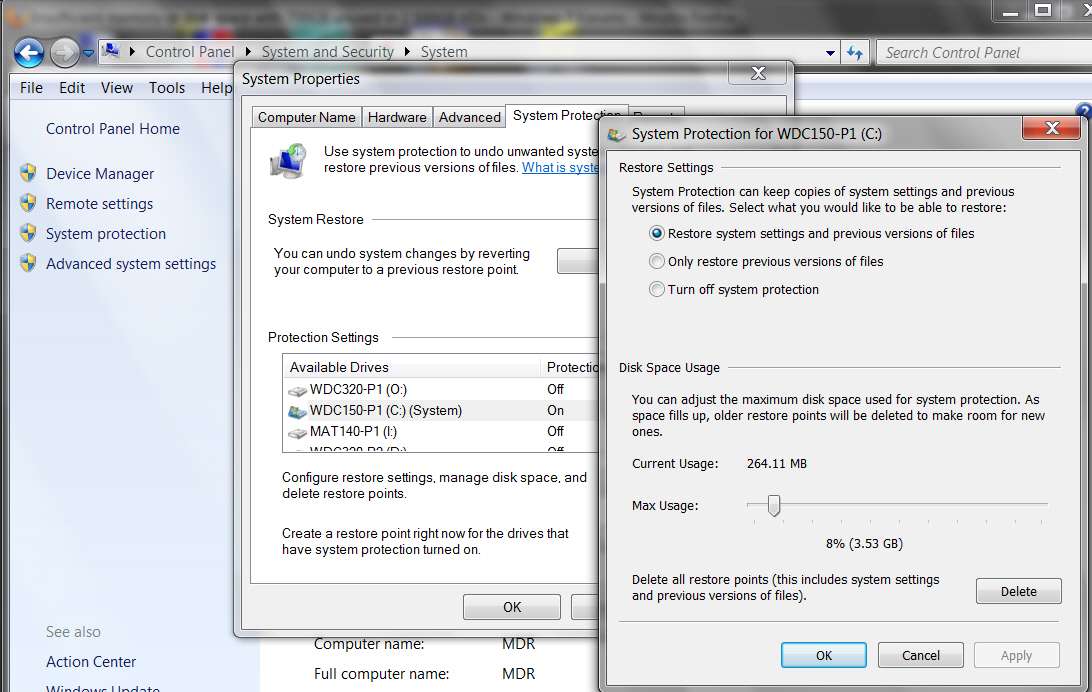
 . I will follow your advice and move the data and also configure the restore point percentage.
