
sequimbob
New member
I attempted to install Win7 Professional 64 bit on an external HDD. An 80gb Western Digital portable hdd. I used WinToUSB running in a Vbox with a Win7 guest os. The host is a Ubuntu 14.04 running on a HP Pavilion g7-2069 Notebook PC with an AMD a8 vision processor and 6gb of ram.
I started WinToUSB.
My ISO file is Windows_7_64-bit_Professional_x64 on an installation cd.
My ext HDD is formatted as follows: A system partition of 2gb formatted as fat32, a boot partition of 83.55gb formatted as NTFS
I then started the installation using WinToUSB.
I selected my Windows_7_64-bit_Professional cd as my input. and selected my external hard drive as the place to install the system. On the External HDD, I selected the fat32, 2gb partition as the system partition and the 73.55gb ntfs partition as the boot partition.
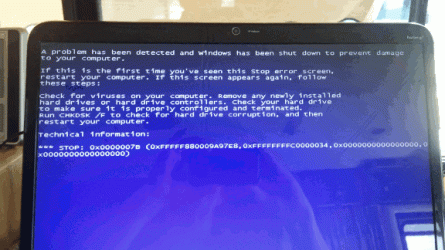
The installation seemed to go through with no errors. However, when I try to boot the ext HDD it attempts to start Windows and then aborts with the following screen:
"A problem has been detected and Windows has been shutdown to protect your computer
If this is the first time you have seen this stop error screen, restart your computer.
If this screen appears again, follow these steps:
Check for viruses on your computer. Remove any newly installed hard drives or hard drive controllers.
Check your hard drive to make sure it is properly formatted and terminated.
Run chkdsk /f to check for hard drive corruption, and then restart your computer.
Technical information:
*** STOP: 0x0000007B (0xFFFFF880009A97e8,0xFFFFFFFFC0000034,0x0000000000000000,0x0000000000000000)"
I restarted it and got the same result. I know it has no virus as the ISO is the same ISO that I used on another laptop and the ext HDD was just formatted. As far as I can tell the disk was properly configured.
I went through and did the whole process again with the same results.
Looking at the Ext. HD after the install. It appear to have the correct files and folders on both the system partition and the boot partition.
I reformatted the Ext HD and then attempted to install Win 7 Home Premium 64 bit. I got exactly the same results..
I have installed both the Win 7 Professional and the Win 7 Home Premium iso's to virtual systems and they work fine.
I hope somebody out there can tell me what is going on.
I have been to WinToUSBs forums and no help there.
http://www.sevenforums.com//www.pinterest.com/pin/create/extension/http://www.sevenforums.com//www.pinterest.com/pin/create/extension/
I started WinToUSB.
My ISO file is Windows_7_64-bit_Professional_x64 on an installation cd.
My ext HDD is formatted as follows: A system partition of 2gb formatted as fat32, a boot partition of 83.55gb formatted as NTFS
I then started the installation using WinToUSB.
I selected my Windows_7_64-bit_Professional cd as my input. and selected my external hard drive as the place to install the system. On the External HDD, I selected the fat32, 2gb partition as the system partition and the 73.55gb ntfs partition as the boot partition.
The installation seemed to go through with no errors. However, when I try to boot the ext HDD it attempts to start Windows and then aborts with the following screen:
"A problem has been detected and Windows has been shutdown to protect your computer
If this is the first time you have seen this stop error screen, restart your computer.
If this screen appears again, follow these steps:
Check for viruses on your computer. Remove any newly installed hard drives or hard drive controllers.
Check your hard drive to make sure it is properly formatted and terminated.
Run chkdsk /f to check for hard drive corruption, and then restart your computer.
Technical information:
*** STOP: 0x0000007B (0xFFFFF880009A97e8,0xFFFFFFFFC0000034,0x0000000000000000,0x0000000000000000)"
I restarted it and got the same result. I know it has no virus as the ISO is the same ISO that I used on another laptop and the ext HDD was just formatted. As far as I can tell the disk was properly configured.
I went through and did the whole process again with the same results.
Looking at the Ext. HD after the install. It appear to have the correct files and folders on both the system partition and the boot partition.
I reformatted the Ext HD and then attempted to install Win 7 Home Premium 64 bit. I got exactly the same results..
I have installed both the Win 7 Professional and the Win 7 Home Premium iso's to virtual systems and they work fine.
I hope somebody out there can tell me what is going on.
I have been to WinToUSBs forums and no help there.
http://www.sevenforums.com//www.pinterest.com/pin/create/extension/http://www.sevenforums.com//www.pinterest.com/pin/create/extension/
Attachments
My Computer
At a glance
Win7 Professional 64 bit, Win 7 Home Premium ...AMD Vision A86GBAMD/ATI
- Computer type
- Laptop
- Computer Manufacturer/Model Number
- HP Pavilion g7-2069wm Notebook PC,
- OS
- Win7 Professional 64 bit, Win 7 Home Premium 64 bit (virtual Machine)
- CPU
- AMD Vision A8
- Memory
- 6GB
- Graphics Card(s)
- AMD/ATI
- Hard Drives
- ATA Hitachi HTS 54757
- Antivirus
- McAfee
- Browser
- Internet Explorer and Firefox
