Intel 82579LM - Error code 10

LcsFletcher

New member
Local time
5:20 PM
Messages
16
Hello,

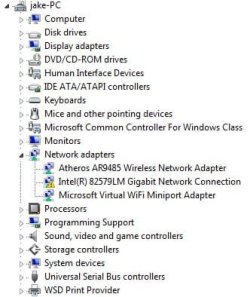
I've been having a reoccuring problem with my NIC on my motherboard, recently after a power outage my network card fails to start up with the "error code 10" but after about 3 days it randomly fixed itself, not after a reboot or anything it just started working. Now today we had another power outage and the problem is back.

I have tried disabling and re-enabling, Reinstalling updated drivers, reboots, and hard reboots nothing has worked so far. I have found solutions online but all the solutions point to download links such as this one and this one but for some reason on 3 different browsers EVERY single download related page on the Intel website comes up as "page not found" like wtf... If anybody has any solutions of could possibly link me a direct DL to both those drivers it would be greatly appreciated.

Thank you
 

My Computer

Computer type
PC/Desktop
OS
Windows 7 x64
Hi What is the Model Number of your Motherboard ... It would seem the Intel Site is not working so well at the moment ...
 

My Computer

Computer Manufacturer/Model Number
W530-3630QM1
OS
windows 7 home 64bit
CPU
INTEL-CORE I7
Memory
16GB
Hard Drives
750GB
Browser
Chrome
Hi What is the Model Number of your Motherboard ... It would seem the Intel Site is not working so well at the moment ...

Its the P8Z77-V Pro by ASUS
 

My Computer

Computer type
PC/Desktop
OS
Windows 7 x64
You can Uninstall the Driver .. No guarantee it will work but it is not working any how ...
 

My Computer

Computer Manufacturer/Model Number
W530-3630QM1
OS
windows 7 home 64bit
CPU
INTEL-CORE I7
Memory
16GB
Hard Drives
750GB
Browser
Chrome
You can Uninstall the Driver .. No guarantee it will work but it is not working any how ...

What do you mean Uninstall the driver? The driver for the 82579LM or the Intel PROset for Windows? I have already tried uninstalling the NIC for it to then reinstall automatically but still doesnt work.
 

My Computer

Computer type
PC/Desktop
OS
Windows 7 x64
They look to be the same Driver ... Remove it through the Device Manager
 

My Computer

Computer Manufacturer/Model Number
W530-3630QM1
OS
windows 7 home 64bit
CPU
INTEL-CORE I7
Memory
16GB
Hard Drives
750GB
Browser
Chrome
They look to be the same Driver ... Remove it through the Device Manager

Im sorry but remove what? We have 2 separate driver now the NIC and the "Intel PROset" if your implying to remove the NIC driver from the device manager thats what I have done.
Edit: And after removing it, it re installed itself but still isn't working.
 

My Computer

Computer type
PC/Desktop
OS
Windows 7 x64
Thanks remove the Driver for Intel 82579LM ...
 

My Computer

Computer Manufacturer/Model Number
W530-3630QM1
OS
windows 7 home 64bit
CPU
INTEL-CORE I7
Memory
16GB
Hard Drives
750GB
Browser
Chrome
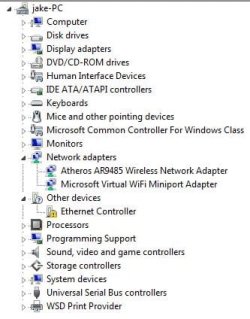
It attempted to reinstall itself but said "No drivers were found" so now I have a "Ethernet Controller" device under "Other devices" in device manager
 

My Computer

Computer type
PC/Desktop
OS
Windows 7 x64
Sorry for the trouble can you Post another screenshot ...
 

My Computer

Computer Manufacturer/Model Number
W530-3630QM1
OS
windows 7 home 64bit
CPU
INTEL-CORE I7
Memory
16GB
Hard Drives
750GB
Browser
Chrome
Okay so select the Ethernet Controller right click update Driver then select let me choose and point it to the path where you Downloaded the Driver to from the Motherboards Website ...
 

My Computer

Computer Manufacturer/Model Number
W530-3630QM1
OS
windows 7 home 64bit
CPU
INTEL-CORE I7
Memory
16GB
Hard Drives
750GB
Browser
Chrome
Okay so select the Ethernet Controller right click update Driver then select let me choose and point it to the path where you Downloaded the Driver to from the Motherboards Website ...

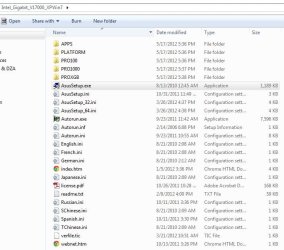
The Driver(s) I downloaded from the link you sent me was a Zip File containing all of this

3333.JPG

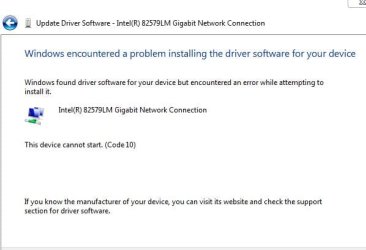
I did what you said and searched manually changing the directory to the file above with "check subfolders" checked and did okay, it said "installing drivers" and then gave me this:
44444.JPG
 

My Computer

Computer type
PC/Desktop
OS
Windows 7 x64
It could be a Hardware issue ...
 

My Computer

Computer Manufacturer/Model Number
W530-3630QM1
OS
windows 7 home 64bit
CPU
INTEL-CORE I7
Memory
16GB
Hard Drives
750GB
Browser
Chrome
It could be a Hardware issue ...

This download page here has the DL for a program that says fixes the same problem im having but it says "page not" found when its obviously is, can you not access this page too?

The page has the download for the "NVM update utility"
 

My Computer

Computer type
PC/Desktop
OS
Windows 7 x64
Back
Top