Intel Adapter not found!

AmberM

New member
Local time
7:30 AM
Messages
8
Hi all,

So I know that this topic has been discussed before so I'm attaching my laptop's information on the basis of those threads.

So my Dell Inspiron 14z N411z's wireless stopped working suddenly. So I reinstalled my Windows 7, Ultimate 64-bit. But the issue is still persisting.

I conducted a test using intel's proset wireless and it says that the wireless hardware is enabled but the driver results cannot be found. The network adapter is also missing in the device manager.

Please find attached the results using 'DxDiag' command and 'msinfo32'.

Please please tell me about the drivers and their links.
 

Attachments

My Computer

Computer type
Laptop
Computer Manufacturer/Model Number
Dell Inspiron 14z
OS
Windows 7 Ultimate x64
The correct install procedure for a Dell is (1) Install Windows (2) Install Dell Desktop or Laptop System Software (3) Install Motherboard Chipset Drivers (3) Install Device Drivers including Video, Sound, Ethernet/Wireless, etc.

Did you follow that procedure. And, install drivers direct from Dell? (There are 5 chipset drivers to install).
Product Support | Dell US
 

My Computer

Computer type
PC/Desktop
Computer Manufacturer/Model Number
My Own Build
OS
Windows 10 64 bit
CPU
Intel i7 6700K
Motherboard
ASUS ROG Maximus VIII Hero
Memory
16GB Corsair Dominator
Graphics Card(s)
Intel CPU Graphics
Sound Card
RealTek
Monitor(s) Displays
27" Dell S2719dgf
Screen Resolution
2560X1440
Hard Drives
1 TB Samsung 850 EVO SSD for Win 10 Pro
500GB Samsung 850 EVO SSD for Win 10 Insider
2 TB drive for backup
PSU
EVGA Supernova 750G2
Case
BeQuiet Silent Base 600
Cooling
Deepcool Captain 120EX
Keyboard
Microsoft Wireless 2000
Mouse
Microsoft wireless
Internet Speed
100 MB/sec (Cable)
Antivirus
Microsoft Defender and Malwarebytes
Browser
Edge/Firefox
Other Info
Cakewalk (Sonar) by BandLab and Studio One 4.1 Pro recording studio software. MOTU 896Mk3 Hybrid recording interface, Frontier Tranzport wireless control unit, Behringer X-Touch Control Surface.
Five USB connected optical drives for CD Audio production using Nero BurningROM
I have downloaded them from dell's website but not really in the given order.
Let me do that and I'll get back to you.
Thank you.
 

My Computer

Computer type
Laptop
Computer Manufacturer/Model Number
Dell Inspiron 14z
OS
Windows 7 Ultimate x64
So I have done everything in the order you prescribed but the wifi is still not working.
 

My Computer

Computer type
Laptop
Computer Manufacturer/Model Number
Dell Inspiron 14z
OS
Windows 7 Ultimate x64
Hi Amber,
open device manager, check
1) network devices
2) problem devices

If in 1) you see a small down arrow or ! then the driver is not installed >> post device name
if 2) any problem device please find/post the pci and ven info.

Roy
 

My Computer

Computer type
PC/Desktop
Computer Manufacturer/Model Number
medionl/Aspire 6930G/acer x55a
OS
W7 home premium 32bit/W7HP 64bit/w10 tp insider ring
CPU
E5300 dual core
Motherboard
medion MS7366
Memory
3gb
Graphics Card(s)
Nvidia Geforce 7100 Nforce 630i
Monitor(s) Displays
avixc
Internet Speed
n (isp resticted to 72)
Antivirus
mse/pands
Browser
palemoon
Other Info
Belkin Fd7050 n USB using Railink RT2870 drivers, more upto date
Hi Torchwood,

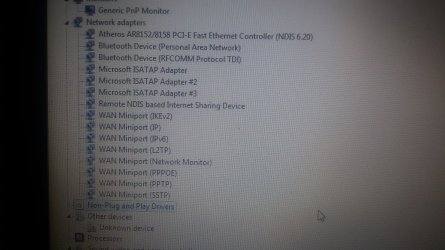
Please find attached a screenshot of my device manager.
Under 'Other devices' there is an unknown device with a yellow sign opposite to it.
It's located on PCI bus and the other details like Manufacturer details and driver details are missing
The hardware ID is :
ACPI\SMO8800
*SMO8800
 

Attachments

  • 20160802_003410.jpg
    20160802_003410.jpg
    942.2 KB · Views: 2

My Computer

Computer type
Laptop
Computer Manufacturer/Model Number
Dell Inspiron 14z
OS
Windows 7 Ultimate x64
Hi Amber,
its not that 1, thats some kind of accelerator.
Dell usually incorporate an system updater program, if you run that it should pick it up and install it.

According to the specs your wireless is
Centrino Wireless-N 1030
Now as its not showing in device manager, can you check your BIOS, if its turned off then it will not show.

Roy
 

My Computer

Computer type
PC/Desktop
Computer Manufacturer/Model Number
medionl/Aspire 6930G/acer x55a
OS
W7 home premium 32bit/W7HP 64bit/w10 tp insider ring
CPU
E5300 dual core
Motherboard
medion MS7366
Memory
3gb
Graphics Card(s)
Nvidia Geforce 7100 Nforce 630i
Monitor(s) Displays
avixc
Internet Speed
n (isp resticted to 72)
Antivirus
mse/pands
Browser
palemoon
Other Info
Belkin Fd7050 n USB using Railink RT2870 drivers, more upto date
Did you install all of the chipset drivers listed on the Dell downloads for your model?
 

My Computer

Computer type
PC/Desktop
Computer Manufacturer/Model Number
My Own Build
OS
Windows 10 64 bit
CPU
Intel i7 6700K
Motherboard
ASUS ROG Maximus VIII Hero
Memory
16GB Corsair Dominator
Graphics Card(s)
Intel CPU Graphics
Sound Card
RealTek
Monitor(s) Displays
27" Dell S2719dgf
Screen Resolution
2560X1440
Hard Drives
1 TB Samsung 850 EVO SSD for Win 10 Pro
500GB Samsung 850 EVO SSD for Win 10 Insider
2 TB drive for backup
PSU
EVGA Supernova 750G2
Case
BeQuiet Silent Base 600
Cooling
Deepcool Captain 120EX
Keyboard
Microsoft Wireless 2000
Mouse
Microsoft wireless
Internet Speed
100 MB/sec (Cable)
Antivirus
Microsoft Defender and Malwarebytes
Browser
Edge/Firefox
Other Info
Cakewalk (Sonar) by BandLab and Studio One 4.1 Pro recording studio software. MOTU 896Mk3 Hybrid recording interface, Frontier Tranzport wireless control unit, Behringer X-Touch Control Surface.
Five USB connected optical drives for CD Audio production using Nero BurningROM
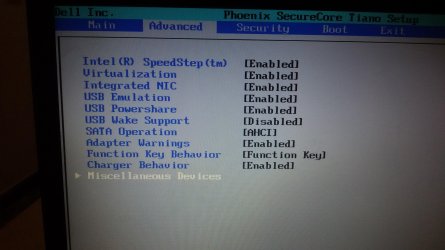
Torchwood, please find attached a screenshot of my bios.

fireberd...Yes downloaded all of them from here:
Product Support | Dell US


I don't know what's wrong. Literally on the verge of giving up :(
Please give me all the advice you can. Really need to fix this up.
 

Attachments

  • 20160802_154425.jpg
    20160802_154425.jpg
    322.4 KB · Views: 1
  • 20160802_154443.jpg
    20160802_154443.jpg
    604.9 KB · Views: 1

My Computer

Computer type
Laptop
Computer Manufacturer/Model Number
Dell Inspiron 14z
OS
Windows 7 Ultimate x64
Also, I ran the Dell Support Assistant. Please find the report in the link below:
file:///C:/Users/Amber%20%20Masood/Desktop/Test%20Event%20Logs%20-%20Remote%20NDIS%20based%20Internet%20Sharing%20Device.html
 

My Computer

Computer type
Laptop
Computer Manufacturer/Model Number
Dell Inspiron 14z
OS
Windows 7 Ultimate x64
There are several Wi-Fi drivers listed on the Dell downloads, depending on which Intel Wi-Fi you have will determine which driver you need.

Are you accessing the Dell downloads using your Service Tag number? If no, access using the service tag number. The download list will only be the drivers applicable to your specific system.

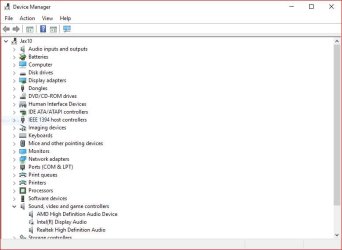
Use the Snipping Tool to grab screen shots and post that way on the forum. You don't have to take a picture.
Here is an example of using the snipping tool to grab my Device Manager.
 

Attachments

  • Capture.JPG
    Capture.JPG
    43.6 KB · Views: 1

My Computer

Computer type
PC/Desktop
Computer Manufacturer/Model Number
My Own Build
OS
Windows 10 64 bit
CPU
Intel i7 6700K
Motherboard
ASUS ROG Maximus VIII Hero
Memory
16GB Corsair Dominator
Graphics Card(s)
Intel CPU Graphics
Sound Card
RealTek
Monitor(s) Displays
27" Dell S2719dgf
Screen Resolution
2560X1440
Hard Drives
1 TB Samsung 850 EVO SSD for Win 10 Pro
500GB Samsung 850 EVO SSD for Win 10 Insider
2 TB drive for backup
PSU
EVGA Supernova 750G2
Case
BeQuiet Silent Base 600
Cooling
Deepcool Captain 120EX
Keyboard
Microsoft Wireless 2000
Mouse
Microsoft wireless
Internet Speed
100 MB/sec (Cable)
Antivirus
Microsoft Defender and Malwarebytes
Browser
Edge/Firefox
Other Info
Cakewalk (Sonar) by BandLab and Studio One 4.1 Pro recording studio software. MOTU 896Mk3 Hybrid recording interface, Frontier Tranzport wireless control unit, Behringer X-Touch Control Surface.
Five USB connected optical drives for CD Audio production using Nero BurningROM
Thanks :)
And yes downloading them using the service tag number.
 

My Computer

Computer type
Laptop
Computer Manufacturer/Model Number
Dell Inspiron 14z
OS
Windows 7 Ultimate x64
One last try. Reset the BIOS and then see if it is detected or allows installing driver. If the BIOS is corrupted and does not recognize the controller, then Windows will not.

If this does not fix it, suggest posting on the Dell forum so one of the Dell user experts can help.
General Hardware - Laptop - Dell Community
 

My Computer

Computer type
PC/Desktop
Computer Manufacturer/Model Number
My Own Build
OS
Windows 10 64 bit
CPU
Intel i7 6700K
Motherboard
ASUS ROG Maximus VIII Hero
Memory
16GB Corsair Dominator
Graphics Card(s)
Intel CPU Graphics
Sound Card
RealTek
Monitor(s) Displays
27" Dell S2719dgf
Screen Resolution
2560X1440
Hard Drives
1 TB Samsung 850 EVO SSD for Win 10 Pro
500GB Samsung 850 EVO SSD for Win 10 Insider
2 TB drive for backup
PSU
EVGA Supernova 750G2
Case
BeQuiet Silent Base 600
Cooling
Deepcool Captain 120EX
Keyboard
Microsoft Wireless 2000
Mouse
Microsoft wireless
Internet Speed
100 MB/sec (Cable)
Antivirus
Microsoft Defender and Malwarebytes
Browser
Edge/Firefox
Other Info
Cakewalk (Sonar) by BandLab and Studio One 4.1 Pro recording studio software. MOTU 896Mk3 Hybrid recording interface, Frontier Tranzport wireless control unit, Behringer X-Touch Control Surface.
Five USB connected optical drives for CD Audio production using Nero BurningROM
Thank you. I ll try that.
But the issue is that my battery isnt working.
How should I flash with out a battery?
 

My Computer

Computer type
Laptop
Computer Manufacturer/Model Number
Dell Inspiron 14z
OS
Windows 7 Ultimate x64
You don't need to "flash" the BIOS. If you access the BIOS (usually F2 on a Dell), there should be an option to reset the BIOS, or "set defaults".
 

My Computer

Computer type
PC/Desktop
Computer Manufacturer/Model Number
My Own Build
OS
Windows 10 64 bit
CPU
Intel i7 6700K
Motherboard
ASUS ROG Maximus VIII Hero
Memory
16GB Corsair Dominator
Graphics Card(s)
Intel CPU Graphics
Sound Card
RealTek
Monitor(s) Displays
27" Dell S2719dgf
Screen Resolution
2560X1440
Hard Drives
1 TB Samsung 850 EVO SSD for Win 10 Pro
500GB Samsung 850 EVO SSD for Win 10 Insider
2 TB drive for backup
PSU
EVGA Supernova 750G2
Case
BeQuiet Silent Base 600
Cooling
Deepcool Captain 120EX
Keyboard
Microsoft Wireless 2000
Mouse
Microsoft wireless
Internet Speed
100 MB/sec (Cable)
Antivirus
Microsoft Defender and Malwarebytes
Browser
Edge/Firefox
Other Info
Cakewalk (Sonar) by BandLab and Studio One 4.1 Pro recording studio software. MOTU 896Mk3 Hybrid recording interface, Frontier Tranzport wireless control unit, Behringer X-Touch Control Surface.
Five USB connected optical drives for CD Audio production using Nero BurningROM
Back
Top