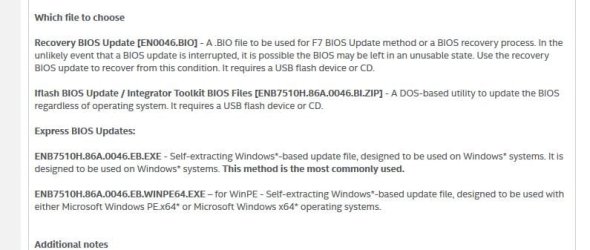
I had a video issue today and while looking at the Intel MB site, noticed my BIOS was out of date. I downloaded the Express (exe) file and tried to update my BIOS from 0123 to 0133, one year date apart. Problem is, Intel BIOS update program shows successful... but when I view sys info it still reports old version. Yes, rebooted to BIOS and same-o, same-o. It lies to me.
Question: Do I have to break my RAID mirror to do a BIOS update? That's the only thing I can think of that might be the issue.
Is there an actual reason you want to update the BIOS. If your BIOS is working without any problems just leave it alone. You can completely brick your motherboard by messing around with the BIOS. Just because a later version maybe available doesn't mean you should update it.
My Computer
At a glance
Windows 7 Home Premium 64 bit sp1Intel i5 3570 3.4Ghz Ivy Bridge SKT 1155 quad...G-Skill Rip Jaws 16Gb (8x2) DDR3 -1600 PC3 12...Gigabyte NVIDIA GT610 1Gb DDR3 810/1200 PCI-E...
Is there an actual reason you want to update the BIOS. If your BIOS is working without any problems just leave it alone. You can completely brick your motherboard by messing around with the BIOS. Just because a later version maybe available doesn't mean you should update it.
Yes, I realize that. I have updated the BIOS in many PCs over the years... however I did read the release notes and don't see anything that will help my current issue. So thanks for the reminder.
Now... does anyone have an idea why a BIOS update will report successful but not actually updated?
Are you sure about this? On re-boot, it goes to a RAID configuration screen, then re-boots to the primary boot screen and from there to Windows. I'm thinking that the extra boot to the RAID config may be interfering..... ?
edit: I am using the Intel Express option to update BIOS which does the process in Windows. I have not attempted to use the DOS/USB Flash option.
I'm sure. The BIOS is the BIOS and it's function comes before everything else. Once it has handed of to the hard drives it's job is done.
I have never trusted Windows based BIOS flash utilities. There is too much stuff going on in the background to trust flashing the BIOS during. And that could be why the RAID is getting in the way.
You might try using the IFlash Bios Update method if that is available for your motherboard.
Attachments
Bios.JPG
41.8 KB
· Views: 0
My Computer
At a glance
Windows 7 64 Bit Home Premium SP1i7-3820GSkill F3-14900CL9Q - 16GBEVGA GeForce GTX660 - Driver 352.86
Computer type
PC/Desktop
Computer Manufacturer/Model Number
Home Built - Jan 2013
OS
Windows 7 64 Bit Home Premium SP1
CPU
i7-3820
Motherboard
Asus P9X79-PRO - Bios 4608
Memory
GSkill F3-14900CL9Q - 16GB
Graphics Card(s)
EVGA GeForce GTX660 - Driver 352.86
Sound Card
On board Realtek ALC898
Monitor(s) Displays
Acer S271HL
Screen Resolution
1920 x 1080
Hard Drives
#1- Samsung 840 Pro Series
#2- Western Digital WD1002FAEX Sata3 Black
#3- Western Digital WD1002FAEX Sata3 Black
PSU
Corsair CMPSU-850TX-V2 - 850 watt (by Seasonic)
Case
Corsair Obsidian 550D
Cooling
Standard 3 120mm case fans, Cooler Master Hyper 212 EVO