
Adrianaopdeit
New member
- Local time
- 12:00 AM
- Messages
- 4
Hello everyone i hope someone could help me with this , i recently made a clean install on my laptop toshiba u405 of windows 7 professional and started to intall the drivers that were on the toshiba webpage, sometimes when i reboot several problems occur but is not always sometimes it works fine and sometimes don't. and also sometimes when i shutdown the screen stays black like if its going to shutdown but it doesnt and i have wait for it to shut it down for 30 minutes, so i have to press the on/off button to shut it down "manually". Sorry for my english. please help me,
I have made like 7 clean installs trying different things to see if something works
1.- i install the drivers of toshiba and no updates of windows.
2.- i install the drivers of toshiba for win 7(32) and updates of windows update.
3.- i install the drivers with the driver genius pro and no updates of windows.
4.- i install the drivers with the software upgrade for win 7 that it suposes to download the drivers for win 7 and no updates of windows.
5 .- i install the drivers of toshiba win 7 (32) and some others of win vista and the updates of windows.
6.- i install the drivers of toshiba win 7 and also some others of driver genius and no updates.
7.- i install drivers with toshiba software updates and driver genius and also updates of windows
This is what i have observed when the problem occurs, but is always:
Screen resolution drops to very low 800x600(the optimal is 1200X800)
Touch pad and keyboard does not respond (if I connecta USB mouse it works)
Device manager shows issue with the Mobile Intel 965 Express Chip set family.
Device manager shows driver not installed for HID compliant mouse.
Device manager shows drivers not installed for PS/2 Compatable mouse.
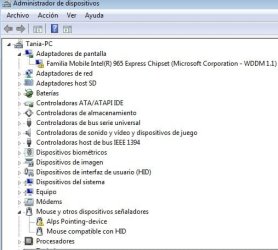
This is a screen shot of the device manager,i also update the chipset intel , this is of my last reboot.
please help me, I have made like 7 clean installs trying different things to see if something works
1.- i install the drivers of toshiba and no updates of windows.
2.- i install the drivers of toshiba for win 7(32) and updates of windows update.
3.- i install the drivers with the driver genius pro and no updates of windows.
4.- i install the drivers with the software upgrade for win 7 that it suposes to download the drivers for win 7 and no updates of windows.
5 .- i install the drivers of toshiba win 7 (32) and some others of win vista and the updates of windows.
6.- i install the drivers of toshiba win 7 and also some others of driver genius and no updates.
7.- i install drivers with toshiba software updates and driver genius and also updates of windows
This is what i have observed when the problem occurs, but is always:
Screen resolution drops to very low 800x600(the optimal is 1200X800)
Touch pad and keyboard does not respond (if I connecta USB mouse it works)
Device manager shows issue with the Mobile Intel 965 Express Chip set family.
Device manager shows driver not installed for HID compliant mouse.
Device manager shows drivers not installed for PS/2 Compatable mouse.
This is a screen shot of the device manager,i also update the chipset intel , this is of my last reboot.
Attachments
Last edited:
My Computer
- Computer Manufacturer/Model Number
- Toshiba u405-sp2801
- OS
- windows seven professional 32 bit
- CPU
- intel (R) core (TM)2 Duo CPU T8100 2.10 ghz
- Memory
- 2048 MB
- Graphics Card(s)
- Mobile intel 965 express chipset family v 8.15.10
- Sound Card
- conexant high definition smart audio 221 v 4.98.6.61
- Screen Resolution
- 1280X800
- Hard Drives
- 231 gb


 i have made the clean install to another 2 laptops and none of them did this. the intel shows a code 37 and the synaptic driver shows a code 10 , also if i touch the touchpad the keyboard locks and if i dont do touch the tpuch pad i can use the keyboar.