
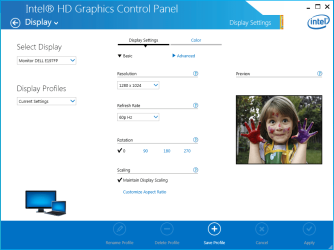
Hi. I have a problem with my integrated graphics card not fitting the resolution to the screen. The resolution is always too big. It would be nice if i could get this to work, because i edit videos, and i only have 1 Square monitor that isn't even really that big. I have tried going into Windows 7 Screen Resolution to tinker with settings, but no success. So then i went into the Integrated Graphics card settings, and nothing worked there either. I am stuck at a lose. I have a picture, showing where the picture gets cut off on the 19". Windows Media Player is set to where i can see it. Any bigger and it would get cut off.
Attachments


My Computer
- Computer type
- PC/Desktop
- Computer Manufacturer/Model Number
- Custom
- OS
- Windows 7 Home Premium x64
- CPU
- Intel Core i3-4130 CPU @ 3.40 GHz
- Motherboard
- MSI Z87-G41
- Memory
- 2x4 (8GB) DDR3
- Graphics Card(s)
- GTX 960
- Sound Card
- Stock Integrated w/ MotherBoard
- Monitor(s) Displays
- Acer x223w
- PSU
- Startech ATM-530FB
- Case
- Deepcool Tesseract SW
- Cooling
- Stock with added 120mm Case Fan
- Keyboard
- BlackWeb CENTAUR BWA15HO108
- Mouse
- Zelotes T-10
- Internet Speed
- 240D 12U
- Antivirus
- Avast Premier
- Browser
- Chrome