Intel Turbo Memory - Any progress?

aleks001

New member
Local time
1:01 PM
Messages
13
Hi Guys,

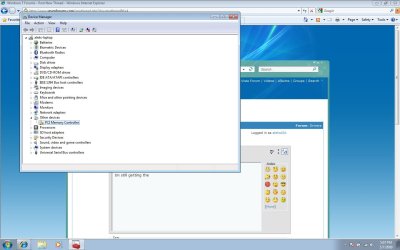
Im still getting the invalid driver crap for intel turbo memory for my asus f3sc laptop. I've tried downloading the latest intel turbo memory and it installed in compatability mode but it still messed up in the device manager. I've also tried the one provided by asus but no dice. Im running build 71000. Any help would be appreciated.

Cheers,
Aleks
 

My Computer

OS
Windows 7 RC1
If you're willing you can try out the ones provided by Acer, they work and they appear to be the Intel versions, not Acer specific.

Acer FTP site - Notebooks - 8920 - Drivers - Intel_Robson driver
 

My Computer

OS
Windows 7 RC Build 7100
I will give it a try as soon as i get my laptop back from asus, i took in for some work, it was being retarded lol. Will update this thread when i get the laptop back.
 

My Computer

OS
Windows 7 RC1
I am getting in a new laptop as well tomorrow with the Turbo Memory II in it so I will try those Acer drivers as well, or list something else if I get them to work.
 

My Computer

OS
Windows 7 64-bit Build 7100
CPU
E8400 @4Ghz
Motherboard
EVGA
Memory
4GB DDR2 OCZ 4-4-4-12
Graphics Card(s)
BFG GeForce 7800 GTS 320MB
Sound Card
On Board
Monitor(s) Displays
Samsung 52" LN52A750 + Dell 24" Widescreen
Screen Resolution
1920x1080 + 1920x1200
Hard Drives
2TB Array
800GB Array
400GB Stand Alone
Case
Kandalf
Internet Speed
26MB Comcast

My Computer

OS
Windows 7 RC1
Doesn't work, can't get it to install under any compatability setting. Crappy crappy crap crap.
 

My Computer

OS
Windows 7 RC1
Version 1.9 Works!!

I donwloaded the Intel Turbo Memory Controller version 1.9 and installed it using Vista compatability mode. The driver registered correctly and Windows now see the 1GB. After the initial install reboot, you need to open the Intel Turbo Memory Console and ensure that the ReadyBoost is enabled via the checkbox, and then reboot again.

My Alienware m15x is now smokin' along! :D

James
 

My Computer

OS
Windows 7 x64 RC1

My Computer

Computer Manufacturer/Model Number
Custom Build
OS
Windows 7 Ultimate x64 SP1 RC
CPU
Core i7 950, 3.06GHz, s1366, 8MB Tray
Motherboard
GIGABYTE X58A-UD5 s1366 Core i7, Intel X58, DDR3 2200+, 4xPC
Memory
Corsair 3x2GB Corsair Dominator-GT Triple Channel CL7
Graphics Card(s)
GIGABYTE GTX580 1536MB GDDR5 DX11 2xDVI Mini HDMI PCI-E
Sound Card
Onboard
Monitor(s) Displays
Samsung XL2370 23'' LED 2ms DVI HDMI WideScreen Black
Screen Resolution
1920x1080
Hard Drives
HD 1 (OS): Mushkin Callisto Series 60GB SSD Sata II MLC 2.5'' Retail
HD 2 (DATA): WD Caviar Black 1TB 7200RPM, 64MB, SATA III WD1002FAEX
PSU
Corsair HX 850W Active PFC 12cm Fan Modular
Case
Antec P183 Mid Tower Black
Cooling
Scythe Mugen II Rev.b 5 Heat Pipes CPU Cooler s1156/s1366
Internet Speed
VDSL 30Mbit
THanks, im downloading it now, ill try it out, but im not sure if I should most people have said that turbo memory is a useless gimick anyways, so might just leave it.
 

My Computer

OS
Windows 7 RC1
Confirmed Intel Turbo Memory 1.9 works x64 bit

Confirmed Intel Turbo Memory 1.9 install works if you do the following:

- download file
- right click, properties, compatibility mode, set to Vista ( I just picked vista no SP), click Ok.
- Ok out of all windows
- Run installer
- Reboot

Do a google search for "Intel Turbo Memory 1.9"

You should find a download link fairly easily. Here is the one I got:

Intel Turbo Memory Driver 1.9.0.1006 Driver for Windows Vista / Windows Vista64 Free Download - Softpedia
 

My Computer

OS
Wins 7 build 7100
Confirmed Intel Turbo Memory 1.9 install works if you do the following:

- download file
- right click, properties, compatibility mode, set to Vista ( I just picked vista no SP), click Ok.
- Ok out of all windows
- Run installer
- Reboot

Do a google search for "Intel Turbo Memory 1.9"

You should find a download link fairly easily. Here is the one I got:

Intel Turbo Memory Driver 1.9.0.1006 Driver for Windows Vista / Windows Vista64 Free Download - Softpedia

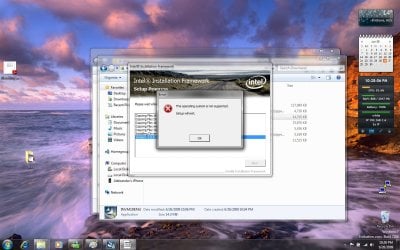
This hasn't worked for me. Here are uploaded pictures, sorry for late reply
haven't been around the computer for a while. I have attached pictures just incase I'm doing something wrong. Also I have tried ticking and unticking run in administrator mode.
 

Attachments

  • desktop.jpg
    desktop.jpg
    168.8 KB · Views: 101
  • desktop2.jpg
    desktop2.jpg
    159.3 KB · Views: 121

My Computer

OS
Windows 7 RC1
Asus F7E Intel Turbo Memory

I have succesfully installed the turbo memory driver on an Asus F7E Notebook.

The Lenovo driver works in 'windows xp' compatible mode:
Intel Turbo Memory Driver for Windows 7 (32-bit, 64-bit) and Vista (32-bit, 64-bit) - ThinkPad Reserve Edition, R61, R400, R500, T61, T61p, T400, T400s, T500, W500, W700, W700ds, X61, X61s, X61 Tablet, X200, X200s, X200 Tablet, X300, X301

The Intel Turbo Memory Console works fine, showing the 1GB memory card.
I can enable 'windows readydrive'. When Readyboost is enabled it is automaticly disabled after reboot. I Guess that's because readyboost is for Vista only.

In the device manager the device will appear in diskstations as 'IMD-0'.

Goodluck all.
 

My Computer

OS
Win 7 x64
Back
Top