Solved "Interactive Services Detection" message pop up every 5 minutes

Drikos

New member
Local time
12:34 PM
Messages
13
"Interactive Services Detection" message pop up every 5 minutes

Hi everyone

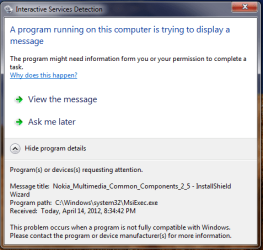
Well i have a small issue here. After a long research over the internet, i see that the only way to fix this, is to format disk or reinstall Windows. Well my computer is for company and i have many programs that will need to be reinstalled after a format or windows reinstallation, and this is a big problem. I recently tried to update "Nokia Multimedia Common Components". It suddenly stopped and said that it couldn't remove the old software, because Nokia Suit needed it. I click on "OK". Since then i have a pop up message, telling me that "A running service is trying to show me a message". Well the message is that it can't be installed. My problem is that i can't install other software because the current installation is running, looks like there is no way to stop this installation, delete this file, finish installation or just in some way put this program to background so i could install other programs or stop the annoying message.

If anyone can help me, i would really appreciate this.

attachment.php
 

Attachments

  • Untitled.png
    Untitled.png
    16.6 KB · Views: 17,601

My Computer My Computer

OS
Windows 7 Ultimate 32 bit
Have you tried uninstalling it? If that works then you can reinstall it.

If it won't let you, open msconfig and disable anything Nokia related in the Startup and Services tabs. For services, check the Hide all Microsoft services box first.

Reboot then uninstall it.
 

My Computer My Computer

Computer type
PC/Desktop
Computer Manufacturer/Model Number
Lenovo IdeaCenter 450
OS
Windows 10 Pro X64
CPU
Intel Quad Core i7-4770 @ 3.4Ghz
Memory
16.0GB PC3-12800 DDR3 SDRAM 1600 MHz
Graphics Card(s)
Intel Integrated HD Graphics
Sound Card
Realtek HD Audio
Monitor(s) Displays
HP 22" LCD
Screen Resolution
1680 x 1050
Hard Drives
250GB Samsung EVO SATA-3 SSD
2TB Seagate ST2000DM001 SATA-2
1.5TB Seagate ST3150041AS SATA
Keyboard
Dell USB
Mouse
Lenovo USB
Internet Speed
Cable via Road Runner 3MB Upload, 30MB Download
Antivirus
Windows Defender, MBAM Pro, MBAE
Browser
Seamonkey
Other Info
UEFI/GPT
PLDS DVD-RW DH16AERSH
Hi Ztruker

Thank you for your reply. Well, I actually tried this out, but you see, my PC says that this program is not even installed on System. When I try to uninstall “from uninstall a program” it says: “Another program is being installed. Please wait until the other program finish the installation”. But the program which is being installed is actually the one that I want to remove completely from my PC. When I log on in Safe Mode, the annoying massage is not appearing, but in “Uninstall a Program” says that the “Nokia Multimedia Common Components” is not properly installed so I can’t uninstall it.

By the way, thank you for your help!!!
 

My Computer My Computer

OS
Windows 7 Ultimate 32 bit
Solved

SOLVED
Hi guys,

I figured out how to fix this problem.

1) Shutdown your PC
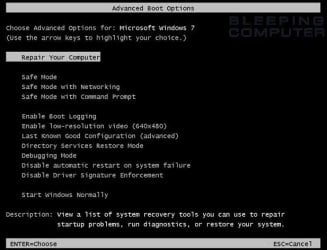
2) Start it again and click the F8 button multiple times, until the menu for Safe Mode etc. comes out.
3) Choose the first selection “Repair your Computer”
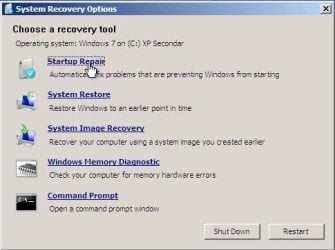
4) When the System recovery option appears choose “System Image Recovery”
5) If you see button “Load Driver” or “Advance” click on it
6) If you clicked on “Advance” then it will ask you if you want to load from internet or you computer
7) Choose the computer
8) In any way, you now should be able to see a window which shows your computer
9) Click on “Computer” on the left
10) Then go to Local Disk C\Windows\System 32 and search for the file MsiExec.exe
11) Now move this file to your desktop. MAKE SURE that this file is missing from the System 32 Folder
12) ATTENTION: when you click on “Load Driver” or “Advance” in step 5 and 6, the computer will probably navigate you to System 32 of Recovery Partition. There you will not be able to find the file that you need. So follow exactly the step 9 and 10.
13) That’s it. You are ready. Click everywhere “Cancel” and restart your PC.

This worked 100% for me. I don’t have annoying messages about interactive programs and I am able to install other software again.
windows-7-f8.jpg

repair16.jpg
 

My Computer My Computer

OS
Windows 7 Ultimate 32 bit
When you rebooted, was msiexec.exe put back in the system32 folder? From what I've read it's needed to process msi (Microsoft Installer) files.
 

My Computer My Computer

Computer type
PC/Desktop
Computer Manufacturer/Model Number
Lenovo IdeaCenter 450
OS
Windows 10 Pro X64
CPU
Intel Quad Core i7-4770 @ 3.4Ghz
Memory
16.0GB PC3-12800 DDR3 SDRAM 1600 MHz
Graphics Card(s)
Intel Integrated HD Graphics
Sound Card
Realtek HD Audio
Monitor(s) Displays
HP 22" LCD
Screen Resolution
1680 x 1050
Hard Drives
250GB Samsung EVO SATA-3 SSD
2TB Seagate ST2000DM001 SATA-2
1.5TB Seagate ST3150041AS SATA
Keyboard
Dell USB
Mouse
Lenovo USB
Internet Speed
Cable via Road Runner 3MB Upload, 30MB Download
Antivirus
Windows Defender, MBAM Pro, MBAE
Browser
Seamonkey
Other Info
UEFI/GPT
PLDS DVD-RW DH16AERSH
Actually, it is not there anymore. I did the mistake, and removed it from my system. But if you move it on your desktop and after the reboot, you transfer it back to System 32 Folder, i am not sure if the problem will continue. In any way i can now install new softwares without getting Error 1500. If you can upload the msiexec.exe somewere and send me the link, i would really appreciate it.

Thanks
 

My Computer My Computer

OS
Windows 7 Ultimate 32 bit
If you open a Command Prompt and change to teh \Windows directory, do a

dir msiexec.exe /s

It will show you other locations the files already exists. On my WIn 7 Pro X64 system, I find it in these places:
Directory of C:\Windows\System32
11/20/2010 06:25 AM 128,000 msiexec.exe

Directory of C:\Windows\SysWOW64
11/20/2010 05:17 AM 73,216 msiexec.exe

Directory of C:\Windows\winsxs\amd64_microsoft-windows-installer-executable_31bf3856ad364e35_6.1.7600.16385_none_a57666739fcae94c
07/13/2009 09:39 PM 127,488 msiexec.exe

Directory of C:\Windows\winsxs\amd64_microsoft-windows-installer-executable_31bf3856ad364e35_6.1.7601.17514_none_a7a77a3b9cb96ce6
11/20/2010 06:25 AM 128,000 msiexec.exe

Directory of C:\Windows\winsxs\x86_microsoft-windows-installer-executable_31bf3856ad364e35_6.1.7600.16385_none_4957caefe76d7816
07/13/2009 09:14 PM 73,216 msiexec.exe

Directory of C:\Windows\winsxs\x86_microsoft-windows-installer-executable_31bf3856ad364e35_6.1.7601.17514_none_4b88deb7e45bfbb0
11/20/2010 05:17 AM 73,216 msiexec.exe
 

My Computer My Computer

Computer type
PC/Desktop
Computer Manufacturer/Model Number
Lenovo IdeaCenter 450
OS
Windows 10 Pro X64
CPU
Intel Quad Core i7-4770 @ 3.4Ghz
Memory
16.0GB PC3-12800 DDR3 SDRAM 1600 MHz
Graphics Card(s)
Intel Integrated HD Graphics
Sound Card
Realtek HD Audio
Monitor(s) Displays
HP 22" LCD
Screen Resolution
1680 x 1050
Hard Drives
250GB Samsung EVO SATA-3 SSD
2TB Seagate ST2000DM001 SATA-2
1.5TB Seagate ST3150041AS SATA
Keyboard
Dell USB
Mouse
Lenovo USB
Internet Speed
Cable via Road Runner 3MB Upload, 30MB Download
Antivirus
Windows Defender, MBAM Pro, MBAE
Browser
Seamonkey
Other Info
UEFI/GPT
PLDS DVD-RW DH16AERSH
You are right. Looks like there are no problems. I recently updated Deamon Tools Light 4. And i had no problems. That means, you can follow those step above. In any case, If you modify your PC, always keep backups, they are really useful.
 

My Computer My Computer

OS
Windows 7 Ultimate 32 bit
You could have done a System Restore to a time previous to this issue as well.
 

My Computer My Computer

OS
XP / Win7 x64 Pro
CPU
Intel Quad-Core Q9450 @ 3.2GHz
Motherboard
Asus P5-E
Memory
2x2GB GSkill DDR2
Graphics Card(s)
NVIDIA GeForce 8600 GTS (EVGA)
Monitor(s) Displays
Dell 2408WFP
Screen Resolution
1920x1200
You are also right, but you see, there weren’t any system restore points, so I couldn’t restore it.
 

My Computer My Computer

OS
Windows 7 Ultimate 32 bit
When i tried to install Program that was actually "Windows Installer", it was showing me the message "Windows Installer couldn't start" so I have followed Ztruker's advice. I Changed CMD directory to "WINDOWS" using this code: "CD C:\Windows" and then typed: "dir msiexec.exe /s". After 5 minutes, the CMD showed me one directory of the other msiexec.exe file. i followed the directory and found the msiexec.exe file in the folder. Then i copied back the misexec.exe file into the C:Windows\System 32 folder and the installation worked fine. No Errors, no "Interactive services Detection" messages. Everything working again as it was.
 

My Computer My Computer

OS
Windows 7 Ultimate 32 bit
I am sorry. My mistake. If you put back the msiexec.exe file in System 32 Folder. The Message of Interactive Service Detection will pop up again and again. I will try to fix this in other way, and i will tell you later.
 

My Computer My Computer

OS
Windows 7 Ultimate 32 bit
It turns out c:\Windows\system32\msiexec.exe is a Hardlink, not the file itself. When you deleted it or moved it all you did was move the hardlink, not the actual file.

>fsutil hardlink list c:\windows\system32\msiexec.exe
\Windows\System32\msiexec.exe
\Windows\winsxs\amd64_microsoft-windows-installer-executable_31bf3856ad364e35_6.1.7601.17514_none_a7a77a3b9cb96ce6\msiexec.exe

So if there really is a problem with that file, it's the one in \Windows\winsxs\amd64_microsoft.......

Hope that makes sense.
 

My Computer My Computer

Computer type
PC/Desktop
Computer Manufacturer/Model Number
Lenovo IdeaCenter 450
OS
Windows 10 Pro X64
CPU
Intel Quad Core i7-4770 @ 3.4Ghz
Memory
16.0GB PC3-12800 DDR3 SDRAM 1600 MHz
Graphics Card(s)
Intel Integrated HD Graphics
Sound Card
Realtek HD Audio
Monitor(s) Displays
HP 22" LCD
Screen Resolution
1680 x 1050
Hard Drives
250GB Samsung EVO SATA-3 SSD
2TB Seagate ST2000DM001 SATA-2
1.5TB Seagate ST3150041AS SATA
Keyboard
Dell USB
Mouse
Lenovo USB
Internet Speed
Cable via Road Runner 3MB Upload, 30MB Download
Antivirus
Windows Defender, MBAM Pro, MBAE
Browser
Seamonkey
Other Info
UEFI/GPT
PLDS DVD-RW DH16AERSH
I understand, but i think it is the Nokia Multimedia Common Components installer that causes the error. Let me contact them, and lets see, what they will say. Thanks by the way for your replies, it feels good, when someone out there is really interesting in resolving problems. THANK YOU.
 

My Computer My Computer

OS
Windows 7 Ultimate 32 bit
Ok guys. Finally it is solved. All you need is "MicrosoftFixit.ProgramInstallUninstall.Run". You can download it from: "http://support.microsoft.com/mats/Program_Install_and_Uninstall" after downloading this small application, run it and let it do it's magic. This software is from official Microsoft website and it is not from other location on the internet, so it is save.
 

My Computer My Computer

OS
Windows 7 Ultimate 32 bit
Back
Top